 Olek
Olek This workflow corresponds to n8n.io template #3229 — we link there as the canonical source.
The workflow JSON
Copy or download the full n8n JSON below. Paste it into a new n8n workflow, add your credentials, activate. Full import guide →
{
"id": "cGqPi5Uy2u1ShmoO",
"meta": {
"templateCredsSetupCompleted": true
},
"name": "\ud83d\udcbb Schedule workflow activity time",
"tags": [
{
"id": "0IPbflTW7vujkmxO",
"name": "DevOps",
"createdAt": "2025-03-16T13:11:38.707Z",
"updatedAt": "2025-03-16T13:11:38.707Z"
}
],
"nodes": [
{
"id": "294244fd-8c35-4b70-af84-cc466a60541f",
"name": "n8n Activate",
"type": "n8n-nodes-base.n8n",
"position": [
360,
-180
],
"parameters": {
"operation": "activate",
"workflowId": {
"__rl": true,
"mode": "id",
"value": "={{ $json.workflowID }}"
},
"requestOptions": {}
},
"credentials": {
"n8nApi": {
"name": "<your credential>"
}
},
"typeVersion": 1
},
{
"id": "e669e5e3-288a-4d6b-af12-011340e60f64",
"name": "n8n Deactivate",
"type": "n8n-nodes-base.n8n",
"position": [
360,
140
],
"parameters": {
"operation": "deactivate",
"workflowId": {
"__rl": true,
"mode": "id",
"value": "={{ $json.workflowID }}"
},
"requestOptions": {}
},
"credentials": {
"n8nApi": {
"name": "<your credential>"
}
},
"typeVersion": 1
},
{
"id": "a9c7337f-d0ca-4e7e-873d-1d38813f2717",
"name": "Workflow ID",
"type": "n8n-nodes-base.set",
"position": [
-60,
-80
],
"parameters": {
"options": {},
"assignments": {
"assignments": [
{
"id": "86a66597-b7c3-4e26-aab9-fdf6cc4e43b5",
"name": "workflowID",
"type": "string",
"value": "cGqPi5Uy2u1ShmoO"
}
]
}
},
"typeVersion": 3.4
},
{
"id": "9c641940-fb33-4750-b3ef-ed3d216c339e",
"name": "Merge in Workflow ID for deactivation",
"type": "n8n-nodes-base.merge",
"position": [
180,
140
],
"parameters": {
"mode": "combine",
"options": {},
"combineBy": "combineByPosition"
},
"typeVersion": 3
},
{
"id": "1368366d-0bec-45b3-9de9-d1902ca9b30c",
"name": "Merge in Workflow ID for activation",
"type": "n8n-nodes-base.merge",
"position": [
180,
-180
],
"parameters": {
"mode": "combine",
"options": {},
"combineBy": "combineByPosition"
},
"typeVersion": 3
},
{
"id": "68f765bc-23e2-48c9-8558-a30fc4d8bbb1",
"name": "Activate at 08:00 daily",
"type": "n8n-nodes-base.scheduleTrigger",
"position": [
-320,
-200
],
"parameters": {
"rule": {
"interval": [
{
"field": "cronExpression",
"expression": "0 8 * * *"
}
]
}
},
"typeVersion": 1.2
},
{
"id": "2b51cc72-55c8-444a-931e-54adb0a7ada8",
"name": "Deactivate at 20:00 daily",
"type": "n8n-nodes-base.scheduleTrigger",
"position": [
-320,
160
],
"parameters": {
"rule": {
"interval": [
{
"field": "cronExpression",
"expression": "0 20 * * *"
}
]
}
},
"typeVersion": 1.2
},
{
"id": "27edd566-b0cc-47d8-922b-33a909df9e56",
"name": "Sticky Note",
"type": "n8n-nodes-base.stickyNote",
"position": [
-180,
-500
],
"parameters": {
"color": 5,
"width": 320,
"height": 800,
"content": "## Set targeted Workflow ID\n\nYou will find it in the URL of the workflow you want to manage.\n\n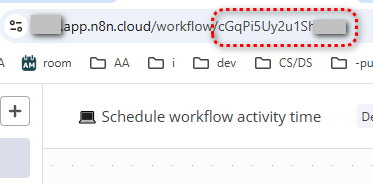\n"
},
"typeVersion": 1
},
{
"id": "d568b8e8-aaad-45ae-aa56-b6e6671f246d",
"name": "Sticky Note1",
"type": "n8n-nodes-base.stickyNote",
"position": [
-500,
-500
],
"parameters": {
"color": 5,
"width": 300,
"height": 800,
"content": "## Set Activate/deactivate schedule \n\n[Custom (cron) interval](https://docs.n8n.io/integrations/builtin/core-nodes/n8n-nodes-base.scheduletrigger/#custom-cron-interval) is a recommended approach.\n\n"
},
"typeVersion": 1
},
{
"id": "d23ff5a9-a8c2-43c7-8241-fcc3ff53f290",
"name": "Sticky Note2",
"type": "n8n-nodes-base.stickyNote",
"position": [
300,
-500
],
"parameters": {
"color": 5,
"width": 320,
"height": 800,
"content": "## Set n8n API credentials\n\n1. Create an API key:\nhttps://docs.n8n.io/api/authentication/\n\n2. Create n8n credentials using the API key\n\n\nThis workflow uses **[n8n node](https://docs.n8n.io/integrations/builtin/core-nodes/n8n-nodes-base.n8n/)**."
},
"typeVersion": 1
},
{
"id": "0dd08d9b-046a-4c11-9bf4-bfb6beffa852",
"name": "Sticky Note3",
"type": "n8n-nodes-base.stickyNote",
"position": [
-500,
-620
],
"parameters": {
"width": 1120,
"height": 100,
"content": "## \u26a0\ufe0f Warning!\nThis approach **won't work for trial users** as it requires n8n API that is not available to trial users.\nSee https://docs.n8n.io/api/ for details."
},
"typeVersion": 1
},
{
"id": "895034b7-5d7d-4e02-a125-6df6e4c44531",
"name": "Sticky Note4",
"type": "n8n-nodes-base.stickyNote",
"position": [
-500,
-740
],
"parameters": {
"color": 4,
"width": 1120,
"height": 100,
"content": "## Scheduling workflow activity time\nYour workflow wants to work normal business hours?\nMaybe it is in its own right."
},
"typeVersion": 1
},
{
"id": "18e464f1-fc3b-4ce5-b5c7-c3769b3fc697",
"name": "Sticky Note5",
"type": "n8n-nodes-base.stickyNote",
"position": [
640,
-500
],
"parameters": {
"color": 5,
"width": 320,
"height": 800,
"content": "## Activate this workflow!"
},
"typeVersion": 1
}
],
"active": false,
"settings": {
"executionOrder": "v1"
},
"versionId": "bb1c2014-2e38-41c0-ae1c-952fb98d0504",
"connections": {
"Workflow ID": {
"main": [
[
{
"node": "Merge in Workflow ID for activation",
"type": "main",
"index": 1
},
{
"node": "Merge in Workflow ID for deactivation",
"type": "main",
"index": 0
}
]
]
},
"Activate at 08:00 daily": {
"main": [
[
{
"node": "Workflow ID",
"type": "main",
"index": 0
},
{
"node": "Merge in Workflow ID for activation",
"type": "main",
"index": 0
}
]
]
},
"Deactivate at 20:00 daily": {
"main": [
[
{
"node": "Workflow ID",
"type": "main",
"index": 0
},
{
"node": "Merge in Workflow ID for deactivation",
"type": "main",
"index": 1
}
]
]
},
"Merge in Workflow ID for activation": {
"main": [
[
{
"node": "n8n Activate",
"type": "main",
"index": 0
}
]
]
},
"Merge in Workflow ID for deactivation": {
"main": [
[
{
"node": "n8n Deactivate",
"type": "main",
"index": 0
}
]
]
}
}
}
Credentials you'll need
Each integration node will prompt for credentials when you import. We strip credential IDs before publishing — you'll add your own.
n8nApi
For the full experience including quality scoring and batch install features for each workflow upgrade to Pro
About this workflow
This workflow will activate and deactivate a selected other workflow on schedule.
Source: https://n8n.io/workflows/3229/ — original creator credit. Request a take-down →
Related workflows
Workflows that share integrations, category, or trigger type with this one. All free to copy and import.
Complete backup solution that saves both workflows and credentials to local/server disk with optional FTP upload for off-site redundancy.
Click here to access this Workflow for free.
This workflow runs daily and uses the n8n API to find archived workflows older than a retention threshold, optionally deleting unprotected ones in batches while producing a detailed preview or deletio
Make your n8n instance faster, cleaner, and more efficient by deleting old workflow executions — while keeping only the most recent ones you actually need. Whether you're using n8n Cloud or self-hoste
Workflow 2469. Uses moveBinaryData, googleDrive, itemLists, n8n. Scheduled trigger; 33 nodes.