This workflow follows the Agent → Chat Trigger recipe pattern — see all workflows that pair these two integrations.
The workflow JSON
Copy or download the full n8n JSON below. Paste it into a new n8n workflow, add your credentials, activate. Full import guide →
{
"nodes": [
{
"id": "e0abec7d-6753-42ed-8339-e1ad612797ac",
"name": "Chat Trigger",
"type": "@n8n/n8n-nodes-langchain.chatTrigger",
"position": [
40,
360
],
"parameters": {},
"typeVersion": 1
},
{
"id": "9502381d-518a-4eff-a439-c9efdff782b6",
"name": "Window Buffer Memory",
"type": "@n8n/n8n-nodes-langchain.memoryBufferWindow",
"position": [
1000,
600
],
"parameters": {
"sessionKey": "={{ $('Chat Trigger').item.json.sessionId }}",
"sessionIdType": "customKey",
"contextWindowLength": 10
},
"typeVersion": 1.3
},
{
"id": "08621d63-9067-4a92-b6c8-ba129c6adfa0",
"name": "Extract_Columns",
"type": "n8n-nodes-base.set",
"position": [
640,
360
],
"parameters": {
"options": {},
"assignments": {
"assignments": [
{
"id": "c5d1f5ab-91dd-4067-ad51-7707ef1ec8bb",
"name": "columns",
"type": "string",
"value": "={{ $json.columns.map(item => item.title).toJsonString() }}"
}
]
}
},
"typeVersion": 3.4
},
{
"id": "2ee6401a-a45c-4c81-83b5-3995a9a25118",
"name": "NocoDB",
"type": "n8n-nodes-base.nocoDbTool",
"position": [
1200,
600
],
"parameters": {
"table": "={{ $('Settings').item.json.table_id }}",
"options": {
"where": "={{ $fromAI('filter_formula','formula to filter. for example, (Ticker,eq,IMMR) will filter for Ticker column equal to IMMR. the operators are neq for not equal, gt for greater than, etc. Compound conditions can be expressed like (MCAP,gt,500000000)~or(MCAP,lt,1000000000)') }}"
},
"operation": "getAll",
"projectId": "ppltdbh6c0a30cj",
"workspaceId": "wse2vl0o",
"authentication": "nocoDbApiToken"
},
"credentials": {
"nocoDbApiToken": {
"name": "<your credential>"
}
},
"typeVersion": 3
},
{
"id": "8e8ce2e3-890a-46cd-a95e-0c355dde8c06",
"name": "Settings",
"type": "n8n-nodes-base.set",
"position": [
240,
360
],
"parameters": {
"options": {},
"assignments": {
"assignments": [
{
"id": "968e6040-5ff3-40d1-901a-ba1fa7576c0c",
"name": "table_id",
"type": "string",
"value": "m7c7lrw7n0bne4j"
}
]
}
},
"typeVersion": 3.4
},
{
"id": "3a986007-32dd-4152-93ca-d8a435603708",
"name": "nocodb_extract_table",
"type": "n8n-nodes-base.httpRequest",
"position": [
440,
360
],
"parameters": {
"url": "=https://app.nocodb.com/api/v2/meta/tables/{{ $json.table_id }}",
"options": {},
"authentication": "predefinedCredentialType",
"nodeCredentialType": "nocoDbApiToken"
},
"credentials": {
"nocoDbApiToken": {
"name": "<your credential>"
}
},
"typeVersion": 4.2
},
{
"id": "2c594b59-95db-4fd9-bea3-06a861de9766",
"name": "Data Analyst Agent",
"type": "@n8n/n8n-nodes-langchain.agent",
"position": [
900,
360
],
"parameters": {
"text": "={{ $('Chat Trigger').item.json.chatInput }}",
"options": {
"systemMessage": "=You are a helpful Data Analyst assistant who is skilled at working with a database called nocodb. \n\nYou goal is to help the user understand the table that is specified.\n\nHere are the column names for the table.\n{{ $json.columns }}"
},
"promptType": "define"
},
"typeVersion": 1.7
},
{
"id": "6b786282-8782-430b-852a-c60b94e05493",
"name": "Sticky Note",
"type": "n8n-nodes-base.stickyNote",
"position": [
200,
280
],
"parameters": {
"color": 7,
"width": 580,
"height": 280,
"content": "## Prepare meta information\n"
},
"typeVersion": 1
},
{
"id": "77cd95ff-dece-4770-9d38-a9cacc174368",
"name": "OpenAI Chat Model",
"type": "@n8n/n8n-nodes-langchain.lmChatOpenAi",
"position": [
840,
600
],
"parameters": {
"model": "gpt-4o",
"options": {}
},
"credentials": {
"openAiApi": {
"name": "<your credential>"
}
},
"typeVersion": 1
},
{
"id": "f9d28f2e-aea8-4b7f-910b-655fac062fb3",
"name": "Sticky Note6",
"type": "n8n-nodes-base.stickyNote",
"position": [
-680,
200
],
"parameters": {
"color": 7,
"width": 567,
"height": 550,
"content": "## Start here: Step-by Step Youtube Tutorial :star:\n\n[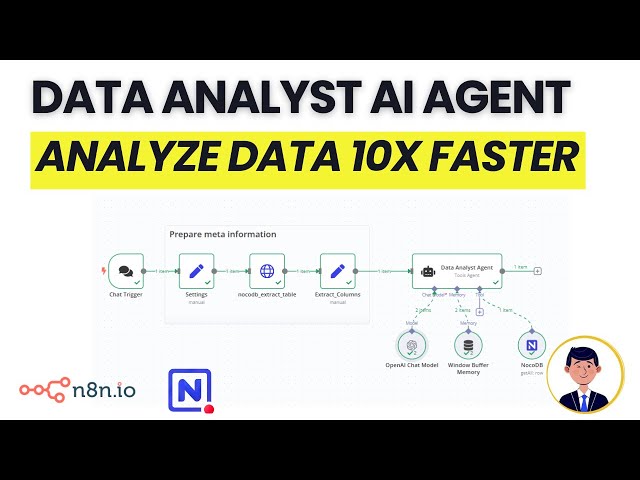](https://youtu.be/eScD4Y7nRBQ)\n"
},
"typeVersion": 1
}
],
"connections": {
"NocoDB": {
"ai_tool": [
[
{
"node": "Data Analyst Agent",
"type": "ai_tool",
"index": 0
}
]
]
},
"Settings": {
"main": [
[
{
"node": "nocodb_extract_table",
"type": "main",
"index": 0
}
]
]
},
"Chat Trigger": {
"main": [
[
{
"node": "Settings",
"type": "main",
"index": 0
}
]
]
},
"Extract_Columns": {
"main": [
[
{
"node": "Data Analyst Agent",
"type": "main",
"index": 0
}
]
]
},
"OpenAI Chat Model": {
"ai_languageModel": [
[
{
"node": "Data Analyst Agent",
"type": "ai_languageModel",
"index": 0
}
]
]
},
"Window Buffer Memory": {
"ai_memory": [
[
{
"node": "Data Analyst Agent",
"type": "ai_memory",
"index": 0
}
]
]
},
"nocodb_extract_table": {
"main": [
[
{
"node": "Extract_Columns",
"type": "main",
"index": 0
}
]
]
}
}
}
Credentials you'll need
Each integration node will prompt for credentials when you import. We strip credential IDs before publishing — you'll add your own.
nocoDbApiTokenopenAiApi
For the full experience including quality scoring and batch install features for each workflow upgrade to Pro
How this works
This workflow empowers spreadsheet users to analyse their data effortlessly through natural language queries, delivering instant insights without manual formula tinkering or coding. Ideal for business analysts, marketers, or anyone managing tabular data in NocoDB, it transforms raw spreadsheets into actionable intelligence by leveraging an AI agent that interprets questions and retrieves relevant information. The key step involves the AI agent processing your chat input alongside historical context from the memory buffer, then querying the NocoDB database via HTTP requests to extract and summarise precise data points.
Use this workflow when you need quick, conversational access to spreadsheet insights, such as identifying sales trends or filtering customer records on the fly, especially with NocoDB as your backend. Avoid it for massive datasets requiring complex statistical models, where dedicated tools like Python scripts might be more suitable. Common variations include swapping the OpenAI chat model for alternatives like Anthropic, or extending it to integrate with Google Sheets for hybrid data sources.
About this workflow
Ai Data Analyst Agent For Spreadsheets With Nocodb. Uses chatTrigger, memoryBufferWindow, nocoDbTool, httpRequest. Chat trigger; 10 nodes.
Source: https://github.com/Zie619/n8n-workflows — original creator credit. Request a take-down →
Related workflows
Workflows that share integrations, category, or trigger type with this one. All free to copy and import.
This template is designed for creators, founders, and automation builders who publish regularly on LinkedIn and want to analyze their content performance using real data.
Purpose of workflow:
by Varritech Technologies
Who is this workflow for? This workflow is designed for SEO analysts, content creators, marketing agencies, and developers who need to index a website and then interact with its content as if it were
Airtable AI Agent. Uses lmChatOpenAi, agent, toolWorkflow, toolCode. Chat trigger; 42 nodes.