 Kean
Kean This workflow corresponds to n8n.io template #11459 — we link there as the canonical source.
This workflow follows the Agent → Google Drive recipe pattern — see all workflows that pair these two integrations.
The workflow JSON
Copy or download the full n8n JSON below. Paste it into a new n8n workflow, add your credentials, activate. Full import guide →
{
"meta": {
"templateCredsSetupCompleted": true
},
"nodes": [
{
"id": "57ac832c-74ce-46fb-8298-8f323a12e9bb",
"name": "Convert to File",
"type": "n8n-nodes-base.convertToFile",
"position": [
-208,
224
],
"parameters": {
"options": {},
"operation": "toBinary",
"sourceProperty": "data[0].b64_json"
},
"typeVersion": 1.1
},
{
"id": "0ed20bfa-c93e-423c-b25b-028f2ff4d497",
"name": "Generate Image",
"type": "n8n-nodes-base.httpRequest",
"position": [
-384,
224
],
"parameters": {
"url": "https://api.openai.com/v1/images/generations",
"method": "POST",
"options": {},
"sendBody": true,
"authentication": "predefinedCredentialType",
"bodyParameters": {
"parameters": [
{
"name": "model",
"value": "gpt-image-1"
},
{
"name": "prompt",
"value": "={{ $json.output.replace(/\"/g, '') }}"
},
{
"name": "size",
"value": "1024x1024"
}
]
},
"nodeCredentialType": "openAiApi"
},
"credentials": {
"openAiApi": {
"name": "<your credential>"
},
"httpHeaderAuth": {
"name": "<your credential>"
}
},
"typeVersion": 4.2
},
{
"id": "3032992c-6911-492d-8116-b4709258e5eb",
"name": "Image Prompt",
"type": "@n8n/n8n-nodes-langchain.agent",
"position": [
-768,
224
],
"parameters": {
"text": "={{ $json.subject }}",
"options": {
"systemMessage": "=\nYou are a specialist in crafting high-quality image prompts. Your task is to take a simple concept and expand it into a fully detailed prompt suitable for text-to-image generation models.\n\nPrompt Requirements\n\nYour expanded prompt must explicitly cover:\n\t1.\tPrimary Subject: The central figure, object, or scene.\n\t2.\tEnvironment/Setting: The surrounding context, location, or background activity.\n\t3.\tArt Style: The visual treatment (e.g., hyper-realistic, digital illustration, watercolor, anime, 3D render).\n\t4.\tMood & Lighting: The emotional tone and lighting conditions (e.g., warm sunrise, dramatic shadows, neon glow).\n\t5.\tSpecific Details: Any notable elements such as colors, textures, props, clothing, or defining features.\n\nOutput Format\n\t\u2022\tStart with a polished, coherent descriptive prompt that naturally incorporates all elements.\n\t\u2022\tWrite it as if instructing an AI to generate a professional, visually rich image.\n\t\u2022\tDo not repeat the input phrase; reinterpret it as a vivid scene.\n\t\u2022\tUse detailed, evocative language.\n\nExample\n\nInput: \u201cA futuristic city\u201d\nOutput: \u201cA vast nighttime metropolis illuminated by blue and purple neon. Sleek glass skyscrapers stretch into a misty sky while streams of flying vehicles weave between them. Crowded streets glow with holographic ads and pedestrians in advanced techwear. Digital-painting style, cinematic detail, moody atmosphere with neon reflections shimmering across wet pavement.\u201d"
},
"promptType": "define"
},
"typeVersion": 1.9
},
{
"id": "7df0f7e9-3391-4a1d-ae35-0700c43282ef",
"name": "GPT 4.1",
"type": "@n8n/n8n-nodes-langchain.lmChatOpenRouter",
"position": [
-736,
464
],
"parameters": {
"model": "openai/gpt-4.1",
"options": {}
},
"credentials": {
"openRouterApi": {
"name": "<your credential>"
}
},
"typeVersion": 1
},
{
"id": "56b016cd-fbab-4d92-b639-9fe5e4a2fb72",
"name": "Sticky Note4",
"type": "n8n-nodes-base.stickyNote",
"position": [
-816,
144
],
"parameters": {
"color": 5,
"width": 360,
"height": 240,
"content": "# Image Prompt\n"
},
"typeVersion": 1
},
{
"id": "52ca29aa-4f19-468f-9156-26b475060b8e",
"name": "Sticky Note2",
"type": "n8n-nodes-base.stickyNote",
"position": [
-816,
400
],
"parameters": {
"color": 7,
"height": 180,
"content": "## Model"
},
"typeVersion": 1
},
{
"id": "7c75ee32-190e-4a52-821b-1d5ad49f9a61",
"name": "Sticky Note5",
"type": "n8n-nodes-base.stickyNote",
"disabled": true,
"position": [
-1280,
160
],
"parameters": {
"color": 7,
"width": 436,
"height": 240,
"content": "# Trigger\n"
},
"typeVersion": 1
},
{
"id": "ab9dd0b5-7b1e-4c71-bacc-9604a1411877",
"name": "Sticky Note1",
"type": "n8n-nodes-base.stickyNote",
"position": [
-432,
144
],
"parameters": {
"color": 5,
"width": 400,
"height": 240,
"content": "# Generate Image\n"
},
"typeVersion": 1
},
{
"id": "7e0478c5-cf0b-4ff7-a286-962bb4989ab0",
"name": "Sticky Note6",
"type": "n8n-nodes-base.stickyNote",
"position": [
0,
144
],
"parameters": {
"color": 5,
"width": 540,
"height": 240,
"content": "# Write to Drive & Sheets"
},
"typeVersion": 1
},
{
"id": "ab0a0ebd-e9e6-4679-a8c3-0410d69d1e9d",
"name": "When clicking \u2018Execute workflow\u2019",
"type": "n8n-nodes-base.manualTrigger",
"position": [
-1184,
224
],
"parameters": {},
"typeVersion": 1
},
{
"id": "ffb364c8-df57-43cb-9e39-9c68cd0e7135",
"name": "Set image subject",
"type": "n8n-nodes-base.set",
"position": [
-976,
224
],
"parameters": {
"options": {},
"assignments": {
"assignments": [
{
"id": "56925d9b-1928-4d06-ba27-64728f53da37",
"name": "subject",
"type": "string",
"value": "A monkey holding a banana in cartoon style"
}
]
}
},
"typeVersion": 3.4
},
{
"id": "5ab783f8-67ef-4fe0-b01c-a39f20cc0481",
"name": "Send a message",
"type": "n8n-nodes-base.slack",
"position": [
304,
224
],
"parameters": {
"select": "channel",
"blocksUi": "={\n \"blocks\": [\n {\n \"type\": \"divider\"\n },\n {\n \"type\": \"section\",\n \"text\": {\n \"type\": \"mrkdwn\",\n \"text\": \"An image has been created:\\n\\n{{ $json.name }}\\n\\nClick <{{ $json.webViewLink }}|here> to view\"\n },\n \"accessory\": {\n \"type\": \"image\",\n \"image_url\": \"{{ $json.thumbnailLink }}\",\n \"alt_text\": \"image in drive\"\n }\n }\n ]\n}",
"channelId": {
"__rl": true,
"mode": "list",
"value": "C08QZPHUN1Y",
"cachedResultName": "idea"
},
"messageType": "block",
"otherOptions": {}
},
"credentials": {
"slackApi": {
"name": "<your credential>"
}
},
"typeVersion": 2.3
},
{
"id": "c7576a7f-f0a1-4688-9e25-73e177ebfaa5",
"name": "Save image to Drive",
"type": "n8n-nodes-base.googleDrive",
"position": [
112,
224
],
"parameters": {
"name": "={{ $('Set image subject').item.json.subject }}.png",
"driveId": {
"__rl": true,
"mode": "list",
"value": "My Drive",
"cachedResultUrl": "https://drive.google.com/drive/my-drive",
"cachedResultName": "My Drive"
},
"options": {},
"folderId": {
"__rl": true,
"mode": "id",
"value": "13INQR6dKeD3YOEILFNb9mOXG4-eDj1ZM"
}
},
"credentials": {
"googleDriveOAuth2Api": {
"name": "<your credential>"
}
},
"typeVersion": 3
},
{
"id": "abc42f02-def5-4654-954f-81c6969350b3",
"name": "Sticky Note",
"type": "n8n-nodes-base.stickyNote",
"position": [
-1264,
-368
],
"parameters": {
"width": 912,
"height": 448,
"content": "# Text-to-Image Generator with OpenAI\n\n## What It Is\n\nThis is an automated text-to-image generation system that converts simple subject descriptions into AI-generated photos using OpenAI's image generation technology.\n\n## Setup\n\nThe system works through a streamlined workflow:\n\n1. You input a subject or brief description into a designated note field\n2. The system automatically expands your simple subject into a detailed, comprehensive prompt\n3. This enhanced prompt is sent to OpenAI's image generator\n4. Once the image is created, it is automatically saved to your Google Drive for easy access and storage\n5. You receive a notification in Slack to view it"
},
"typeVersion": 1
},
{
"id": "ef0963df-6b2b-4d32-a562-cecdd427cf31",
"name": "Sticky Note3",
"type": "n8n-nodes-base.stickyNote",
"position": [
-304,
-368
],
"parameters": {
"width": 576,
"height": 448,
"content": "## Video explanation\n\n[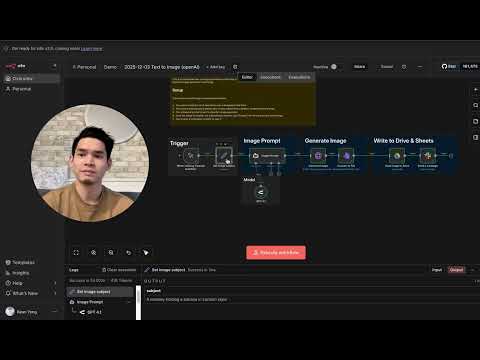](https://youtu.be/ZgDFb54P9ww)"
},
"typeVersion": 1
}
],
"connections": {
"GPT 4.1": {
"ai_languageModel": [
[
{
"node": "Image Prompt",
"type": "ai_languageModel",
"index": 0
}
]
]
},
"Image Prompt": {
"main": [
[
{
"node": "Generate Image",
"type": "main",
"index": 0
}
]
]
},
"Generate Image": {
"main": [
[
{
"node": "Convert to File",
"type": "main",
"index": 0
}
]
]
},
"Convert to File": {
"main": [
[
{
"node": "Save image to Drive",
"type": "main",
"index": 0
}
]
]
},
"Set image subject": {
"main": [
[
{
"node": "Image Prompt",
"type": "main",
"index": 0
}
]
]
},
"Save image to Drive": {
"main": [
[
{
"node": "Send a message",
"type": "main",
"index": 0
}
]
]
},
"When clicking \u2018Execute workflow\u2019": {
"main": [
[
{
"node": "Set image subject",
"type": "main",
"index": 0
}
]
]
}
}
}
Credentials you'll need
Each integration node will prompt for credentials when you import. We strip credential IDs before publishing — you'll add your own.
googleDriveOAuth2ApihttpHeaderAuthopenAiApiopenRouterApislackApi
For the full experience including quality scoring and batch install features for each workflow upgrade to Pro
About this workflow
This is an automated text-to-image generation system that converts simple subject descriptions into AI-generated photos using OpenAI's image generation technology.
Source: https://n8n.io/workflows/11459/ — original creator credit. Request a take-down →
Related workflows
Workflows that share integrations, category, or trigger type with this one. All free to copy and import.
Who is this for? Agencies, consultants, and service providers who conduct discovery calls and need to quickly turn conversations into professional proposals.
Arvifund - Supabase (Fixed v6). Uses httpRequest, telegram, supabase, telegramTrigger. Event-driven trigger; 92 nodes.
Arvifund - Supabase (Fixed v5). Uses httpRequest, telegram, googleSheets, telegramTrigger. Event-driven trigger; 91 nodes.
Arvifund - Supabase. Uses httpRequest, telegram, googleSheets, telegramTrigger. Event-driven trigger; 90 nodes.
Arvifund - Supabase (Fixed v2). Uses httpRequest, telegram, googleSheets, telegramTrigger. Event-driven trigger; 90 nodes.