 Trung Tran
 This workflow corresponds to n8n.io template #7490 — we link there as the canonical source.
The workflow JSON
Copy or download the full n8n JSON below. Paste it into a new n8n workflow, add your credentials, activate. Full import guide →
{
"id": "Rptc1H55PaNYDVZa",
"meta": {
"templateCredsSetupCompleted": true
},
"name": "AWS ACM Certificate Auto-Renew with Slack approval",
"tags": [],
"nodes": [
{
"id": "19f3e8a0-5957-4c10-8d09-75d88a55402e",
"name": "Schedule Trigger",
"type": "n8n-nodes-base.scheduleTrigger",
"position": [
0,
0
],
"parameters": {
"rule": {
"interval": [
{}
]
}
},
"typeVersion": 1.2
},
{
"id": "76302994-4f45-4353-8b5e-f253fbf28b5a",
"name": "Renew a certificate",
"type": "n8n-nodes-base.awsCertificateManager",
"position": [
1184,
0
],
"parameters": {
"certificateArn": "={{ $('Cert expire in next 7 days?').item.json.CertificateArn }}"
},
"credentials": {
"aws": {
"name": "<your credential>"
}
},
"typeVersion": 1
},
{
"id": "0620ba39-d94d-4876-a802-b6cc1100e9a9",
"name": "Get many certificates",
"type": "n8n-nodes-base.awsCertificateManager",
"position": [
240,
0
],
"parameters": {
"options": {},
"operation": "getMany"
},
"credentials": {
"aws": {
"name": "<your credential>"
}
},
"typeVersion": 1
},
{
"id": "6d3e2484-43da-4a0e-8e92-175b4d1ec3fe",
"name": "Send message and wait for response",
"type": "n8n-nodes-base.slack",
"position": [
880,
0
],
"parameters": {
"user": {
"__rl": true,
"mode": "list",
"value": "U054RMBTVBM",
"cachedResultName": "trung.tran"
},
"message": "=:warning: *AWS ACM Certificate Expiry Alert* :warning:\n\nThe following ACM certificate will expire soon and requires renewal:\n\n*Domain Name:* {{ $json.DomainName }}\n*Alternate Names:* {{ $json.SubjectAlternativeNameSummaries }}\n*Certificate ARN:* {{ $json.CertificateArn }}\n*Key Algorithm:* {{ $json.KeyAlgorithm }}\n*Status:* {{ $json.Status }}\n*Issued At:* {{ $json.IssuedAt.toDateTime('s')}}\n*Expires At:* {{ $json.NotAfter.toDateTime('s')}}\n\nPlease confirm renewal action to proceed.",
"options": {},
"operation": "sendAndWait",
"authentication": "oAuth2"
},
"credentials": {
"slackOAuth2Api": {
"name": "<your credential>"
}
},
"typeVersion": 2.3
},
{
"id": "6e47976b-6eb8-4a42-a777-b23e857f9651",
"name": "Cert expire in next 7 days?",
"type": "n8n-nodes-base.filter",
"position": [
528,
0
],
"parameters": {
"options": {},
"conditions": {
"options": {
"version": 2,
"leftValue": "",
"caseSensitive": true,
"typeValidation": "strict"
},
"combinator": "or",
"conditions": [
{
"id": "fe1b749d-3046-465e-b60a-786f5b0e2f99",
"operator": {
"type": "dateTime",
"operation": "before"
},
"leftValue": "={{ $json.NotAfter.toDateTime('s') }}",
"rightValue": "={{ $today.plus(7,'days') }}"
},
{
"id": "8db3e990-dca3-4c23-9d62-e4d25a807588",
"operator": {
"type": "dateTime",
"operation": "before"
},
"leftValue": "={{ $json.NotBefore.toDateTime('s') }}",
"rightValue": "={{ $today }}"
}
]
}
},
"typeVersion": 2.2
},
{
"id": "5a336509-7d02-4c62-8198-04ad2750682f",
"name": "Sticky Note",
"type": "n8n-nodes-base.stickyNote",
"position": [
-1136,
-576
],
"parameters": {
"width": 928,
"height": 1616,
"content": "# AWS ACM Certificate Auto-Renew with Slack approval\n\n## **Who\u2019s it for**\n- SRE/DevOps teams managing many ACM certs.\n- Cloud ops who want **hands-off renewals** with an **approval step in Slack**.\n- MSPs that need auditable reminders and renewals on schedule.\n\n## **How it works / What it does**\n1. **Schedule Trigger** \u2013 runs daily (or your cadence).\n2. **Get many certificates** \u2013 fetches ACM certs (paginate if needed).\n3. **Filter: expiring in next 7 days** \u2013 keeps items where:\n - `NotAfter` **before** `today + 7d`\n - `NotBefore` **before** `today` (already valid)\n4. **Send message and wait for response (Slack)** \u2013 posts a certificate summary and **pauses** until Approve/Reject.\n5. **Renew a certificate** \u2013 on **Approve**, calls the renew action for the item.\n\n## **How to set up**\n1. **Credentials**\n - **AWS** in n8n with permissions to list/read/renew certs.\n - **Slack** OAuth (bot in the target channel). \n2. **Schedule Trigger**\n - Set to run once per day (e.g., `09:00` local).\n3. **Get many certificates**\n - Region: your ACM region(s). \n - If you have several regions, loop regions or run multiple branches.\n4. **Filter (IF / Filter node)**\n - Add these two conditions (AND):\n - `{{ $json.NotAfter.toDateTime('s') }}` **is before** `{{ $today.plus(7,'days') }}`\n - `{{ $json.NotBefore.toDateTime('s') }}` **is before** `{{ $today }}`\n5. **Slack \u2192 Send & Wait**\n - Message (text input):\n ```\n :warning: *ACM Certificate Expiry Alert* :warning:\n\n *Domain:* {{ $json.DomainName }}\n *SANs:* {{ $json.SubjectAlternativeNameSummaries }}\n *ARN:* {{ $json.CertificateArn }}\n *Algo:* {{ $json.KeyAlgorithm }}\n *Status:* {{ $json.Status }}\n *Issued:* {{ $json.IssuedAt | toDate | formatDate(\"YYYY-MM-DD HH:mm\") }}\n *Expires:* {{ $json.NotAfter | toDate | formatDate(\"YYYY-MM-DD HH:mm\") }}\n\n Approve to start renewal.\n ```\n - Add two buttons: **Approve** / **Reject** (the node will output which was clicked).\n6. **Renew a certificate**\n - Map the **CertificateArn** from the Slack Approved branch.\n\n## **Requirements**\n- n8n (current version with Slack *Send & Wait*).\n- AWS IAM permissions (read + renew ACM), e.g.:\n - `acm:ListCertificates`, `acm:DescribeCertificate`, `acm:RenewCertificate` (plus region access).\n- Slack bot with permission to post & use interactivity in the target channel.\n\n## **How to customize the workflow**\n- **Window size:** change `7` to `14` or `30` days in the filter.\n- **Catch expired**: add an OR path `{{ $json.NotAfter.toDateTime('s') }} is before {{ $today }}` \u2192 send a **red** Slack alert.\n- **Auto-renew w/o approval:** bypass Slack and renew directly for low-risk domains.\n- **Multiple regions/accounts:** iterate over a list of regions or assume roles per account.\n- **Logging:** add a Google Sheet/DB append after Slack click with `user`, `time`, `result`.\n- **Escalation:** if no Slack response after N hours, ping `@oncall` or open a ticket.\n\n## **Notes**\n- The Slack node **pauses** execution until a button is clicked\u2014perfect for change control.\n- Time conversions above assume `NotAfter`/`IssuedAt` are Unix seconds (`'s'`). Adjust if your data differs."
},
"typeVersion": 1
},
{
"id": "158aa163-42cb-42d6-b915-c1525983e069",
"name": "Sticky Note1",
"type": "n8n-nodes-base.stickyNote",
"position": [
-80,
192
],
"parameters": {
"width": 272,
"content": "### 1. Schedule Trigger\nThe workflow starts on a scheduled basis (e.g., daily at 09:00) to automatically check ACM certificates without manual intervention."
},
"typeVersion": 1
},
{
"id": "38d53502-a32b-4734-a63b-d362f0c16f7d",
"name": "Sticky Note2",
"type": "n8n-nodes-base.stickyNote",
"position": [
240,
192
],
"parameters": {
"width": 256,
"content": "### 2. Get Certificates\nFetches all ACM certificates in the configured AWS region(s), including details such as domain names, status, and expiration dates."
},
"typeVersion": 1
},
{
"id": "c41f8bcd-9473-45a5-b8da-08090d024955",
"name": "Sticky Note3",
"type": "n8n-nodes-base.stickyNote",
"position": [
528,
192
],
"parameters": {
"content": "### 3. Filter Certificates Expiring Soon\nChecks each certificate and keeps only those that are already valid and will expire within the next 7 days.\n\n"
},
"typeVersion": 1
},
{
"id": "8b46936f-4dfd-44ea-bdda-cd35209d7c61",
"name": "Sticky Note4",
"type": "n8n-nodes-base.stickyNote",
"position": [
832,
192
],
"parameters": {
"content": "### 4. Notify via Slack and Wait for Approval\nSends a Slack message with certificate details (domain, ARN, expiration date, status). \nThe workflow pauses here until a user clicks **Approve** or **Reject**."
},
"typeVersion": 1
},
{
"id": "4de9462c-89e2-4a78-87c1-eaeaf0b418a5",
"name": "Sticky Note5",
"type": "n8n-nodes-base.stickyNote",
"position": [
1120,
192
],
"parameters": {
"content": "### 5. Renew Certificate\nIf **Approve** is selected in Slack, the workflow triggers AWS ACM to renew the certificate automatically. \nIf **Reject** is clicked, no action is taken, and the workflow ends."
},
"typeVersion": 1
},
{
"id": "d72ec217-74be-481b-bb17-d640a80dfede",
"name": "Inform IT Admin",
"type": "n8n-nodes-base.slack",
"position": [
1456,
0
],
"parameters": {
"text": "=:white_check_mark: *ACM Certificate Renewed Successfully*\n\n*Domain:* {{ $('Cert expire in next 7 days?').item.json.DomainName }}\n*ARN:* {{ $('Cert expire in next 7 days?').item.json.CertificateArn }}\n*Previous Expiry:* {{ $('Cert expire in next 7 days?').item.json.NotAfter.toDateTime('s') }}\n*Renewed At:* {{ $now }}\n\nApproved by: {{ $('Send message and wait for response').item.json.user?.name || $('Send message and wait for response').item.json.username || 'N/A' }}",
"user": {
"__rl": true,
"mode": "list",
"value": "U054RMBTVBM",
"cachedResultName": "trung.tran"
},
"select": "user",
"otherOptions": {},
"authentication": "oAuth2"
},
"credentials": {
"slackOAuth2Api": {
"name": "<your credential>"
}
},
"typeVersion": 2.3
},
{
"id": "5b0e2374-fc3a-49e5-8538-65551f9d5422",
"name": "Sticky Note6",
"type": "n8n-nodes-base.stickyNote",
"position": [
1680,
-32
],
"parameters": {
"width": 624,
"height": 192,
"content": "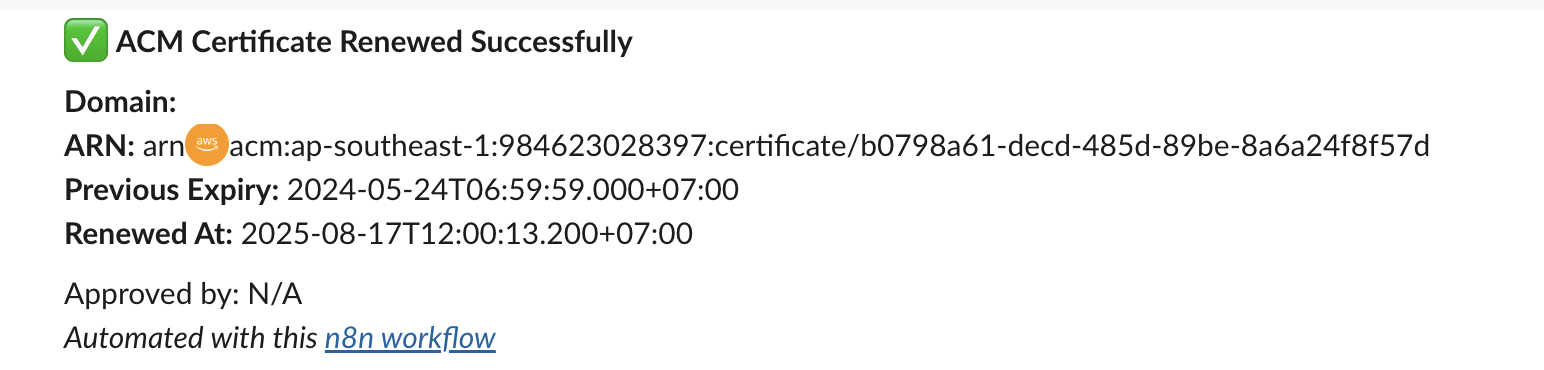"
},
"typeVersion": 1
},
{
"id": "8fd13176-f90c-4fea-bb42-c13d98488d33",
"name": "Sticky Note7",
"type": "n8n-nodes-base.stickyNote",
"position": [
1424,
192
],
"parameters": {
"content": "### 6. Notify admin via Slack"
},
"typeVersion": 1
}
],
"active": false,
"settings": {
"executionOrder": "v1"
},
"versionId": "e61ccea4-43f6-410d-9036-90d750e3837b",
"connections": {
"Schedule Trigger": {
"main": [
[
{
"node": "Get many certificates",
"type": "main",
"index": 0
}
]
]
},
"Renew a certificate": {
"main": [
[
{
"node": "Inform IT Admin",
"type": "main",
"index": 0
}
]
]
},
"Get many certificates": {
"main": [
[
{
"node": "Cert expire in next 7 days?",
"type": "main",
"index": 0
}
]
]
},
"Cert expire in next 7 days?": {
"main": [
[
{
"node": "Send message and wait for response",
"type": "main",
"index": 0
}
]
]
},
"Send message and wait for response": {
"main": [
[
{
"node": "Renew a certificate",
"type": "main",
"index": 0
}
]
]
}
}
}
Credentials you'll need
Each integration node will prompt for credentials when you import. We strip credential IDs before publishing — you'll add your own.
awsslackOAuth2Api
For the full experience including quality scoring and batch install features for each workflow upgrade to Pro
About this workflow
SRE/DevOps teams managing many ACM certs. Cloud ops who want hands-off renewals with an approval step in Slack. MSPs that need auditable reminders and renewals on schedule. Schedule Trigger – runs daily (or your cadence). Get many certificates – fetches ACM certs (paginate if…
Source: https://n8n.io/workflows/7490/ — original creator credit. Request a take-down →
Related workflows
Workflows that share integrations, category, or trigger type with this one. All free to copy and import.
This workflow fully automates your team's daily standup process using Slack for communication, Notion for structured data storage, and Redis for real-time session management.
debug. Uses httpRequest, slack, redis, mailgun. Scheduled trigger; 60 nodes.
Seller Follow-Up Engine (Enhanced). Uses httpRequest, slack. Scheduled trigger; 44 nodes.
This workflow is an automated employee time tracking and reporting system that monitors weekly work hours via TMetric, then delivers personalized summaries directly to each team member on Slack. It co