 Frederik Duchi
 This workflow corresponds to n8n.io template #8602 — we link there as the canonical source.
The workflow JSON
Copy or download the full n8n JSON below. Paste it into a new n8n workflow, add your credentials, activate. Full import guide →
{
"nodes": [
{
"id": "0a933c3b-9f6b-4f45-97ec-e3cc4d343a97",
"name": "Generate tasks in batch",
"type": "n8n-nodes-base.httpRequest",
"onError": "continueErrorOutput",
"position": [
1312,
544
],
"parameters": {
"url": "={{ $('Configure settings and ids').item.json['API host'] }}/api/database/rows/table/{{ $('Configure settings and ids').item.json['Tasks table ID'] }}/batch/?user_field_names=true",
"method": "POST",
"options": {},
"jsonBody": "={\"items\": {{ JSON.stringify($json.items) }}}",
"sendBody": true,
"sendHeaders": true,
"specifyBody": "json",
"headerParameters": {
"parameters": [
{
"name": "Authorization",
"value": "=Token {{ $('Configure settings and ids').item.json.Token }}"
}
]
}
},
"typeVersion": 4.2
},
{
"id": "95e2115f-702f-42dc-8320-605727f05017",
"name": "Aggregate tasks for insert",
"type": "n8n-nodes-base.aggregate",
"position": [
1088,
544
],
"parameters": {
"options": {},
"aggregate": "aggregateAllItemData",
"destinationFieldName": "items"
},
"typeVersion": 1
},
{
"id": "ada410ae-504e-418b-9a5c-cdeec042e68c",
"name": "Error response",
"type": "n8n-nodes-base.respondToWebhook",
"position": [
1536,
640
],
"parameters": {
"options": {},
"respondWith": "text",
"responseBody": "\u274c Something went wrong, please check the log files"
},
"typeVersion": 1.4
},
{
"id": "d980e86e-b261-4ddf-b73d-45dd3b9fbf56",
"name": "Get all template steps",
"type": "n8n-nodes-base.baserow",
"position": [
416,
544
],
"parameters": {
"tableId": "={{ $json[\"Detail template table ID\"] }}",
"returnAll": true,
"databaseId": "={{ $json[\"Database ID\"] }}",
"additionalOptions": {
"filters": {
"fields": [
{
"field": "={{ $json[\"Link to master template field ID\"] }}",
"value": "={{ $('Trigger task creation').item.json.body.template_id }}",
"operator": "link_row_has"
}
]
}
}
},
"credentials": {
"baserowApi": {
"name": "<your credential>"
}
},
"typeVersion": 1
},
{
"id": "12f6eb7e-1dd5-4d67-995f-493d58197d46",
"name": "Trigger task creation",
"type": "n8n-nodes-base.webhook",
"position": [
-32,
544
],
"parameters": {
"path": "create-tasks-for-template",
"options": {},
"httpMethod": "POST",
"responseMode": "responseNode"
},
"typeVersion": 2
},
{
"id": "e188e6da-2de1-4dfb-a203-0319ff720a80",
"name": "Avoid scheduling during the weekend",
"type": "n8n-nodes-base.code",
"position": [
864,
544
],
"parameters": {
"jsCode": "function adjustDateForWeekend(original_date){\n const new_date = new Date(original_date)\n const day = new_date.getDay();\n // check for Saturday: add 2 days if necessary\n if(day == 6){\n new_date.setDate(new_date.getDate() + 2)\n }\n // check for Sunday: add 1 day if necessary\n if(day == 0){\n new_date.setDate(new_date.getDate() + 1)\n }\n //return the new day in format YYYY-mm-dd\n return new_date.toISOString().slice(0,10)\n}\n\n// Loop over all the deadlines and adjust to the next monday if the original date is during the weekend\nfor (const item of $input.all()) {\n item.json.Deadline = adjustDateForWeekend(item.json.Deadline);\n}\n\nreturn $input.all();"
},
"typeVersion": 2
},
{
"id": "907e6348-ec6f-434b-b7b2-4568d2a27e7d",
"name": "Calculate deadlines for each step",
"type": "n8n-nodes-base.set",
"position": [
640,
544
],
"parameters": {
"options": {},
"assignments": {
"assignments": [
{
"id": "fbdee67a-9eb1-4970-9f51-103002e69253",
"name": "Procedure step",
"type": "array",
"value": "=[{{ $json.id }}]"
},
{
"id": "abd084cc-b13f-48d2-a0ff-31398bce757a",
"name": "Deadline",
"type": "string",
"value": "={{new Date($('Configure settings and ids').item.json['Schedule date']).plus($json['Days to complete'],'days').format('yyyy-MM-dd')}}"
},
{
"id": "cf93c092-6126-4b36-a9ce-3725e1a7e47b",
"name": "Assignee",
"type": "array",
"value": "=[{{ $('Configure settings and ids').item.json['Assignee ID'] }}]"
},
{
"id": "6127e270-7305-4a61-b22a-8273544487b3",
"name": "Note",
"type": "string",
"value": "={{ $('Configure settings and ids').item.json.Note }}"
}
]
}
},
"typeVersion": 3.4
},
{
"id": "2514909f-2cba-41b2-9a7f-0a7c4b41a61a",
"name": "Configure settings and ids",
"type": "n8n-nodes-base.set",
"position": [
192,
544
],
"parameters": {
"options": {},
"assignments": {
"assignments": [
{
"id": "644a34f8-a7dc-4812-a5b6-4efa5b47efa1",
"name": "API host",
"type": "string",
"value": "https://api.baserow.io"
},
{
"id": "daba6cf7-c391-4a08-89c7-6164ce5b594e",
"name": "Token",
"type": "string",
"value": "<your_token>"
},
{
"id": "ba45eee9-7823-4e83-bbc0-e1754c04709d",
"name": "Database ID",
"type": "number",
"value": 1111
},
{
"id": "c8a493c3-2ff4-4f63-9a99-b586c14cf4a1",
"name": "Detail template table ID",
"type": "number",
"value": 1111
},
{
"id": "9a4c326a-1581-47bf-b5da-35084656e5f3",
"name": "Link to master template field ID",
"type": "string",
"value": "1111"
},
{
"id": "a420b11a-e75f-45ef-b4ab-373d5754edc2",
"name": "Tasks table ID",
"type": "number",
"value": 1111
},
{
"id": "507da617-8380-437e-ad09-2355e1473544",
"name": "Assignee ID",
"type": "number",
"value": "={{ $json.body.assignee_id }}"
},
{
"id": "59cb1495-86e3-4795-b05b-65e61c9907fb",
"name": "Schedule date",
"type": "string",
"value": "={{ $if(typeof $json.body.schedule_date == 'undefined',$now.format('yyyy-MM-dd'), $json.body.schedule_date)}}"
},
{
"id": "2bf36248-a5a9-49b2-bf5f-8387034159bb",
"name": "Note",
"type": "string",
"value": "={{ $json.body.note }}"
}
]
}
},
"typeVersion": 3.4
},
{
"id": "8f2b7922-2f35-427e-8b65-5c1220122000",
"name": "Sticky Note",
"type": "n8n-nodes-base.stickyNote",
"position": [
-1088,
-112
],
"parameters": {
"width": 928,
"height": 1920,
"content": "This n8n template demonstrates how to automatically **create** **tasks** (or in general, records) in Baserow based on template or blueprint tables. The first blueprint table is the **master table** that holds the general information about the template. For example: a standard procedure to handle incidents. The second table is the **details table** that holds multiple records for the template. Each record in that table is a specific task that needs to be assigned to someone with a certain deadline. \n\nThis makes it easy to streamline task creation for recurring processes. Use cases are many:\n- Project management (generate tasks for employees based on a project template)\n- HR & onboarding (generate tasks for employee onboarding based on a template)\n- Operations (create checklists for maintenance, audits, or recurring procedures)\n\n## Good to know\n- The Baserow template for handling [Standard Operating Procedures](https://baserow.io/templates/standard-operating-procedures) works perfect as a base schema to try out this workflow.\n- Authentication is done through a database token. Check the [documentation](https://baserow.io/user-docs/personal-api-tokens) on how to create such a token.\n- Tasks are inserted using the HTTP request node instead of a dedicated Baserow node. This is to support batch import instead of importing records one by one.\n\n## Requirements\n- Baserow account (cloud or self-hosted)\n- A Baserow database with at least the following tables:\n - `Assignee` / employee table. This is required to be able to assign someone to a task.\n - `Master` table with procedure or template information. This is required to be able to select a certain template\n - `Details` table with all the steps associated with a procedure or template. This is required to convert each step into a specific task.\n - A step must have a field `Days to complete` with the number of days to complete the step. This field will be used to calculate the deadline.\n - `Tasks` table that contains the actual tasks with an assignee and deadline.\n\n## How it works\n- **Trigger task creation (webhook)**\n - The automation starts when the webhook is triggered through a POST request.\n - It should contain an assignee, template, date and note in the body of the request.\n - It will send a succes or failure response once all steps are completed.\n- **Configure settings and ids**\n - Stores the ids of the involved Baserow database and tables, together with the API credentials and the data from the webhook.\n- **Get all template steps**\n - Gets all the steps from the template `Details` table that are associated with the id of the `Master` template table.\n - For example: the master template can have a record about handling customer complaints. The details table contains all the steps to handle this procedure.\n- **Calculate deadlines for each step**\n - Prepares the input of the tasks by using the same property names as the field of the `Tasks` table. Adjust this names, add or remove fields if this is required for your database structure.\n - The deadline of each step is calculated by adding the number of days a step can take based on the deadline of the first step. This is done through a field `Days to complete` in the template `Details` table.\n - For example. If the `schedule_date` property in the webhook is set to 2025-10-01 and the `Days to complete` for the step is 3, then the deadline will be 2025-10-04\n- **Avoid scheduling during the weekend**\n - It might happen that the calculated deadline is on a Saturday or Sunday. This Code node moves those dates to the first Monday to avoid scheduling during the weekend.\n- **Aggregate tasks for insert**\n - Aggregates the data from the previous nodes as an array in a property named `items`. This matches perfect with the Baserow API to insert new records in batch.\n- **Generate tasks in batch**\n - Calls the API endpoint `/api/database/rows/table/{table_id}/batch/` to insert multiple records at once in the tasks table. Check the [Baserow API documentation](https://api.baserow.io/api/redoc/#tag/Database-table-rows/operation/batch_create_database_table_rows) for further details.\n- **Success / Error response**\n - Sends a simple text response to indicate the success or failure of the record creation. This is to offer feedback when triggering the automation from a Baserow application, but can be replaced with a JSON response.\n\n## How to use\n- Call the `Trigger task creation` node with the required parameters through a POST request. This can be done from any web application. For example: the application builder in Baserow supports an action to send an HTTP request. The Procedure details page in the [Standard Operating Procedures](https://baserow.io/templates/standard-operating-procedures) template demonstrates this action.\n - The following information is required in the body of the request. This information is required to create the actual tasks.\n \n ```json\n {\n \"assignee_id\": integer refering to the id of the assignee in the database,\n \"template_id\": integer refering to the id of the template or procedure in the master table,\n \"schedule_date\": the date the tasks need to start scheduling,\n \"note\": text with an optional note about the tasks\n }\n ```\n \n- Set the corresponding ids in the `Configure settings and ids` node.\n- Check the names of the properties in the `Calculate deadlines for each step` node. Make sure the names of those properties match the field names of your `Tasks` table.\n- You can replace the text message in the `Success response` and `Failure response` with a more structured format if this is necessary in your application.\n\n## Customising this workflow\n- Add support for public holidays (e.g., using an external calendar API).\n- Modify the task assignment logic (e.g., pre-assign tasks in the details table).\n- Combine with notifications (email, Slack, etc.) to alert employees when new tasks are generated."
},
"typeVersion": 1
},
{
"id": "df72abe3-8919-4854-ace5-0a35ed2a25c9",
"name": "Success response",
"type": "n8n-nodes-base.respondToWebhook",
"position": [
1536,
448
],
"parameters": {
"options": {},
"respondWith": "text",
"responseBody": "\u2705 The tasks were created"
},
"typeVersion": 1.4
},
{
"id": "3ec01ca3-cbb1-4932-8a26-63609021fb43",
"name": "Sticky Note1",
"type": "n8n-nodes-base.stickyNote",
"position": [
-80,
736
],
"parameters": {
"color": 7,
"width": 688,
"height": 944,
"content": "## Trigger task creation\n\nThe following information must be passed in the body of the request\n```json\n {\n \"assignee_id\": integer,\n \"template_id\": integer,\n \"schedule_date\": date,\n \"note\":\n }\n```\n\nYou can trigger the webhook for example through the Baserow application builder by adding an Send an HTTP request action to a button click and passing the required parameters.\n\n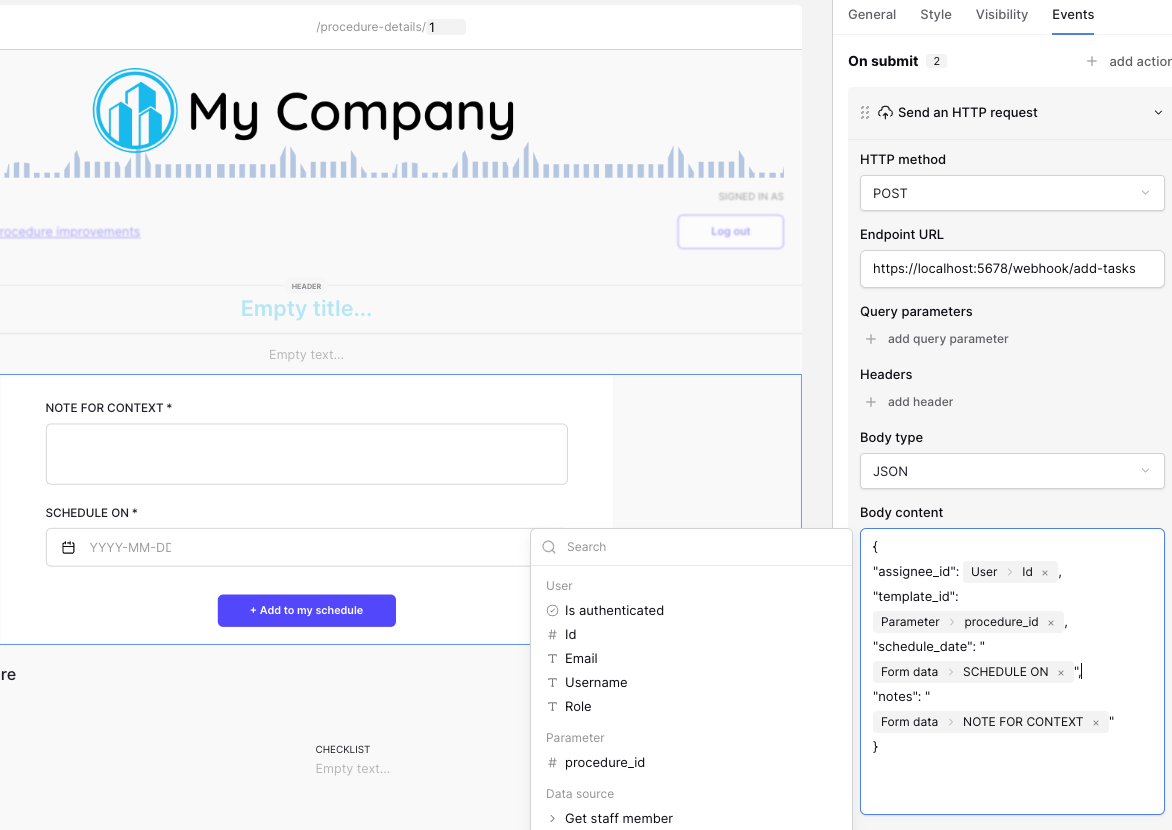"
},
"typeVersion": 1
},
{
"id": "4e516ff5-099a-4c9f-a881-846b6d1d25b6",
"name": "Sticky Note2",
"type": "n8n-nodes-base.stickyNote",
"position": [
144,
160
],
"parameters": {
"color": 7,
"width": 512,
"height": 352,
"content": "## Configure settings and ids\n\n* API host: the path to the API of your instance. This is https://api.baserow.io when using the cloud instance.\n* Token: a token you need to generate for the database. Check the [documentation](https://baserow.io/user-docs/personal-api-tokens) on how to create such a token.\n* Database ID: the unique id of the database you want to use\n* Detail template table ID: the unique id of the table containing the steps that need to be converted to tasks\n* Link to master template field ID: the unique ID of the field that references the Masters table\n* Task table ID: the unique id of the table holding the tasks\n\nThe other fields are filled in with the data from the webhook body"
},
"typeVersion": 1
}
],
"connections": {
"Trigger task creation": {
"main": [
[
{
"node": "Configure settings and ids",
"type": "main",
"index": 0
}
]
]
},
"Get all template steps": {
"main": [
[
{
"node": "Calculate deadlines for each step",
"type": "main",
"index": 0
}
]
]
},
"Generate tasks in batch": {
"main": [
[
{
"node": "Success response",
"type": "main",
"index": 0
}
],
[
{
"node": "Error response",
"type": "main",
"index": 0
}
]
]
},
"Aggregate tasks for insert": {
"main": [
[
{
"node": "Generate tasks in batch",
"type": "main",
"index": 0
}
]
]
},
"Configure settings and ids": {
"main": [
[
{
"node": "Get all template steps",
"type": "main",
"index": 0
}
]
]
},
"Calculate deadlines for each step": {
"main": [
[
{
"node": "Avoid scheduling during the weekend",
"type": "main",
"index": 0
}
]
]
},
"Avoid scheduling during the weekend": {
"main": [
[
{
"node": "Aggregate tasks for insert",
"type": "main",
"index": 0
}
]
]
}
}
}
Credentials you'll need
Each integration node will prompt for credentials when you import. We strip credential IDs before publishing — you'll add your own.
baserowApi
For the full experience including quality scoring and batch install features for each workflow upgrade to Pro
About this workflow
This n8n template demonstrates how to automatically create tasks (or in general, records) in Baserow based on template or blueprint tables. The first blueprint table is the master table that holds the general information about the template. For example: a standard procedure to…
Source: https://n8n.io/workflows/8602/ — original creator credit. Request a take-down →
Related workflows
Workflows that share integrations, category, or trigger type with this one. All free to copy and import.
create-video. Uses httpRequest, baserow. Webhook trigger; 11 nodes.
This n8n template provides enterprise-level version control for your workflows using GitHub integration. Stop losing hours to broken workflows and manual exports – get proper commit history, visual di
This flow creates dummy files for every item added in your *Arrs (Radarr/Sonarr) with the tag .
eek-Go v2 (Batch-Then-Review). Uses httpRequest. Webhook trigger; 75 nodes.
This workflow receives webhook requests from a content calendar and uses the X API v2 to publish text posts, threads, image/video posts, and polls, as well as delete existing posts and run a credentia