 Trung Tran
 This workflow corresponds to n8n.io template #8623 — we link there as the canonical source.
This workflow follows the Agent → Chat Trigger recipe pattern — see all workflows that pair these two integrations.
The workflow JSON
Copy or download the full n8n JSON below. Paste it into a new n8n workflow, add your credentials, activate. Full import guide →
{
"id": "8Hr1UiypOyXzJuXf",
"meta": {
"templateCredsSetupCompleted": true
},
"name": "Chat-Based AWS Lambda Manager with Automated Audit Logging (GPT-4.1 mini + Google Sheet)",
"tags": [
{
"id": "zVkByIt5M465W2a8",
"name": "aws",
"createdAt": "2025-09-12T06:14:33.823Z",
"updatedAt": "2025-09-12T06:14:33.823Z"
}
],
"nodes": [
{
"id": "616e9751-00a6-4313-a1ae-aa0ffb44430e",
"name": "OpenAI Chat Model",
"type": "@n8n/n8n-nodes-langchain.lmChatOpenAi",
"position": [
-160,
736
],
"parameters": {
"model": {
"__rl": true,
"mode": "list",
"value": "gpt-4.1-mini"
},
"options": {}
},
"credentials": {
"openAiApi": {
"name": "<your credential>"
}
},
"typeVersion": 1.2
},
{
"id": "a1dca496-5a02-45d4-b230-65a12d8a51d9",
"name": "Simple Memory",
"type": "@n8n/n8n-nodes-langchain.memoryBufferWindow",
"position": [
-32,
736
],
"parameters": {
"contextWindowLength": 10
},
"typeVersion": 1.3
},
{
"id": "cffff788-b047-4553-83cc-726d5028ebfb",
"name": "When chat message received",
"type": "@n8n/n8n-nodes-langchain.chatTrigger",
"position": [
-384,
512
],
"parameters": {
"options": {}
},
"typeVersion": 1.3
},
{
"id": "73569e82-cc64-4435-a06c-c7b8eed1b453",
"name": "Sticky Note",
"type": "n8n-nodes-base.stickyNote",
"position": [
-1840,
-80
],
"parameters": {
"color": 6,
"width": 880,
"height": 1184,
"content": "# Chat-Based AWS Lambda Manager with Automated Audit Logging (GPT-4.1 mini + Google Sheet)\n> This workflow provides a chat-based AI agent to manage AWS Lambda functions. It allows users to list, invoke, get details, and delete Lambda functions, while automatically recording every action into Google Sheets for audit and compliance tracking.\n\n## **Who\u2019s it for**\n- Cloud engineers and DevOps teams managing AWS Lambda functions. \n- Developers who want a simple chat interface to perform Lambda operations. \n- Compliance and operations teams needing automatic audit logs of AWS actions. \n\n## **How it works / What it does**\n1. A chat message triggers the **AWS Lambda Manager Agent**. \n2. The agent interprets user intent and calls one of the available tools: \n - **Invoke Lambda Function**: Runs a Lambda function with given payload. \n - **List Lambda Functions**: Shows all functions in the account. \n - **Get Lambda Function**: Retrieves details/configuration of a function. \n - **Delete a Function**: Removes a Lambda function permanently. \n3. After each action, the agent calls **Audit Logs (Google Sheets)** to record the operation type, function name, timestamp, and outcome. \n4. The agent confirms destructive actions (like delete) before execution. \n\n## **How to set up**\n1. Add a **Chat Trigger** node to start the workflow when a user sends a message. \n2. Connect it to the **AWS Lambda Manager Agent** node. \n3. Configure the agent with the provided system prompt to enforce rules and logging. \n4. Link the agent to the following tool nodes: \n - Invoke Lambda Function \n - List Lambda Functions \n - Get Lambda Function \n - Delete a Function \n - Audit Logs (Google Sheets with `appendOrUpdate` enabled) \n5. Deploy the workflow and test it with sample chat commands like \u201clist functions\u201d or \u201cinvoke testFunction\u201d. \n\n## **Requirements**\n- AWS account with IAM credentials that have `lambda:ListFunctions`, `lambda:InvokeFunction`, `lambda:GetFunction`, and `lambda:DeleteFunction` permissions. \n- Google Sheets API connected for storing audit logs. \n- Proper region and function names configured when invoking or deleting. \n- n8n instance or automation platform that supports agent + tool integration. \n\n## **How to customize the workflow**\n- **Add new tools**: Extend with more AWS Lambda operations like Update Function Code or Publish Version. \n- **Enhance logging**: Include user ID, request payload, or execution results in Audit Logs. \n- **Access control**: Restrict delete actions to admins by adding role-based logic. \n- **Multi-cloud support**: Extend the agent to handle Azure/AWS/GCP serverless functions in one workflow. \n- **Custom responses**: Modify agent prompt to tailor tone (developer-friendly vs. business-friendly). "
},
"typeVersion": 1
},
{
"id": "40693ce3-331d-4164-bd28-1fbee18ec87b",
"name": "Sticky Note1",
"type": "n8n-nodes-base.stickyNote",
"position": [
-416,
368
],
"parameters": {
"color": 5,
"height": 128,
"content": "### Receive Chat Message\nThe workflow begins when a user sends a chat message. This acts as the trigger for the AWS Lambda Manager Agent."
},
"typeVersion": 1
},
{
"id": "bd9ce2c4-5637-4d1e-b5ed-5b11ed11e2ac",
"name": "Sticky Note2",
"type": "n8n-nodes-base.stickyNote",
"position": [
144,
320
],
"parameters": {
"color": 5,
"content": "### Interpret User Intent\nThe AWS Lambda Manager Agent analyzes the chat input to determine which Lambda operation is being requested (list, invoke, get details, or delete)."
},
"typeVersion": 1
},
{
"id": "bc5292ea-8e7b-4c3a-ae26-555861f7b8e7",
"name": "AWS Lambda Manager Agent",
"type": "@n8n/n8n-nodes-langchain.agent",
"position": [
152,
512
],
"parameters": {
"options": {
"systemMessage": "You are AWS Lambda Manager Agent, a chat-based assistant that helps users manage their AWS Lambda functions.\nYou are equipped with 5 tools:\n1. Invoke Lambda Function \u2013 Run a specific Lambda function with an input payload.\n2. List Lambda Functions \u2013 Retrieve all Lambda functions in the account/region.\n3. Get Lambda Function \u2013 Get configuration and details of a function.\n4. Delete a Function \u2013 Permanently delete a Lambda function.\n5. Audit Logs \u2013 Append every action performed into Google Sheets for tracking. The input must always be a simple log string (for example: \"Invoked function processOrders at 2025-09-16 10:30 UTC\").\n\nResponsibilities:\n- Parse user requests and determine intent.\n- Call the correct tool to execute the operation.\n- After any of the first 4 Lambda operations, always call Audit Logs to record action details (function name, action type, timestamp, requestor, and outcome).\n- If the request is unclear, ask clarifying questions before taking action.\n- Keep answers short and action-focused, but confirm important destructive actions like deletion.\nExamples of behavior:\n- User: \u201cShow me all my Lambda functions.\u201d\nAgent: Calls List Lambda Functions, then logs action with Audit Logs.\n- User: \u201cRun my processOrders function with this JSON.\u201d\nAgent: Calls Invoke Lambda Function with provided JSON, then logs action.\n- User: \u201cTell me details about paymentHandler.\u201d\nAgent: Calls Get Lambda Function, then logs action.\n- User: \u201cDelete the testFunction.\u201d\nAgent: Confirms: \u201cAre you sure you want to permanently delete testFunction?\u201d If confirmed, calls Delete a Function, then logs action.\nRules:\n- Always log operations in Audit Logs as a single text string.\n- Never skip logging.\n- Confirm destructive actions like delete.\n- Respect the user\u2019s natural language and support flexible phrasing such as \u201cremove,\u201d \u201crun,\u201d \u201cshow,\u201d or \u201cinfo.\u201d"
}
},
"typeVersion": 2.2
},
{
"id": "9c1b9a0d-3152-459e-99ac-e5ef64fc5e66",
"name": "Invoke Lambda Function",
"type": "n8n-nodes-base.awsLambdaTool",
"position": [
96,
736
],
"parameters": {
"payload": "={{ /*n8n-auto-generated-fromAI-override*/ $fromAI('JSON_Input', ``, 'string') }}",
"function": "arn:aws:lambda:ap-southeast-1:984623028397:function:myFunction",
"invocationType": "Event"
},
"credentials": {
"aws": {
"name": "<your credential>"
}
},
"typeVersion": 1
},
{
"id": "ce85a47e-4828-4e7e-b3b6-ef2c0195510b",
"name": "List Lambda Functions",
"type": "n8n-nodes-base.httpRequestTool",
"position": [
224,
736
],
"parameters": {
"url": "={{ /*n8n-auto-generated-fromAI-override*/ $fromAI('URL', `Template: https://lambda.REGION.amazonaws.com/2015-03-31/functions\nREGION is parameter`, 'string') }}",
"options": {},
"sendHeaders": true,
"authentication": "predefinedCredentialType",
"toolDescription": "Description: Returns all Lambda functions in your account for the given region.",
"headerParameters": {
"parameters": [
{}
]
},
"nodeCredentialType": "aws"
},
"credentials": {
"aws": {
"name": "<your credential>"
}
},
"typeVersion": 4.2
},
{
"id": "3e2516da-8d3f-4c82-8026-8d9fbd037906",
"name": "Get Lambda Function",
"type": "n8n-nodes-base.httpRequestTool",
"position": [
352,
736
],
"parameters": {
"url": "={{ /*n8n-auto-generated-fromAI-override*/ $fromAI('URL', `Format: https://lambda.region.amazonaws.com/2015-03-31/functions/FUNCTION_NAME\nRegion & function_name are params`, 'string') }}",
"options": {},
"sendHeaders": true,
"authentication": "predefinedCredentialType",
"nodeCredentialType": "aws"
},
"credentials": {
"aws": {
"name": "<your credential>"
}
},
"typeVersion": 4.2
},
{
"id": "02700199-d4ab-499c-ad0f-6e2063d551a4",
"name": "Delete a Function",
"type": "n8n-nodes-base.httpRequestTool",
"position": [
480,
736
],
"parameters": {
"url": "={{ /*n8n-auto-generated-fromAI-override*/ $fromAI('URL', `Template: https://lambda.region.amazonaws.com/2015-03-31/functions/FUNCTION_NAME\nregion & FUNCTION_NAME are params`, 'string') }}",
"method": "DELETE",
"options": {},
"sendHeaders": true,
"authentication": "predefinedCredentialType",
"toolDescription": "Description: Deletes a Lambda function permanently.",
"headerParameters": {
"parameters": [
{}
]
},
"nodeCredentialType": "aws"
},
"credentials": {
"aws": {
"name": "<your credential>"
}
},
"typeVersion": 4.2
},
{
"id": "65430de9-aadf-4af9-a755-3ed28ff84e25",
"name": "Audit Logs",
"type": "n8n-nodes-base.googleSheetsTool",
"position": [
608,
736
],
"parameters": {
"columns": {
"value": {},
"schema": [],
"mappingMode": "autoMapInputData",
"matchingColumns": [],
"attemptToConvertTypes": false,
"convertFieldsToString": false
},
"options": {},
"operation": "appendOrUpdate",
"sheetName": {
"__rl": true,
"mode": "list",
"value": "gid=0",
"cachedResultUrl": "https://docs.google.com/spreadsheets/d/1aaDJ9ZAt2LLpZDFcXjVaYW57JwyruCrl5UJWejG1ZTk/edit#gid=0",
"cachedResultName": "Sheet1"
},
"documentId": {
"__rl": true,
"mode": "list",
"value": "1aaDJ9ZAt2LLpZDFcXjVaYW57JwyruCrl5UJWejG1ZTk",
"cachedResultUrl": "https://docs.google.com/spreadsheets/d/1aaDJ9ZAt2LLpZDFcXjVaYW57JwyruCrl5UJWejG1ZTk/edit?usp=drivesdk",
"cachedResultName": "AWS S3 Audit Logs"
}
},
"credentials": {
"googleSheetsOAuth2Api": {
"name": "<your credential>"
}
},
"typeVersion": 4.7
},
{
"id": "a08f808b-1196-46dd-bac4-ae1b4682ff6d",
"name": "Sticky Note3",
"type": "n8n-nodes-base.stickyNote",
"position": [
80,
912
],
"parameters": {
"color": 5,
"width": 336,
"height": 256,
"content": "### Execute Lambda Operation\nBased on the intent, the agent calls one of the connected Lambda tools:\n- **Invoke Lambda Function** to run a function with payload. \n- **List Lambda Functions** to retrieve all available functions. \n- **Get Lambda Function** to fetch configuration details. \n- **Delete a Function** to permanently remove a Lambda function (requires confirmation)."
},
"typeVersion": 1
},
{
"id": "f445f4a6-9ff0-46c0-932a-7deee046648c",
"name": "Sticky Note4",
"type": "n8n-nodes-base.stickyNote",
"position": [
544,
912
],
"parameters": {
"color": 5,
"height": 176,
"content": "### Record Action in Audit Logs\nAfter executing any Lambda operation, the agent automatically calls the **Audit Logs** tool to append details (function name, action, timestamp, result) into Google Sheets for compliance tracking."
},
"typeVersion": 1
},
{
"id": "b84bbe70-1375-41e1-9e91-6b27cd707ed4",
"name": "Sticky Note5",
"type": "n8n-nodes-base.stickyNote",
"position": [
-928,
208
],
"parameters": {
"width": 480,
"height": 624,
"content": "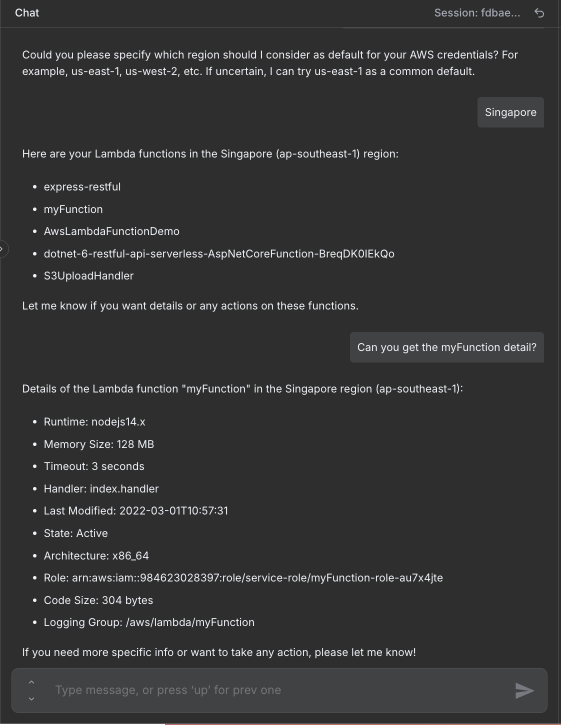"
},
"typeVersion": 1
}
],
"active": false,
"settings": {
"executionOrder": "v1"
},
"versionId": "72f00ce5-d7b4-4369-b869-48b6e73611ba",
"connections": {
"Audit Logs": {
"ai_tool": [
[
{
"node": "AWS Lambda Manager Agent",
"type": "ai_tool",
"index": 0
}
]
]
},
"Simple Memory": {
"ai_memory": [
[
{
"node": "AWS Lambda Manager Agent",
"type": "ai_memory",
"index": 0
}
]
]
},
"Delete a Function": {
"ai_tool": [
[
{
"node": "AWS Lambda Manager Agent",
"type": "ai_tool",
"index": 0
}
]
]
},
"OpenAI Chat Model": {
"ai_languageModel": [
[
{
"node": "AWS Lambda Manager Agent",
"type": "ai_languageModel",
"index": 0
}
]
]
},
"Get Lambda Function": {
"ai_tool": [
[
{
"node": "AWS Lambda Manager Agent",
"type": "ai_tool",
"index": 0
}
]
]
},
"List Lambda Functions": {
"ai_tool": [
[
{
"node": "AWS Lambda Manager Agent",
"type": "ai_tool",
"index": 0
}
]
]
},
"Invoke Lambda Function": {
"ai_tool": [
[
{
"node": "AWS Lambda Manager Agent",
"type": "ai_tool",
"index": 0
}
]
]
},
"AWS Lambda Manager Agent": {
"main": [
[]
]
},
"When chat message received": {
"main": [
[
{
"node": "AWS Lambda Manager Agent",
"type": "main",
"index": 0
}
]
]
}
}
}
Credentials you'll need
Each integration node will prompt for credentials when you import. We strip credential IDs before publishing — you'll add your own.
awsgoogleSheetsOAuth2ApiopenAiApi
For the full experience including quality scoring and batch install features for each workflow upgrade to Pro
About this workflow
> This workflow provides a chat-based AI agent to manage AWS Lambda functions. It allows users to list, invoke, get details, and delete Lambda functions, while automatically recording every action into Google Sheets for audit and compliance tracking. Cloud engineers and…
Source: https://n8n.io/workflows/8623/ — original creator credit. Request a take-down →
Related workflows
Workflows that share integrations, category, or trigger type with this one. All free to copy and import.
Who is this workflow for? This workflow is designed for SEO analysts, content creators, marketing agencies, and developers who need to index a website and then interact with its content as if it were
Biteship Ongkir Chatbot. Uses agent, chatTrigger, lmChatOpenAi, memoryBufferWindow. Chat trigger; 8 nodes.
This workflow transforms WhatsApp into a powerful personal AI using n8n + Green-API. Send text or voice messages — the assistant understands intent and handles daily tasks automatically. 💰 Expense & i
Categories: AI Agents, Design Automation, Business Tools
Enhance your data analysis by connecting an AI Agent to your dataset, using n8n tools.