 Davide Boizza
 This workflow corresponds to n8n.io template #5821 — we link there as the canonical source.
This workflow follows the Agent → Chat Trigger recipe pattern — see all workflows that pair these two integrations.
The workflow JSON
Copy or download the full n8n JSON below. Paste it into a new n8n workflow, add your credentials, activate. Full import guide →
{
"id": "muEszdmquRYSUdM9",
"meta": {
"templateCredsSetupCompleted": true
},
"name": "Pipedream's MCP server",
"tags": [],
"nodes": [
{
"id": "d498ed94-65f4-4560-a186-ba324506f73f",
"name": "When chat message received",
"type": "@n8n/n8n-nodes-langchain.chatTrigger",
"position": [
16,
-64
],
"parameters": {
"options": {}
},
"typeVersion": 1.1
},
{
"id": "866a327c-22a2-4a3a-8993-75ae9e836c71",
"name": "AI Agent",
"type": "@n8n/n8n-nodes-langchain.agent",
"position": [
240,
-64
],
"parameters": {
"options": {
"systemMessage": "You are a helpful assistant"
}
},
"typeVersion": 2.1
},
{
"id": "457b6172-4519-4bf9-aa84-44dbf14befb6",
"name": "OpenAI Chat Model",
"type": "@n8n/n8n-nodes-langchain.lmChatOpenAi",
"position": [
112,
144
],
"parameters": {
"model": {
"__rl": true,
"mode": "list",
"value": "gpt-4.1-mini"
},
"options": {}
},
"credentials": {
"openAiApi": {
"name": "<your credential>"
}
},
"typeVersion": 1.2
},
{
"id": "cd652804-a75c-4efd-b197-92810f94bb5f",
"name": "Calendly",
"type": "@n8n/n8n-nodes-langchain.mcpClientTool",
"position": [
400,
144
],
"parameters": {
"sseEndpoint": "https://mcp.pipedream.net/xxx/calendly_v2"
},
"typeVersion": 1
},
{
"id": "ae996f82-1e34-486a-af82-2fdcfe32c3d9",
"name": "Simple Memory",
"type": "@n8n/n8n-nodes-langchain.memoryBufferWindow",
"position": [
256,
144
],
"parameters": {},
"typeVersion": 1.3
},
{
"id": "4465fc4e-68b0-456d-828a-bff296038a34",
"name": "Gmail",
"type": "@n8n/n8n-nodes-langchain.mcpClientTool",
"position": [
512,
144
],
"parameters": {
"sseEndpoint": "https://mcp.pipedream.net/xxx/gmail"
},
"typeVersion": 1
},
{
"id": "32e919f8-6e73-4aa3-9148-93f920930f3b",
"name": "Sticky Note",
"type": "n8n-nodes-base.stickyNote",
"position": [
-352,
-768
],
"parameters": {
"width": 624,
"height": 656,
"content": "## Pipedream's MCP server\n\nAdd 2,700+ APIs and 10,000+ tools to your AI assistant for free. Connect your accounts securely and revoke access at any time.\n\n\n"
},
"typeVersion": 1
},
{
"id": "79a54171-4f68-418c-8ad2-b30e2ed23fe5",
"name": "Sticky Note1",
"type": "n8n-nodes-base.stickyNote",
"position": [
288,
-768
],
"parameters": {
"width": 624,
"height": 656,
"content": "### How to work\n\n- Sign up on [Pipedream](https://mcp.pipedream.com/)\n- Manage your MCP server and connected accounts\n- Copy and paste your MCP Server URL https://mcp.pipedream.net/xxx/{app_slug} into the MCP SSE Endpoint node in n8n.\n\nExample:\n- https://mcp.pipedream.net/xxx/calendly_v2 for Calendly\n- https://mcp.pipedream.net/xxx/calendly_v2 for Gmail\n\n\n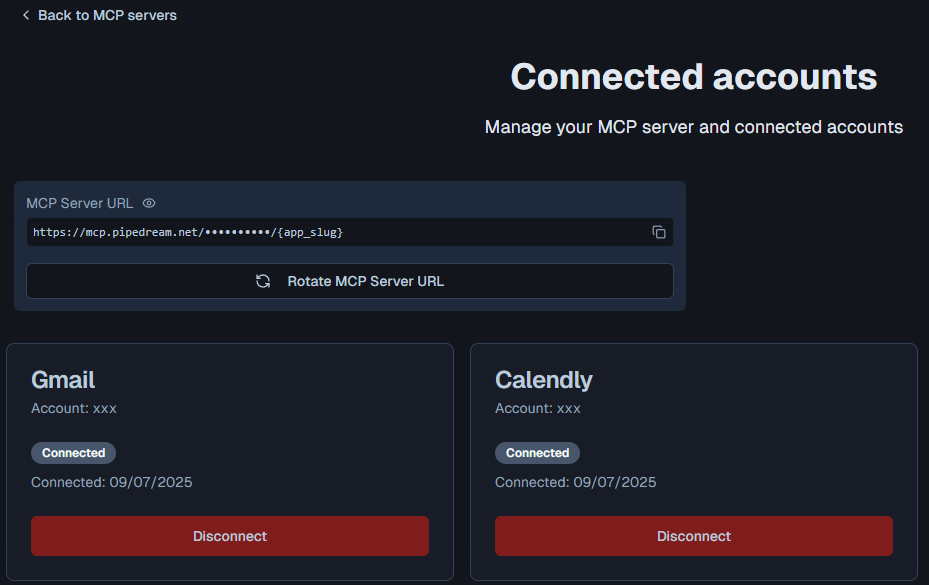"
},
"typeVersion": 1
}
],
"active": false,
"settings": {
"executionOrder": "v1"
},
"versionId": "d75b30d2-ecdf-4ac7-8d4b-72c5961c7a7c",
"connections": {
"Gmail": {
"ai_tool": [
[
{
"node": "AI Agent",
"type": "ai_tool",
"index": 0
}
]
]
},
"Calendly": {
"ai_tool": [
[
{
"node": "AI Agent",
"type": "ai_tool",
"index": 0
}
]
]
},
"Simple Memory": {
"ai_memory": [
[
{
"node": "AI Agent",
"type": "ai_memory",
"index": 0
}
]
]
},
"OpenAI Chat Model": {
"ai_languageModel": [
[
{
"node": "AI Agent",
"type": "ai_languageModel",
"index": 0
}
]
]
},
"When chat message received": {
"main": [
[
{
"node": "AI Agent",
"type": "main",
"index": 0
}
]
]
}
}
}
Credentials you'll need
Each integration node will prompt for credentials when you import. We strip credential IDs before publishing — you'll add your own.
openAiApi
For the full experience including quality scoring and batch install features for each workflow upgrade to Pro
About this workflow
This workflow contains community nodes that are only compatible with the self-hosted version of n8n.
Source: https://n8n.io/workflows/5821/ — original creator credit. Request a take-down →
Related workflows
Workflows that share integrations, category, or trigger type with this one. All free to copy and import.
Description: Turn your WooCommerce store into a conversational AI assistant — create products, place orders, run reports and manage coupons using natural language via n8n + an MCP Server.
This n8n workflow template uses community nodes and is only compatible with the self-hosted version of n8n.
This workflow runs a chat-based OpenAI assistant in n8n that calls three MCP servers for Google Calendar management, Gmail search and draft replies, and utility tools for weather, currency conversion,
This n8n workflow showcases a full-featured AI-powered assistant connected to a Shopify store through a custom MCP (Multi-Channel Commerce Platform) Server toolkit. It empowers users to automate compr
AI Agent MCP for Email & News Research