 Thesys
 This workflow corresponds to n8n.io template #12690 — we link there as the canonical source.
This workflow follows the Agent → Chat Trigger recipe pattern — see all workflows that pair these two integrations.
The workflow JSON
Copy or download the full n8n JSON below. Paste it into a new n8n workflow, add your credentials, activate. Full import guide →
{
"id": "rUPXdgLCG9LbkGa7",
"meta": {
"templateCredsSetupCompleted": true
},
"name": "Shopify Storefront Agent",
"tags": [],
"nodes": [
{
"id": "bfcf9c25-a20c-4906-9651-2f113857e451",
"name": "Simple Memory",
"type": "@n8n/n8n-nodes-langchain.memoryBufferWindow",
"position": [
1328,
2352
],
"parameters": {},
"typeVersion": 1.3
},
{
"id": "468f9791-ff7d-4c2a-87d8-d604aabf9da6",
"name": "Sticky Note5",
"type": "n8n-nodes-base.stickyNote",
"position": [
592,
2304
],
"parameters": {
"width": 480,
"height": 768,
"content": "### Step 1: Setup Thesys\n\n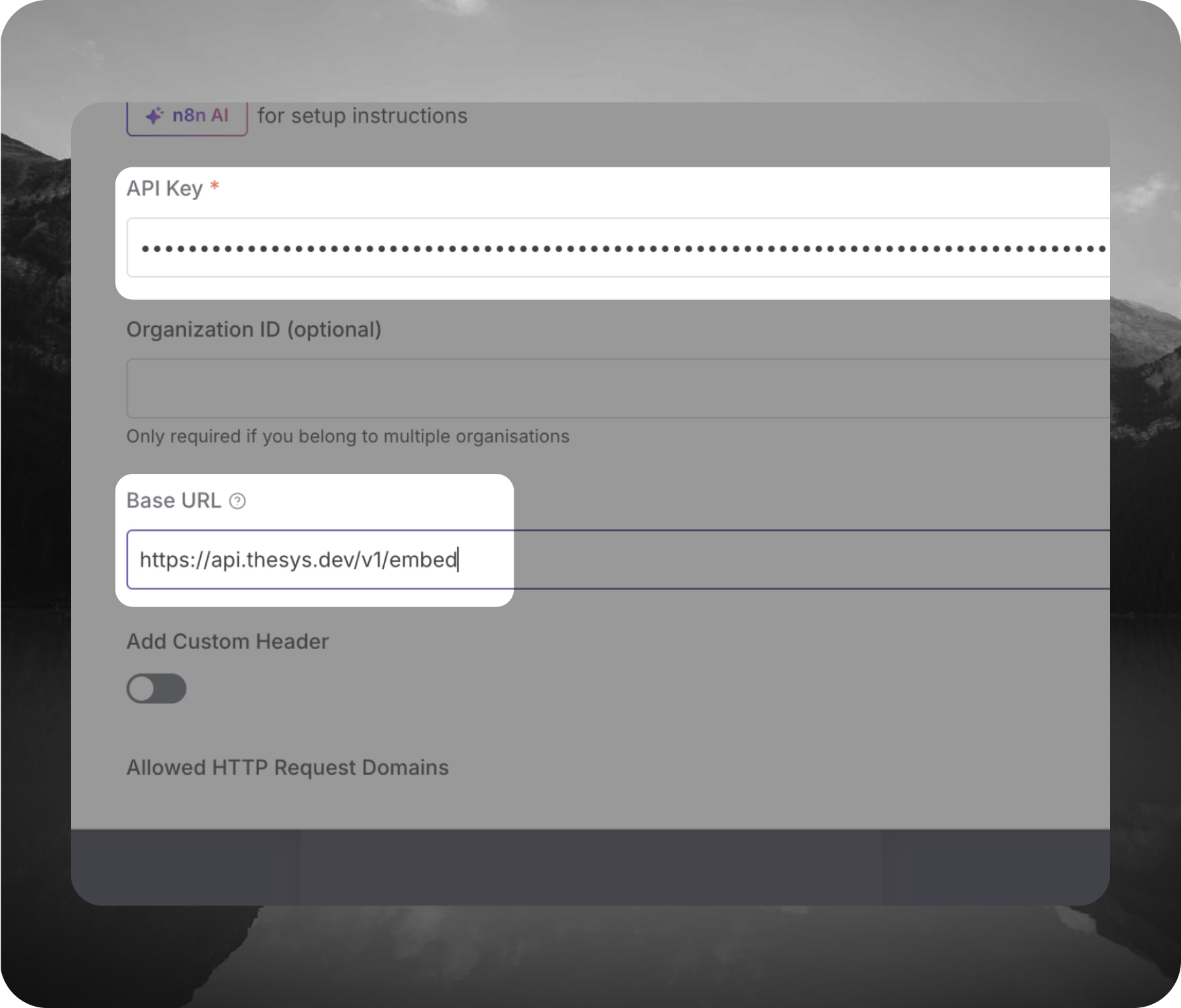\n\n1. [Go to Thesys Console and log in](https://console.thesys.dev/keys)\n\n2. Generate a new API key and copy it somewhere safe.\n\n3. In the Credentials section, click Create New to add a new credential.\n\n4. Update the Base URL to - https://api.thesys.dev/v1/embed and save the credential.\n\n5. Back in the Model section of the node, select the model you want to use\n(for example: c1/openai/gpt-5/v20251230) and save the node."
},
"typeVersion": 1
},
{
"id": "66924446-f0d0-405f-b406-6368aa9732fe",
"name": "Sticky Note1",
"type": "n8n-nodes-base.stickyNote",
"position": [
1648,
1312
],
"parameters": {
"width": 1136,
"height": 656,
"content": "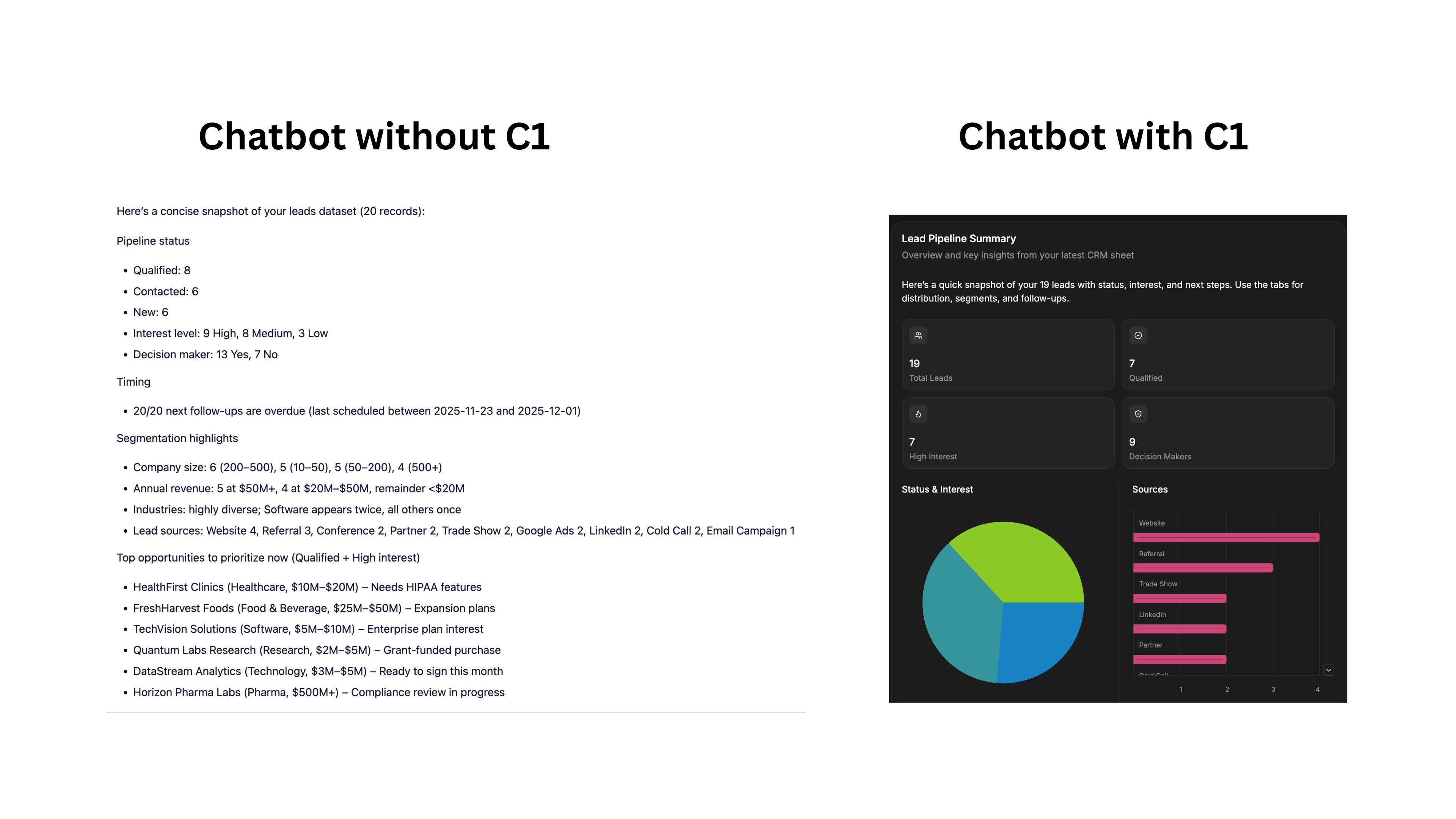"
},
"typeVersion": 1
},
{
"id": "f4eba13d-b4cc-479c-80ca-90a8c2b39a8f",
"name": "Sticky Note2",
"type": "n8n-nodes-base.stickyNote",
"position": [
688,
176
],
"parameters": {
"width": 928,
"height": 1792,
"content": "\n## Build your own Shopify Store Agent with Shopify MCP and C1 by Thesys\n\nThis n8n template can setup a embeddable web chat widget for your Shopify store.\n\n### [Check out a working demo of this template here](https://www.thesys.dev/n8n?url=https%3A%2F%2Fasd2224.app.n8n.cloud%2Fwebhook%2F814526b2-6ee5-498a-a2a7-472b0827c139%2Fchat).\n\n### What this workflow does\n1. A user sends a message in the **n8n Chat** UI (public chat trigger).\n2. The **AI Agent** interprets the request.\n3. The agent calls **CoinGecko Free MCP** to fetch market data (prices, coins, trending, etc.).\n4. The model responds through **C1 by Thesys** with a **streaming, UI** answer.\n\n### Example prompts you can try right away\nCopy/paste any of these into the chat:\n\n- \u201cWhat are the products in the catalog?\u201d\n- \"Purchase white shirt\"\n- \"Checkout my cart\"\n\n### How it works\n\n1. User sends a prompt\n2. C1 model based on prompt will use Shopify MCP to fetch live catalog\n3. C1 Model generates a UI Schema Response\n4. Schema is rendered as UI using Thesys GenUI SDK on the frontend\n\n\n### Setup \n\nMake sure you have the following:\n\n#### 1. Thesys API Key\nYou\u2019ll need an API key to authenticate and use Thesys services.\n\nGet your key [here](https://console.thesys.dev/keys) \n\n#### 2. Shopify MCP URL\nYou\u2019ll need the URL of your Shopify Storefront MCP to access the catalog.\n\nFor more information, please refer to the [Shopify MCP Docs](https://shopify.dev/docs/apps/build/storefront-mcp/servers/storefront).\n\n\n### What is C1 by Thesys?\nC1 by [Thesys](https://www.thesys.dev/) is an API middleware that augments LLMs to respond with **interactive UI (charts, buttons, forms)** in real time instead of text.\n\n### Video Tutorial\n\n@[youtube](0rtdVfjKJ-M)\n\n### Facing setup issues?\n#### If you get stuck or have questions:\n\n- #### \ud83d\udcac Join the [Thesys Community](https://discord.com/invite/Pbv5PsqUSv) \n- #### \ud83d\udce7 Email support: support@thesys.dev\n"
},
"typeVersion": 1
},
{
"id": "95b4acfb-17e0-43c7-90ff-3c8344cfc618",
"name": "Sticky Note8",
"type": "n8n-nodes-base.stickyNote",
"position": [
1728,
2032
],
"parameters": {
"color": 5,
"width": 448,
"height": 288,
"content": "\n### Step 3: Activate the Workflow\n\n1. At the top of the n8n editor, click the Active / Inactive toggle.\n\n2. Make the chat publicly available and copy the link\n\n\n### Step 4: Try It Out\n\n1. Open [Thesys N8N page](https://www.thesys.dev/n8n)\n\n2. Paste your Chat URL into the input box."
},
"typeVersion": 1
},
{
"id": "ec0bd1d2-2400-424c-bb9c-6860485e574d",
"name": "UI Agent",
"type": "@n8n/n8n-nodes-langchain.agent",
"position": [
1264,
2128
],
"parameters": {
"options": {
"systemMessage": "You are a Shopify Store Assistant. Use the MCP to aid user in their shopping experience.",
"enableStreaming": true
}
},
"typeVersion": 3
},
{
"id": "1f1ac3af-2969-4940-b60d-013101027851",
"name": "C1 Model",
"type": "@n8n/n8n-nodes-langchain.lmChatOpenAi",
"notes": "ZZZ",
"position": [
1200,
2352
],
"parameters": {
"model": {
"__rl": true,
"mode": "list",
"value": "c1/openai/gpt-5/v-20250930",
"cachedResultName": "c1/openai/gpt-5/v-20250930"
},
"options": {},
"responsesApiEnabled": false
},
"credentials": {
"openAiApi": {
"name": "<your credential>"
}
},
"notesInFlow": false,
"typeVersion": 1.3
},
{
"id": "729cbf80-cb4f-49d3-beeb-72a0cae22fc4",
"name": "Sticky Note",
"type": "n8n-nodes-base.stickyNote",
"position": [
1104,
2016
],
"parameters": {
"color": 7,
"width": 528,
"height": 480,
"content": "## UI Agent\nThis agent can reason, use tools and returns results as interactive UI"
},
"typeVersion": 1
},
{
"id": "70be9b35-4f76-4812-b8cd-2408ec3775d1",
"name": "When chat message received",
"type": "@n8n/n8n-nodes-langchain.chatTrigger",
"position": [
976,
2128
],
"parameters": {
"public": true,
"options": {
"responseMode": "streaming"
}
},
"typeVersion": 1.4
},
{
"id": "01138e5a-c9c4-4a1c-b55b-067e02564364",
"name": "Shopify Storefront MCP",
"type": "@n8n/n8n-nodes-langchain.mcpClientTool",
"position": [
1456,
2352
],
"parameters": {
"options": {}
},
"typeVersion": 1.2
},
{
"id": "e0c39be7-c9f8-4c22-af58-0d9f312aa265",
"name": "Sticky Note3",
"type": "n8n-nodes-base.stickyNote",
"position": [
1440,
2512
],
"parameters": {
"width": 336,
"content": "### Step 2: Add your Shopify MCP URL\n\nMCP URL = https://<STOREFRONT_URL>/api/mcp\n\nFor more information, refer [Shopify Docs](https://shopify.dev/docs/apps/build/storefront-mcp/servers/storefront)"
},
"typeVersion": 1
}
],
"active": true,
"settings": {
"executionOrder": "v1"
},
"versionId": "112549ef-9d4b-4eaf-8c81-a9f407667e29",
"connections": {
"C1 Model": {
"ai_languageModel": [
[
{
"node": "UI Agent",
"type": "ai_languageModel",
"index": 0
}
]
]
},
"Simple Memory": {
"ai_memory": [
[
{
"node": "UI Agent",
"type": "ai_memory",
"index": 0
}
]
]
},
"Shopify Storefront MCP": {
"ai_tool": [
[
{
"node": "UI Agent",
"type": "ai_tool",
"index": 0
}
]
]
},
"When chat message received": {
"main": [
[
{
"node": "UI Agent",
"type": "main",
"index": 0
}
]
]
}
}
}
Credentials you'll need
Each integration node will prompt for credentials when you import. We strip credential IDs before publishing — you'll add your own.
openAiApi
For the full experience including quality scoring and batch install features for each workflow upgrade to Pro
About this workflow
This n8n template can setup a embeddable web chat widget for your Shopify store. A user sends a message in the n8n Chat UI (public chat trigger). The AI Agent interprets the request. The agent calls CoinGecko Free MCP to fetch market data (prices, coins, trending, etc.). The…
Source: https://n8n.io/workflows/12690/ — original creator credit. Request a take-down →
Related workflows
Workflows that share integrations, category, or trigger type with this one. All free to copy and import.
Description: Turn your WooCommerce store into a conversational AI assistant — create products, place orders, run reports and manage coupons using natural language via n8n + an MCP Server.
This n8n workflow template uses community nodes and is only compatible with the self-hosted version of n8n.
This workflow runs a chat-based OpenAI assistant in n8n that calls three MCP servers for Google Calendar management, Gmail search and draft replies, and utility tools for weather, currency conversion,
This n8n workflow showcases a full-featured AI-powered assistant connected to a Shopify store through a custom MCP (Multi-Channel Commerce Platform) Server toolkit. It empowers users to automate compr
AI Agent MCP for Email & News Research