 InfraNodus
 This workflow corresponds to n8n.io template #11571 — we link there as the canonical source.
This workflow follows the Agent → HTTP Request Tool recipe pattern — see all workflows that pair these two integrations.
The workflow JSON
Copy or download the full n8n JSON below. Paste it into a new n8n workflow, add your credentials, activate. Full import guide →
{
"id": "xhLyJ4EWBt2ljawr",
"meta": {
"templateCredsSetupCompleted": true
},
"name": "AI Chat Agent for Zendesk Knowledge Base",
"tags": [
{
"id": "66wgFoDi9Xjl74M3",
"name": "Support",
"createdAt": "2025-05-21T17:06:32.355Z",
"updatedAt": "2025-05-21T17:06:32.355Z"
},
{
"id": "6RL6WutxFvThSY35",
"name": "GraphRAG",
"createdAt": "2025-12-06T21:44:48.353Z",
"updatedAt": "2025-12-06T21:44:48.353Z"
},
{
"id": "Hd23erjIskV5mwPl",
"name": "Sales",
"createdAt": "2025-06-05T12:03:26.567Z",
"updatedAt": "2025-06-05T12:03:26.567Z"
},
{
"id": "sJk9cUvmMU8FkJXv",
"name": "AI",
"createdAt": "2025-05-20T13:16:15.636Z",
"updatedAt": "2025-05-20T13:16:15.636Z"
}
],
"nodes": [
{
"id": "8d02d55d-8a04-4cf2-86d2-78d10be04e1a",
"name": "OpenAI Chat Model",
"type": "@n8n/n8n-nodes-langchain.lmChatOpenAi",
"position": [
-256,
368
],
"parameters": {
"model": {
"__rl": true,
"mode": "list",
"value": "gpt-4.1-mini"
},
"options": {}
},
"credentials": {
"openAiApi": {
"name": "<your credential>"
}
},
"typeVersion": 1.2
},
{
"id": "b63808c3-68f9-4aac-bbf6-77d2f9f3d4a8",
"name": "Simple Memory",
"type": "@n8n/n8n-nodes-langchain.memoryBufferWindow",
"position": [
0,
368
],
"parameters": {
"sessionKey": "={{ $('Webhook').item.json.query.sessionId }}",
"sessionIdType": "customKey"
},
"typeVersion": 1.3
},
{
"id": "83aa623c-79c0-4f02-8210-45bb9db62a7b",
"name": "Webhook",
"type": "n8n-nodes-base.webhook",
"position": [
-400,
0
],
"parameters": {
"path": "486b2675-a4d1-4050-ad3a-7d92a57c084b",
"options": {
"allowedOrigins": "*"
},
"responseMode": "responseNode"
},
"typeVersion": 2.1
},
{
"id": "0af57fa9-36e7-4bf0-ba64-2f2c4ad12af6",
"name": "Respond to Webhook",
"type": "n8n-nodes-base.respondToWebhook",
"position": [
560,
0
],
"parameters": {
"options": {}
},
"typeVersion": 1.4
},
{
"id": "4c5b0e77-bbc2-4e9f-af6c-7231296d42c0",
"name": "Support Agent",
"type": "@n8n/n8n-nodes-langchain.agent",
"position": [
48,
0
],
"parameters": {
"text": "={{ $json.query.message }}",
"options": {
"systemMessage": "If ran for the first time with no memory access, always run the GraphRAG service to extract information about the context of the InfraNodus support portal (graphSummary).\n\nThen use this knowledge to generate an enhanced search query based on the original user request for InfraNodus support portal that would help extract the correct responses, extract the answers. \n\nOnly after GraphRAG is ran and you can augment the search query, only then send this search query to search in the Zendesk articles using the Zendesk tool. \n\nThen Provide a concise response that directly addresses the original user's query using both the information you got from GraphRAG and from the Zendesk search tool.\n\nProvide references to the support articles you used to get the response in the markdown format."
},
"promptType": "define"
},
"typeVersion": 2.2
},
{
"id": "fc257500-e2f5-4185-8ffb-2d40223a3e94",
"name": "Get a response from knowledge base in InfraNodus Graph RAG",
"type": "n8n-nodes-infranodus.infranodusTool",
"position": [
320,
352
],
"parameters": {
"name": "infranodus_support",
"prompt": "={{ /*n8n-auto-generated-fromAI-override*/ $fromAI('Prompt', ``, 'string') }}",
"requestOptions": {}
},
"credentials": {
"infranodusApi": {
"name": "<your credential>"
}
},
"typeVersion": 1
},
{
"id": "28d7576b-5c5d-4cb5-b948-c73d0007a62a",
"name": "Zendek Search",
"type": "n8n-nodes-base.httpRequestTool",
"position": [
608,
352
],
"parameters": {
"url": "https://noduslabs.zendesk.com/api/v2/help_center/articles/search",
"options": {},
"sendQuery": true,
"authentication": "predefinedCredentialType",
"queryParameters": {
"parameters": [
{
"name": "query",
"value": "={{ /*n8n-auto-generated-fromAI-override*/ $fromAI('parameters0_Value', ``, 'string') }}"
},
{
"name": "per_page",
"value": "5"
}
]
},
"toolDescription": "Search through the Zendesk articles using a simplified search phrase as a query parameter",
"nodeCredentialType": "zendeskApi"
},
"credentials": {
"zendeskApi": {
"name": "<your credential>"
}
},
"typeVersion": 4.2
},
{
"id": "cb70ea7b-c33b-4d75-9a98-74186888761f",
"name": "Sticky Note2",
"type": "n8n-nodes-base.stickyNote",
"position": [
-336,
304
],
"parameters": {
"width": 224,
"height": 400,
"content": "\n\n\n\n\n\n\n\n\n\n\n\n\n\n\n\n## 3. LLM Model to Use\n\nConnect it to your favorite LLM and set up API authentication for it."
},
"typeVersion": 1
},
{
"id": "5fde6330-ef1e-4fd1-9fb0-2bcf07edd5f5",
"name": "Sticky Note3",
"type": "n8n-nodes-base.stickyNote",
"position": [
-64,
304
],
"parameters": {
"width": 224,
"height": 400,
"content": "\n\n\n\n\n\n\n\n\n\n\n\n\n\n\n\n## 4. Chat Memory Node\n\nThis maintains the context of the conversation."
},
"typeVersion": 1
},
{
"id": "ff3cf0db-cdd6-4ce4-809b-779fda516619",
"name": "Sticky Note4",
"type": "n8n-nodes-base.stickyNote",
"position": [
240,
304
],
"parameters": {
"width": 224,
"height": 400,
"content": "\n\n\n\n\n\n\n\n\n\n\n\n\n\n\n\n## 5. Expert Ontology\n\nUses [InfraNodus GraphRAG node](https://n8n.io/integrations/infranodus-graph-rag/) to extract a relevant response on a query based on prebuilt "
},
"typeVersion": 1
},
{
"id": "39f8c616-d947-47e7-8ccc-444566a51326",
"name": "Sticky Note5",
"type": "n8n-nodes-base.stickyNote",
"position": [
528,
304
],
"parameters": {
"width": 320,
"height": 560,
"content": "\n\n\n\n\n\n\n\n\n\n\n\n\n\n\n\n## 5. Zendesk Knowledge Search\n\nUses [Zendesk search API](https://developer.zendesk.com/api-reference/help_center/help-center-api/search/) to find relevant articles based on the search query augmented using the InfraNodus expert ontology data (5). \n\nGet the Zendesk API key at your support portal Admin > Apps & Integrations > API Tokens. Usually it's located at [https://noduslabs.zendesk.com/admin/apps-integrations/apis/api-tokens](https://noduslabs.zendesk.com/admin/apps-integrations/apis/api-tokens) where instead of `noduslabs` you need to put the name of your support portal."
},
"typeVersion": 1
},
{
"id": "fcb0cfc2-b600-4405-8f4f-5f3668263d4a",
"name": "Sticky Note6",
"type": "n8n-nodes-base.stickyNote",
"position": [
496,
-288
],
"parameters": {
"width": 448,
"height": 464,
"content": "## 6. Send Response Back to the User\n\nSends the final response, based on the InfraNodus ontology expert graph and on the search results from Zendesk support portal back to the user.\n\n### The message is sent to the webhook, which is then picked up by the [n8n Chat Widget](https://n8n-chat-widget.com) embedded on your website."
},
"typeVersion": 1
},
{
"id": "f4b8bc81-d0d3-4f13-97e9-c5a331ad8f5a",
"name": "Sticky Note1",
"type": "n8n-nodes-base.stickyNote",
"position": [
-32,
-288
],
"parameters": {
"width": 448,
"height": 464,
"content": "## 2. Add AI Agent Node\n\n\ud83d\udea8 Edit the prompt here to be more suitable for your content, but keep the structure \u2014 it works pretty well!\n\nThis AI agent is instructed to: \n1) Consult the [InfraNodus GraphRAG](https://infranodus.com/docs/graph-rag-knowledge-graph) node to retrieve an authoritative response to the user's query.\n2) Then rewrite user's query with that context obtained to get the most relevant results from the Zendesk support portal\n3) Then synthesize these responses and deliver them to the user."
},
"typeVersion": 1
},
{
"id": "c16c5868-21e1-4568-ab6f-c9db94fe4e4f",
"name": "Sticky Note",
"type": "n8n-nodes-base.stickyNote",
"position": [
-480,
-288
],
"parameters": {
"width": 304,
"height": 464,
"content": "## 1. Create Webhook\nThis will activate your workflow every time a user message arrives to the URL provided.\n\n### You can connect it to the [n8n Chat Widget](https://n8n-chat-widget.com) to trigger it via a popup chat that you can embed to your support portal."
},
"typeVersion": 1
},
{
"id": "ac975b0d-a015-4339-9782-00a954b837db",
"name": "Sticky Note7",
"type": "n8n-nodes-base.stickyNote",
"position": [
-144,
736
],
"parameters": {
"color": 6,
"width": 608,
"height": 416,
"content": "### The Ontology is an [InfraNodus](https://infranodus.com) Graph Used to Help Model Rewrite Prompt and Extract Better Results from Zendesk:\n\n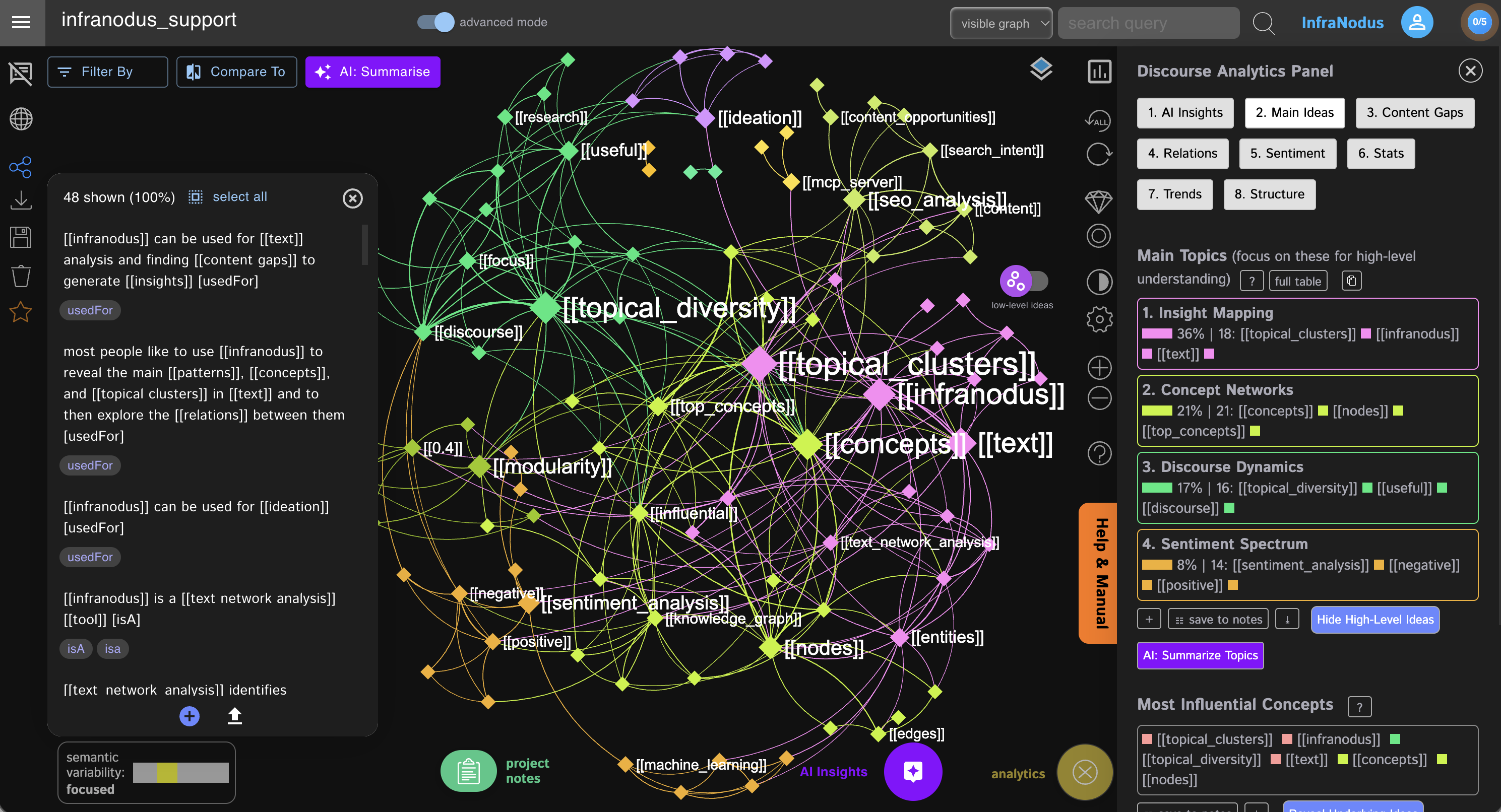"
},
"typeVersion": 1
},
{
"id": "9afdf945-4745-47f1-b456-2a0c4e551d98",
"name": "Sticky Note8",
"type": "n8n-nodes-base.stickyNote",
"position": [
-1152,
-288
],
"parameters": {
"color": 6,
"width": 624,
"height": 1456,
"content": "# n8n Zendesk Support AI Chat Agent\n\n## Add a widget to your Zendesk support portal or any website that uses n8n and [InfraNodus](https://infranodus.com) expert ontology to provide high-quality GraphRAG powered responses to your users.\n\n### This widget can be embedded on any website using the [n8n Chat Widget](https://n8n-chat-widget.com) generator. Here's an example from our own support portal: [support.noduslabs.com](https://support.noduslabs.com)\n\n## Video Tutorial:\n\n[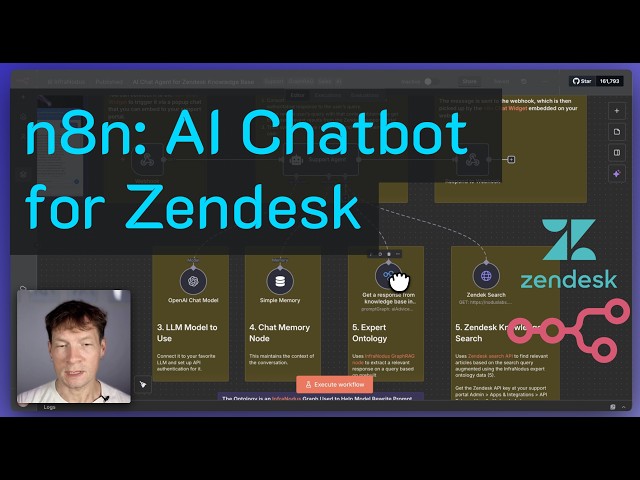](https://www.youtube.com/watch?v=aYoPSEmGJbc)\n\n## Integration Example:\n\n[](https://support.noduslabs.com/hc/en-us)\n\n\n"
},
"typeVersion": 1
}
],
"active": true,
"settings": {
"executionOrder": "v1"
},
"versionId": "c7a6db8a-2730-48fc-afb4-53908c2a769b",
"connections": {
"Webhook": {
"main": [
[
{
"node": "Support Agent",
"type": "main",
"index": 0
}
]
]
},
"Simple Memory": {
"ai_memory": [
[
{
"node": "Support Agent",
"type": "ai_memory",
"index": 0
}
]
]
},
"Support Agent": {
"main": [
[
{
"node": "Respond to Webhook",
"type": "main",
"index": 0
}
]
]
},
"Zendek Search": {
"ai_tool": [
[
{
"node": "Support Agent",
"type": "ai_tool",
"index": 0
}
]
]
},
"OpenAI Chat Model": {
"ai_languageModel": [
[
{
"node": "Support Agent",
"type": "ai_languageModel",
"index": 0
}
]
]
},
"Get a response from knowledge base in InfraNodus Graph RAG": {
"ai_tool": [
[
{
"node": "Support Agent",
"type": "ai_tool",
"index": 0
}
]
]
}
}
}
Credentials you'll need
Each integration node will prompt for credentials when you import. We strip credential IDs before publishing — you'll add your own.
infranodusApiopenAiApizendeskApi
For the full experience including quality scoring and batch install features for each workflow upgrade to Pro
About this workflow
See example at support.noduslabs.com or a screenshot below:
Source: https://n8n.io/workflows/11571/ — original creator credit. Request a take-down →
Related workflows
Workflows that share integrations, category, or trigger type with this one. All free to copy and import.
AI Customer Service Automation - Portfolio. Uses googleSheets, httpRequest, agent, memoryBufferWindow. Webhook trigger; 91 nodes.
This workflow automates enterprise resource planning (ERP) operations across Engineering, Finance, HR, and Admin departments for operations managers, ERP administrators, and business process owners wh
This workflow transforms WhatsApp into a powerful personal AI using n8n + Green-API. Send text or voice messages — the assistant understands intent and handles daily tasks automatically. 💰 Expense & i
This workflow automates enterprise compliance governance using a multi-agent AI architecture. It targets compliance officers, legal teams, and risk managers who need continuous, jurisdiction-aware mon
This workflow automates credit operations onboarding by running KYC verification, credit bureau checks, identity validation, and sanctions screening through a single AI-powered agent. Built for credit