 Jimleuk
 This workflow corresponds to n8n.io template #4815 — we link there as the canonical source.
This workflow follows the Google Drive → HTTP Request recipe pattern — see all workflows that pair these two integrations.
The workflow JSON
Copy or download the full n8n JSON below. Paste it into a new n8n workflow, add your credentials, activate. Full import guide →
{
"meta": {
"templateCredsSetupCompleted": true
},
"nodes": [
{
"id": "b6a5c37d-b845-4fd2-8ea3-db23aed99286",
"name": "When clicking \u2018Execute workflow\u2019",
"type": "n8n-nodes-base.manualTrigger",
"position": [
-80,
320
],
"parameters": {},
"typeVersion": 1
},
{
"id": "1f363fc5-42cf-4e9c-ae74-496030362ed9",
"name": "Sample Images",
"type": "n8n-nodes-base.set",
"position": [
120,
320
],
"parameters": {
"options": {},
"assignments": {
"assignments": [
{
"id": "7196d08d-dff6-48e4-a06d-0ec863a4dff3",
"name": "url",
"type": "array",
"value": "={{\n[\n \"https://res.cloudinary.com/daglih2g8/image/upload/f_auto,q_auto/v1/n8n-workflows/l8b3j1sf6ejx73z0awsh\",\n \"https://res.cloudinary.com/daglih2g8/image/upload/f_auto,q_auto/v1/n8n-workflows/htrjbmiozdrvxwdsreyt\",\n \"https://res.cloudinary.com/daglih2g8/image/upload/f_auto,q_auto/v1/n8n-workflows/ykftgxpozp2pr4sxpuoy\"\n]\n}}"
}
]
}
},
"typeVersion": 3.4
},
{
"id": "e078aba0-2f2b-47b5-90b2-c457184e6237",
"name": "Split Out",
"type": "n8n-nodes-base.splitOut",
"position": [
320,
320
],
"parameters": {
"options": {},
"fieldToSplitOut": "url"
},
"typeVersion": 1
},
{
"id": "a0fbf72b-d079-4777-be06-531e0e131857",
"name": "Download Image",
"type": "n8n-nodes-base.httpRequest",
"position": [
520,
320
],
"parameters": {
"url": "={{ $json.url }}",
"options": {}
},
"typeVersion": 4.2
},
{
"id": "77f0d0c7-e6bd-4f15-beff-9cb53446fcb0",
"name": "Gemini Image Restoration",
"type": "n8n-nodes-base.httpRequest",
"position": [
1100,
320
],
"parameters": {
"url": "https://generativelanguage.googleapis.com/v1beta/models/gemini-2.0-flash-preview-image-generation:generateContent",
"method": "POST",
"options": {},
"jsonBody": "={\n \"contents\": [\n {\n \"parts\": [\n {\n \"text\": \"You are an vintage image restoration agent. Restore the given image by removing cracks and tears and fill in missing sections of the image. Retain the dimensions, colors and camera film type of the original image.\"\n },\n {\n \"inline_data\": {\n \"mime_type\": \"{{ $('Download Image').item.binary.data.mimeType }}\",\n \"data\": \"{{ $json.data }}\"\n }\n }\n ]\n }\n ],\n \"generationConfig\": {\n \"responseModalities\": [\n \"TEXT\",\n \"IMAGE\"\n ]\n }\n}",
"sendBody": true,
"specifyBody": "json",
"authentication": "predefinedCredentialType",
"nodeCredentialType": "googlePalmApi"
},
"credentials": {
"googlePalmApi": {
"name": "<your credential>"
}
},
"typeVersion": 4.2
},
{
"id": "6aebcc29-a65d-4cb9-8d6a-56f24b58c7f5",
"name": "Extract from File",
"type": "n8n-nodes-base.extractFromFile",
"position": [
720,
320
],
"parameters": {
"options": {},
"operation": "binaryToPropery"
},
"typeVersion": 1
},
{
"id": "1c50d319-1771-408f-9015-f04bb6a3d305",
"name": "Get Image Contents",
"type": "n8n-nodes-base.set",
"position": [
1340,
320
],
"parameters": {
"options": {},
"assignments": {
"assignments": [
{
"id": "021aad70-de11-4387-844e-7e7dfd3b1044",
"name": "image",
"type": "string",
"value": "={{ $json.candidates[0].content.parts.find(part => part.inlineData).inlineData.data }}"
},
{
"id": "62877ef7-2057-4d35-a44b-1d58fa1f1769",
"name": "mimeType",
"type": "string",
"value": "={{ $json.candidates[0].content.parts.find(part => part.inlineData).inlineData.mimeType }}"
}
]
}
},
"typeVersion": 3.4
},
{
"id": "c19074f0-45a1-42bd-b25f-966f26ef5ef5",
"name": "Sticky Note",
"type": "n8n-nodes-base.stickyNote",
"position": [
2220,
-200
],
"parameters": {
"width": 700,
"height": 320,
"content": "|Original|Restored|\n|-|-|\n|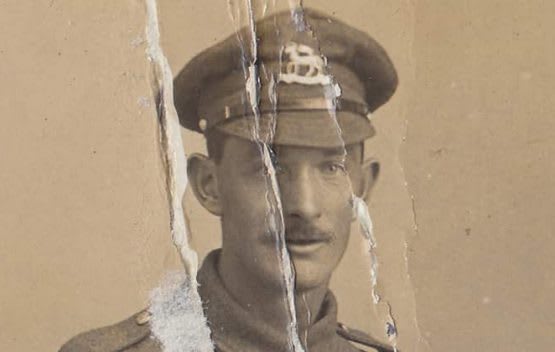|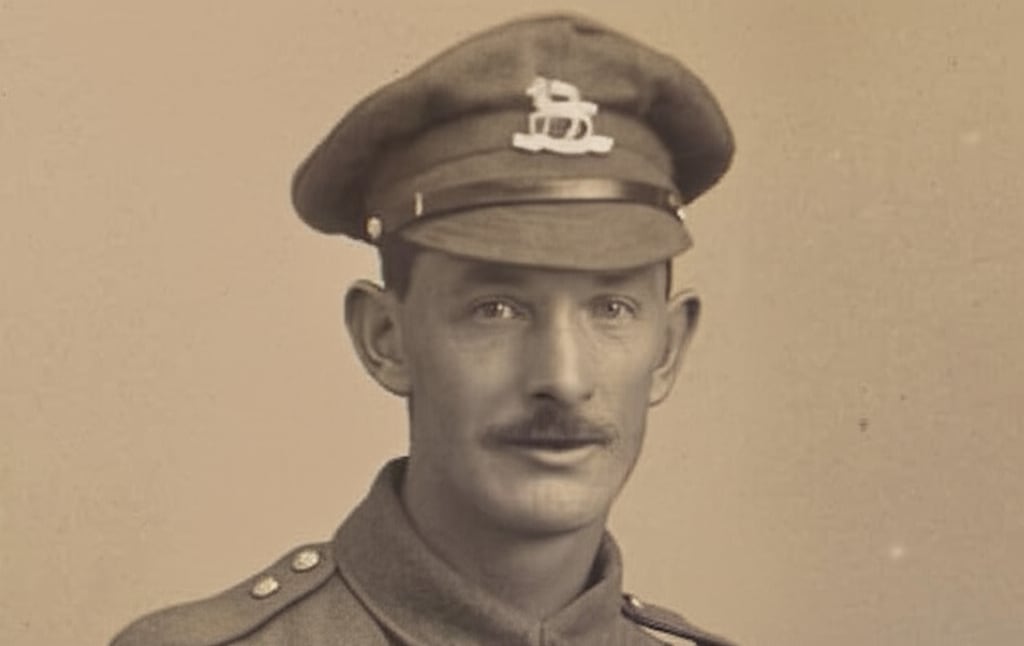|"
},
"typeVersion": 1
},
{
"id": "82e82d53-e5ff-44a2-96ca-1867058fbb65",
"name": "Sticky Note1",
"type": "n8n-nodes-base.stickyNote",
"position": [
-140,
80
],
"parameters": {
"color": 7,
"width": 1060,
"height": 460,
"content": "## 1. Download Sample Images\n[Read more about the HTTP Request node](https://docs.n8n.io/integrations/builtin/core-nodes/n8n-nodes-base.httprequest/)\n\nFor this demonstration, we'll download 3 sample vintage photographs. These images show a variety of damage such as cracks, tears and missing or obscured sections and it will be the goal of this workflow to automate the restoration.\n\nInstead of a manual trigger, use a webhook trigger instead to integrate it into apps!"
},
"typeVersion": 1
},
{
"id": "eb1f70d5-2d3f-4f22-badb-d49569f565c2",
"name": "Upload to Drive",
"type": "n8n-nodes-base.googleDrive",
"position": [
1960,
320
],
"parameters": {
"name": "=file_restored_{{ $itemIndex }}.{{ $binary.data.fileExtension }}",
"driveId": {
"__rl": true,
"mode": "list",
"value": "My Drive"
},
"options": {},
"folderId": {
"__rl": true,
"mode": "list",
"value": "root",
"cachedResultName": "/ (Root folder)"
}
},
"credentials": {
"googleDriveOAuth2Api": {
"name": "<your credential>"
}
},
"typeVersion": 3
},
{
"id": "4f980d9d-a993-4ec6-80fd-1a323e40822d",
"name": "Sticky Note2",
"type": "n8n-nodes-base.stickyNote",
"position": [
960,
80
],
"parameters": {
"color": 7,
"width": 620,
"height": 460,
"content": "## 2. Use Gemini LLM to Restore Damaged Images\n[Read more about Gemini's Text and Image to Image Editing](https://ai.google.dev/gemini-api/docs/image-generation#gemini-image-editing)\n\nText-and-image-to-image capability enables LLMs to become instant replacements for a lot of image and photo editing applications. Here, we can use Gemini's new Image Generation model to restore vintage photos by removing damage and filling in missing sections."
},
"typeVersion": 1
},
{
"id": "69f7f355-5443-4265-b2a1-901711fa93dd",
"name": "Convert to File",
"type": "n8n-nodes-base.convertToFile",
"onError": "continueRegularOutput",
"position": [
1720,
320
],
"parameters": {
"options": {
"mimeType": "={{ $json.mimeType }}"
},
"operation": "toBinary",
"sourceProperty": "image"
},
"typeVersion": 1.1
},
{
"id": "beae9111-8186-4afd-9fa6-c732f0229854",
"name": "Sticky Note3",
"type": "n8n-nodes-base.stickyNote",
"position": [
1620,
80
],
"parameters": {
"color": 7,
"width": 560,
"height": 460,
"content": "## 3. Upload to Google Drive\n[Read more about Google Drive node](https://docs.n8n.io/integrations/builtin/app-nodes/n8n-nodes-base.googledrive)\n\nGemini outputs the image data as a base64 string so conversion to binary is sometimes necessary such as when uploading to Google Drive. We're using Google drive here but you can upload to any destination of your choosing."
},
"typeVersion": 1
},
{
"id": "00aaa458-1c49-4adf-87d6-ea70309107f9",
"name": "Sticky Note4",
"type": "n8n-nodes-base.stickyNote",
"position": [
-640,
-380
],
"parameters": {
"width": 460,
"height": 920,
"content": "## Try It Out!\n### This n8n template demonstrates how to build a simple but effective vintage image restoration service using an AI model with image editing capabilities.\n\nWith Gemini now capable of multimodal output, it's a great time to explore this capability for image or graphics automation. Let's see how well it does for a task such as image restoration.\n\n**Please note, at time of writing each image generated will cost $0.039 USD**. See Gemini Pricing for updated info.\n\n### How it works\n* Images are imported into our workflow via the HTTP node and converted to base64 strings using the Extract from file node.\n* The image data is then pipelined to Gemini's Image Generation model. A prompt is provided to instruct Gemini to \"restore\" the image to near new condition - of course, feel free to experiment with this prompt to improve the results!\n* Gemini's responds with the image as a base64 string and hence, a convert to file node is used to transform the data to binary.\n* With the restored image as a binary, we can then use this with our Google Drive node to upload it to our desired folder.\n\n### How to use\n* This demonstration uses 3 random images sourced from the internet but any typical image file will work.\n* Use a webhook node to allow integration from other applications.\n* Use a telegram trigger for instant mobile service!\n\n### Requirements\n* Google Gemini for LLM/Image generation\n* Google Drive for Upload Storage\n\n### Need Help?\nJoin the [Discord](https://discord.com/invite/XPKeKXeB7d) or ask in the [Forum](https://community.n8n.io/)!\n\nHappy Hacking!"
},
"typeVersion": 1
},
{
"id": "4e4b822b-983b-48d2-a319-68242b7af171",
"name": "Sticky Note8",
"type": "n8n-nodes-base.stickyNote",
"position": [
-640,
580
],
"parameters": {
"color": 5,
"width": 460,
"height": 140,
"content": "### Geo Restrictions!\nPlease note at time of writing, the Gemini Image Generation model is restricted to certain countries and regions. If you're getting model not found errors, it's possible the model may not be available in your country!"
},
"typeVersion": 1
},
{
"id": "24d74843-d9b5-4302-8136-159e0a7dd492",
"name": "Sticky Note5",
"type": "n8n-nodes-base.stickyNote",
"position": [
2220,
140
],
"parameters": {
"width": 400,
"height": 440,
"content": "|Original|Restored|\n|-|-|\n|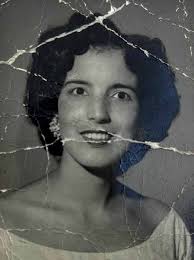|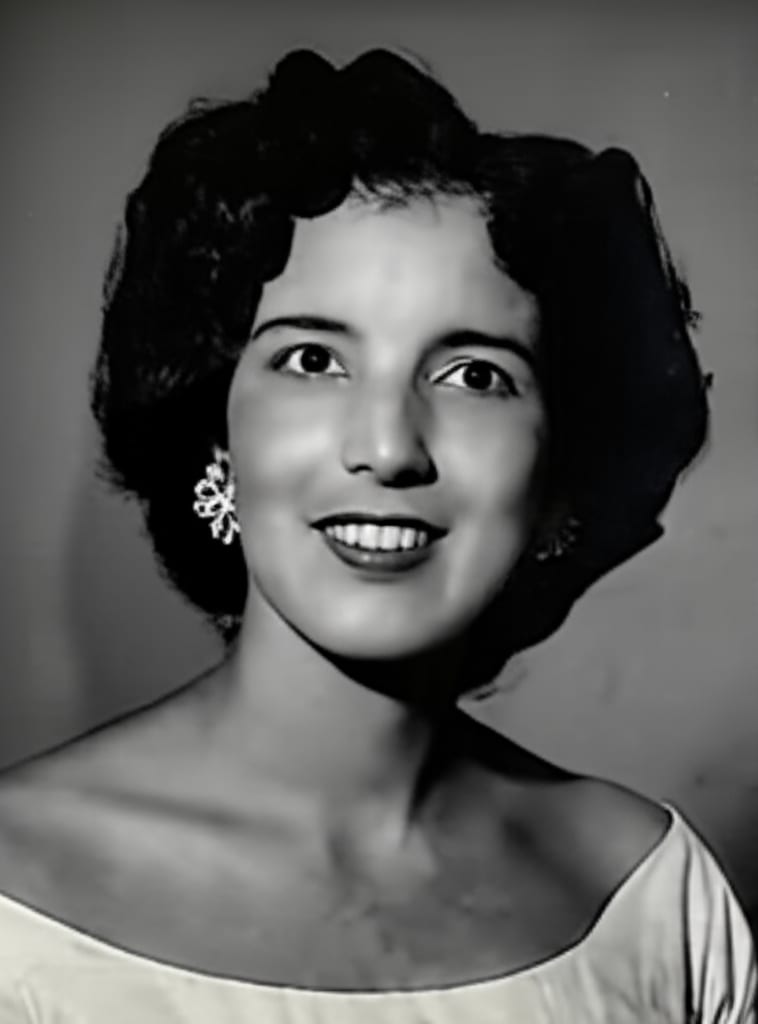|"
},
"typeVersion": 1
},
{
"id": "f77ed90e-70ca-4268-9c77-17e49f94a4bb",
"name": "Sticky Note6",
"type": "n8n-nodes-base.stickyNote",
"position": [
2640,
140
],
"parameters": {
"width": 580,
"height": 300,
"content": "|Original|Restored|\n|-|-|\n|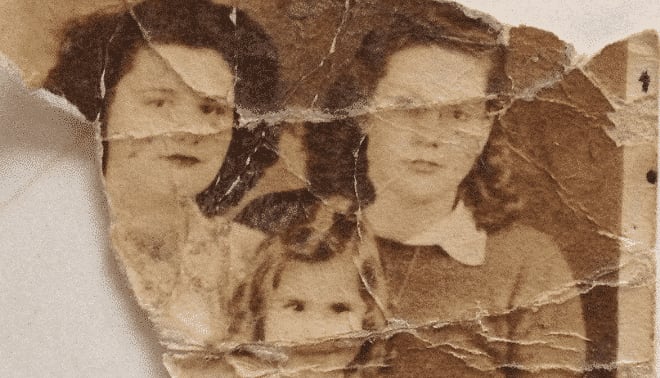|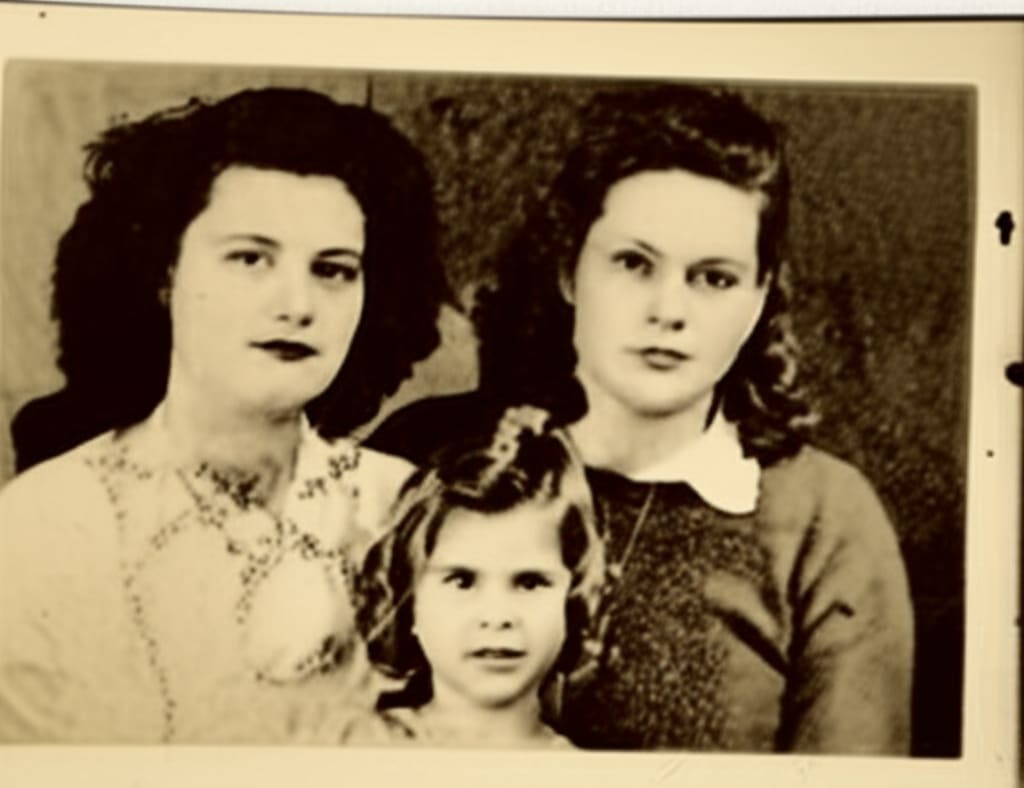|"
},
"typeVersion": 1
}
],
"connections": {
"Split Out": {
"main": [
[
{
"node": "Download Image",
"type": "main",
"index": 0
}
]
]
},
"Sample Images": {
"main": [
[
{
"node": "Split Out",
"type": "main",
"index": 0
}
]
]
},
"Download Image": {
"main": [
[
{
"node": "Extract from File",
"type": "main",
"index": 0
}
]
]
},
"Convert to File": {
"main": [
[
{
"node": "Upload to Drive",
"type": "main",
"index": 0
}
]
]
},
"Extract from File": {
"main": [
[
{
"node": "Gemini Image Restoration",
"type": "main",
"index": 0
}
]
]
},
"Get Image Contents": {
"main": [
[
{
"node": "Convert to File",
"type": "main",
"index": 0
}
]
]
},
"Gemini Image Restoration": {
"main": [
[
{
"node": "Get Image Contents",
"type": "main",
"index": 0
}
]
]
},
"When clicking \u2018Execute workflow\u2019": {
"main": [
[
{
"node": "Sample Images",
"type": "main",
"index": 0
}
]
]
}
}
}
Credentials you'll need
Each integration node will prompt for credentials when you import. We strip credential IDs before publishing — you'll add your own.
googleDriveOAuth2ApigooglePalmApi
For the full experience including quality scoring and batch install features for each workflow upgrade to Pro
About this workflow
With Gemini now capable of multimodal output, it's a great time to explore this capability for image or graphics automation. Let's see how well it does for a task such as image restoration.
Source: https://n8n.io/workflows/4815/ — original creator credit. Request a take-down →
Related workflows
Workflows that share integrations, category, or trigger type with this one. All free to copy and import.
This n8n workflow automatically generates presentation-style "screen recording" videos with AI-generated slides and a talking head avatar overlay. You provide a topic and intention, and the workflow h
Monitor Google Drive folder, parsing PDF, DOCX and image file into a destination folder, ready for further processing (e.g. RAG ingestion, translation, etc.) Keep processing log in Google Sheet and se
This workflow is ideal for content creators, video marketers, and research professionals who need to extract actionable insights, detailed transcripts, or metadata from YouTube videos efficiently. It
Creators, designers, and developers exploring AI-powered image generation. Automation enthusiasts who want to integrate image creation into n8n workflows. Telegram bot builders looking to add visual A
Automatically watches a Google Drive folder, submits new documents to Landing.ai for parsing, caches processed files in - Supabase to avoid reprocessing, and reliably polls results with retry and time