 Jimleuk
 This workflow corresponds to n8n.io template #2331 — we link there as the canonical source.
This workflow follows the Editimage → HTTP Request recipe pattern — see all workflows that pair these two integrations.
The workflow JSON
Copy or download the full n8n JSON below. Paste it into a new n8n workflow, add your credentials, activate. Full import guide →
{
"nodes": [
{
"id": "6359f725-1ede-4b05-bc19-05a7e85c0865",
"name": "When clicking \"Test workflow\"",
"type": "n8n-nodes-base.manualTrigger",
"position": [
680,
292
],
"parameters": {},
"typeVersion": 1
},
{
"id": "9e1e61c7-f5fd-4e8a-99a6-ccc5a24f5528",
"name": "Fetch Source Image",
"type": "n8n-nodes-base.httpRequest",
"position": [
1000,
292
],
"parameters": {
"url": "={{ $json.source_image }}",
"options": {}
},
"typeVersion": 4.2
},
{
"id": "9b1b94cf-3a7d-4c43-ab6c-8df9824b5667",
"name": "Split Out Results Only",
"type": "n8n-nodes-base.splitOut",
"position": [
1428,
323
],
"parameters": {
"options": {},
"fieldToSplitOut": "result"
},
"typeVersion": 1
},
{
"id": "fcbaf6c3-2aee-4ea1-9c5e-2833dd7a9f50",
"name": "Filter Score >= 0.9",
"type": "n8n-nodes-base.filter",
"position": [
1608,
323
],
"parameters": {
"options": {},
"conditions": {
"options": {
"leftValue": "",
"caseSensitive": true,
"typeValidation": "strict"
},
"combinator": "and",
"conditions": [
{
"id": "367d83ef-8ecf-41fe-858c-9bfd78b0ae9f",
"operator": {
"type": "number",
"operation": "gte"
},
"leftValue": "={{ $json.score }}",
"rightValue": 0.9
}
]
}
},
"typeVersion": 2
},
{
"id": "954ce7b0-ef82-4203-8706-17cfa5e5e3ff",
"name": "Crop Object From Image",
"type": "n8n-nodes-base.editImage",
"position": [
2080,
432
],
"parameters": {
"width": "={{ $json.box.xmax - $json.box.xmin }}",
"height": "={{ $json.box.ymax - $json.box.ymin }}",
"options": {
"format": "jpeg",
"fileName": "={{ $binary.data.fileName.split('.')[0].urlEncode()+'-'+$json.label.urlEncode() + '-' + $itemIndex }}.jpg"
},
"operation": "crop",
"positionX": "={{ $json.box.xmin }}",
"positionY": "={{ $json.box.ymin }}"
},
"typeVersion": 1
},
{
"id": "40027456-4bf9-4eea-8d71-aa28e69b29e5",
"name": "Set Variables",
"type": "n8n-nodes-base.set",
"position": [
840,
292
],
"parameters": {
"options": {},
"assignments": {
"assignments": [
{
"id": "9e95d951-8530-4a80-bd00-6bb55623a71f",
"name": "CLOUDFLARE_ACCOUNT_ID",
"type": "string",
"value": ""
},
{
"id": "66807a90-63a1-4d4e-886e-e8abf3019a34",
"name": "model",
"type": "string",
"value": "@cf/facebook/detr-resnet-50"
},
{
"id": "a13ccde6-e6e3-46f4-afa3-2134af7bc765",
"name": "source_image",
"type": "string",
"value": "https://images.pexels.com/photos/2293367/pexels-photo-2293367.jpeg?auto=compress&cs=tinysrgb&w=600"
},
{
"id": "0734fc55-b414-47f7-8b3e-5c880243f3ed",
"name": "elasticsearch_index",
"type": "string",
"value": "n8n-image-search"
}
]
}
},
"typeVersion": 3.3
},
{
"id": "c3d8c5e3-546e-472c-9e6e-091cf5cee3c3",
"name": "Use Detr-Resnet-50 Object Classification",
"type": "n8n-nodes-base.httpRequest",
"position": [
1248,
324
],
"parameters": {
"url": "=https://api.cloudflare.com/client/v4/accounts/{{ $('Set Variables').item.json.CLOUDFLARE_ACCOUNT_ID }}/ai/run/{{ $('Set Variables').item.json.model }}",
"method": "POST",
"options": {},
"sendBody": true,
"contentType": "binaryData",
"authentication": "predefinedCredentialType",
"inputDataFieldName": "data",
"nodeCredentialType": "cloudflareApi"
},
"credentials": {
"cloudflareApi": {
"name": "<your credential>"
}
},
"typeVersion": 4.2
},
{
"id": "3c7aa2fc-9ca1-41ba-a10d-aa5930d45f18",
"name": "Upload to Cloudinary",
"type": "n8n-nodes-base.httpRequest",
"position": [
2380,
380
],
"parameters": {
"url": "https://api.cloudinary.com/v1_1/daglih2g8/image/upload",
"method": "POST",
"options": {},
"sendBody": true,
"sendQuery": true,
"contentType": "multipart-form-data",
"authentication": "genericCredentialType",
"bodyParameters": {
"parameters": [
{
"name": "file",
"parameterType": "formBinaryData",
"inputDataFieldName": "data"
}
]
},
"genericAuthType": "httpQueryAuth",
"queryParameters": {
"parameters": [
{
"name": "upload_preset",
"value": "n8n-workflows-preset"
}
]
}
},
"credentials": {
"httpQueryAuth": {
"name": "<your credential>"
}
},
"typeVersion": 4.2
},
{
"id": "3c4e1f04-a0ba-4cce-b82a-aa3eadc4e7e1",
"name": "Create Docs In Elasticsearch",
"type": "n8n-nodes-base.elasticsearch",
"position": [
2580,
380
],
"parameters": {
"indexId": "={{ $('Set Variables').item.json.elasticsearch_index }}",
"options": {},
"fieldsUi": {
"fieldValues": [
{
"fieldId": "image_url",
"fieldValue": "={{ $json.secure_url.replace('upload','upload/f_auto,q_auto') }}"
},
{
"fieldId": "source_image_url",
"fieldValue": "={{ $('Set Variables').item.json.source_image }}"
},
{
"fieldId": "label",
"fieldValue": "={{ $('Crop Object From Image').item.json.label }}"
},
{
"fieldId": "metadata",
"fieldValue": "={{ JSON.stringify(Object.assign($('Crop Object From Image').item.json, { filename: $json.original_filename })) }}"
}
]
},
"operation": "create",
"additionalFields": {}
},
"credentials": {
"elasticsearchApi": {
"name": "<your credential>"
}
},
"typeVersion": 1
},
{
"id": "292c9821-c123-44fa-9ba1-c37bf84079bc",
"name": "Sticky Note",
"type": "n8n-nodes-base.stickyNote",
"position": [
620,
120
],
"parameters": {
"color": 7,
"width": 541.1455500767354,
"height": 381.6388867600897,
"content": "## 1. Get Source Image\n[Read more about setting variables for your workflow](https://docs.n8n.io/integrations/builtin/core-nodes/n8n-nodes-base.set)\n\nFor this demo, we'll manually define an image to process. In production however, this image can come from a variety of sources such as drives, webhooks and more."
},
"typeVersion": 1
},
{
"id": "863271dc-fb9d-4211-972d-6b57336073b4",
"name": "Sticky Note1",
"type": "n8n-nodes-base.stickyNote",
"position": [
1180,
80
],
"parameters": {
"color": 7,
"width": 579.7748008857744,
"height": 437.4680103498263,
"content": "## 2. Use Detr-Resnet-50 Object Classification\n[Learn more about Cloudflare Workers AI](https://developers.cloudflare.com/workers-ai/)\n\nNot all AI workflows need an LLM! As in this example, we're using a non-LLM vision model to parse the source image and return what objects are contained within. The image search feature we're building will be based on the objects in the image making for a much more granular search via object association.\n\nWe'll use the Cloudflare Workers AI service which conveniently provides this model via API use."
},
"typeVersion": 1
},
{
"id": "b73b45da-0436-4099-b538-c6b3b84822f2",
"name": "Sticky Note2",
"type": "n8n-nodes-base.stickyNote",
"position": [
1800,
260
],
"parameters": {
"color": 7,
"width": 466.35460775498495,
"height": 371.9272151757119,
"content": "## 3. Crop Objects Out of Source Image\n[Read more about Editing Images in n8n](https://docs.n8n.io/integrations/builtin/core-nodes/n8n-nodes-base.editimage)\n\nWith our objects identified by their bounding boxes, we can \"cut\" them out of the source image as separate images."
},
"typeVersion": 1
},
{
"id": "465bd842-8a35-49d8-a9ff-c30d164620db",
"name": "Sticky Note3",
"type": "n8n-nodes-base.stickyNote",
"position": [
2300,
180
],
"parameters": {
"color": 7,
"width": 478.20345439832454,
"height": 386.06196032653685,
"content": "## 4. Index Object Images In ElasticSearch\n[Read more about using ElasticSearch](https://docs.n8n.io/integrations/builtin/app-nodes/n8n-nodes-base.elasticsearch)\n\nBy storing the newly created object images externally and indexing them in Elasticsearch, we now have a foundation for our Image Search service which queries by object association."
},
"typeVersion": 1
},
{
"id": "6a04b4b5-7830-410d-9b5b-79acb0b1c78b",
"name": "Sticky Note4",
"type": "n8n-nodes-base.stickyNote",
"position": [
1800,
-220
],
"parameters": {
"color": 7,
"width": 328.419768654291,
"height": 462.65463700396174,
"content": "Fig 1. Result of Classification\n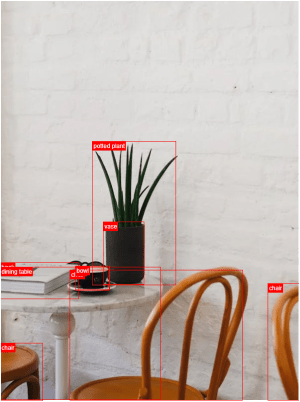"
},
"typeVersion": 1
},
{
"id": "8f607951-ba41-4362-8323-e8b4b96ad122",
"name": "Fetch Source Image Again",
"type": "n8n-nodes-base.httpRequest",
"position": [
1880,
432
],
"parameters": {
"url": "={{ $('Set Variables').item.json.source_image }}",
"options": {}
},
"typeVersion": 4.2
},
{
"id": "6933f67d-276b-4908-8602-654aa352a68b",
"name": "Sticky Note8",
"type": "n8n-nodes-base.stickyNote",
"position": [
220,
120
],
"parameters": {
"width": 359.6648027457353,
"height": 352.41026669883723,
"content": "## Try It Out!\n### This workflow does the following:\n* Downloads an image\n* Uses an object classification AI model to identify objects in the image.\n* Crops the objects out from the original image into new image files.\n* Indexes the image's object in an Elasticsearch Database to enable image search.\n\n### Need Help?\nJoin the [Discord](https://discord.com/invite/XPKeKXeB7d) or ask in the [Forum](https://community.n8n.io/)!\n\nHappy Hacking!"
},
"typeVersion": 1
},
{
"id": "35615ed5-43e8-43f0-95fe-1f95a1177d69",
"name": "Sticky Note5",
"type": "n8n-nodes-base.stickyNote",
"position": [
800,
280
],
"parameters": {
"width": 172.9365918827757,
"height": 291.6881468483679,
"content": "\n\n\n\n\n\n\n\n\n\n\n\n\n\n\n\n\ud83d\udea8**Required**\n* Set your variables here first!"
},
"typeVersion": 1
}
],
"connections": {
"Set Variables": {
"main": [
[
{
"node": "Fetch Source Image",
"type": "main",
"index": 0
}
]
]
},
"Fetch Source Image": {
"main": [
[
{
"node": "Use Detr-Resnet-50 Object Classification",
"type": "main",
"index": 0
}
]
]
},
"Filter Score >= 0.9": {
"main": [
[
{
"node": "Fetch Source Image Again",
"type": "main",
"index": 0
}
]
]
},
"Upload to Cloudinary": {
"main": [
[
{
"node": "Create Docs In Elasticsearch",
"type": "main",
"index": 0
}
]
]
},
"Crop Object From Image": {
"main": [
[
{
"node": "Upload to Cloudinary",
"type": "main",
"index": 0
}
]
]
},
"Split Out Results Only": {
"main": [
[
{
"node": "Filter Score >= 0.9",
"type": "main",
"index": 0
}
]
]
},
"Fetch Source Image Again": {
"main": [
[
{
"node": "Crop Object From Image",
"type": "main",
"index": 0
}
]
]
},
"When clicking \"Test workflow\"": {
"main": [
[
{
"node": "Set Variables",
"type": "main",
"index": 0
}
]
]
},
"Use Detr-Resnet-50 Object Classification": {
"main": [
[
{
"node": "Split Out Results Only",
"type": "main",
"index": 0
}
]
]
}
}
}
Credentials you'll need
Each integration node will prompt for credentials when you import. We strip credential IDs before publishing — you'll add your own.
cloudflareApielasticsearchApihttpQueryAuth
For the full experience including quality scoring and batch install features for each workflow upgrade to Pro
About this workflow
This n8n workflow demonstrates how to automate indexing of images to build a object-based image search.
Source: https://n8n.io/workflows/2331/ — original creator credit. Request a take-down →
Related workflows
Workflows that share integrations, category, or trigger type with this one. All free to copy and import.
Workflow 2331. Uses httpRequest, editImage, elasticsearch. Event-driven trigger; 17 nodes.
2331. Uses httpRequest, editImage, elasticsearch. Event-driven trigger; 17 nodes.
This n8n workflow simplifies the process of removing backgrounds from images stored in Google Drive. By leveraging the PhotoRoom API, this template enables automatic background removal, padding adjust
This provides a web form for use with my personal property inventory workflow, allowing you to upload image(s) and an optional description with a simple web interface. Displays web form allowing you u