This workflow follows the Chainllm → HTTP Request recipe pattern — see all workflows that pair these two integrations.
The workflow JSON
Copy or download the full n8n JSON below. Paste it into a new n8n workflow, add your credentials, activate. Full import guide →
{
"nodes": [
{
"id": "0b64edf1-57e0-4704-b78c-c8ab2b91f74d",
"name": "When clicking \u2018Test workflow\u2019",
"type": "n8n-nodes-base.manualTrigger",
"position": [
480,
300
],
"parameters": {},
"typeVersion": 1
},
{
"id": "a875d1c5-ccfe-4bbf-b429-56a42b0ca778",
"name": "Google Gemini Chat Model",
"type": "@n8n/n8n-nodes-langchain.lmChatGoogleGemini",
"position": [
1280,
720
],
"parameters": {
"options": {},
"modelName": "models/gemini-1.5-flash"
},
"credentials": {
"googlePalmApi": {
"name": "<your credential>"
}
},
"typeVersion": 1
},
{
"id": "a5e00543-dbaa-4e62-afb0-825ebefae3f3",
"name": "Structured Output Parser",
"type": "@n8n/n8n-nodes-langchain.outputParserStructured",
"position": [
1480,
720
],
"parameters": {
"jsonSchemaExample": "{\n\t\"caption_title\": \"\",\n\t\"caption_text\": \"\"\n}"
},
"typeVersion": 1.2
},
{
"id": "bb9af9c6-6c81-4e92-a29f-18ab3afbe327",
"name": "Get Info",
"type": "n8n-nodes-base.editImage",
"position": [
1100,
400
],
"parameters": {
"operation": "information"
},
"typeVersion": 1
},
{
"id": "8a0dbd5d-5886-484a-80a0-486f349a9856",
"name": "Resize For AI",
"type": "n8n-nodes-base.editImage",
"position": [
1100,
560
],
"parameters": {
"width": 512,
"height": 512,
"options": {},
"operation": "resize"
},
"typeVersion": 1
},
{
"id": "d29f254a-5fa3-46fa-b153-19dfd8e8c6a7",
"name": "Calculate Positioning",
"type": "n8n-nodes-base.code",
"position": [
2020,
720
],
"parameters": {
"mode": "runOnceForEachItem",
"jsCode": "const { size, output } = $input.item.json;\n\nconst lineHeight = 35;\nconst fontSize = Math.round(size.height / lineHeight);\nconst maxLineLength = Math.round(size.width/fontSize) * 2;\nconst text = `\"${output.caption_title}\". ${output.caption_text}`;\nconst numLinesOccupied = Math.round(text.length / maxLineLength);\n\nconst verticalPadding = size.height * 0.02;\nconst horizontalPadding = size.width * 0.02;\nconst rectPosX = 0;\nconst rectPosY = size.height - (verticalPadding * 2.5) - (numLinesOccupied * fontSize);\nconst textPosX = horizontalPadding;\nconst textPosY = size.height - (numLinesOccupied * fontSize) - (verticalPadding/2);\n\nreturn {\n caption: {\n fontSize,\n maxLineLength,\n numLinesOccupied,\n rectPosX,\n rectPosY,\n textPosX,\n textPosY,\n verticalPadding,\n horizontalPadding,\n }\n}\n"
},
"typeVersion": 2
},
{
"id": "12a7f2d6-8684-48a5-aa41-40a8a4f98c79",
"name": "Apply Caption to Image",
"type": "n8n-nodes-base.editImage",
"position": [
2380,
560
],
"parameters": {
"options": {},
"operation": "multiStep",
"operations": {
"operations": [
{
"color": "=#0000008c",
"operation": "draw",
"endPositionX": "={{ $json.size.width }}",
"endPositionY": "={{ $json.size.height }}",
"startPositionX": "={{ $json.caption.rectPosX }}",
"startPositionY": "={{ $json.caption.rectPosY }}"
},
{
"font": "/usr/share/fonts/truetype/msttcorefonts/Arial.ttf",
"text": "=\"{{ $json.output.caption_title }}\". {{ $json.output.caption_text }}",
"fontSize": "={{ $json.caption.fontSize }}",
"fontColor": "#FFFFFF",
"operation": "text",
"positionX": "={{ $json.caption.textPosX }}",
"positionY": "={{ $json.caption.textPosY }}",
"lineLength": "={{ $json.caption.maxLineLength }}"
}
]
}
},
"typeVersion": 1
},
{
"id": "4d569ec8-04c2-4d21-96e1-86543b26892d",
"name": "Sticky Note",
"type": "n8n-nodes-base.stickyNote",
"position": [
-120,
80
],
"parameters": {
"width": 423.75,
"height": 431.76353488372104,
"content": "## Try it out!\n\n### This workflow takes an image and generates a caption for it using AI. The OpenAI node has been able to do this for a while but this workflow demonstrates how to achieve the same with other multimodal vision models such as Google's Gemini.\n\nAdditional, we'll use the Edit Image node to overlay the generated caption onto the image. This can be useful for publications or can be repurposed for copyrights and/or watermarks.\n\n### Need Help?\nJoin the [Discord](https://discord.com/invite/XPKeKXeB7d) or ask in the [Forum](https://community.n8n.io/)!\n"
},
"typeVersion": 1
},
{
"id": "45d37945-5a7a-42eb-8c8c-5940ea276072",
"name": "Merge Image & Caption",
"type": "n8n-nodes-base.merge",
"position": [
1620,
400
],
"parameters": {
"mode": "combine",
"options": {},
"combineBy": "combineByPosition"
},
"typeVersion": 3
},
{
"id": "53a26842-ad56-4c8d-a59d-4f6d3f9e2407",
"name": "Merge Caption & Positions",
"type": "n8n-nodes-base.merge",
"position": [
2200,
560
],
"parameters": {
"mode": "combine",
"options": {},
"combineBy": "combineByPosition"
},
"typeVersion": 3
},
{
"id": "b6c28913-b16a-4c59-aa49-47e9bb97f86d",
"name": "Get Image",
"type": "n8n-nodes-base.httpRequest",
"position": [
680,
300
],
"parameters": {
"url": "https://images.pexels.com/photos/1267338/pexels-photo-1267338.jpeg?auto=compress&cs=tinysrgb&w=600",
"options": {}
},
"typeVersion": 4.2
},
{
"id": "6c25054d-8103-4be9-bea7-6c3dd47f49a3",
"name": "Sticky Note1",
"type": "n8n-nodes-base.stickyNote",
"position": [
340,
80
],
"parameters": {
"color": 7,
"width": 586.25,
"height": 486.25,
"content": "## 1. Import an Image \n[Read more about the HTTP request node](https://docs.n8n.io/integrations/builtin/core-nodes/n8n-nodes-base.httprequest)\n\nFor this demonstration, we'll grab an image off Pexels.com - a popular free stock photography site - by using the HTTP request node to download.\n\nIn your own workflows, this can be replaces by other triggers such as webhooks."
},
"typeVersion": 1
},
{
"id": "d1b708e2-31c3-4cd1-a353-678bc33d4022",
"name": "Sticky Note2",
"type": "n8n-nodes-base.stickyNote",
"position": [
960,
140
],
"parameters": {
"color": 7,
"width": 888.75,
"height": 783.75,
"content": "## 2. Using Vision Model to Generate Caption\n[Learn more about the Basic LLM Chain](https://docs.n8n.io/integrations/builtin/cluster-nodes/root-nodes/n8n-nodes-langchain.chainllm)\n\nn8n's basic LLM node supports multimodal input by allowing you to specify either a binary or an image url to send to a compatible LLM. This makes it easy to start utilising this powerful feature for visual classification or OCR tasks which have previously depended on more dedicated OCR models.\n\nHere, we've simply passed our image binary as a \"user message\" option, asking the LLM to help us generate a caption title and text which is appropriate for the given subject. Once generated, we'll pass this text along with the image to combine them both."
},
"typeVersion": 1
},
{
"id": "36a39871-340f-4c44-90e6-74393b9be324",
"name": "Sticky Note3",
"type": "n8n-nodes-base.stickyNote",
"position": [
1880,
280
],
"parameters": {
"color": 7,
"width": 753.75,
"height": 635,
"content": "## 3. Overlay Caption on Image \n[Read more about the Edit Image node](https://docs.n8n.io/integrations/builtin/core-nodes/n8n-nodes-base.editimage)\n\nFinally, we\u2019ll perform some basic calculations to place the generated caption onto the image. With n8n's user-friendly image editing features, this can be done entirely within the workflow!\n\nThe Code node tool is ideal for these types of calculations and is used here to position the caption at the bottom of the image. To create the overlay, the Edit Image node enables us to insert text onto the image, which we\u2019ll use to add the generated caption."
},
"typeVersion": 1
},
{
"id": "d175fe97-064e-41da-95fd-b15668c330c4",
"name": "Sticky Note4",
"type": "n8n-nodes-base.stickyNote",
"position": [
2660,
280
],
"parameters": {
"width": 563.75,
"height": 411.25,
"content": "**FIG 1.** Example input image with AI generated caption\n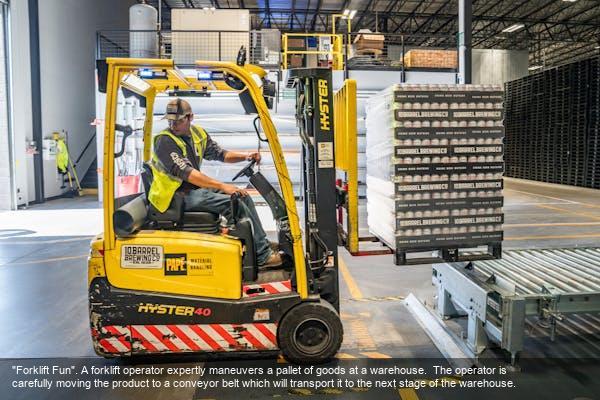"
},
"typeVersion": 1
},
{
"id": "23db0c90-45b6-4b85-b017-a52ad5a9ad5b",
"name": "Image Captioning Agent",
"type": "@n8n/n8n-nodes-langchain.chainLlm",
"position": [
1280,
560
],
"parameters": {
"text": "Generate a caption for this image.",
"messages": {
"messageValues": [
{
"message": "=You role is to provide an appropriate image caption for user provided images.\n\nThe individual components of a caption are as follows: who, when, where, context and miscellaneous. For a really good caption, follow this template: who + when + where + context + miscellaneous\n\nGive the caption a punny title."
},
{
"type": "HumanMessagePromptTemplate",
"messageType": "imageBinary"
}
]
},
"promptType": "define",
"hasOutputParser": true
},
"typeVersion": 1.4
}
],
"connections": {
"Get Info": {
"main": [
[
{
"node": "Merge Image & Caption",
"type": "main",
"index": 0
}
]
]
},
"Get Image": {
"main": [
[
{
"node": "Resize For AI",
"type": "main",
"index": 0
},
{
"node": "Get Info",
"type": "main",
"index": 0
}
]
]
},
"Resize For AI": {
"main": [
[
{
"node": "Image Captioning Agent",
"type": "main",
"index": 0
}
]
]
},
"Calculate Positioning": {
"main": [
[
{
"node": "Merge Caption & Positions",
"type": "main",
"index": 1
}
]
]
},
"Merge Image & Caption": {
"main": [
[
{
"node": "Calculate Positioning",
"type": "main",
"index": 0
},
{
"node": "Merge Caption & Positions",
"type": "main",
"index": 0
}
]
]
},
"Image Captioning Agent": {
"main": [
[
{
"node": "Merge Image & Caption",
"type": "main",
"index": 1
}
]
]
},
"Google Gemini Chat Model": {
"ai_languageModel": [
[
{
"node": "Image Captioning Agent",
"type": "ai_languageModel",
"index": 0
}
]
]
},
"Structured Output Parser": {
"ai_outputParser": [
[
{
"node": "Image Captioning Agent",
"type": "ai_outputParser",
"index": 0
}
]
]
},
"Merge Caption & Positions": {
"main": [
[
{
"node": "Apply Caption to Image",
"type": "main",
"index": 0
}
]
]
},
"When clicking \u2018Test workflow\u2019": {
"main": [
[
{
"node": "Get Image",
"type": "main",
"index": 0
}
]
]
}
}
}
Credentials you'll need
Each integration node will prompt for credentials when you import. We strip credential IDs before publishing — you'll add your own.
googlePalmApi
For the full experience including quality scoring and batch install features for each workflow upgrade to Pro
How this works
Generate accurate, context-aware captions for your images effortlessly, saving hours of manual description and enhancing accessibility for visual content like social media posts or product photos. This workflow suits content creators, marketers, and developers needing quick AI-powered labelling without complex setups. It leverages Google Gemini 1.5 Pro to analyse images and produce structured captions, followed by the key step of applying the text directly onto the image using editImage for a polished, ready-to-share result.
Use this workflow when handling batches of images requiring consistent, descriptive captions, such as for e-commerce listings or blog illustrations, especially if you want event-driven automation via simple triggers. Avoid it for high-volume processing needing custom AI fine-tuning or when images demand advanced editing beyond basic resizing and text overlay. Common variations include swapping Gemini for another LLM via chainLlm or adding HTTP requests to fetch images from external sources like cloud storage.
About this workflow
Easy Image Captioning With Gemini 1.5 Pro. Uses manualTrigger, lmChatGoogleGemini, outputParserStructured, editImage. Event-driven trigger; 16 nodes.
Source: https://github.com/Zie619/n8n-workflows — original creator credit. Request a take-down →
Related workflows
Workflows that share integrations, category, or trigger type with this one. All free to copy and import.
My workflow 53. Uses formTrigger, httpRequest, lmChatOpenAi, form. Event-driven trigger; 74 nodes.
Any-File2Json-Converter. Uses chainLlm, lmChatGroq, outputParserStructured, executeWorkflowTrigger. Event-driven trigger; 30 nodes.
ugc-prototipal copy. Uses openAi, chainLlm, outputParserStructured, httpRequest. Event-driven trigger; 28 nodes.
This n8n template demonstrates how to automatically generate authentic User-Generated Content (UGC) style marketing videos for eCommerce products using AI. Simply upload a product image, and the workf
The Recap AI - eCommerce UGC Video Generator. Uses formTrigger, openAi, chainLlm, outputParserStructured. Event-driven trigger; 24 nodes.