 Joel Sage
 This workflow corresponds to n8n.io template #13306 — we link there as the canonical source.
This workflow follows the Form Trigger → HTTP Request recipe pattern — see all workflows that pair these two integrations.
The workflow JSON
Copy or download the full n8n JSON below. Paste it into a new n8n workflow, add your credentials, activate. Full import guide →
{
"id": "kE8av2l9-2Oq0_H7MH8TL",
"name": "Reference-Based Super-Resolution using Riverflow 2.0 (Image Enhancer/Upscaler)",
"tags": [],
"nodes": [
{
"id": "717536e2-4702-4f02-bc79-d0278fc36b5f",
"name": "Wait",
"type": "n8n-nodes-base.wait",
"position": [
640,
0
],
"parameters": {
"amount": 20
},
"typeVersion": 1.1
},
{
"id": "58b739bc-bfe1-4263-83ef-e01735456663",
"name": "Stop and Error",
"type": "n8n-nodes-base.stopAndError",
"position": [
1504,
-48
],
"parameters": {
"errorMessage": "=Error occurred while generating: {{ $json.error }}"
},
"typeVersion": 1
},
{
"id": "9eff9355-9290-46eb-87e1-c9b25347fad8",
"name": "Sticky Note",
"type": "n8n-nodes-base.stickyNote",
"position": [
-592,
-368
],
"parameters": {
"width": 528,
"height": 560,
"content": "## Reference-based super-resolution using Riverflow 2.0\n\n### How it works\n- **Input form** takes in the Image as well as super reference Images.\n- **Inputs are sanitised** to ensure they are in the right form to be used by Replicate API .\n- **POST Request** is then made with this data to the Riverflow 2.0 model in the Replicate API.\n- **GET Request** is checked and looped until the output or error is given.\n- Results returned as **raw Image**.\n### How to Setup\n- Add **Replicate API key** (https://replicate.com/) for HTTPS Requests\n### What is Reference-based super-resolution\nRiverflow Reference-Based Super-Resolution is an agentic detail repair capability designed to fix blurry, incorrect, or low-resolution details in an image by using reference images as ground truth.\n\nIt\u2019s ideal for restoring things like: - product labels and packaging text - logos and brand marks - printed designs on objects (bottles, cans, boxes, apparel) - fine text and small UI-like elements inside a scene. More details at [Replicate API - riverflow-2.0-refsr](https://replicate.com/sourceful/riverflow-2.0-refsr).\n"
},
"typeVersion": 1
},
{
"id": "a428b7e8-9fb8-49a3-9ed3-4d940b04b2dd",
"name": "Input form",
"type": "n8n-nodes-base.formTrigger",
"position": [
0,
0
],
"parameters": {
"options": {},
"formTitle": "Input data for Riverflow2.0 refsr",
"formFields": {
"values": [
{
"fieldLabel": "Image",
"requiredField": true
},
{
"fieldLabel": "Super Resolution References",
"requiredField": true
}
]
},
"formDescription": "for multiple references, separate with commas (MAX 4)"
},
"typeVersion": 2.5
},
{
"id": "28509967-3e6f-44bf-9ad0-4cd1d4246da5",
"name": "Input Handling",
"type": "n8n-nodes-base.code",
"position": [
160,
0
],
"parameters": {
"jsCode": "const items = $input.all();\n\n// Allowed fields only\nconst allowedFields = [\n \"image\",\n \"super_resolution_references\"\n];\n\n// Normalize field names\nfunction normalizeFieldName(name) {\n return name.toLowerCase().replace(/\\s+/g, \"_\");\n}\n\nitems.forEach(item => {\n const newJson = {};\n\n for (const key in item.json) {\n const normalizedKey = normalizeFieldName(key);\n if (!allowedFields.includes(normalizedKey)) continue;\n\n let value = item.json[key];\n\n // IMAGE: must be a non-empty string\n if (normalizedKey === \"image\") {\n if (typeof value !== \"string\" || value.trim() === \"\") {\n throw new Error(\"image must be a non-empty string\");\n }\n newJson.image = value.trim();\n continue;\n }\n\n // SUPER RES REFS: ALWAYS ARRAY\n if (normalizedKey === \"super_resolution_references\") {\n let refs = [];\n\n if (typeof value === \"string\") {\n refs = value\n .split(\",\")\n .map(v => v.trim())\n .filter(Boolean);\n } else if (Array.isArray(value)) {\n refs = value.filter(Boolean);\n } else if (value) {\n refs = [value];\n }\n\n if (refs.length > 4) {\n throw new Error(\n `super_resolution_refs cannot contain more than 4 items (found ${refs.length})`\n );\n }\n\n newJson.super_resolution_refs = refs;\n }\n }\n\n // Ensure field exists even if user supplied nothing\n if (!newJson.super_resolution_refs) {\n newJson.super_resolution_refs = [];\n }\n\n item.json = newJson;\n});\n\nreturn items;\n"
},
"typeVersion": 2
},
{
"id": "dc49b778-e02e-4aea-a8c9-65abd81bb140",
"name": "POST Request to Replicate API",
"type": "n8n-nodes-base.httpRequest",
"position": [
384,
0
],
"parameters": {
"url": "https://api.replicate.com/v1/models/sourceful/riverflow-2.0-refsr/predictions",
"method": "POST",
"options": {},
"jsonBody": "={\n \"input\": {\n \"image\": {{ $json.image.toJsonString() }},\n \"super_resolution_references\": {{ $json.super_resolution_refs.toJsonString() }}\n }\n}",
"sendBody": true,
"sendHeaders": true,
"specifyBody": "json",
"authentication": "predefinedCredentialType",
"headerParameters": {
"parameters": [
{
"name": "Prefer",
"value": "wait"
}
]
},
"nodeCredentialType": "httpBearerAuth"
},
"credentials": {
"httpBearerAuth": {
"name": "<your credential>"
}
},
"typeVersion": 4.4
},
{
"id": "519e3a77-c53a-4183-855f-9cb89f6e5d16",
"name": "GET Request to check status",
"type": "n8n-nodes-base.httpRequest",
"position": [
848,
0
],
"parameters": {
"url": "={{ $json.urls.get }}",
"options": {},
"authentication": "predefinedCredentialType",
"nodeCredentialType": "httpBearerAuth"
},
"credentials": {
"httpBearerAuth": {
"name": "<your credential>"
}
},
"typeVersion": 4.4
},
{
"id": "67da3f7a-5894-44da-93dc-54ccba99763f",
"name": "Check if finished",
"type": "n8n-nodes-base.if",
"position": [
1056,
0
],
"parameters": {
"options": {},
"conditions": {
"options": {
"version": 3,
"leftValue": "",
"caseSensitive": true,
"typeValidation": "strict"
},
"combinator": "and",
"conditions": [
{
"id": "278c55ff-9f14-41af-9bca-202b911eaf2f",
"operator": {
"type": "string",
"operation": "equals"
},
"leftValue": "={{ $json.status }}",
"rightValue": "processing"
}
]
}
},
"typeVersion": 2.3
},
{
"id": "ef0ddbb1-23a4-45cd-b753-43e97ab3f0e4",
"name": "Check for errors",
"type": "n8n-nodes-base.if",
"position": [
1296,
16
],
"parameters": {
"options": {},
"conditions": {
"options": {
"version": 3,
"leftValue": "",
"caseSensitive": true,
"typeValidation": "strict"
},
"combinator": "and",
"conditions": [
{
"id": "e01b4bfd-d7aa-4f74-9967-5352902f8a9d",
"operator": {
"type": "string",
"operation": "notEquals"
},
"leftValue": "={{ $json.status }}",
"rightValue": "succeeded"
}
]
}
},
"typeVersion": 2.3
},
{
"id": "cb348df1-9258-4680-9ad5-51e82aec543e",
"name": "Retrieve Image",
"type": "n8n-nodes-base.httpRequest",
"position": [
1664,
16
],
"parameters": {
"url": "={{ $json.url }}",
"options": {}
},
"typeVersion": 4.4
},
{
"id": "f3aae287-e0ce-47f5-a429-945b10c07d7a",
"name": "Sticky Note1",
"type": "n8n-nodes-base.stickyNote",
"position": [
-16,
-32
],
"parameters": {
"color": 7,
"width": 304,
"height": 176,
"content": "### Receive and process inputs"
},
"typeVersion": 1
},
{
"id": "35a0d40b-d39c-482f-b555-a241c917a3a6",
"name": "Sticky Note2",
"type": "n8n-nodes-base.stickyNote",
"position": [
320,
-64
],
"parameters": {
"color": 7,
"width": 224,
"height": 240,
"content": "### Riverflow 2.0 takes data and begins generations"
},
"typeVersion": 1
},
{
"id": "ecb69d83-1d02-421a-84a2-4324ccdae305",
"name": "Sticky Note3",
"type": "n8n-nodes-base.stickyNote",
"position": [
576,
-48
],
"parameters": {
"color": 7,
"width": 640,
"height": 240,
"content": "### Polling loop to see if generation is complete"
},
"typeVersion": 1
},
{
"id": "2af4b0d6-d7db-42a9-a47e-aa857161a68a",
"name": "Sticky Note4",
"type": "n8n-nodes-base.stickyNote",
"position": [
1248,
-80
],
"parameters": {
"color": 7,
"width": 592,
"height": 320,
"content": "### Error checking and ouput"
},
"typeVersion": 1
},
{
"id": "0723f529-b08e-4f8a-892a-d7953ca72a83",
"name": "Sticky Note6",
"type": "n8n-nodes-base.stickyNote",
"position": [
-528,
592
],
"parameters": {
"color": 5,
"width": 384,
"height": 416,
"content": "### Output Image\n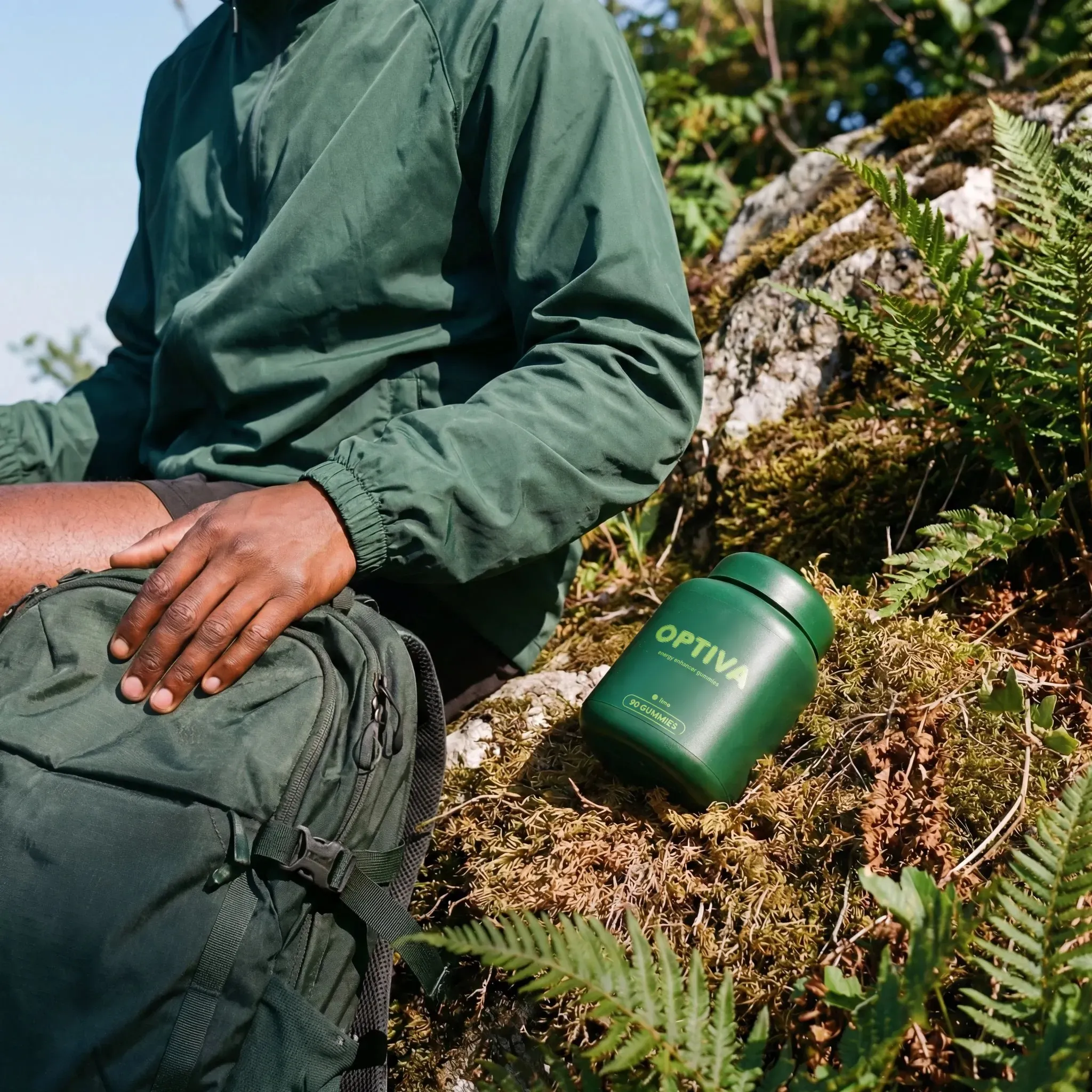"
},
"typeVersion": 1
},
{
"id": "63b6db26-6da9-40dd-97c9-47abc0c7d1b0",
"name": "Sticky Note7",
"type": "n8n-nodes-base.stickyNote",
"position": [
-592,
224
],
"parameters": {
"color": 4,
"width": 528,
"height": 800,
"content": "## Examples\n"
},
"typeVersion": 1
},
{
"id": "cf408e82-6f54-46ec-ad7e-b9e80bf098fe",
"name": "Sticky Note10",
"type": "n8n-nodes-base.stickyNote",
"position": [
-576,
272
],
"parameters": {
"color": 5,
"width": 246,
"height": 304,
"content": "### Initial Image\n\n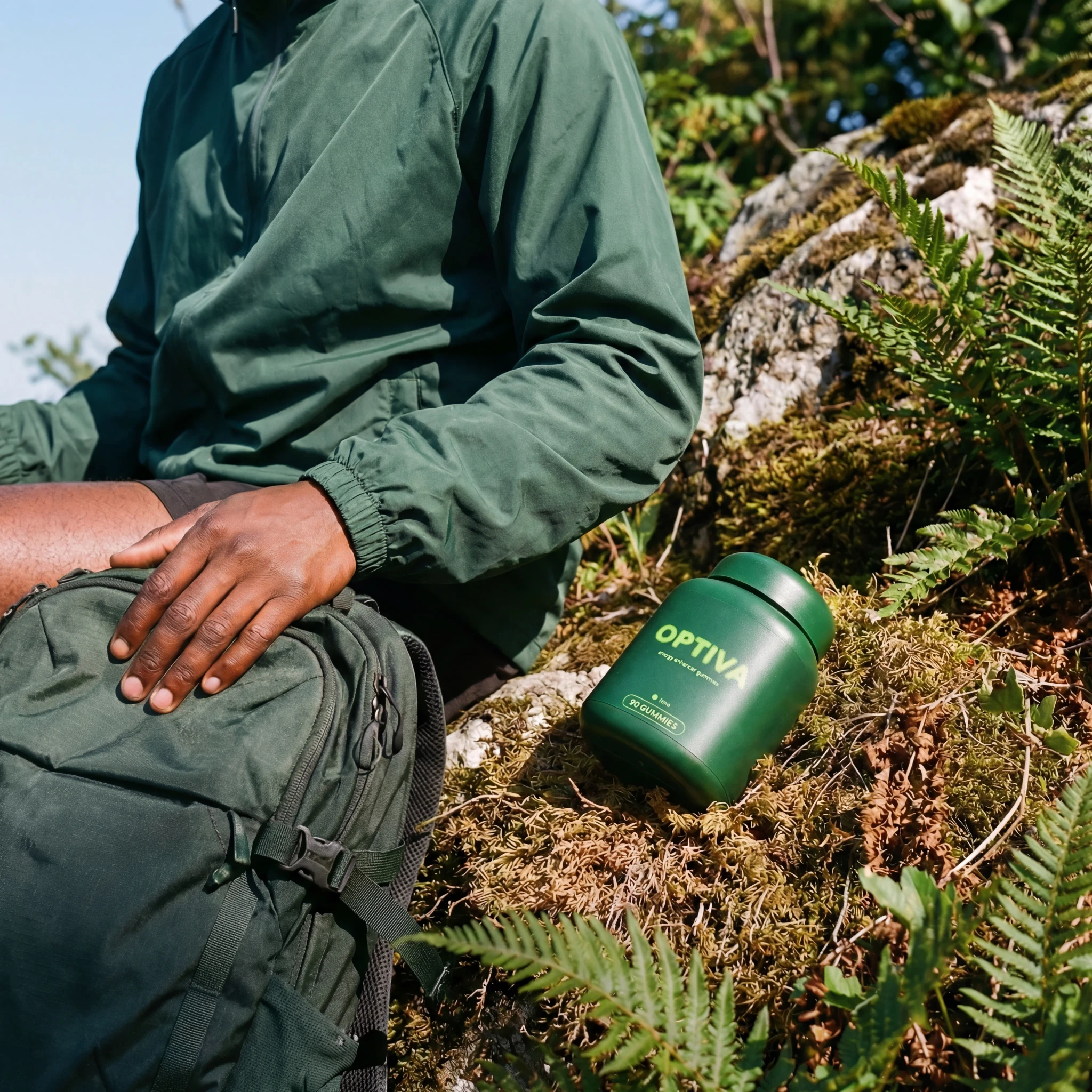"
},
"typeVersion": 1
},
{
"id": "18ba4456-7a5d-4181-90c9-8656bb1aee87",
"name": "Sticky Note11",
"type": "n8n-nodes-base.stickyNote",
"position": [
-320,
272
],
"parameters": {
"color": 5,
"width": 246,
"height": 272,
"content": "### Super resolution ref\n\n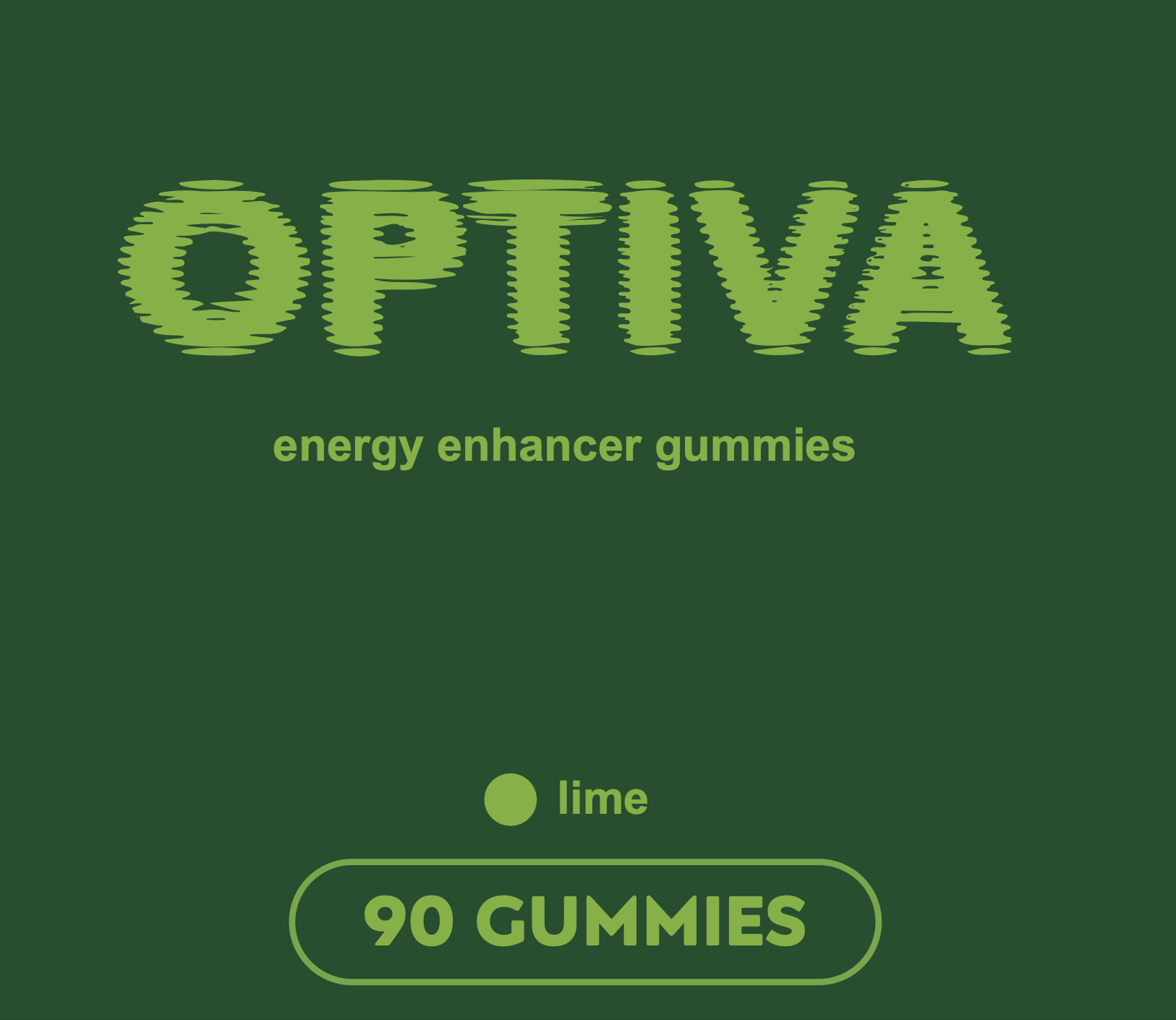"
},
"typeVersion": 1
},
{
"id": "8acc2cdd-0683-49b9-8dff-188da1ec6125",
"name": "Isolate output URL",
"type": "n8n-nodes-base.set",
"position": [
1504,
80
],
"parameters": {
"options": {},
"assignments": {
"assignments": [
{
"id": "bbfc7efa-1fcf-4115-ae33-cac7ec3aad80",
"name": "url",
"type": "string",
"value": "={{ $json.output[0] }}"
}
]
}
},
"typeVersion": 3.4
}
],
"active": true,
"settings": {
"binaryMode": "separate",
"availableInMCP": false,
"executionOrder": "v1"
},
"versionId": "398b9940-d89a-4024-9438-5c71653b473a",
"connections": {
"Wait": {
"main": [
[
{
"node": "GET Request to check status",
"type": "main",
"index": 0
}
]
]
},
"Input form": {
"main": [
[
{
"node": "Input Handling",
"type": "main",
"index": 0
}
]
]
},
"Input Handling": {
"main": [
[
{
"node": "POST Request to Replicate API",
"type": "main",
"index": 0
}
]
]
},
"Check for errors": {
"main": [
[
{
"node": "Stop and Error",
"type": "main",
"index": 0
}
],
[
{
"node": "Isolate output URL",
"type": "main",
"index": 0
}
]
]
},
"Check if finished": {
"main": [
[
{
"node": "Wait",
"type": "main",
"index": 0
}
],
[
{
"node": "Check for errors",
"type": "main",
"index": 0
}
]
]
},
"Isolate output URL": {
"main": [
[
{
"node": "Retrieve Image",
"type": "main",
"index": 0
}
]
]
},
"GET Request to check status": {
"main": [
[
{
"node": "Check if finished",
"type": "main",
"index": 0
}
]
]
},
"POST Request to Replicate API": {
"main": [
[
{
"node": "Wait",
"type": "main",
"index": 0
}
]
]
}
}
}
Credentials you'll need
Each integration node will prompt for credentials when you import. We strip credential IDs before publishing — you'll add your own.
httpBearerAuth
For the full experience including quality scoring and batch install features for each workflow upgrade to Pro
About this workflow
This workflow can take an image URL and enhance said image using Riverflow 2.0 Reference-Based Super-Resolution. This process involves giving the model an image to enhance along with a reference image to specify a certain element to enhance. For example, if we have a photoshoot…
Source: https://n8n.io/workflows/13306/ — original creator credit. Request a take-down →
Related workflows
Workflows that share integrations, category, or trigger type with this one. All free to copy and import.
[n8n] Advanced URL Parsing and Shortening Workflow - Switchy.io Integration. Uses splitInBatches, stickyNote, httpRequest, html. Event-driven trigger; 56 nodes.
[](https://youtu.be/c7yCZhmMjtI)
Formtrigger Workflow. Uses formTrigger, googleDrive, httpRequest, stopAndError. Event-driven trigger; 28 nodes.
Formtrigger Workflow. Uses formTrigger, googleDrive, httpRequest, stopAndError. Event-driven trigger; 28 nodes.
Basic Create VM. Uses formTrigger, httpRequest, stopAndError. Event-driven trigger; 19 nodes.