 Anchor
 This workflow corresponds to n8n.io template #10738 — we link there as the canonical source.
This workflow follows the Apifyn8N Nodes Apify → Google Sheets recipe pattern — see all workflows that pair these two integrations.
The workflow JSON
Copy or download the full n8n JSON below. Paste it into a new n8n workflow, add your credentials, activate. Full import guide →
{
"id": "VMrO1AvTaswHYxpY",
"meta": {
"templateCredsSetupCompleted": true
},
"name": "LinkedIn URL Company finder from Google sheets to Google sheets",
"tags": [],
"nodes": [
{
"id": "93f0f15e-c64f-45ac-b5cd-2c89a71d4b61",
"name": "When clicking \u2018Execute workflow\u2019",
"type": "n8n-nodes-base.manualTrigger",
"position": [
-96,
624
],
"parameters": {},
"typeVersion": 1
},
{
"id": "9dfadbf2-8d26-4055-a922-7fbeeb9deb0a",
"name": "Sticky Note7",
"type": "n8n-nodes-base.stickyNote",
"position": [
-800,
512
],
"parameters": {
"width": 540,
"height": 1200,
"content": "## Try It Out!\n\nThis n8n template shows how to populate a Google Spreadsheet with LinkedIn company URLs automatically using the [Apify LinkedIn Company URL Finder actor](https://apify.com/anchor/linkedin-company-url-finder) from [Anchor](https://apify.com/anchor). It will create a new sheet with the matched LinkedIn URLs.\n\nYou can use it to speed up lead research, keep CRM records consistent, or prep outreach lists \u2014 all directly inside n8n.\n\n### Who is this for\n- Sales Teams: Map accounts to their official LinkedIn pages fast.\n- Recruiters: Locate company pages before sourcing.\n- Growth Marketers: Clean and enrich account lists at scale.\n- Researchers: Track competitors and market segments.\n- CRM Builders: Normalize company records with an authoritative URL.\n- Lead-Gen Agencies: Deliver verified company URLs at volume.\n\n### How it works\n- Write a list of company names in Google Sheets (one per row)\n- The Apify node resolves each name to its LinkedIn company page\n- The results are then stored in a new Google Sheet\n\n### How to use\n\nIn Google Sheets:\n- Create a Google Sheet, rename the sheet companies, and add all the company names you want to resolve (one per row)\n\n\nIn this Workflow:\n- Open \u201cSet google sheet URL & original sheet name\u201d and replace the example Google Sheet URL, and the name of the sheet where your company names are.\n\n\nIn the n8n credentials:\n- Connect your Google Sheets account with read and write privileges.\n- Connect your Apify account.\n\n\nIn Apify:\n- Sign up for this [Apify Actor](https://apify.com/anchor/linkedin-company-url-finder)\ufffc \n\n### Requirements\n- Apify account with access to LinkedIn Company URL Finder.\n- A list of company names to process.\n\n### Need Help?\nOpen an issue directly on Apify! Avg answer in less than 24h\n\n\nHappy URL Finding!"
},
"typeVersion": 1
},
{
"id": "9b7ff544-37eb-4461-bf8f-a48ccfd544d1",
"name": "Sticky Note",
"type": "n8n-nodes-base.stickyNote",
"position": [
-192,
816
],
"parameters": {
"color": 4,
"width": 448,
"height": 224,
"content": "## Input Example\n```json\n[\n {\n \"google_sheet_url\": \"https://docs.google.com/spreadsheets/d/1ffxxxxxxxxxxvI/\",\n \"google_sheet_name\": \"profiles\"\n }\n]\n```"
},
"typeVersion": 1
},
{
"id": "cc9daaaf-0c94-492d-8b60-784f5bd38cf9",
"name": "Sticky Note1",
"type": "n8n-nodes-base.stickyNote",
"position": [
1184,
800
],
"parameters": {
"color": 5,
"width": 896,
"height": 304,
"content": "## Output Example\n\n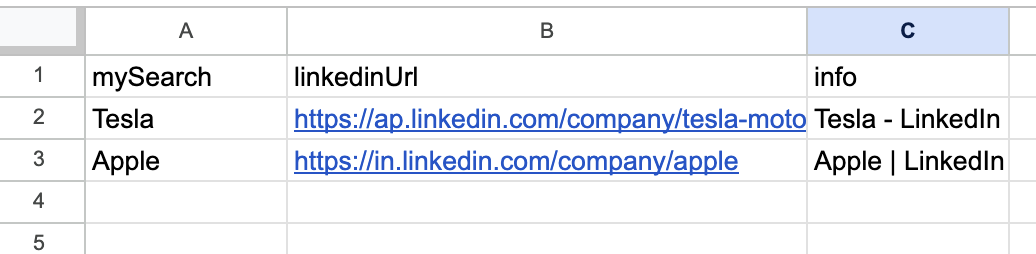"
},
"typeVersion": 1
},
{
"id": "00dab93c-f84e-4829-80ae-d8cc6031800f",
"name": "Get URLs from first sheet",
"type": "n8n-nodes-base.googleSheets",
"position": [
352,
720
],
"parameters": {
"options": {},
"sheetName": {
"__rl": true,
"mode": "name",
"value": "={{ $json.google_sheet_name }}"
},
"documentId": {
"__rl": true,
"mode": "url",
"value": "={{ $json.google_sheet_url }}"
}
},
"credentials": {
"googleSheetsOAuth2Api": {
"name": "<your credential>"
}
},
"typeVersion": 4.6
},
{
"id": "1ad7685b-0303-45dd-95ff-b79c2e57622d",
"name": "Set google sheet URL & original sheet name",
"type": "n8n-nodes-base.set",
"position": [
128,
624
],
"parameters": {
"options": {},
"assignments": {
"assignments": [
{
"id": "1cdf422f-6817-4666-a8f3-90a2939d3377",
"name": "google_sheet_url",
"type": "string",
"value": "xxxxxxxxxxxx"
},
{
"id": "6a06b96f-0df8-4b3c-bd42-cb22127e7ac2",
"name": "google_sheet_name",
"type": "string",
"value": "companies"
}
]
}
},
"typeVersion": 3.4
},
{
"id": "18dd0ef5-b90a-488d-aae8-ac7e91918531",
"name": "Sticky Note2",
"type": "n8n-nodes-base.stickyNote",
"position": [
320,
880
],
"parameters": {
"color": 4,
"width": 400,
"height": 352,
"content": "## Google Sheet INPUT Example\n\n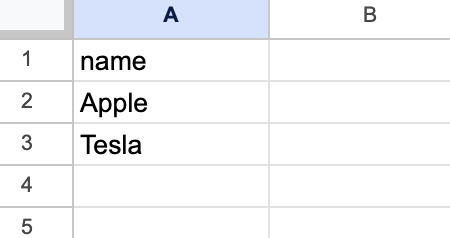"
},
"typeVersion": 1
},
{
"id": "7be3757e-fc71-46aa-b2b2-955c9b11565c",
"name": "wait for previous nodes to finish",
"type": "n8n-nodes-base.merge",
"position": [
576,
624
],
"parameters": {},
"typeVersion": 3.2
},
{
"id": "8cd6f699-ca26-442a-9ff2-3d4ee0fe1a3a",
"name": "format data for Apify INPUT type",
"type": "n8n-nodes-base.code",
"notes": "This node is deisgned to properly format the data before its feed to the APIFY Actor, which needs a specific formating as INPUT as you can check here https://apify.com/dev_fusion/linkedin-profile-scraper/input-schema",
"position": [
800,
624
],
"parameters": {
"jsCode": "let listOfCompanies = ''\nfor (const item of $('Get URLs from first sheet').all()) {\n listOfCompanies += `\\n${item.json.name}`\n}\n\nreturn { \n json: {\n queries : listOfCompanies\n }\n}"
},
"typeVersion": 2
},
{
"id": "0b6fa7e5-2cd5-42ed-86e2-606b420a476f",
"name": "Run Actor on Apify",
"type": "@apify/n8n-nodes-apify.apify",
"position": [
1024,
624
],
"parameters": {
"actorId": {
"__rl": true,
"mode": "list",
"value": "9X6Pju8NeHNTvzRxF",
"cachedResultUrl": "https://console.apify.com/actors/9X6Pju8NeHNTvzRxF/input",
"cachedResultName": "LinkedIn Company URL - Mass Profile Finder (anchor/LinkedIn-company-url-finder)"
},
"timeout": {},
"customBody": "={{ $json }}",
"actorSource": "store"
},
"credentials": {
"apifyApi": {
"name": "<your credential>"
}
},
"typeVersion": 1
},
{
"id": "c8ee379d-0574-42fd-94b0-ceb571290425",
"name": "Get Results from Apify",
"type": "@apify/n8n-nodes-apify.apify",
"position": [
1248,
624
],
"parameters": {
"offset": {},
"resource": "Datasets",
"datasetId": "={{ $json.defaultDatasetId }}"
},
"credentials": {
"apifyApi": {
"name": "<your credential>"
}
},
"typeVersion": 1
},
{
"id": "6822cf59-2533-41c8-937f-ce627eca61e5",
"name": "Create new sheet for founded compnaies",
"type": "n8n-nodes-base.googleSheets",
"position": [
352,
528
],
"parameters": {
"title": "=company-urls-{{new Date().format('dd/mm-HH:mm')}}",
"options": {},
"operation": "create",
"documentId": {
"__rl": true,
"mode": "url",
"value": "={{ $json.google_sheet_url }}"
}
},
"credentials": {
"googleSheetsOAuth2Api": {
"name": "<your credential>"
}
},
"typeVersion": 4.6
},
{
"id": "bf4e6d14-c3b8-4b65-beca-94727c2763c9",
"name": "Add company urls into the new Sheet",
"type": "n8n-nodes-base.googleSheets",
"position": [
1472,
624
],
"parameters": {
"columns": {
"value": {},
"schema": [
{
"id": "full_name",
"type": "string",
"display": true,
"removed": false,
"required": false,
"displayName": "full_name",
"defaultMatch": false,
"canBeUsedToMatch": true
},
{
"id": "first_name",
"type": "string",
"display": true,
"removed": false,
"required": false,
"displayName": "first_name",
"defaultMatch": false,
"canBeUsedToMatch": true
},
{
"id": "last_name",
"type": "string",
"display": true,
"removed": false,
"required": false,
"displayName": "last_name",
"defaultMatch": false,
"canBeUsedToMatch": true
},
{
"id": "headline",
"type": "string",
"display": true,
"removed": false,
"required": false,
"displayName": "headline",
"defaultMatch": false,
"canBeUsedToMatch": true
},
{
"id": "summary",
"type": "string",
"display": true,
"removed": false,
"required": false,
"displayName": "summary",
"defaultMatch": false,
"canBeUsedToMatch": true
},
{
"id": "country",
"type": "string",
"display": true,
"removed": false,
"required": false,
"displayName": "country",
"defaultMatch": false,
"canBeUsedToMatch": true
},
{
"id": "city",
"type": "string",
"display": true,
"removed": false,
"required": false,
"displayName": "city",
"defaultMatch": false,
"canBeUsedToMatch": true
},
{
"id": "profile_pic_url",
"type": "string",
"display": true,
"removed": false,
"required": false,
"displayName": "profile_pic_url",
"defaultMatch": false,
"canBeUsedToMatch": true
},
{
"id": "follower_count",
"type": "string",
"display": true,
"removed": false,
"required": false,
"displayName": "follower_count",
"defaultMatch": false,
"canBeUsedToMatch": true
},
{
"id": "public_identifier",
"type": "string",
"display": true,
"removed": false,
"required": false,
"displayName": "public_identifier",
"defaultMatch": false,
"canBeUsedToMatch": true
},
{
"id": "open_to_work",
"type": "string",
"display": true,
"removed": false,
"required": false,
"displayName": "open_to_work",
"defaultMatch": false,
"canBeUsedToMatch": true
},
{
"id": "show_verification_badge",
"type": "string",
"display": true,
"removed": false,
"required": false,
"displayName": "show_verification_badge",
"defaultMatch": false,
"canBeUsedToMatch": true
},
{
"id": "skills",
"type": "string",
"display": true,
"removed": false,
"required": false,
"displayName": "skills",
"defaultMatch": false,
"canBeUsedToMatch": true
},
{
"id": "certifications",
"type": "string",
"display": true,
"removed": false,
"required": false,
"displayName": "certifications",
"defaultMatch": false,
"canBeUsedToMatch": true
},
{
"id": "experiences",
"type": "string",
"display": true,
"removed": false,
"required": false,
"displayName": "experiences",
"defaultMatch": false,
"canBeUsedToMatch": true
},
{
"id": "education",
"type": "string",
"display": true,
"removed": false,
"required": false,
"displayName": "education",
"defaultMatch": false,
"canBeUsedToMatch": true
},
{
"id": "background_cover_image_url",
"type": "string",
"display": true,
"removed": false,
"required": false,
"displayName": "background_cover_image_url",
"defaultMatch": false,
"canBeUsedToMatch": true
},
{
"id": "languages",
"type": "string",
"display": true,
"removed": false,
"required": false,
"displayName": "languages",
"defaultMatch": false,
"canBeUsedToMatch": true
},
{
"id": "personal_emails",
"type": "string",
"display": true,
"removed": false,
"required": false,
"displayName": "personal_emails",
"defaultMatch": false,
"canBeUsedToMatch": true
},
{
"id": "personal_numbers",
"type": "string",
"display": true,
"removed": false,
"required": false,
"displayName": "personal_numbers",
"defaultMatch": false,
"canBeUsedToMatch": true
},
{
"id": "company_name",
"type": "string",
"display": true,
"removed": false,
"required": false,
"displayName": "company_name",
"defaultMatch": false,
"canBeUsedToMatch": true
},
{
"id": "company_industry",
"type": "string",
"display": true,
"removed": false,
"required": false,
"displayName": "company_industry",
"defaultMatch": false,
"canBeUsedToMatch": true
},
{
"id": "company_website",
"type": "string",
"display": true,
"removed": false,
"required": false,
"displayName": "company_website",
"defaultMatch": false,
"canBeUsedToMatch": true
},
{
"id": "company_linkedin",
"type": "string",
"display": true,
"removed": false,
"required": false,
"displayName": "company_linkedin",
"defaultMatch": false,
"canBeUsedToMatch": true
},
{
"id": "company_size",
"type": "string",
"display": true,
"removed": false,
"required": false,
"displayName": "company_size",
"defaultMatch": false,
"canBeUsedToMatch": true
},
{
"id": "url",
"type": "string",
"display": true,
"removed": false,
"required": false,
"displayName": "url",
"defaultMatch": false,
"canBeUsedToMatch": true
}
],
"mappingMode": "autoMapInputData",
"matchingColumns": [],
"attemptToConvertTypes": false,
"convertFieldsToString": false
},
"options": {},
"operation": "append",
"sheetName": {
"__rl": true,
"mode": "id",
"value": "={{ $('Create new sheet for founded compnaies').first().json.sheetId }}"
},
"documentId": {
"__rl": true,
"mode": "url",
"value": "={{ $('Set google sheet URL & original sheet name').first().json.google_sheet_url }}"
}
},
"credentials": {
"googleSheetsOAuth2Api": {
"name": "<your credential>"
}
},
"typeVersion": 4.6
}
],
"active": false,
"settings": {
"executionOrder": "v1"
},
"versionId": "8174a379-354c-4efa-a9d5-2e691d4ab67a",
"connections": {
"Run Actor on Apify": {
"main": [
[
{
"node": "Get Results from Apify",
"type": "main",
"index": 0
}
]
]
},
"Get Results from Apify": {
"main": [
[
{
"node": "Add company urls into the new Sheet",
"type": "main",
"index": 0
}
]
]
},
"Get URLs from first sheet": {
"main": [
[
{
"node": "wait for previous nodes to finish",
"type": "main",
"index": 1
}
]
]
},
"format data for Apify INPUT type": {
"main": [
[
{
"node": "Run Actor on Apify",
"type": "main",
"index": 0
}
]
]
},
"wait for previous nodes to finish": {
"main": [
[
{
"node": "format data for Apify INPUT type",
"type": "main",
"index": 0
}
]
]
},
"When clicking \u2018Execute workflow\u2019": {
"main": [
[
{
"node": "Set google sheet URL & original sheet name",
"type": "main",
"index": 0
}
]
]
},
"Create new sheet for founded compnaies": {
"main": [
[
{
"node": "wait for previous nodes to finish",
"type": "main",
"index": 0
}
]
]
},
"Set google sheet URL & original sheet name": {
"main": [
[
{
"node": "Create new sheet for founded compnaies",
"type": "main",
"index": 0
},
{
"node": "Get URLs from first sheet",
"type": "main",
"index": 0
}
]
]
}
}
}
Credentials you'll need
Each integration node will prompt for credentials when you import. We strip credential IDs before publishing — you'll add your own.
apifyApigoogleSheetsOAuth2Api
For the full experience including quality scoring and batch install features for each workflow upgrade to Pro
About this workflow
This n8n template shows how to populate a Google Spreadsheet with LinkedIn company URLs automatically using the Apify LinkedIn Company URL Finder actor from Anchor. It will create a new sheet with the matched LinkedIn URLs.
Source: https://n8n.io/workflows/10738/ — original creator credit. Request a take-down →
Related workflows
Workflows that share integrations, category, or trigger type with this one. All free to copy and import.
Lead Generation, Market Intelligence, Recruitment Automation, Business Intelligence
This workflow transforms new YouTube videos from any channel into high-quality, ready-to-publish LinkedIn posts and saves them directly to a Google Sheet, creating a powerful, automated content repurp
Disclaimer: this workflow only works on self-hosted instances due to the file system usage.
More workflow: https://aitool.wiki/
⚠️ Important — Start Here Before importing this template, make a personal copy of the provided Google Sheets template. This workflow is designed to work out of the box with that sheet.