 zahir khan
 This workflow corresponds to n8n.io template #12452 — we link there as the canonical source.
This workflow follows the Google Sheets → HTTP Request recipe pattern — see all workflows that pair these two integrations.
The workflow JSON
Copy or download the full n8n JSON below. Paste it into a new n8n workflow, add your credentials, activate. Full import guide →
{
"meta": {
"templateCredsSetupCompleted": true
},
"nodes": [
{
"id": "3a431ca8-7558-42a8-a139-94ec7bd055fd",
"name": "When clicking \u2018Test workflow\u2019",
"type": "n8n-nodes-base.manualTrigger",
"position": [
2704,
7360
],
"parameters": {},
"typeVersion": 1
},
{
"id": "eff529f6-62b4-4214-8fdf-aff3b7fd82cf",
"name": "Schedule Trigger",
"type": "n8n-nodes-base.scheduleTrigger",
"position": [
2704,
7248
],
"parameters": {
"rule": {
"interval": [
{
"field": "minutes"
}
]
}
},
"typeVersion": 1.2
},
{
"id": "242dd0cc-be1a-4b81-8bba-4f992a3b4401",
"name": "Get new image",
"type": "n8n-nodes-base.googleSheets",
"position": [
2912,
7360
],
"parameters": {
"sheetName": {
"__rl": true,
"mode": "list",
"value": "",
"cachedResultUrl": ""
},
"documentId": {
"__rl": true,
"mode": "list",
"value": "",
"cachedResultUrl": ""
}
},
"typeVersion": 4.5
},
{
"id": "350b660d-4a06-4958-b0bf-79492c693a0c",
"name": "Set Data",
"type": "n8n-nodes-base.set",
"position": [
3056,
7360
],
"parameters": {
"options": {},
"assignments": {
"assignments": [
{
"id": "assign-image",
"name": "image_url",
"type": "string",
"value": "={{ $json['IMAGE_URL'] }}"
}
]
}
},
"typeVersion": 3.4
},
{
"id": "9a0fe2a2-c883-4417-972c-ba5ca7c36bf9",
"name": "Submit to Hunyuan3D",
"type": "n8n-nodes-base.httpRequest",
"position": [
3360,
7360
],
"parameters": {
"url": "https://queue.fal.run/fal-ai/hunyuan3d/v2",
"method": "POST",
"options": {},
"jsonBody": "={\n \"input_image_url\": \"{{ $json.image_url }}\",\n \"num_inference_steps\": 50,\n \"guidance_scale\": 7.5,\n \"octree_resolution\": 256,\n \"textured_mesh\": true\n}",
"sendBody": true,
"specifyBody": "json",
"authentication": "genericCredentialType",
"genericAuthType": "httpHeaderAuth"
},
"typeVersion": 4.2
},
{
"id": "0dd63e22-9e97-4456-a76e-4703f01d10ac",
"name": "Wait 30 sec",
"type": "n8n-nodes-base.wait",
"position": [
3584,
7360
],
"parameters": {
"amount": 30
},
"typeVersion": 1.1
},
{
"id": "515a6da6-9731-47b0-952a-5ad7842f81cd",
"name": "Check Status",
"type": "n8n-nodes-base.httpRequest",
"position": [
3792,
7360
],
"parameters": {
"url": "=https://queue.fal.run/fal-ai/hunyuan3d/v2/requests/{{ $('Submit to Hunyuan3D').item.json.request_id }}/status",
"options": {},
"authentication": "genericCredentialType",
"genericAuthType": "httpHeaderAuth"
},
"typeVersion": 4.2
},
{
"id": "96a80bfa-289a-4240-a789-e7f43b99a66f",
"name": "Is Completed?",
"type": "n8n-nodes-base.if",
"position": [
4016,
7360
],
"parameters": {
"options": {},
"conditions": {
"options": {
"version": 2,
"leftValue": "",
"caseSensitive": true,
"typeValidation": "strict"
},
"combinator": "and",
"conditions": [
{
"id": "condition-completed",
"operator": {
"name": "filter.operator.equals",
"type": "string",
"operation": "equals"
},
"leftValue": "={{ $json.status }}",
"rightValue": "COMPLETED"
}
]
}
},
"typeVersion": 2.2
},
{
"id": "c2ce1ee3-4689-4850-86c9-60646aea3caf",
"name": "Get Final Result",
"type": "n8n-nodes-base.httpRequest",
"position": [
4240,
7264
],
"parameters": {
"url": "=https://queue.fal.run/fal-ai/hunyuan3d/v2/requests/{{ $('Submit to Hunyuan3D').item.json.request_id }}",
"options": {},
"authentication": "genericCredentialType",
"genericAuthType": "httpHeaderAuth"
},
"typeVersion": 4.2
},
{
"id": "991a3e46-4aea-4dc2-83db-242329c69005",
"name": "Update Result",
"type": "n8n-nodes-base.googleSheets",
"position": [
4464,
7264
],
"parameters": {
"operation": "update",
"sheetName": {
"__rl": true,
"mode": "list",
"value": "",
"cachedResultUrl": ""
},
"documentId": {
"__rl": true,
"mode": "list",
"value": "",
"cachedResultUrl": ""
}
},
"typeVersion": 4.5
},
{
"id": "3fce6d49-b635-49f4-a5b3-b0a1d9266e02",
"name": "Sticky Note",
"type": "n8n-nodes-base.stickyNote",
"position": [
2912,
6624
],
"parameters": {
"width": 551,
"height": 451,
"content": "## How it works\n1. **Trigger:** Starts manually or on a 15-minute schedule.\n2. **Fetch Data:** Reads image URLs (e.g. fashion sketches, product photos) from Google Sheets.\n3. **Generate 3D:** Sends the image to Fal.ai (Hunyuan3D v2) for processing.\n4. **Poll Status:** Loops every 30 seconds to check if the 3D model is ready.\n5. **Update Sheet:** Retrieves the `.glb` file URL and saves it back to Google Sheets.\n\n## Setup steps\n1. **Google Sheet:** Create a sheet with headers `IMAGE_URL` and `RESULT_GLB`.\n2. **Credentials:** Set up Fal.ai (API Key) and Google Sheets OAuth2 credentials.\n3. **Configuration:** Select your specific Sheet ID in the 'Get new image' and 'Update Result' nodes."
},
"typeVersion": 1
},
{
"id": "6417e0c8-6d9e-448a-964b-f4afd9af501f",
"name": "Sticky Note1",
"type": "n8n-nodes-base.stickyNote",
"position": [
2656,
7152
],
"parameters": {
"color": 7,
"width": 560,
"height": 380,
"content": "### 1. Input & Data Setup\nWatches for new data on schedule or manual trigger, then fetches empty rows from Google Sheets."
},
"typeVersion": 1
},
{
"id": "c2e0cb9c-5583-4e51-ab16-9fb7bd562246",
"name": "Sticky Note2",
"type": "n8n-nodes-base.stickyNote",
"position": [
3264,
7184
],
"parameters": {
"color": 7,
"width": 940,
"height": 380,
"content": "### 2. Generate & Poll Status\nSubmits the image to Hunyuan3D v2, then enters a 30s wait-loop until the generation status is 'COMPLETED'."
},
"typeVersion": 1
},
{
"id": "a20ff25a-3017-4b2f-b0f3-0aa6757e5fff",
"name": "Sticky Note3",
"type": "n8n-nodes-base.stickyNote",
"position": [
4224,
7184
],
"parameters": {
"color": 7,
"width": 380,
"height": 380,
"content": "### 3. Save Result\nFetches the final .glb URL and updates the Google Sheet row."
},
"typeVersion": 1
},
{
"id": "838fa0c0-596d-4a5f-a632-f8579648fb51",
"name": "Sticky Note4",
"type": "n8n-nodes-base.stickyNote",
"position": [
3552,
6544
],
"parameters": {
"width": 708,
"height": 584,
"content": "# Image-to-3D(.glb)\n\n\nThis workflow allows users to convert a 2D image into a 3D model by integrating multiple AI and web services. The process begins with a user uploading or providing an image URL, which is then sent to a generative AI model capable of interpreting the content and generating a 3D representation in .glb format.\n\n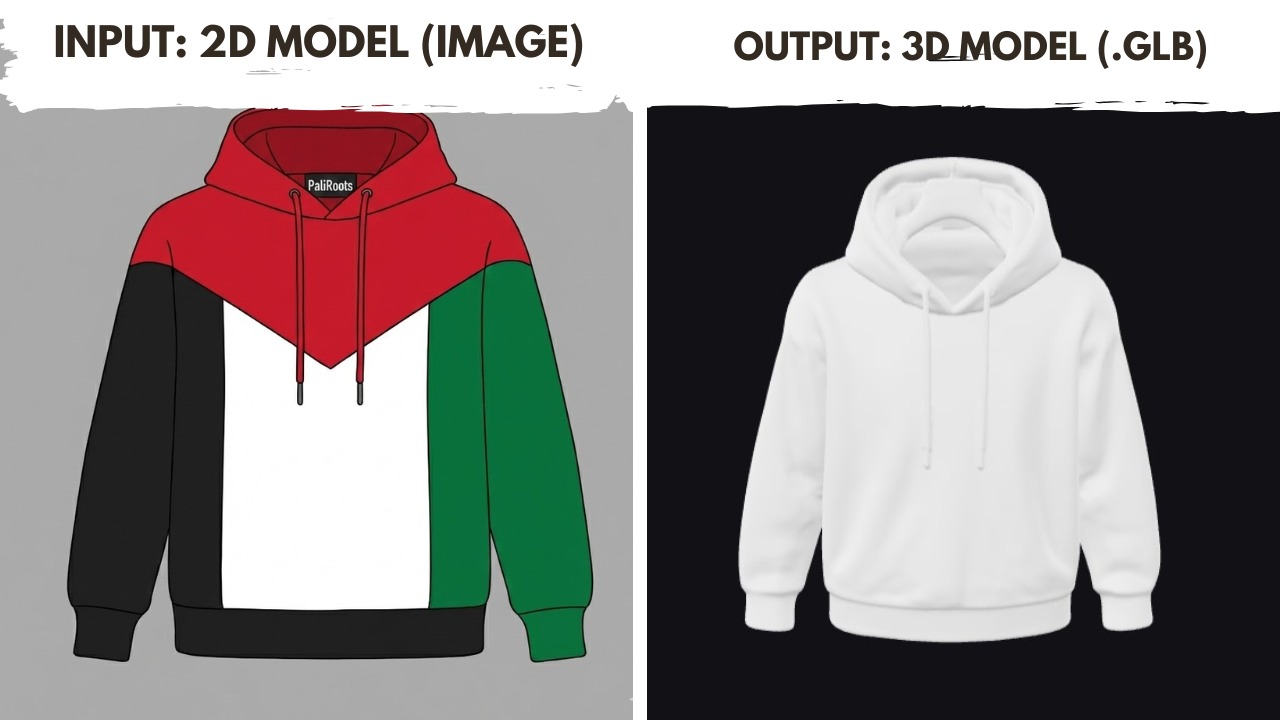"
},
"typeVersion": 1
}
],
"connections": {
"Set Data": {
"main": [
[
{
"node": "Submit to Hunyuan3D",
"type": "main",
"index": 0
}
]
]
},
"Wait 30 sec": {
"main": [
[
{
"node": "Check Status",
"type": "main",
"index": 0
}
]
]
},
"Check Status": {
"main": [
[
{
"node": "Is Completed?",
"type": "main",
"index": 0
}
]
]
},
"Get new image": {
"main": [
[
{
"node": "Set Data",
"type": "main",
"index": 0
}
]
]
},
"Is Completed?": {
"main": [
[
{
"node": "Get Final Result",
"type": "main",
"index": 0
}
],
[
{
"node": "Wait 30 sec",
"type": "main",
"index": 0
}
]
]
},
"Get Final Result": {
"main": [
[
{
"node": "Update Result",
"type": "main",
"index": 0
}
]
]
},
"Schedule Trigger": {
"main": [
[
{
"node": "Get new image",
"type": "main",
"index": 0
}
]
]
},
"Submit to Hunyuan3D": {
"main": [
[
{
"node": "Wait 30 sec",
"type": "main",
"index": 0
}
]
]
},
"When clicking \u2018Test workflow\u2019": {
"main": [
[
{
"node": "Get new image",
"type": "main",
"index": 0
}
]
]
}
}
}
For the full experience including quality scoring and batch install features for each workflow upgrade to Pro
About this workflow
This workflow automates the conversion of 2D images into high-quality 3D models ( format) by integrating Google Sheets with the Hunyuan3D v2 model on Fal.ai. It handles the entire pipeline—from fetching image URLs to polling for completion and saving the final asset—eliminating…
Source: https://n8n.io/workflows/12452/ — original creator credit. Request a take-down →
Related workflows
Workflows that share integrations, category, or trigger type with this one. All free to copy and import.
TrackCollect_deeper. Uses googleSheets, httpRequest, @n-octo-n/n8n-nodes-json-database, itemLists. Event-driven trigger; 80 nodes.
This template is ideal for solo store owners, eCommerce marketers, automation beginners, or anyone using Shopify and Gmail who wants to recover lost revenue without coding.
PCN. Uses googleSheets, httpRequest, @n-octo-n/n8n-nodes-json-database, itemLists. Event-driven trigger; 60 nodes.
Product Ad Machine. Uses googleDrive, googleSheets, httpRequest, @ffmpeg-micro/n8n-nodes-ffmpeg-micro. Event-driven trigger; 60 nodes.
Basic AI SEO KW Research n8n DataForSEO Gumroad 030125. Uses googleSheets, googleDrive, httpRequest. Event-driven trigger; 56 nodes.