 Laura Piraux
 This workflow corresponds to n8n.io template #5048 — we link there as the canonical source.
This workflow follows the Agent → HTTP Request recipe pattern — see all workflows that pair these two integrations.
The workflow JSON
Copy or download the full n8n JSON below. Paste it into a new n8n workflow, add your credentials, activate. Full import guide →
{
"id": "VkMKwxev9DEtmKjz",
"meta": {
"templateCredsSetupCompleted": true
},
"name": "Notion AI summary property",
"tags": [],
"nodes": [
{
"id": "3ea07cde-120c-4e53-a4ab-150bbe9d3f3d",
"name": "Sticky Note",
"type": "n8n-nodes-base.stickyNote",
"position": [
280,
-300
],
"parameters": {
"color": 5,
"width": 440,
"height": 300,
"content": "## Adapt this template to your needs \n1. Instead of using a cron that runs every hour, use Notion webhooks to retrigger the automation when a new comment is added (and run it only on the pages that received a new comment). It's easier to do with a Cloud n8n.\n2. Play around with the prompt to get something short/longer, more action oriented, etc. \n3. If the AI summary has been erased by mistake, make sure the automation will re-fill it. \n4. Reduce what is passed to the AI model to reduce the tokens consumption (e.g. to keep only the plain text version of the comments)"
},
"typeVersion": 1
},
{
"id": "1669e388-fc92-4290-86a6-af565fd16cc7",
"name": "Google Gemini Chat Model",
"type": "@n8n/n8n-nodes-langchain.lmChatGoogleGemini",
"position": [
1860,
-260
],
"parameters": {
"options": {},
"modelName": "models/gemini-2.5-pro-preview-03-25"
},
"credentials": {
"googlePalmApi": {
"name": "<your credential>"
}
},
"typeVersion": 1
},
{
"id": "26177b80-b908-408d-9adc-be87d60625d0",
"name": "Sticky Note5",
"type": "n8n-nodes-base.stickyNote",
"position": [
960,
-300
],
"parameters": {
"width": 200,
"height": 240,
"content": "## Step 1\nDefine your variables: \n* ID of the database\n* Name of the property that will contain the AI summary (type text)\n* Name of the property that can store the last execution date (type date)"
},
"typeVersion": 1
},
{
"id": "383071b8-d174-423d-8bfc-eff9c431c551",
"name": "Sticky Note6",
"type": "n8n-nodes-base.stickyNote",
"position": [
1200,
-300
],
"parameters": {
"width": 180,
"height": 220,
"content": "## Step 2\nSet your Notion credentials. \n\nYou'll need a Notion internal integration.\n\nhttps://www.notion.so/profile/integrations"
},
"typeVersion": 1
},
{
"id": "704f0a7e-e9c3-4109-854b-49341f4b218f",
"name": "Sticky Note7",
"type": "n8n-nodes-base.stickyNote",
"position": [
1420,
-300
],
"parameters": {
"width": 180,
"content": "## Step 3\nSet your Notion credentials. \n\nRe-use the credentials created in Step 2\n"
},
"typeVersion": 1
},
{
"id": "d6c30d1b-eea3-46fd-a96c-0b9f9d0b57e2",
"name": "Sticky Note8",
"type": "n8n-nodes-base.stickyNote",
"position": [
1820,
-100
],
"parameters": {
"width": 180,
"height": 140,
"content": "## Step 4\nSet your API key. You can use the LLM of your choice (e.g. OpenAI, Claude, etc.)."
},
"typeVersion": 1
},
{
"id": "96749f98-914f-4317-ae47-fb4d7bb12d41",
"name": "Run every hour",
"type": "n8n-nodes-base.scheduleTrigger",
"position": [
800,
-480
],
"parameters": {
"rule": {
"interval": [
{
"field": "hours"
}
]
}
},
"typeVersion": 1.2
},
{
"id": "fc95f0f5-80b1-4e36-9004-d188d15eec4a",
"name": "Define your Notion Database",
"type": "n8n-nodes-base.set",
"position": [
1000,
-480
],
"parameters": {
"options": {},
"assignments": {
"assignments": [
{
"id": "8a294900-f367-47a2-b260-344b133dc2ff",
"name": "notionDatabaseId",
"type": "string",
"value": "20d45c70c57381f09418d42c78ad360b"
},
{
"id": "650dfea4-7240-482e-bf0d-b978edcc3d78",
"name": "AI Summary Notion Property (type text)",
"type": "string",
"value": "AI Summary"
},
{
"id": "47c1271d-2b0b-4dab-a3c2-c6030a03a660",
"name": "Last Execution Notion Property (type date)",
"type": "string",
"value": "Last AI summary update"
}
]
}
},
"typeVersion": 3.4,
"alwaysOutputData": true
},
{
"id": "45a590dc-ccf0-4497-87e3-e257f5ce9279",
"name": "List database pages",
"type": "n8n-nodes-base.notion",
"position": [
1220,
-480
],
"parameters": {
"simple": false,
"options": {},
"resource": "databasePage",
"operation": "getAll",
"returnAll": true,
"databaseId": {
"__rl": true,
"mode": "id",
"value": "={{ $json.notionDatabaseId }}"
}
},
"credentials": {
"notionApi": {
"name": "<your credential>"
}
},
"typeVersion": 2.2
},
{
"id": "95959678-6a03-454f-beba-ac622f42f293",
"name": "List comments",
"type": "n8n-nodes-base.httpRequest",
"position": [
1440,
-480
],
"parameters": {
"url": "=https://api.notion.com/v1/comments?block_id={{ $json.id }}",
"options": {},
"authentication": "predefinedCredentialType",
"nodeCredentialType": "notionApi"
},
"credentials": {
"notionApi": {
"name": "<your credential>"
}
},
"typeVersion": 4.2
},
{
"id": "25a54b62-0b18-4012-880f-1c6ce05386fb",
"name": "Only keep pages that received new comments since last execution",
"type": "n8n-nodes-base.filter",
"position": [
1640,
-480
],
"parameters": {
"options": {},
"conditions": {
"options": {
"version": 2,
"leftValue": "",
"caseSensitive": true,
"typeValidation": "strict"
},
"combinator": "or",
"conditions": [
{
"id": "309836eb-51d2-4543-bc03-949d6280b0dc",
"operator": {
"type": "dateTime",
"operation": "after"
},
"leftValue": "={{$json.results.length && $json.results[$json.results.length-1].last_edited_time }}",
"rightValue": "={{ $('List database pages').item.json.properties[$('Define your Notion Database').item.json['Last Execution Notion Property']].date.start }}"
},
{
"id": "24faa20c-973d-4539-9b7a-706368527304",
"operator": {
"type": "string",
"operation": "empty",
"singleValue": true
},
"leftValue": "={{ $('List database pages').item.json.properties[$('Define your Notion Database').item.json['Last Execution Notion Property']].date.start }}",
"rightValue": ""
}
]
}
},
"typeVersion": 2.2
},
{
"id": "5b7a56df-590f-4c4b-a912-086ec4cddce6",
"name": "Summarize conversation",
"type": "@n8n/n8n-nodes-langchain.agent",
"position": [
1880,
-480
],
"parameters": {
"text": "={{ JSON.stringify($json.results)}}\n\nThose are comments from a single Notion Page extracted from Notion API. They show an email conversation (each comment representing an email). \n\nCan you please summarize the email conversation? \n\nPlease send me only the summary of maximum 6 sentencences. Example: \"Stefan initially had trouble selecting a Notion database in Slap, which he resolved. He then faced email delivery/ingestion issues between his Infomaniak email and Slap/Notion, partly complicated by general Notion instability. They scheduled and had a meeting, after which Laura shared resources and promised follow-ups on specific features/offers.\"\n\nIf there is no comment, do not generate a summary but give as answer \"Empty\".",
"options": {},
"promptType": "define"
},
"typeVersion": 2
},
{
"id": "5351ddd9-b900-4646-9fa4-03529a73dba7",
"name": "Add summary to Notion page and update last execution date",
"type": "n8n-nodes-base.notion",
"position": [
2260,
-480
],
"parameters": {
"pageId": {
"__rl": true,
"mode": "id",
"value": "={{ $('List database pages').item.json.id }}"
},
"simple": false,
"options": {},
"resource": "databasePage",
"operation": "update",
"propertiesUi": {
"propertyValues": [
{
"key": "={{ $('Define your Notion Database').item.json['AI Summary Notion Property (type text)'] }}|rich_text",
"textContent": "={{ $json.output }}"
},
{
"key": "={{ $('Define your Notion Database').item.json['Last Execution Notion Property (type date)'] }}|date",
"date": "={{ $('Run every hour').item.json.timestamp }}"
}
]
}
},
"credentials": {
"notionApi": {
"name": "<your credential>"
}
},
"typeVersion": 2.2
},
{
"id": "04e9194e-adc5-4f3f-9b20-bec0be48304b",
"name": "Sticky Note1",
"type": "n8n-nodes-base.stickyNote",
"position": [
280,
-620
],
"parameters": {
"color": 6,
"width": 440,
"height": 300,
"content": "## Generate an AI summary of your Notion comments\n\nThis automation reads the comments of your Notion pages and ask the AI to provide a summary of the conversation.\n\n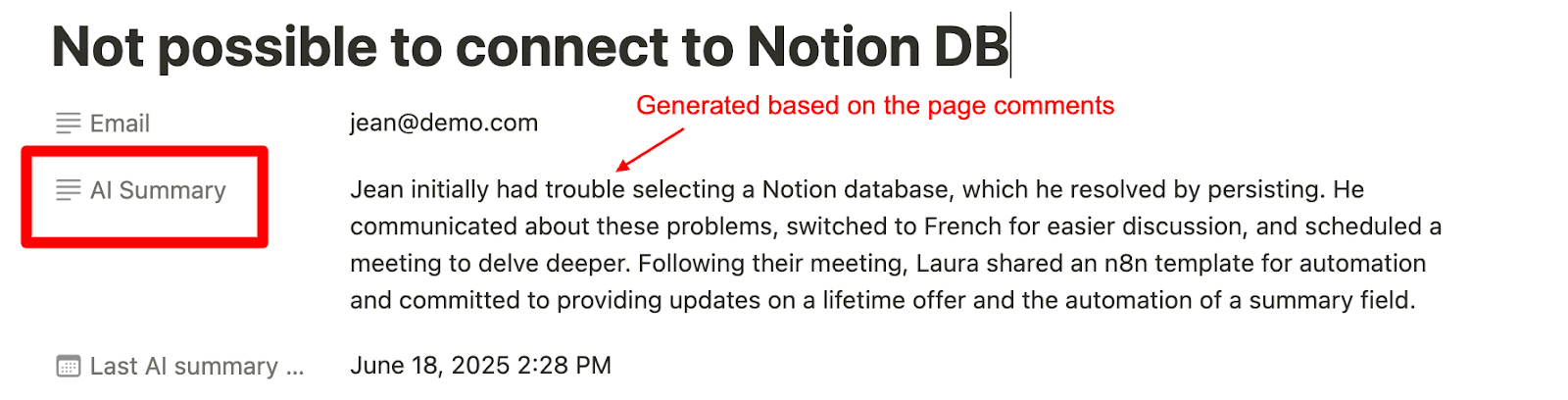\n"
},
"typeVersion": 1
},
{
"id": "c67a2e06-14ef-414c-b4b6-1d04ee4ed43e",
"name": "Sticky Note2",
"type": "n8n-nodes-base.stickyNote",
"position": [
1880,
-580
],
"parameters": {
"color": 5,
"height": 80,
"content": "**Tip**\nAdapt the prompt to your use case for better results."
},
"typeVersion": 1
}
],
"active": false,
"settings": {
"executionOrder": "v1"
},
"versionId": "264e930a-01cf-4bf7-a198-cd344d25038f",
"connections": {
"List comments": {
"main": [
[
{
"node": "Only keep pages that received new comments since last execution",
"type": "main",
"index": 0
}
]
]
},
"Run every hour": {
"main": [
[
{
"node": "Define your Notion Database",
"type": "main",
"index": 0
}
]
]
},
"List database pages": {
"main": [
[
{
"node": "List comments",
"type": "main",
"index": 0
}
]
]
},
"Summarize conversation": {
"main": [
[
{
"node": "Add summary to Notion page and update last execution date",
"type": "main",
"index": 0
}
]
]
},
"Google Gemini Chat Model": {
"ai_languageModel": [
[
{
"node": "Summarize conversation",
"type": "ai_languageModel",
"index": 0
}
]
]
},
"Define your Notion Database": {
"main": [
[
{
"node": "List database pages",
"type": "main",
"index": 0
}
]
]
},
"Only keep pages that received new comments since last execution": {
"main": [
[
{
"node": "Summarize conversation",
"type": "main",
"index": 0
}
]
]
}
}
}
Credentials you'll need
Each integration node will prompt for credentials when you import. We strip credential IDs before publishing — you'll add your own.
googlePalmApinotionApi
For the full experience including quality scoring and batch install features for each workflow upgrade to Pro
About this workflow
This automation is for teams working in Notion. When you have a lot of back and forth in the comment section, it’s easy to lose track of what is going on in the conversation. This automation relies on AI to generate a summary of the comment section.
Source: https://n8n.io/workflows/5048/ — original creator credit. Request a take-down →
Related workflows
Workflows that share integrations, category, or trigger type with this one. All free to copy and import.
LinkedIn_Job_Hunt_and_Cover_Letter. Uses outputParserStructured, outputParserAutofixing, googleDrive, agent. Scheduled trigger; 85 nodes.
Reddit-Insights-N8N. Uses @brightdata/n8n-nodes-brightdata, agent, lmChatGoogleGemini, rssFeedRead. Scheduled trigger; 29 nodes.
Eliminates the slow, inconsistent, and error-prone process of manually replying to Facebook comments by automating it with AI, ensuring fast, accurate, and on-brand customer engagement 24/7.
blog writing automation. Uses rssFeedRead, lmChatOpenAi, textClassifier, agent. Scheduled trigger; 90 nodes.
Automatically scan major financial newswires for biotech catalyst events, score them with AI sentiment analysis, and surface ranked trade candidates — all without manual monitoring.