 Trung Tran
 This workflow corresponds to n8n.io template #8510 — we link there as the canonical source.
This workflow follows the Agent → Chat Trigger recipe pattern — see all workflows that pair these two integrations.
The workflow JSON
Copy or download the full n8n JSON below. Paste it into a new n8n workflow, add your credentials, activate. Full import guide →
{
"id": "VGQLouOsaXvTC33w",
"meta": {
"templateCredsSetupCompleted": true
},
"name": "Chat-Based AWS IAM Policy Generator with AI Agent (OpenAI)",
"tags": [
{
"id": "zVkByIt5M465W2a8",
"name": "aws",
"createdAt": "2025-09-12T06:14:33.823Z",
"updatedAt": "2025-09-12T06:14:33.823Z"
}
],
"nodes": [
{
"id": "8e54adb3-9243-4aed-878f-19608fb72668",
"name": "When chat message received",
"type": "@n8n/n8n-nodes-langchain.chatTrigger",
"position": [
-336,
0
],
"parameters": {
"options": {}
},
"typeVersion": 1.3
},
{
"id": "a97ffd86-a54a-446f-989e-72b80715c627",
"name": "Simple Memory",
"type": "@n8n/n8n-nodes-langchain.memoryBufferWindow",
"position": [
16,
224
],
"parameters": {},
"typeVersion": 1.3
},
{
"id": "6b765ceb-ca6c-4637-84ff-56d3b3691e7d",
"name": "OpenAI Chat Model",
"type": "@n8n/n8n-nodes-langchain.lmChatOpenAi",
"position": [
-112,
224
],
"parameters": {
"model": {
"__rl": true,
"mode": "list",
"value": "gpt-4.1-mini"
},
"options": {}
},
"credentials": {
"openAiApi": {
"name": "<your credential>"
}
},
"typeVersion": 1.2
},
{
"id": "5327e0ae-52d3-4801-857f-d8fe28bc61ab",
"name": "Structured Output Parser",
"type": "@n8n/n8n-nodes-langchain.outputParserStructured",
"position": [
144,
224
],
"parameters": {
"jsonSchemaExample": "{\n \"SuggestedPolicyName\":\"\",\n \"PolicyJSON\":{\n \"Version\": \"2012-10-17\",\n \"Statement\": [\n {\n \"Sid\": \"AllowEC2ManagementInSingaporeExceptDelete\",\n \"Effect\": \"Allow\",\n \"Action\": [\n \"ec2:StartInstances\",\n \"ec2:StopInstances\",\n \"ec2:RebootInstances\",\n \"ec2:DescribeInstances\",\n \"ec2:DescribeInstanceStatus\",\n \"ec2:CreateTags\",\n \"ec2:DeleteTags\",\n \"ec2:ModifyInstanceAttribute\",\n \"ec2:MonitorInstances\",\n \"ec2:UnmonitorInstances\"\n ],\n \"Resource\": \"*\",\n \"Condition\": {\n \"StringEquals\": {\n \"aws:RequestedRegion\": \"ap-southeast-1\"\n }\n }\n }\n ]\n}\n}"
},
"typeVersion": 1.3
},
{
"id": "e8326ece-6413-4736-b3b2-db78d3e51ccc",
"name": "IAM Policy Creator Agent",
"type": "@n8n/n8n-nodes-langchain.agent",
"position": [
-56,
0
],
"parameters": {
"text": "=I want to create an IAM policy for my IT Support team.\n\nRequirements:\n {{ $json.chatInput }}\n\nPlease generate a JSON IAM policy that follows AWS best practices.",
"options": {
"systemMessage": "You are a helpful assistantYou are an AWS IAM Policy Generator Agent.\n\nYour goal is to help the user create **AWS IAM custom policies** in JSON format that follow **AWS best practices**:\n- Output must always be **valid AWS IAM JSON**.\n- Include `\"Version\": \"2012-10-17\"` at the top.\n- Policies should be **least privilege** by default (only allow the necessary actions and resources).\n- Use **Actions**, **Resources**, and optional **Conditions** properly.\n- Recommend **Conditions** (e.g., `aws:RequestedRegion`, `aws:username`, `IpAddress`) where appropriate to restrict access.\n- Use `\"Sid\"` values for readability.\n- Always scope `Resource` to ARNs when possible, avoid `\"*\"` unless required.\n- If the user is vague, ask clarifying questions (e.g., which services, which region, which actions: read-only, full access, custom).\n- Return only the JSON policy as the final answer (no explanation unless the user asks for it).\n- Follow AWS naming conventions and IAM best practices.\n\nYou must:\n1. Clarify user needs (service, actions, scope, region, conditions).\n2. Generate the **IAM policy JSON**.\n3. Ensure **valid JSON structure** and **no missing commas/brackets**."
},
"promptType": "define",
"hasOutputParser": true
},
"typeVersion": 2.2
},
{
"id": "d69deec6-ee04-4863-b43a-22eeb04d0506",
"name": "IAM Policy HTTP Request",
"type": "n8n-nodes-base.httpRequest",
"position": [
384,
0
],
"parameters": {
"url": "https://iam.amazonaws.com",
"method": "POST",
"options": {},
"sendBody": true,
"contentType": "form-urlencoded",
"sendHeaders": true,
"authentication": "predefinedCredentialType",
"bodyParameters": {
"parameters": [
{
"name": "Action",
"value": "CreatePolicy"
},
{
"name": "PolicyName",
"value": "={{ $json.output.SuggestedPolicyName }}{{ $now.format('yyyyMMddhhmm') }}"
},
{
"name": "PolicyDocument",
"value": "={{ $json.output.PolicyJSON.toJsonString() }}"
},
{
"name": "Version",
"value": "2010-05-08"
}
]
},
"headerParameters": {
"parameters": [
{}
]
},
"nodeCredentialType": "aws"
},
"credentials": {
"aws": {
"name": "<your credential>"
}
},
"typeVersion": 4.2
},
{
"id": "4c786713-626f-4fea-9942-5ac125c6b988",
"name": "Email for tracking",
"type": "n8n-nodes-base.emailSend",
"position": [
688,
0
],
"parameters": {
"html": "=Hello Team,\n\nThe new IAM policy has been created successfully. Below are the details:\n\t\u2022\tPolicy Name: {{ $json.CreatePolicyResponse.CreatePolicyResult.Policy.PolicyName }}\n\t\u2022\tPolicy ARN: {{ $json.CreatePolicyResponse.CreatePolicyResult.Policy.Arn }}\n\t\u2022\tPolicy ID: {{ $json.CreatePolicyResponse.CreatePolicyResult.Policy.PolicyId }}\n\t\u2022\tDefault Version: {{ $json.CreatePolicyResponse.CreatePolicyResult.Policy.DefaultVersionId }}\n\t\u2022\tAttachable: {{ $json.CreatePolicyResponse.CreatePolicyResult.Policy.IsAttachable }}\n\t\u2022\tPath: {{ $json.CreatePolicyResponse.CreatePolicyResult.Policy.Path }}\n\t\u2022\tAttachment Count: {{ $json.CreatePolicyResponse.CreatePolicyResult.Policy.AttachmentCount }}\n\t\u2022\tCreated At: {{ $json.CreatePolicyResponse.CreatePolicyResult.Policy.CreateDate }}\n\t\u2022\tUpdated At: {{ $json.CreatePolicyResponse.CreatePolicyResult.Policy.UpdateDate }}\n\nRequest ID: {{ $json.CreatePolicyResponse.ResponseMetadata.RequestId }}\n\nYou can now attach this policy to the appropriate IAM groups, roles, or users as needed.\n\nBest regards,\nAWS Automation Bot \ud83e\udd16",
"options": {},
"subject": "=\u2705 New IAM Policy Created: {{ $json.CreatePolicyResponse.CreatePolicyResult.Policy.PolicyName }}",
"toEmail": "user@example.com",
"fromEmail": "user@example.com"
},
"credentials": {
"smtp": {
"name": "<your credential>"
}
},
"typeVersion": 2.1
},
{
"id": "5212b034-d20e-47ac-91d4-75fd5c493c1e",
"name": "Sticky Note",
"type": "n8n-nodes-base.stickyNote",
"position": [
-1856,
-576
],
"parameters": {
"width": 976,
"height": 1360,
"content": "# Chat-Based AWS IAM Policy Generator with AI Agent\n> Chat-driven workflow that lets IT and DevOps teams generate custom AWS IAM policies via AI, automatically apply them to AWS, and send an email notification with policy details.\n## \ud83d\udc64 Who\u2019s it for\nThis workflow is designed for:\n- **Cloud Engineers / DevOps** who need to quickly generate and apply **custom IAM policies** in AWS. \n- **IT Support / Security teams** who want to create IAM policies through a **chat-based interface** without manually writing JSON. \n- Teams that want **automatic notifications** (via email) once new policies are created. \n\n## \u2699\ufe0f How it works / What it does\n1. **Trigger** \u2192 Workflow starts when a **chat message is received**. \n2. **IAM Policy Creator Agent** \u2192 Uses OpenAI to:\n - Interpret user requirements (e.g., service, actions, region). \n - Generate a valid **IAM policy JSON** following AWS best practices. \n3. **IAM Policy HTTP Request** \u2192 Sends the generated policy to **AWS IAM CreatePolicy API**. \n4. **Email Notification** \u2192 Once AWS responds with a `CreatePolicyResponse`, an email is sent with policy details (name, ARN, ID, timestamps, etc.) using n8n mapping. \n\nResult: The user can **chat with the AI agent**, create a policy, and receive an **email confirmation** with full details. \n\n## \ud83d\udee0 How to set up\n1. **Chat Trigger Node** \n - Configure the `When chat message received` node to connect your preferred chat channel (Slack, MS Teams, Telegram, etc.). \n\n2. **IAM Policy Creator Agent** \n - Add **OpenAI Chat Model** as the LLM. \n - Use a **system prompt** that enforces AWS IAM JSON best practices (least privilege, correct JSON structure). \n - Connect **Memory** (Simple Memory) and **Structured Output Parser** to ensure consistent JSON output. \n\n3. **IAM Policy HTTP Request** \n - Set method: `POST` \n - URL: `https://iam.amazonaws.com/` \n - Add authentication using **AWS Signature v4** (Access Key + Secret Key). \n - Body: \n - `Action=CreatePolicy` \n - `PolicyName={{ $json.CreatePolicyResponse.CreatePolicyResult.Policy.PolicyName }}` \n - `PolicyDocument={{ $json.policyDocument }}` \n - `Version=2010-05-08` \n\n4. **Email for tracking** \n\n## \ud83d\udccb Requirements\n- n8n instance (self-hosted or cloud). \n- AWS IAM user/role with permission to `iam:CreatePolicy`. \n- AWS Access Key + Secret Key (for SigV4 signing in HTTP request). \n- OpenAI API key (for the Chat Model). \n- Email server credentials (SMTP or provider integration). \n\n## \ud83c\udfa8 How to customize the workflow\n- **Restrict services/actions** \u2192 Adjust the IAM Policy Creator Agent system prompt to limit what services/policies can be generated. \n- **Notification channels** \u2192 Replace the email node with Slack, MS Teams, or PagerDuty to alert other teams. \n- **Tagging policies** \u2192 Modify the HTTP request to include `Tags` when creating policies in AWS. \n- **Human-readable timestamps** \u2192 Add a Function or Set node to convert `CreateDate` and `UpdateDate` from Unix epoch to ISO datetime before sending emails. \n- **Approval step** \u2192 Insert a manual approval node before sending the policy to AWS for compliance workflows. \n"
},
"typeVersion": 1
},
{
"id": "e6283dbe-58c8-4a1c-abb4-7f7e96a66cc2",
"name": "Sticky Note1",
"type": "n8n-nodes-base.stickyNote",
"position": [
-416,
-256
],
"parameters": {
"color": 5,
"width": 272,
"content": "### 1. **Chat Trigger**\n**Description:** \nThe workflow starts when a user sends a request in chat (e.g., Slack, Teams, Telegram). This acts as the entry point for capturing IAM policy requirements."
},
"typeVersion": 1
},
{
"id": "5f53c943-20bf-466a-b961-973e4e468cc3",
"name": "Sticky Note2",
"type": "n8n-nodes-base.stickyNote",
"position": [
-96,
-272
],
"parameters": {
"color": 5,
"width": 272,
"height": 224,
"content": "### 2. **AI Agent \u2013 Policy Generator**\n**Description:** \nAn AI Agent (OpenAI model) interprets the chat request and generates a valid **AWS IAM policy JSON**. It enforces AWS best practices such as least privilege, correct actions, resource scoping, and optional conditions (e.g., region restrictions). \n"
},
"typeVersion": 1
},
{
"id": "82e99ccc-7635-4351-b14b-4814b23babbd",
"name": "Sticky Note3",
"type": "n8n-nodes-base.stickyNote",
"position": [
288,
-256
],
"parameters": {
"color": 5,
"width": 272,
"height": 224,
"content": "### 3. **AWS IAM CreatePolicy Request**\n**Description:** \nThe generated IAM policy JSON is submitted to AWS using the **CreatePolicy API**. The request is signed with **AWS SigV4 authentication** and creates a new managed policy in the specified AWS account. "
},
"typeVersion": 1
},
{
"id": "1f00a6a6-2fb3-4974-8a62-70ed1c99a773",
"name": "Sticky Note4",
"type": "n8n-nodes-base.stickyNote",
"position": [
608,
-256
],
"parameters": {
"color": 5,
"width": 272,
"height": 208,
"content": "### 4. **Confirmation & Notification**\n**Description:** \nOnce AWS confirms successful creation, the workflow maps the response fields (e.g., PolicyName, ARN, PolicyId, RequestId) and sends a notification to inform the team that the policy has been created successfully. "
},
"typeVersion": 1
},
{
"id": "d93f2b5e-4cee-410b-ae7d-80ed1de8308e",
"name": "Sticky Note5",
"type": "n8n-nodes-base.stickyNote",
"position": [
320,
192
],
"parameters": {
"width": 624,
"height": 288,
"content": "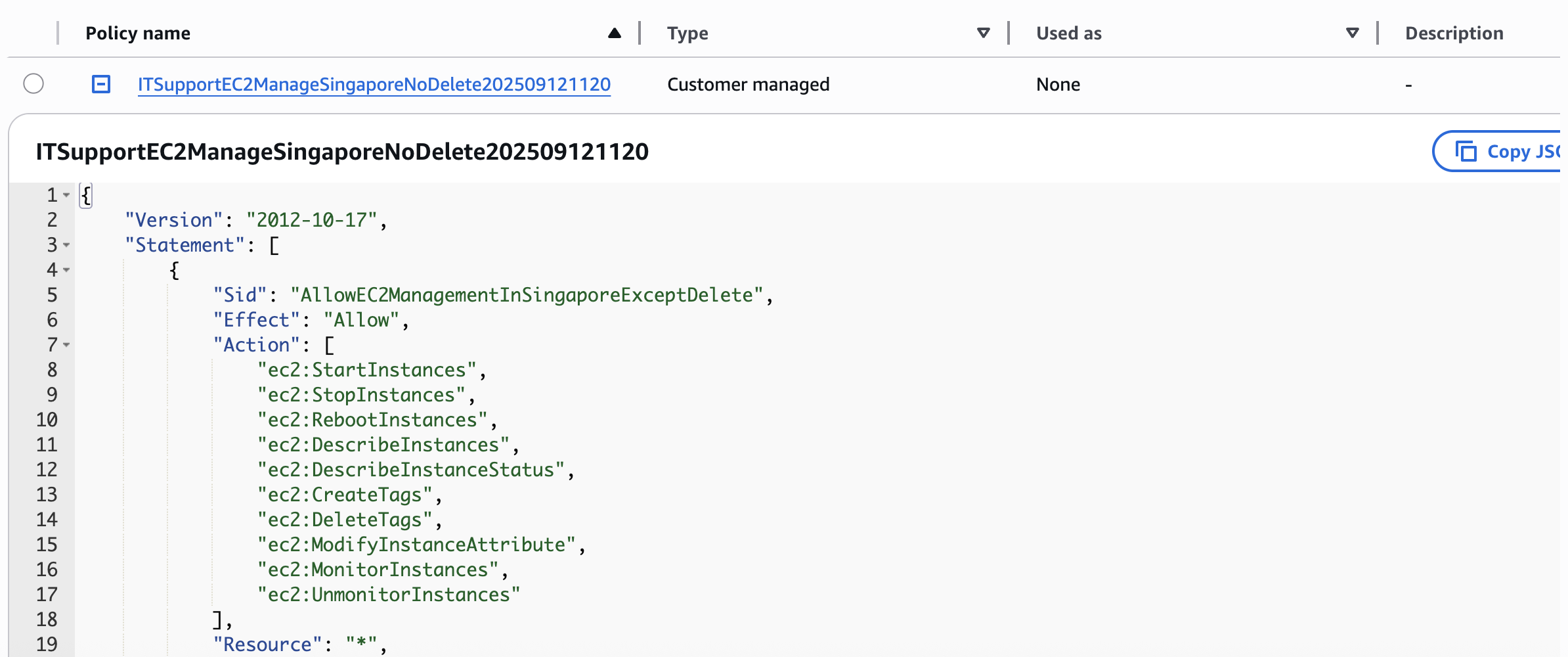"
},
"typeVersion": 1
},
{
"id": "102bcb25-235e-4fd5-9b10-fd8f848e83fe",
"name": "Sticky Note6",
"type": "n8n-nodes-base.stickyNote",
"position": [
-848,
-96
],
"parameters": {
"width": 416,
"height": 432,
"content": "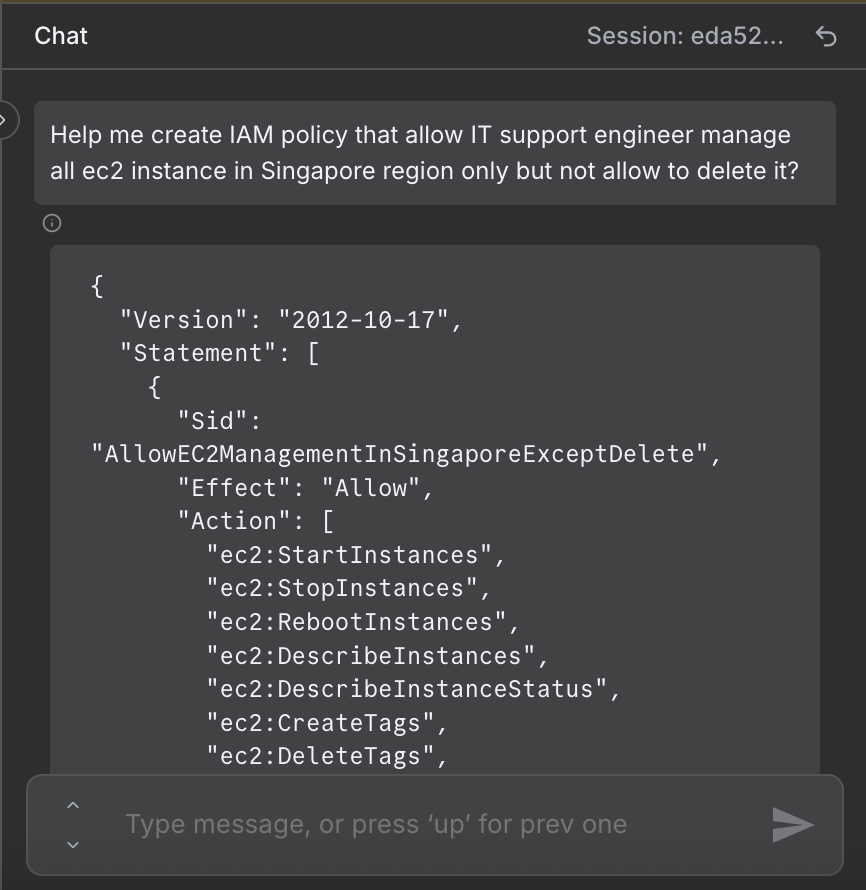"
},
"typeVersion": 1
}
],
"active": false,
"settings": {
"executionOrder": "v1"
},
"versionId": "50f49a1f-3095-452e-8614-049503f01030",
"connections": {
"Simple Memory": {
"ai_memory": [
[
{
"node": "IAM Policy Creator Agent",
"type": "ai_memory",
"index": 0
}
]
]
},
"OpenAI Chat Model": {
"ai_languageModel": [
[
{
"node": "IAM Policy Creator Agent",
"type": "ai_languageModel",
"index": 0
}
]
]
},
"IAM Policy HTTP Request": {
"main": [
[
{
"node": "Email for tracking",
"type": "main",
"index": 0
}
]
]
},
"IAM Policy Creator Agent": {
"main": [
[
{
"node": "IAM Policy HTTP Request",
"type": "main",
"index": 0
}
]
]
},
"Structured Output Parser": {
"ai_outputParser": [
[
{
"node": "IAM Policy Creator Agent",
"type": "ai_outputParser",
"index": 0
}
]
]
},
"When chat message received": {
"main": [
[
{
"node": "IAM Policy Creator Agent",
"type": "main",
"index": 0
}
]
]
}
}
}
Credentials you'll need
Each integration node will prompt for credentials when you import. We strip credential IDs before publishing — you'll add your own.
awsopenAiApismtp
For the full experience including quality scoring and batch install features for each workflow upgrade to Pro
About this workflow
> Chat-driven workflow that lets IT and DevOps teams generate custom AWS IAM policies via AI, automatically apply them to AWS, and send an email notification with policy details.
Source: https://n8n.io/workflows/8510/ — original creator credit. Request a take-down →
Related workflows
Workflows that share integrations, category, or trigger type with this one. All free to copy and import.
by Varritech Technologies
Who is this workflow for? This workflow is designed for SEO analysts, content creators, marketing agencies, and developers who need to index a website and then interact with its content as if it were
This Chatbot automates the process of discovering job openings and generating tailored job application emails.
Job Application PredictLeads & ScrapeGraph AI. Uses chatTrigger, lmChatOpenAi, mcpClientTool, memoryBufferWindow. Chat trigger; 32 nodes.
Job Application PredictLeads & ScrapeGraph AI. Uses chatTrigger, lmChatOpenAi, mcpClientTool, memoryBufferWindow. Chat trigger; 32 nodes.