 Trung Tran
 This workflow corresponds to n8n.io template #7689 — we link there as the canonical source.
This workflow follows the Agent → Google Drive recipe pattern — see all workflows that pair these two integrations.
The workflow JSON
Copy or download the full n8n JSON below. Paste it into a new n8n workflow, add your credentials, activate. Full import guide →
{
"id": "TK91m9bEjdq5Nlgu",
"meta": {
"templateCredsSetupCompleted": true
},
"name": "Automated SSL/TLS Certificate Expiry Report for AWS",
"tags": [
{
"id": "ZWDTpzMgM2j0ZGMO",
"name": "acm",
"createdAt": "2025-08-20T04:24:13.252Z",
"updatedAt": "2025-08-20T04:24:13.252Z"
},
{
"id": "hvp6nueQ4hpIJWbY",
"name": "aws",
"createdAt": "2025-08-17T05:47:27.209Z",
"updatedAt": "2025-08-17T05:47:27.209Z"
}
],
"nodes": [
{
"id": "72c7e0a7-e1bf-40da-b946-f7bc2261bbae",
"name": "Get many certificates",
"type": "n8n-nodes-base.awsCertificateManager",
"position": [
224,
48
],
"parameters": {
"options": {},
"operation": "getMany"
},
"credentials": {
"aws": {
"name": "<your credential>"
}
},
"typeVersion": 1
},
{
"id": "8de106a8-5abb-4194-9179-b3310cd99ede",
"name": "Sticky Note",
"type": "n8n-nodes-base.stickyNote",
"position": [
-1136,
-800
],
"parameters": {
"color": 4,
"width": 928,
"height": 2080,
"content": "# Automated SSL/TLS Certificate Expiry Report for AWS\n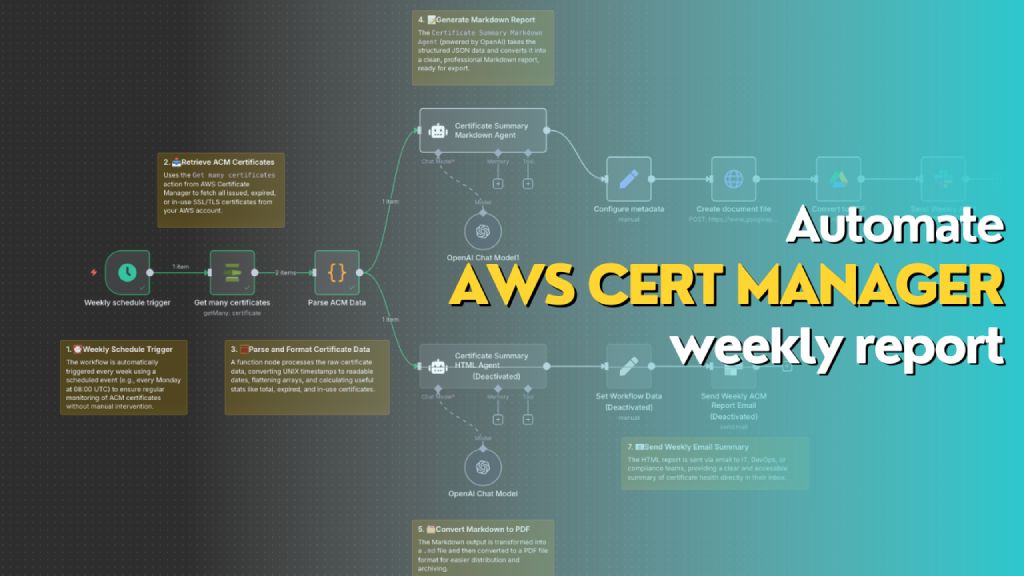\n> Automatically generates a weekly report of all AWS ACM certificates, including status, expiry dates, and renewal eligibility. The workflow formats the data into both Markdown (for PDF export to Slack) and HTML (for email summary), helping teams stay on top of certificate compliance and expiration risks.\n\n## **Who\u2019s it for**\nThis workflow is designed for **DevOps engineers**, **cloud administrators**, and **compliance teams** who manage AWS infrastructure and need **automated weekly visibility** into the status of their SSL/TLS certificates in **AWS Certificate Manager (ACM)**. It's ideal for teams that want to reduce the risk of expired certs, track renewal eligibility, and maintain reporting for audit or operational purposes.\n\n## **How it works / What it does**\nThis n8n workflow performs the following actions on a weekly schedule:\n\n1. **Trigger**: Automatically runs once a week using the `Weekly schedule trigger`.\n2. **Fetch Certificates**: Uses `Get many certificates` action from AWS Certificate Manager to retrieve all certificate records.\n3. **Parse Data**: Processes and reformats certificate data (dates, booleans, SANs, etc.) into a clean JSON object.\n4. **Generate Reports**:\n - \ud83d\udcc4 **Markdown Report**: Uses the `Certificate Summary Markdown Agent` (OpenAI) to generate a Markdown report for PDF export.\n - \ud83c\udf10 **HTML Report**: Uses the `Certificate Summary HTML Agent` to generate a styled HTML report for email.\n5. **Deliver Reports**:\n - Converts Markdown to PDF and sends it to Slack as a file.\n - Sends HTML content as a formatted email.\n\n## **How to set up**\n\n1. **Configure AWS Credentials** in n8n to allow access to AWS ACM.\n2. Create a new workflow and use the following nodes in sequence:\n - `Schedule Trigger`: Weekly (e.g., every Monday at 08:00 UTC)\n - `AWS ACM \u2192 Get many certificates`\n - `Function Node \u2192 Parse ACM Data`: Converts and summarizes certificate metadata\n - `OpenAI Chat Node (Markdown Agent)` with a system/user prompt to generate Markdown\n - `Configure Metadata` \u2192 Define file name and MIME type (`.md`)\n - `Create document file` \u2192 Converts Markdown to document stream\n - `Convert to PDF`\n - `Slack Node` \u2192 Upload the PDF to a channel\n - *(Optional)* Add a second `OpenAI Chat Node` for generating HTML and sending it via email\n\n3. **Connect Output**:\n - Markdown report \u2192 Slack file upload\n - HTML report \u2192 Email node with embedded HTML\n\n## **Requirements**\n\n- \ud83d\udfe9 **n8n instance** (self-hosted or cloud)\n- \ud83d\udfe6 **AWS account** with access to ACM\n- \ud83d\udfe8 **OpenAI API key** (for ChatGPT Agent)\n- \ud83d\udfe5 **Slack webhook or OAuth credentials** (for file upload)\n- \ud83d\udce7 **Email integration** (e.g., SMTP or SendGrid)\n- \ud83d\udcdd Permissions to write documents (Google Drive / file node)\n\n## **How to customize the workflow**\n\n- **Change report frequency**: Adjust the `Weekly schedule trigger` to daily or monthly as needed.\n- **Filter certificates**:\n - Modify the function node to only include `EXPIRED`, `IN_USE`, or `INELIGIBLE` certs.\n - Add tags or domains to include/exclude.\n- **Add visuals**: Enhance the HTML version with colored rows, icons, or company branding.\n- **Change delivery channels**:\n - Replace Slack with Microsoft Teams, Discord, or Telegram.\n - Send Markdown as email attachment instead of PDF.\n- **Integrate ticketing**:\n - Create a JIRA/GitHub issue for each certificate that is `EXPIRED` or `INELIGIBLE`."
},
"typeVersion": 1
},
{
"id": "cdd46941-248b-4f54-8bb1-6be5e6147d95",
"name": "Sticky Note1",
"type": "n8n-nodes-base.stickyNote",
"position": [
-96,
240
],
"parameters": {
"width": 272,
"content": "### 1. \u23f0 Weekly Schedule Trigger\nThe workflow is automatically triggered every week using a scheduled event (e.g., every Monday at 08:00 UTC) to ensure regular monitoring of ACM certificates without manual intervention."
},
"typeVersion": 1
},
{
"id": "2ccee042-087a-44e2-8682-c005948885d4",
"name": "Sticky Note2",
"type": "n8n-nodes-base.stickyNote",
"position": [
112,
-160
],
"parameters": {
"width": 272,
"content": "### 2. \ud83d\udce5 Retrieve ACM Certificates\nUses the `Get many certificates` action from AWS Certificate Manager to fetch all issued, expired, or in-use SSL/TLS certificates from your AWS account."
},
"typeVersion": 1
},
{
"id": "2307a17b-c03d-494a-91ce-e16122cd6886",
"name": "Sticky Note3",
"type": "n8n-nodes-base.stickyNote",
"position": [
256,
240
],
"parameters": {
"width": 352,
"content": "### 3. \ud83e\uddee Parse and Format Certificate Data\nA function node processes the raw certificate data, converting UNIX timestamps to readable dates, flattening arrays, and calculating useful stats like total, expired, and in-use certificates."
},
"typeVersion": 1
},
{
"id": "ccc49d5b-c69a-4b4e-918a-bd758a9adf8c",
"name": "Sticky Note4",
"type": "n8n-nodes-base.stickyNote",
"position": [
656,
-464
],
"parameters": {
"width": 304,
"content": "### 4. \ud83d\udcdd Generate Markdown Report\nThe `Certificate Summary Markdown Agent` (powered by OpenAI) takes the structured JSON data and converts it into a clean, professional Markdown report, ready for export.\n"
},
"typeVersion": 1
},
{
"id": "929c84a2-d3d0-4acf-9034-b7754d8e1fea",
"name": "Sticky Note5",
"type": "n8n-nodes-base.stickyNote",
"position": [
656,
624
],
"parameters": {
"width": 304,
"height": 144,
"content": "### 5. \ud83d\uddc2\ufe0f Convert Markdown to PDF\nThe Markdown output is transformed into a `.md` file and then converted to a PDF file format for easier distribution and archiving.\n"
},
"typeVersion": 1
},
{
"id": "c4e22b44-9389-4886-a76c-ea38726ad617",
"name": "Sticky Note6",
"type": "n8n-nodes-base.stickyNote",
"position": [
1552,
192
],
"parameters": {
"width": 912,
"height": 240,
"content": "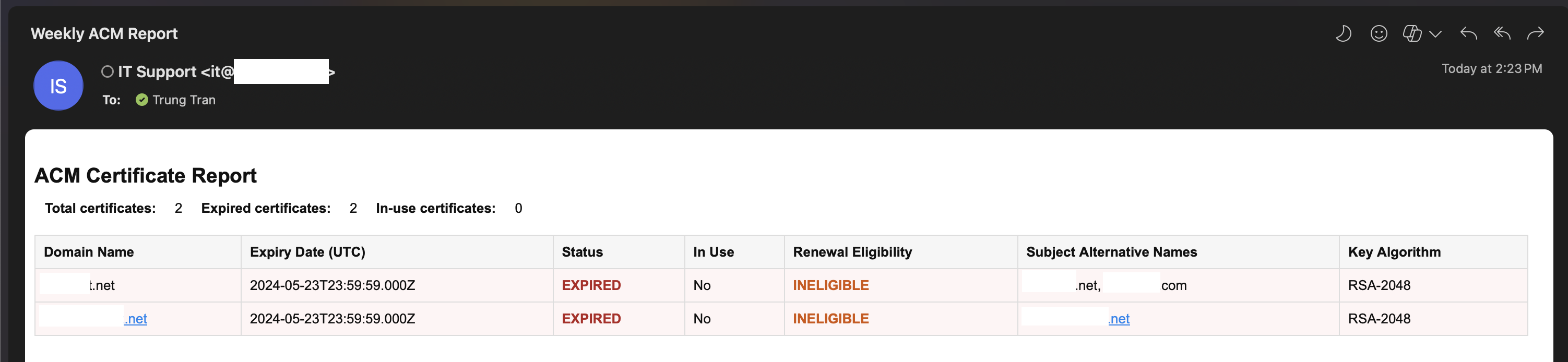"
},
"typeVersion": 1
},
{
"id": "dbfbb8b8-e683-4f8e-9566-e1a45e5442e1",
"name": "Sticky Note7",
"type": "n8n-nodes-base.stickyNote",
"position": [
1120,
528
],
"parameters": {
"width": 400,
"height": 112,
"content": "### 7. \ud83d\udce7 Send Weekly Email Summary\nThe HTML report is sent via email to IT, DevOps, or compliance teams, providing a clear and accessible summary of certificate health directly in their inbox.\n"
},
"typeVersion": 1
},
{
"id": "f4bdc2d2-bc98-4eca-9886-1dd303091150",
"name": "Weekly schedule trigger",
"type": "n8n-nodes-base.scheduleTrigger",
"position": [
0,
48
],
"parameters": {
"rule": {
"interval": [
{
"field": "weeks",
"triggerAtDay": [
1
]
}
]
}
},
"typeVersion": 1.2
},
{
"id": "a736e395-58bb-4263-b42d-aded26afc6b2",
"name": "OpenAI Chat Model",
"type": "@n8n/n8n-nodes-langchain.lmChatOpenAi",
"position": [
768,
472
],
"parameters": {
"model": {
"__rl": true,
"mode": "list",
"value": "gpt-5-mini",
"cachedResultName": "gpt-5-mini"
},
"options": {}
},
"credentials": {
"openAiApi": {
"name": "<your credential>"
}
},
"typeVersion": 1.2
},
{
"id": "bca5adc0-9afe-4a4f-ac72-30501fd2b0d8",
"name": "Parse ACM Data",
"type": "n8n-nodes-base.code",
"position": [
448,
48
],
"parameters": {
"jsCode": "const items = await $input.all();\nconst certificates = [];\n\nfor (const item of items) {\n const certs = Array.isArray(item.json) ? item.json : [item.json];\n\n for (const cert of certs) {\n certificates.push({\n CertificateArn: cert.CertificateArn,\n DomainName: cert.DomainName,\n Status: cert.Status,\n InUse: cert.InUse ? 'Yes' : 'No',\n CreatedAt: new Date(cert.CreatedAt * 1000).toISOString(),\n IssuedAt: new Date(cert.IssuedAt * 1000).toISOString(),\n NotBefore: new Date(cert.NotBefore * 1000).toISOString(),\n NotAfter: new Date(cert.NotAfter * 1000).toISOString(),\n RenewalEligibility: cert.RenewalEligibility,\n SubjectAlternativeNames: (cert.SubjectAlternativeNameSummaries || []).join(', '),\n KeyAlgorithm: cert.KeyAlgorithm,\n KeyUsages: (cert.KeyUsages || []).join(', '),\n ExtendedKeyUsages: (cert.ExtendedKeyUsages || []).join(', '),\n Type: cert.Type,\n Exported: cert.Exported ? 'Yes' : 'No',\n });\n }\n}\n\nreturn [\n {\n json: {\n certificates,\n total: certificates.length,\n expiredCount: certificates.filter(c => c.Status === 'EXPIRED').length,\n inUseCount: certificates.filter(c => c.InUse === 'Yes').length,\n }\n }\n];"
},
"typeVersion": 2
},
{
"id": "7d2d2fa6-2737-4577-bb13-5d776a9a0a5b",
"name": "OpenAI Chat Model1",
"type": "@n8n/n8n-nodes-langchain.lmChatOpenAi",
"position": [
768,
-32
],
"parameters": {
"model": {
"__rl": true,
"mode": "list",
"value": "gpt-4.1-mini"
},
"options": {}
},
"credentials": {
"openAiApi": {
"name": "<your credential>"
}
},
"typeVersion": 1.2
},
{
"id": "4f123f70-a491-4201-a2f7-6069cbd735c2",
"name": "Create document file",
"type": "n8n-nodes-base.httpRequest",
"position": [
1296,
-152
],
"parameters": {
"url": "https://www.googleapis.com/upload/drive/v3/files?uploadType=multipart&supportsAllDrives=true",
"body": "=--foo_bar_baz\nContent-Type: application/json; charset=UTF-8\n\n{\n \"name\": \"ACM Certificate Weekly Report {{ $today.format('yyyy-MM-dd-hhmm') }}\",\n \"mimeType\": \"application/vnd.google-apps.document\",\n \"parents\": [\"{{ $json['Drive Folder ID'] }}\"]\n}\n\n--foo_bar_baz\nContent-Type: text/markdown; charset=UTF-8\n\n{{ $json['Document Content'] }}\n--foo_bar_baz--",
"method": "POST",
"options": {},
"sendBody": true,
"sendQuery": true,
"contentType": "raw",
"sendHeaders": true,
"authentication": "predefinedCredentialType",
"rawContentType": "multipart/related; boundary=foo_bar_baz",
"queryParameters": {
"parameters": [
{
"name": "uploadType",
"value": "multipart"
},
{
"name": "supportsAllDrives",
"value": "true"
}
]
},
"headerParameters": {
"parameters": [
{
"name": "boundary",
"value": "foo_bar_baz"
}
]
},
"nodeCredentialType": "googleDriveOAuth2Api"
},
"credentials": {
"googleDriveOAuth2Api": {
"name": "<your credential>"
}
},
"typeVersion": 4.2
},
{
"id": "1ee4f8f4-1e4b-4977-a090-b350e69e6fd8",
"name": "Configure metadata ",
"type": "n8n-nodes-base.set",
"position": [
1072,
-152
],
"parameters": {
"options": {},
"assignments": {
"assignments": [
{
"id": "1ff0b9a4-7d60-44ec-b047-e49252f1ace9",
"name": "Drive Folder ID",
"type": "string",
"value": "1IPcko8bzogO3W4mxhrW2Q017QA0Lc5MI"
},
{
"id": "75ab39ab-44d0-4272-bceb-fe63bd72a5ba",
"name": "Document Content",
"type": "string",
"value": "={{ $json.output }}"
}
]
}
},
"typeVersion": 3.4
},
{
"id": "44bc4988-b569-4eeb-bee6-af4897743939",
"name": "Convert to PDF",
"type": "n8n-nodes-base.googleDrive",
"position": [
1520,
-152
],
"parameters": {
"fileId": {
"__rl": true,
"mode": "id",
"value": "={{ $json.id }}"
},
"options": {
"googleFileConversion": {
"conversion": {
"docsToFormat": "application/pdf"
}
}
},
"operation": "download"
},
"credentials": {
"googleDriveOAuth2Api": {
"name": "<your credential>"
}
},
"typeVersion": 3
},
{
"id": "cf420f55-0b0e-44a7-84c9-d4ec1b5220d0",
"name": "Send Weekly ACM Report PDF",
"type": "n8n-nodes-base.slack",
"position": [
1744,
-152
],
"parameters": {
"options": {
"channelId": "C097VAKKPUP",
"initialComment": "\ud83d\udcc4 The ACM Certificate Weekly Report is ready! Please find the generated PDF file attached for review and next steps. "
},
"resource": "file",
"authentication": "oAuth2"
},
"credentials": {
"slackOAuth2Api": {
"name": "<your credential>"
}
},
"typeVersion": 2.3
},
{
"id": "00e56531-89a5-447b-b99f-e1946c63eba5",
"name": "Send Weekly ACM Report Email",
"type": "n8n-nodes-base.sendGrid",
"disabled": true,
"position": [
1296,
248
],
"parameters": {
"subject": "Weekly ACM Report",
"toEmail": "={{ $json.RecepientEmail }}",
"fromName": "={{ $json.SenderName }}",
"resource": "mail",
"fromEmail": "={{ $json.SenderEmail }}",
"contentType": "text/html",
"contentValue": "={{ $('Certificate Summary HTML Agent').item.json.output }}",
"additionalFields": {}
},
"credentials": {
"sendGridApi": {
"name": "<your credential>"
}
},
"typeVersion": 1
},
{
"id": "cc91cae2-3dd0-4a16-ba4d-30034521582d",
"name": "Certificate Summary Markdown Agent",
"type": "@n8n/n8n-nodes-langchain.agent",
"position": [
672,
-256
],
"parameters": {
"text": "=Here is the list of AWS ACM certificate metadata in JSON format. Please generate a Markdown report including:\n\n- A summary of:\n - Total number of certificates\n - Number of expired certificates\n - Number currently in use\n\n- A table with the following columns:\n - Domain Name\n - Expiry Date (NotAfter)\n - Status (add \u26a0\ufe0f if expired)\n - In Use\n - Renewal Eligibility\n - Subject Alternative Names\n - Key Algorithm\n\nEnsure the Markdown is readable and ready to be saved as a `.md` file for Slack.\n\nHere is the input data: {{ $json.certificates.toJsonString() }}",
"options": {
"systemMessage": "You are a reporting assistant that converts AWS Certificate Manager (ACM) metadata into a clean, readable, and professional Markdown report.\n\nYour job is to:\n- Generate a summary at the top: total certificates, number expired, number in use\n- Present certificate data as a Markdown table\n- Include key fields: Domain Name, Expiry Date, Status, In Use, Renewal Eligibility, Subject Alternative Names, Key Algorithm\n- Highlight expired certificates with \u26a0\ufe0f in the Status column\n- Sort the table by expiration date descending (nearest expiry at the top)\n- Output only Markdown content (no explanations or extra comments)"
},
"promptType": "define"
},
"typeVersion": 2.1
},
{
"id": "bb2cdcf1-8e34-4b01-9f79-ad2d8efaafae",
"name": "Certificate Summary HTML Agent",
"type": "@n8n/n8n-nodes-langchain.agent",
"disabled": true,
"position": [
672,
248
],
"parameters": {
"text": "=Here is a list of AWS ACM certificates in JSON format. Please generate a summary HTML report with the following fields for each certificate:\n\n- Domain Name \n- Expiry Date \n- Status (highlight if EXPIRED or FAILED) \n- In Use (Yes/No) \n- Renewal Eligibility \n- Subject Alternative Names \n- Key Algorithm \n\nAlso include a summary at the top showing:\n- Total certificates\n- Number of expired certificates\n- Number of in-use certificates\n\nOutput only HTML with a simple table layout.\n\nHere is the data: {{ $json.certificates.toJsonString() }}",
"options": {
"systemMessage": "You are an expert assistant specialized in generating concise, clear, and visually structured HTML reports based on AWS Certificate Manager (ACM) metadata. \n\nYour goal is to help DevOps teams quickly understand the status of their certificates by extracting key information from the given certificate JSON array.\n\nAlways format the output as a valid HTML table, include appropriate headings and summary, and sort certificates by expiration date descending (most urgent first). Use red or orange for expired or ineligible certificates to improve visibility. You do not need to explain the data\u2014just output the HTML for embedding in Slack or email messages."
},
"promptType": "define"
},
"typeVersion": 2.1
},
{
"id": "cf045865-814e-4301-9c73-de39bd3c6585",
"name": "Sticky Note8",
"type": "n8n-nodes-base.stickyNote",
"position": [
1296,
-624
],
"parameters": {
"width": 912,
"height": 416,
"content": "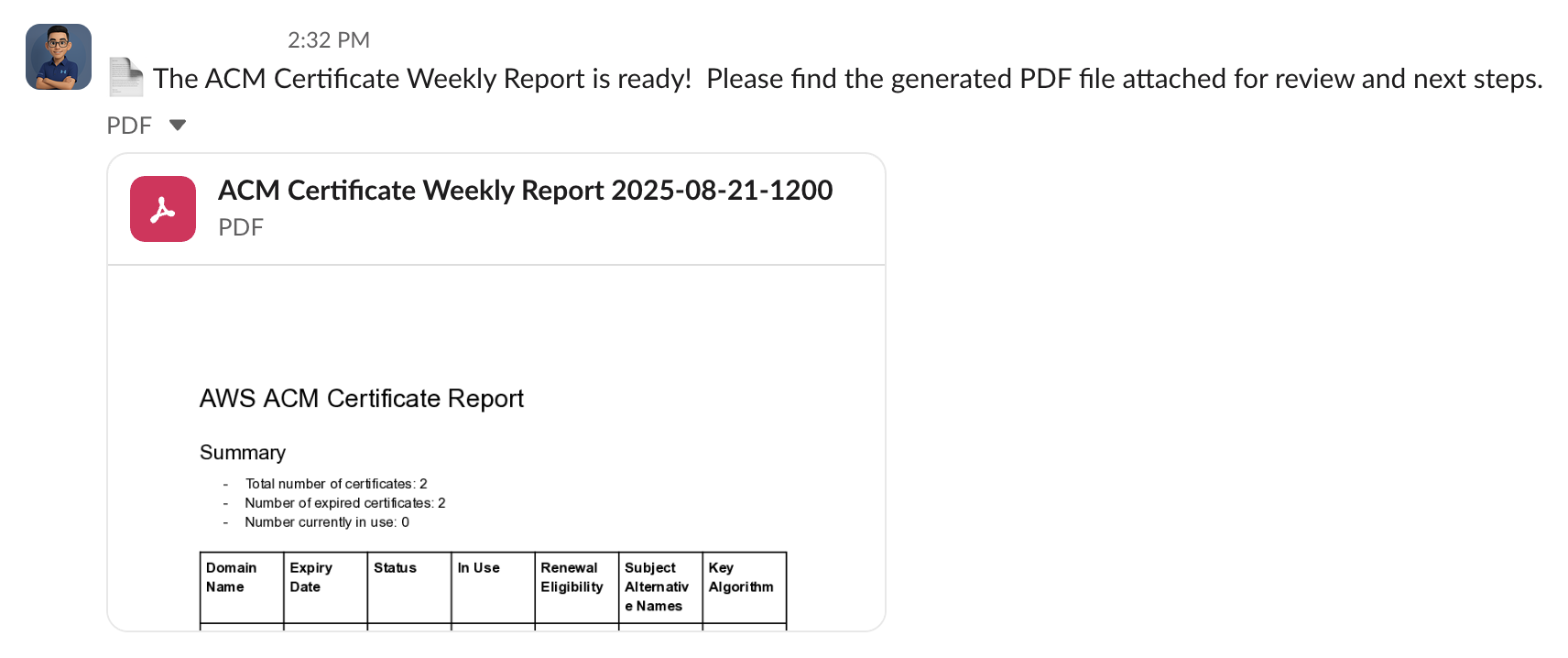"
},
"typeVersion": 1
},
{
"id": "e35484f2-223c-449a-9609-433a04a96109",
"name": "Sticky Note9",
"type": "n8n-nodes-base.stickyNote",
"position": [
1984,
-160
],
"parameters": {
"width": 336,
"height": 144,
"content": "### 6. \ud83d\udcac Send PDF Report to Slack\nThe finalized PDF report is uploaded to a specific Slack channel (e.g., `#it-security` or `#cloud-ops`) so stakeholders are instantly notified of certificate status.\n"
},
"typeVersion": 1
},
{
"id": "5a303f6d-00f4-4668-9b7e-c6bce6187f99",
"name": "Set Workflow Data",
"type": "n8n-nodes-base.set",
"disabled": true,
"position": [
1072,
248
],
"parameters": {
"options": {},
"assignments": {
"assignments": [
{
"id": "0869e141-3255-4268-ad3b-cb88173b6079",
"name": "SenderEmail",
"type": "string",
"value": "user@example.com"
},
{
"id": "6c2047bb-ff37-45c2-a30c-6b00b6aed409",
"name": "SenderName",
"type": "string",
"value": "IT Support"
},
{
"id": "8b5c7afb-3ac0-4be9-ada8-4488d5acf402",
"name": "RecepientEmail",
"type": "string",
"value": "user@example.com"
}
]
}
},
"typeVersion": 3.4
}
],
"active": false,
"settings": {
"executionOrder": "v1"
},
"versionId": "6985d393-0373-4095-b053-76348faa6904",
"connections": {
"Convert to PDF": {
"main": [
[
{
"node": "Send Weekly ACM Report PDF",
"type": "main",
"index": 0
}
]
]
},
"Parse ACM Data": {
"main": [
[
{
"node": "Certificate Summary HTML Agent",
"type": "main",
"index": 0
},
{
"node": "Certificate Summary Markdown Agent",
"type": "main",
"index": 0
}
]
]
},
"OpenAI Chat Model": {
"ai_languageModel": [
[
{
"node": "Certificate Summary HTML Agent",
"type": "ai_languageModel",
"index": 0
}
]
]
},
"Set Workflow Data": {
"main": [
[
{
"node": "Send Weekly ACM Report Email",
"type": "main",
"index": 0
}
]
]
},
"OpenAI Chat Model1": {
"ai_languageModel": [
[
{
"node": "Certificate Summary Markdown Agent",
"type": "ai_languageModel",
"index": 0
}
]
]
},
"Configure metadata ": {
"main": [
[
{
"node": "Create document file",
"type": "main",
"index": 0
}
]
]
},
"Create document file": {
"main": [
[
{
"node": "Convert to PDF",
"type": "main",
"index": 0
}
]
]
},
"Get many certificates": {
"main": [
[
{
"node": "Parse ACM Data",
"type": "main",
"index": 0
}
]
]
},
"Weekly schedule trigger": {
"main": [
[
{
"node": "Get many certificates",
"type": "main",
"index": 0
}
]
]
},
"Certificate Summary HTML Agent": {
"main": [
[
{
"node": "Set Workflow Data",
"type": "main",
"index": 0
}
]
]
},
"Certificate Summary Markdown Agent": {
"main": [
[
{
"node": "Configure metadata ",
"type": "main",
"index": 0
}
]
]
}
}
}
Credentials you'll need
Each integration node will prompt for credentials when you import. We strip credential IDs before publishing — you'll add your own.
awsgoogleDriveOAuth2ApiopenAiApisendGridApislackOAuth2Api
For the full experience including quality scoring and batch install features for each workflow upgrade to Pro
About this workflow
> Automatically generates a weekly report of all AWS ACM certificates, including status, expiry dates, and renewal eligibility. The workflow formats the data into both Markdown (for PDF export to Slack) and HTML (for email summary), helping teams stay on top of certificate…
Source: https://n8n.io/workflows/7689/ — original creator credit. Request a take-down →
Related workflows
Workflows that share integrations, category, or trigger type with this one. All free to copy and import.
This workflow is designed for Japanese-speaking professionals, and learners who want to efficiently stay up to date with practical productivity, lifehack, and efficiency-related insights from Japanese
This n8n automation workflow automates the creation, scripting, production, and posting of YouTube videos. It leverages AI (OpenAI), image generation (PIAPI), video rendering (Shotstack), and platform
This workflow is designed for: Content creators and marketers E-commerce and product-based businesses Agencies producing social media visuals and videos Automation builders looking for AI-powered crea
Generate product images with NanoBanana Pro to Veo videos and Blotato - vide 2 ok. Uses httpRequest, editImage, googleDrive, googleSheets. Scheduled trigger; 76 nodes.
This workflow is for beauty salons who want consistent, high‑quality social media content without writing every post manually. It also suits agencies and automation builders who manage multiple beauty