 Robert Breen
 This workflow corresponds to n8n.io template #7156 — we link there as the canonical source.
This workflow follows the Agent → Google Sheets recipe pattern — see all workflows that pair these two integrations.
The workflow JSON
Copy or download the full n8n JSON below. Paste it into a new n8n workflow, add your credentials, activate. Full import guide →
{
"meta": {
"templateCredsSetupCompleted": true
},
"nodes": [
{
"id": "b44bc1eb-78dd-4cf0-85d0-564a30b0e24b",
"name": "Sticky Note",
"type": "n8n-nodes-base.stickyNote",
"position": [
-272,
176
],
"parameters": {
"color": 5,
"width": 600,
"height": 860,
"content": "### 0\ufe0f\u20e3 Prerequisites\n- **Google Sheets**\n 1. Open **Google Cloud Console** \u2192 create / select a project. \n 2. Enable **Google Sheets API** under *APIs & Services*. \n 3. Create an OAuth **Desktop** credential and connect it in n8n. \n 4. Share the spreadsheet with the Google account linked to the credential.\n- **OpenAI**\n 1. Create a secret key at <https://platform.openai.com/account/api-keys>. \n 2. In n8n \u2192 **Credentials** \u2192 **New** \u2192 choose **OpenAI API** and paste the key.\n- **Sample sheet to copy** (make your own copy and use its link) \n <https://docs.google.com/spreadsheets/d/15i9WIYpqc5lNd5T4VyM0RRptFPdi9doCbEEDn8QglN4/edit?usp=sharing>\n\n---\n\n### 1\ufe0f\u20e3 Trigger \n**Manual Trigger** \u2013 lets you run on demand while learning. \n*(Swap for a Schedule or Webhook once you automate.)*\n\n---\n\n### 2\ufe0f\u20e3 Read existing rows \n- **Node:** `Get Rows from Google Sheets` \n- Reads every row from **Sheet1** of your copied file.\n\n---"
},
"typeVersion": 1
},
{
"id": "df6378cb-73bb-437c-a7c6-cfd0f705721b",
"name": "Sticky Note2",
"type": "n8n-nodes-base.stickyNote",
"position": [
976,
176
],
"parameters": {
"color": 4,
"width": 960,
"height": 860,
"content": "### 5\ufe0f\u20e3 Create a description with GPT-4o \n1. **`OpenAI Chat Model`** \u2013 uses your OpenAI credential. \n2. **`Write description`** (AI Agent) \u2013 prompt = the **Topic**. \n3. **`Structured Output Parser`** \u2013 forces JSON like: `{ \"description\": \"\u2026\" }`.\n\n---\n\n### 6\ufe0f\u20e3 Update that same row \n- **Node:** `Update Sheets data` \n- Operation **update**. \n- Matches on column **Email** to update the correct line. \n- Writes the new **Description** cell returned by GPT-4o.\n\n---\n\n### 7\ufe0f\u20e3 Why this matters \n- Demonstrates the three core Google Sheets operations: **read \u2192 append \u2192 update**. \n- Shows how to enrich sheet data with an **AI step** and push the result right back. \n- Sticky Notes provide inline docs so anyone opening the workflow understands the flow instantly.\n\n---"
},
"typeVersion": 1
},
{
"id": "c6b35aa8-5313-4548-af40-e6d66440347e",
"name": "Sticky Note1",
"type": "n8n-nodes-base.stickyNote",
"position": [
352,
176
],
"parameters": {
"color": 6,
"width": 600,
"height": 860,
"content": "### 3\ufe0f\u20e3 Generate a demo row \n- **Node:** `Generate 1 Row of Data` (Set node) \n- Pretends a form was submitted: \n - `Name`, `Email`, `Topic`, `Submitted = \"Yes\"`\n\n---\n\n### 4\ufe0f\u20e3 Append the new row \n- **Node:** `Append Data to Google` \n- Operation **append** \u2192 writes to the first empty line.\n\n---"
},
"typeVersion": 1
},
{
"id": "b08ad9f7-40cf-4714-ac52-3746eca60b67",
"name": "OpenAI Chat Model4",
"type": "@n8n/n8n-nodes-langchain.lmChatOpenAi",
"position": [
1120,
784
],
"parameters": {
"model": {
"__rl": true,
"mode": "list",
"value": "gpt-4o-mini"
},
"options": {}
},
"credentials": {
"openAiApi": {
"name": "<your credential>"
}
},
"typeVersion": 1.2
},
{
"id": "089e86af-2154-4a1c-9c4b-245e66ddb4d5",
"name": "Structured Output Parser3",
"type": "@n8n/n8n-nodes-langchain.outputParserStructured",
"position": [
1360,
832
],
"parameters": {
"jsonSchemaExample": "{\n\t\"description\": \"description\"\n}"
},
"typeVersion": 1.2
},
{
"id": "3be017cc-04e0-4384-868b-e8169c2cd863",
"name": "Run Workflow",
"type": "n8n-nodes-base.manualTrigger",
"position": [
-208,
896
],
"parameters": {},
"typeVersion": 1
},
{
"id": "1ddd7bc9-6abe-4f2a-9de3-0f88c0109eda",
"name": "Get Rows from Google Sheets",
"type": "n8n-nodes-base.googleSheets",
"position": [
160,
736
],
"parameters": {
"options": {},
"sheetName": {
"__rl": true,
"mode": "list",
"value": "gid=0",
"cachedResultUrl": "https://docs.google.com/spreadsheets/d/15i9WIYpqc5lNd5T4VyM0RRptFPdi9doCbEEDn8QglN4/edit#gid=0",
"cachedResultName": "Sheet1"
},
"documentId": {
"__rl": true,
"mode": "list",
"value": "15i9WIYpqc5lNd5T4VyM0RRptFPdi9doCbEEDn8QglN4",
"cachedResultUrl": "https://docs.google.com/spreadsheets/d/15i9WIYpqc5lNd5T4VyM0RRptFPdi9doCbEEDn8QglN4/edit?usp=drivesdk",
"cachedResultName": "Sample Data"
}
},
"credentials": {
"googleSheetsOAuth2Api": {
"name": "<your credential>"
}
},
"typeVersion": 4.6
},
{
"id": "7b4b1b34-0d2a-4081-9cc1-811dedd66b97",
"name": "Generate 1 Row of Data",
"type": "n8n-nodes-base.set",
"position": [
480,
864
],
"parameters": {
"options": {},
"assignments": {
"assignments": [
{
"id": "9bceded1-6f62-48a8-8727-6a6a1998d5d3",
"name": "Name",
"type": "string",
"value": "Robert Breen"
},
{
"id": "038dac1c-919b-4a54-b3dd-aa5723bf1f1a",
"name": "Email",
"type": "string",
"value": "user@example.com"
},
{
"id": "e55a71f6-66d9-4da2-9dbb-0c45539c76a9",
"name": "Topic",
"type": "string",
"value": "n8n workflows"
},
{
"id": "50999436-4b71-4ea8-b18a-bc193ab51ce9",
"name": "Submitted",
"type": "string",
"value": "Yes"
}
]
}
},
"typeVersion": 3.4
},
{
"id": "a9b4a11b-fd45-46bf-b1d0-188954ef9b48",
"name": "Append Data to google",
"type": "n8n-nodes-base.googleSheets",
"position": [
752,
848
],
"parameters": {
"columns": {
"value": {
"Name": "={{ $json.Name }}",
"Email": "={{ $json.Email }}",
"Topic": "={{ $json.Topic }}",
"Submitted": "={{ $json.Submitted }}"
},
"schema": [
{
"id": "Name",
"type": "string",
"display": true,
"required": false,
"displayName": "Name",
"defaultMatch": false,
"canBeUsedToMatch": true
},
{
"id": "Email",
"type": "string",
"display": true,
"required": false,
"displayName": "Email",
"defaultMatch": false,
"canBeUsedToMatch": true
},
{
"id": "Topic",
"type": "string",
"display": true,
"required": false,
"displayName": "Topic",
"defaultMatch": false,
"canBeUsedToMatch": true
},
{
"id": "Submitted",
"type": "string",
"display": true,
"required": false,
"displayName": "Submitted",
"defaultMatch": false,
"canBeUsedToMatch": true
}
],
"mappingMode": "defineBelow",
"matchingColumns": [],
"attemptToConvertTypes": false,
"convertFieldsToString": false
},
"options": {},
"operation": "append",
"sheetName": {
"__rl": true,
"mode": "list",
"value": "gid=0",
"cachedResultUrl": "https://docs.google.com/spreadsheets/d/15i9WIYpqc5lNd5T4VyM0RRptFPdi9doCbEEDn8QglN4/edit#gid=0",
"cachedResultName": "Sheet1"
},
"documentId": {
"__rl": true,
"mode": "list",
"value": "15i9WIYpqc5lNd5T4VyM0RRptFPdi9doCbEEDn8QglN4",
"cachedResultUrl": "https://docs.google.com/spreadsheets/d/15i9WIYpqc5lNd5T4VyM0RRptFPdi9doCbEEDn8QglN4/edit?usp=drivesdk",
"cachedResultName": "Sample Data"
}
},
"credentials": {
"googleSheetsOAuth2Api": {
"name": "<your credential>"
}
},
"typeVersion": 4.6
},
{
"id": "f08ad7a6-05f9-4035-8c14-3082937a46b4",
"name": "Write description",
"type": "@n8n/n8n-nodes-langchain.agent",
"onError": "continueRegularOutput",
"position": [
1232,
608
],
"parameters": {
"text": "={{ $json.Topic }}",
"options": {
"systemMessage": "Take in the topic and write a description. "
},
"promptType": "define",
"hasOutputParser": true
},
"typeVersion": 2,
"alwaysOutputData": true
},
{
"id": "cef80a95-5ded-4ceb-95e3-21be33725d97",
"name": "Update Sheets data",
"type": "n8n-nodes-base.googleSheets",
"position": [
1712,
656
],
"parameters": {
"columns": {
"value": {
"Email": "={{ $('Get Rows from Google Sheets').item.json.Email }}",
"Description": "={{ $json.output.description }}"
},
"schema": [
{
"id": "Name",
"type": "string",
"display": true,
"required": false,
"displayName": "Name",
"defaultMatch": false,
"canBeUsedToMatch": true
},
{
"id": "Email",
"type": "string",
"display": true,
"removed": false,
"required": false,
"displayName": "Email",
"defaultMatch": false,
"canBeUsedToMatch": true
},
{
"id": "Topic",
"type": "string",
"display": true,
"required": false,
"displayName": "Topic",
"defaultMatch": false,
"canBeUsedToMatch": true
},
{
"id": "Submitted",
"type": "string",
"display": true,
"required": false,
"displayName": "Submitted",
"defaultMatch": false,
"canBeUsedToMatch": true
},
{
"id": "Description",
"type": "string",
"display": true,
"removed": false,
"required": false,
"displayName": "Description",
"defaultMatch": false,
"canBeUsedToMatch": true
},
{
"id": "row_number",
"type": "string",
"display": true,
"removed": true,
"readOnly": true,
"required": false,
"displayName": "row_number",
"defaultMatch": false,
"canBeUsedToMatch": true
}
],
"mappingMode": "defineBelow",
"matchingColumns": [
"Email"
],
"attemptToConvertTypes": false,
"convertFieldsToString": false
},
"options": {},
"operation": "update",
"sheetName": {
"__rl": true,
"mode": "list",
"value": "gid=0",
"cachedResultUrl": "https://docs.google.com/spreadsheets/d/15i9WIYpqc5lNd5T4VyM0RRptFPdi9doCbEEDn8QglN4/edit#gid=0",
"cachedResultName": "Sheet1"
},
"documentId": {
"__rl": true,
"mode": "list",
"value": "15i9WIYpqc5lNd5T4VyM0RRptFPdi9doCbEEDn8QglN4",
"cachedResultUrl": "https://docs.google.com/spreadsheets/d/15i9WIYpqc5lNd5T4VyM0RRptFPdi9doCbEEDn8QglN4/edit?usp=drivesdk",
"cachedResultName": "Sample Data"
}
},
"credentials": {
"googleSheetsOAuth2Api": {
"name": "<your credential>"
}
},
"typeVersion": 4.6
},
{
"id": "0f505760-f0f1-4519-b0c4-c8269569186b",
"name": "Sticky Note13",
"type": "n8n-nodes-base.stickyNote",
"position": [
-816,
-96
],
"parameters": {
"width": 504,
"content": "## \ud83d\udcec Need Help or Want to Customize This?\n\ud83d\udce7 [robert@ynteractive.com](mailto:robert@ynteractive.com) \n\ud83d\udd17 [LinkedIn](https://www.linkedin.com/in/robert-breen-29429625/)"
},
"typeVersion": 1
},
{
"id": "8d44204f-e79e-4c75-b125-579c7ae62f81",
"name": "Sticky Note3",
"type": "n8n-nodes-base.stickyNote",
"position": [
-816,
176
],
"parameters": {
"width": 496,
"height": 848,
"content": "## \ud83c\udfa5 Watch This Tutorial\n\n[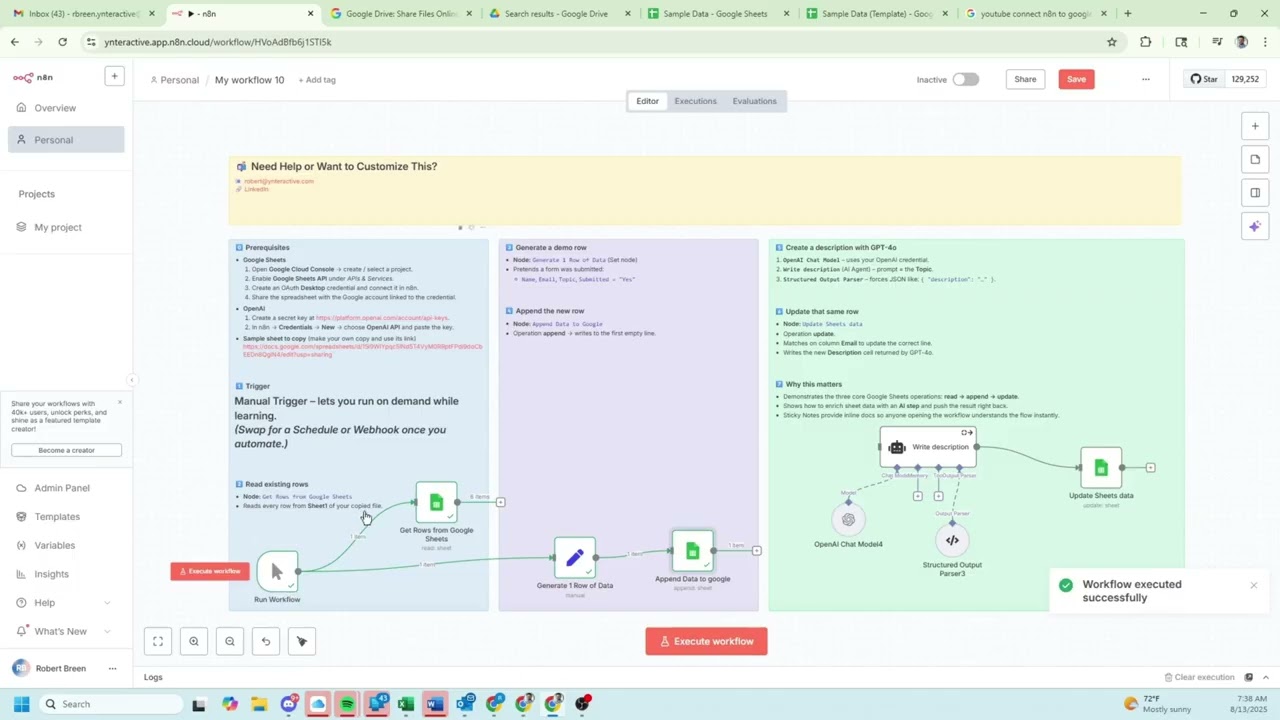](https://www.youtube.com/watch?v=86mJa1aSb3Q)\n\n\n## \ud83c\udf10 How to Connect Google Cloud to n8n\n\n[](https://www.youtube.com/watch?v=czxMethJv8s)\n"
},
"typeVersion": 1
}
],
"connections": {
"Run Workflow": {
"main": [
[
{
"node": "Get Rows from Google Sheets",
"type": "main",
"index": 0
},
{
"node": "Generate 1 Row of Data",
"type": "main",
"index": 0
}
]
]
},
"Write description": {
"main": [
[
{
"node": "Update Sheets data",
"type": "main",
"index": 0
}
]
]
},
"OpenAI Chat Model4": {
"ai_languageModel": [
[
{
"node": "Write description",
"type": "ai_languageModel",
"index": 0
}
]
]
},
"Generate 1 Row of Data": {
"main": [
[
{
"node": "Append Data to google",
"type": "main",
"index": 0
}
]
]
},
"Structured Output Parser3": {
"ai_outputParser": [
[
{
"node": "Write description",
"type": "ai_outputParser",
"index": 0
}
]
]
},
"Get Rows from Google Sheets": {
"main": [
[
{
"node": "Write description",
"type": "main",
"index": 0
}
]
]
}
}
}
Credentials you'll need
Each integration node will prompt for credentials when you import. We strip credential IDs before publishing — you'll add your own.
googleSheetsOAuth2ApiopenAiApi
For the full experience including quality scoring and batch install features for each workflow upgrade to Pro
About this workflow
A hands-on starter workflow that teaches beginners how to:
Source: https://n8n.io/workflows/7156/ — original creator credit. Request a take-down →
Related workflows
Workflows that share integrations, category, or trigger type with this one. All free to copy and import.
Disparo de WhatsApp. Uses agent, lmChatOpenAi, outputParserStructured, chainLlm. Event-driven trigger; 29 nodes.
This workflow contains community nodes that are only compatible with the self-hosted version of n8n.
*Tags: AI Agent, Supply Chain, Logistics, Circular Economy, Route Planning, Transportation, GPS API*
Streamline Facebook Messenger inbox management with an AI-powered categorization and response system. 💬⚙️ This workflow automatically classifies new messages as Lead, Query, or Spam using GPT-4, route
This workflow streamlines your content organization process by automatically analyzing new blog posts in your GitHub repository and assigning appropriate categories and tags using OpenAI. It compares