 Trung Tran
 This workflow corresponds to n8n.io template #7598 — we link there as the canonical source.
This workflow follows the HTTP Request → Slack recipe pattern — see all workflows that pair these two integrations.
The workflow JSON
Copy or download the full n8n JSON below. Paste it into a new n8n workflow, add your credentials, activate. Full import guide →
{
"id": "Q0EjgXk8j2ygOvy5",
"meta": {
"templateCredsSetupCompleted": true
},
"name": "Automated AWS IAM Compliance Workflow for MFA Enforcement and Access Key Deactivation",
"tags": [
{
"id": "hvp6nueQ4hpIJWbY",
"name": "aws",
"createdAt": "2025-08-17T05:47:27.209Z",
"updatedAt": "2025-08-17T05:47:27.209Z"
}
],
"nodes": [
{
"id": "e0c92177-d85f-45c1-b0a6-bcb7e9b424e1",
"name": "Get many users",
"type": "n8n-nodes-base.awsIam",
"position": [
-224,
-48
],
"parameters": {
"returnAll": true,
"requestOptions": {},
"additionalFields": {}
},
"credentials": {
"aws": {
"name": "<your credential>"
}
},
"typeVersion": 1
},
{
"id": "7b14679e-4c0d-42bc-904f-41c8f2e3d957",
"name": "Sticky Note",
"type": "n8n-nodes-base.stickyNote",
"position": [
-1536,
-592
],
"parameters": {
"width": 976,
"height": 1200,
"content": "# Automated AWS IAM Compliance Workflow for MFA Enforcement and Access Key Deactivation\n> This workflow leverages AWS IAM APIs and n8n automation to ensure strict security compliance by continuously monitoring IAM users for MFA (Multi-Factor Authentication) enforcement.\n\n[.jpg)](https://www.youtube.com/watch?v=ZggCRl8z_gQ)\n\n## **Who\u2019s it for**\nThis workflow is designed for **DevOps, Security, or Cloud Engineers** responsible for maintaining IAM security compliance in AWS accounts. It's ideal for teams who want to **enforce MFA usage** and **automatically disable access** for non-compliant IAM users.\n\n## **How it works / What it does**\nThis automated workflow performs a **daily check** to detect IAM users without an MFA device and deactivate their access keys.\n\n### Step-by-step:\n1. **Daily scheduler**: Triggers the workflow once a day.\n2. **Get many users**: Retrieves a list of all IAM users in the account.\n3. **Get IAM User MFA Devices**: Calls AWS API to get MFA device info for each user.\n4. **Filter out IAM users with MFA**: Keeps only users **without any MFA device**.\n5. **Send warning message(s)**: Sends Slack alerts for users who do not have MFA enabled.\n6. **Get User Access Key(s)**: Fetches access keys for each non-MFA user.\n7. **Parse the list of user access key(s)**: Extracts and flattens key information like `AccessKeyId`, `Status`, and `UserName`.\n8. **Filter out inactive keys**: Keeps only **active** access keys for further action.\n9. **Deactivate Access Key(s)**: Calls AWS API to deactivate each active key for non-MFA users.\n\n## **How to set up**\n1. **Configure AWS credentials** in your environment (IAM role or AWS access key with required permissions).\n2. **Connect Slack** via the Slack node for alerting (set channel and credentials).\n3. Set the **scheduler** to your preferred frequency (e.g., daily at 9AM).\n4. Adjust any Slack message template or filtering conditions as needed.\n\n## **Requirements**\n- IAM user or role credentials with the following AWS IAM permissions:\n - `iam:ListUsers`\n - `iam:ListMFADevices`\n - `iam:ListAccessKeys`\n - `iam:UpdateAccessKey`\n- Slack credentials (Bot token with `chat:write` permission).\n- n8n environment with:\n - Slack integration\n - AWS credentials (set via environment or credentials manager)\n\n## **How to customize the workflow**\n- **Alert threshold**: Instead of immediate deactivation, you can delay action (e.g., alert first, wait 24h, then disable).\n- **Change notification channel**: Modify the Slack node to send alerts to a different channel or add email integration.\n- **Whitelist exceptions**: Add a Set or IF node to exclude specific usernames (e.g., service accounts).\n- **Add audit logging**: Use Google Sheets, Airtable, or a database to log which users were flagged or had access disabled.\n- **Extend access checks**: Include console password check (`GetLoginProfile`) if needed."
},
"typeVersion": 1
},
{
"id": "9234cd35-9728-47de-96c8-1eb5c4ffb354",
"name": "Sticky Note1",
"type": "n8n-nodes-base.stickyNote",
"position": [
-528,
-208
],
"parameters": {
"width": 256,
"height": 144,
"content": "### 1. Schedule Workflow\nTriggers the workflow automatically once per day to ensure continuous IAM compliance monitoring without manual intervention."
},
"typeVersion": 1
},
{
"id": "9d2fff11-c252-45f8-af8b-e18761fed2a6",
"name": "Sticky Note2",
"type": "n8n-nodes-base.stickyNote",
"position": [
-320,
128
],
"parameters": {
"width": 304,
"height": 128,
"content": "### 2. \ud83d\udc65 Get All IAM Users\nUses the `ListUsers` API to retrieve all active IAM users in the AWS account. These users will be evaluated for MFA compliance.\n"
},
"typeVersion": 1
},
{
"id": "e5535511-2750-45dd-bd7b-1daf18d41842",
"name": "Sticky Note3",
"type": "n8n-nodes-base.stickyNote",
"position": [
-96,
-240
],
"parameters": {
"width": 288,
"height": 144,
"content": "### 3. \ud83d\udd10 Get IAM User MFA Devices\nCalls `ListMFADevices` for each user to check if they have at least one MFA device enabled. This is a critical step in identifying users who are not following best security practices."
},
"typeVersion": 1
},
{
"id": "9714750e-365f-40fb-a917-7dfbce8d1803",
"name": "Sticky Note4",
"type": "n8n-nodes-base.stickyNote",
"position": [
384,
224
],
"parameters": {
"width": 368,
"height": 128,
"content": "\n### 5. \ud83d\udd0e Get User Access Key(s)\nFor each user without MFA, calls the `ListAccessKeys` API to retrieve all associated access keys that may allow programmatic access to AWS.\n"
},
"typeVersion": 1
},
{
"id": "bee26e8e-3f62-44e0-abf1-2a42b293ae75",
"name": "Sticky Note7",
"type": "n8n-nodes-base.stickyNote",
"position": [
1280,
-144
],
"parameters": {
"width": 608,
"content": "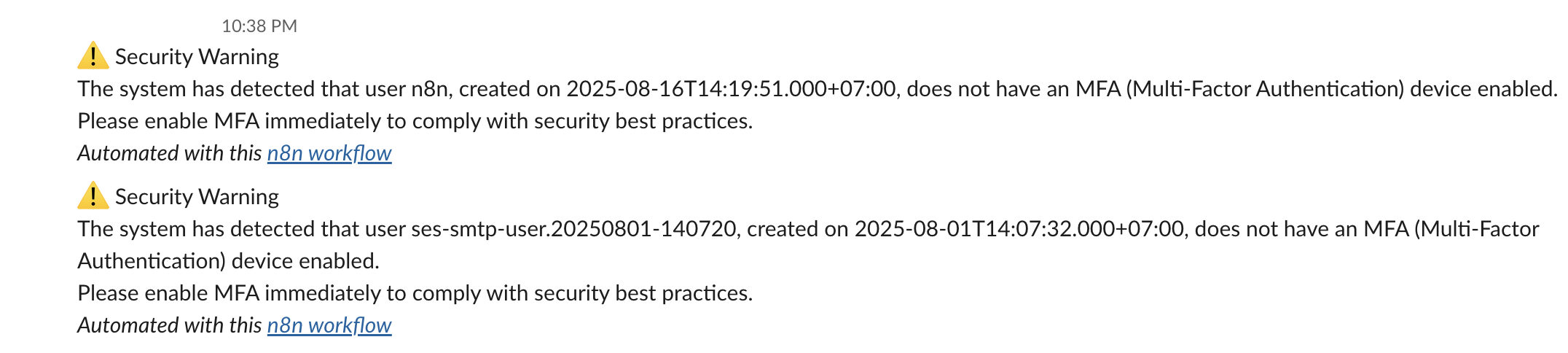"
},
"typeVersion": 1
},
{
"id": "f98f864f-2efa-4246-93ab-a45667751d7a",
"name": "Sticky Note5",
"type": "n8n-nodes-base.stickyNote",
"position": [
368,
-320
],
"parameters": {
"width": 272,
"content": "### 4. \ud83d\udcac Send Warning Messages\nSends real-time Slack alerts for each non-compliant user, including their username and account creation date. This provides visibility and prompts action before access is revoked."
},
"typeVersion": 1
},
{
"id": "ccbe9813-0aa1-410c-b389-abe678fa1d25",
"name": "Get IAM User MFA Devices",
"type": "n8n-nodes-base.httpRequest",
"position": [
0,
-48
],
"parameters": {
"url": "=https://iam.amazonaws.com/?Action=ListMFADevices&UserName={{ $json.UserName }}&Version=2010-05-08",
"options": {},
"authentication": "predefinedCredentialType",
"nodeCredentialType": "aws"
},
"credentials": {
"aws": {
"name": "<your credential>"
}
},
"typeVersion": 4.2
},
{
"id": "60809479-ea5c-4446-aa70-5c6d841d09ea",
"name": "Filter out IAM user with MFA device",
"type": "n8n-nodes-base.filter",
"position": [
224,
-48
],
"parameters": {
"options": {},
"conditions": {
"options": {
"version": 2,
"leftValue": "",
"caseSensitive": true,
"typeValidation": "strict"
},
"combinator": "and",
"conditions": [
{
"id": "2853872a-825b-4f59-8b4b-358cac8b197b",
"operator": {
"type": "array",
"operation": "empty",
"singleValue": true
},
"leftValue": "={{ $json.ListMFADevicesResponse.ListMFADevicesResult.MFADevices }}",
"rightValue": "Active"
}
]
}
},
"typeVersion": 2.2
},
{
"id": "5a499cf2-b352-4e15-93ee-03ce2d0df32d",
"name": "Get User Access Key(s)",
"type": "n8n-nodes-base.httpRequest",
"position": [
448,
48
],
"parameters": {
"url": "=https://iam.amazonaws.com/?Action=ListAccessKeys&UserName={{ $('Get many users').item.json.UserName }}&Version=2010-05-08",
"options": {},
"authentication": "predefinedCredentialType",
"nodeCredentialType": "aws"
},
"credentials": {
"aws": {
"name": "<your credential>"
}
},
"typeVersion": 4.2
},
{
"id": "77d5914f-44dd-4267-be75-f960f477702d",
"name": "Daily scheduler",
"type": "n8n-nodes-base.scheduleTrigger",
"position": [
-448,
-48
],
"parameters": {
"rule": {
"interval": [
{}
]
}
},
"typeVersion": 1.2
},
{
"id": "f0b5101b-e521-45d9-9d93-9bcffa3a1702",
"name": "Send warning message(s)",
"type": "n8n-nodes-base.slack",
"position": [
448,
-144
],
"parameters": {
"text": "=\u26a0\ufe0f Security Warning\nThe system has detected that user {{ $('Get many users').item.json.UserName }}, created on {{ $('Get many users').item.json.CreateDate.toDateTime('s') }}, does not have an MFA (Multi-Factor Authentication) device enabled.\nPlease enable MFA immediately to comply with security best practices.",
"select": "channel",
"channelId": {
"__rl": true,
"mode": "list",
"value": "C097VAKKPUP",
"cachedResultName": "it-support"
},
"otherOptions": {},
"authentication": "oAuth2"
},
"credentials": {
"slackOAuth2Api": {
"name": "<your credential>"
}
},
"typeVersion": 2.3
},
{
"id": "33fec879-44f5-4b87-aa36-976f440a8cd4",
"name": "Deactivate Access Key(s)",
"type": "n8n-nodes-base.httpRequest",
"position": [
1328,
48
],
"parameters": {
"url": "=https://iam.amazonaws.com/?Action=UpdateAccessKey&UserName={{ $json.UserName }}&AccessKeyId={{ $json.AccessKeyId }}&Status=Inactive&Version=2010-05-08",
"options": {},
"authentication": "predefinedCredentialType",
"nodeCredentialType": "aws"
},
"credentials": {
"aws": {
"name": "<your credential>"
}
},
"typeVersion": 4.2
},
{
"id": "5d112ea5-aff9-4a4e-aa4b-835847a70fb3",
"name": "Filter out inactive keys",
"type": "n8n-nodes-base.filter",
"position": [
896,
48
],
"parameters": {
"options": {},
"conditions": {
"options": {
"version": 2,
"leftValue": "",
"caseSensitive": true,
"typeValidation": "strict"
},
"combinator": "and",
"conditions": [
{
"id": "2853872a-825b-4f59-8b4b-358cac8b197b",
"operator": {
"type": "string",
"operation": "equals"
},
"leftValue": "={{ $json.Status }}",
"rightValue": "Active"
}
]
}
},
"typeVersion": 2.2
},
{
"id": "96034aab-7108-4dc8-a525-074ea63b5f3a",
"name": "Parse the list of user access key(s)",
"type": "n8n-nodes-base.code",
"position": [
672,
48
],
"parameters": {
"jsCode": "const items = await $input.all();\nconst results = [];\n\nfor (const item of items) {\n const accessKeys = item.json?.ListAccessKeysResponse?.ListAccessKeysResult?.AccessKeyMetadata || [];\n\n for (const key of accessKeys) {\n results.push({\n json: {\n UserName: key.UserName,\n AccessKeyId: key.AccessKeyId,\n Status: key.Status,\n CreateDate: new Date(key.CreateDate * 1000).toISOString(),\n }\n });\n }\n}\n\nreturn results.length > 0\n ? results\n : [{ json: { warning: 'No access keys found in input data' } }];"
},
"typeVersion": 2
},
{
"id": "f62c4dac-f501-49ca-962a-20dad60cca72",
"name": "Sticky Note6",
"type": "n8n-nodes-base.stickyNote",
"position": [
1520,
48
],
"parameters": {
"width": 400,
"height": 128,
"content": "### 6. \ud83d\udd12 Deactivate Access Key(s)\nUses the `UpdateAccessKey` API to set the status of each active access key to `Inactive`. This immediately blocks unauthorized programmatic access for non-MFA users."
},
"typeVersion": 1
},
{
"id": "e96b7315-a7c9-4fdf-b2cd-dd7ceebd6cd4",
"name": "Send message and wait for response",
"type": "n8n-nodes-base.slack",
"position": [
1136,
48
],
"parameters": {
"user": {
"__rl": true,
"mode": "list",
"value": "U054RMBTVBM",
"cachedResultName": "trung.tran"
},
"message": "=\u26a0\ufe0f *Access Key Deactivation Request*\nUser *`{{ $json.UserName }}`* does not have MFA enabled.\nThey have active access key(s) that may pose a security risk.\nDo you approve disabling the access key *`{{ $json.AccessKeyId }}`*?",
"options": {
"limitWaitTime": {
"values": {
"resumeUnit": "minutes",
"resumeAmount": 60
}
}
},
"operation": "sendAndWait",
"authentication": "oAuth2",
"approvalOptions": {
"values": {
"approvalType": "double"
}
}
},
"credentials": {
"slackOAuth2Api": {
"name": "<your credential>"
}
},
"typeVersion": 2.3
},
{
"id": "807d2857-7a94-4a93-8943-5987497daf13",
"name": "Sticky Note8",
"type": "n8n-nodes-base.stickyNote",
"position": [
928,
224
],
"parameters": {
"width": 464,
"height": 176,
"content": "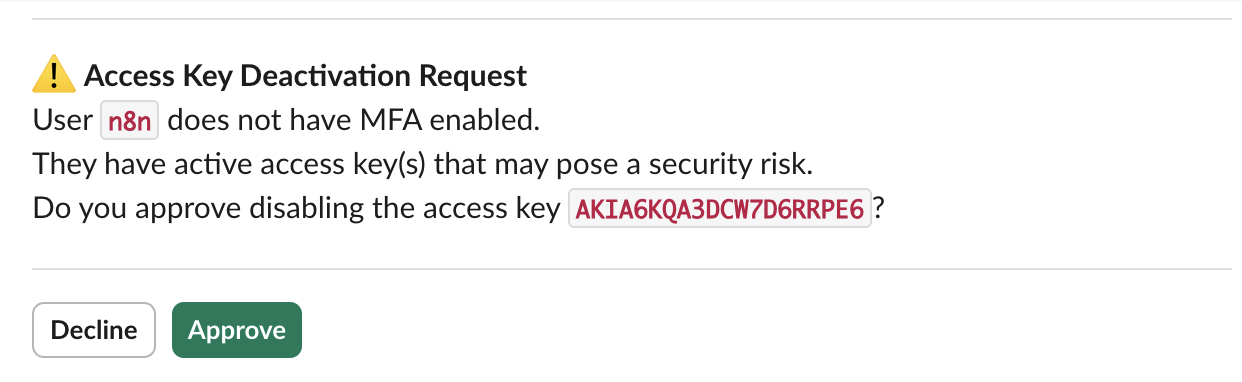"
},
"typeVersion": 1
}
],
"active": false,
"settings": {
"executionOrder": "v1"
},
"versionId": "16313843-f027-42f1-a3dd-e8e0be8ad28a",
"connections": {
"Get many users": {
"main": [
[
{
"node": "Get IAM User MFA Devices",
"type": "main",
"index": 0
}
]
]
},
"Daily scheduler": {
"main": [
[
{
"node": "Get many users",
"type": "main",
"index": 0
}
]
]
},
"Get User Access Key(s)": {
"main": [
[
{
"node": "Parse the list of user access key(s)",
"type": "main",
"index": 0
}
]
]
},
"Deactivate Access Key(s)": {
"main": [
[]
]
},
"Filter out inactive keys": {
"main": [
[
{
"node": "Send message and wait for response",
"type": "main",
"index": 0
}
]
]
},
"Get IAM User MFA Devices": {
"main": [
[
{
"node": "Filter out IAM user with MFA device",
"type": "main",
"index": 0
}
]
]
},
"Send message and wait for response": {
"main": [
[
{
"node": "Deactivate Access Key(s)",
"type": "main",
"index": 0
}
]
]
},
"Filter out IAM user with MFA device": {
"main": [
[
{
"node": "Send warning message(s)",
"type": "main",
"index": 0
},
{
"node": "Get User Access Key(s)",
"type": "main",
"index": 0
}
]
]
},
"Parse the list of user access key(s)": {
"main": [
[
{
"node": "Filter out inactive keys",
"type": "main",
"index": 0
}
]
]
}
}
}
Credentials you'll need
Each integration node will prompt for credentials when you import. We strip credential IDs before publishing — you'll add your own.
awsslackOAuth2Api
For the full experience including quality scoring and batch install features for each workflow upgrade to Pro
About this workflow
> This workflow leverages AWS IAM APIs and n8n automation to ensure strict security compliance by continuously monitoring IAM users for MFA (Multi-Factor Authentication) enforcement.
Source: https://n8n.io/workflows/7598/ — original creator credit. Request a take-down →
Related workflows
Workflows that share integrations, category, or trigger type with this one. All free to copy and import.
debug. Uses httpRequest, slack, redis, mailgun. Scheduled trigger; 60 nodes.
Seller Follow-Up Engine (Enhanced). Uses httpRequest, slack. Scheduled trigger; 44 nodes.
This workflow is an automated employee time tracking and reporting system that monitors weekly work hours via TMetric, then delivers personalized summaries directly to each team member on Slack. It co
Import Productboard Notes Companies And Features Into Snowflake. Uses stickyNote, httpRequest, splitOut, snowflake. Scheduled trigger; 35 nodes.
Import Productboard Notes, Companies and Features into Snowflake. Uses stickyNote, httpRequest, splitOut, snowflake. Scheduled trigger; 35 nodes.