 Lucas Peyrin
 This workflow corresponds to n8n.io template #5170 — we link there as the canonical source.
The workflow JSON
Copy or download the full n8n JSON below. Paste it into a new n8n workflow, add your credentials, activate. Full import guide →
{
"nodes": [
{
"id": "365fdd40-4e46-497b-8fef-9c356b2234cd",
"cid": "Ikx1Y2FzIFBleXJpbiI",
"name": "Execute to Start",
"type": "n8n-nodes-base.manualTrigger",
"notes": "\u00a9 2025 Lucas Peyrin",
"creator": "Lucas Peyrin",
"position": [
-3456,
1056
],
"parameters": {},
"typeVersion": 1
},
{
"id": "6c2fe8ca-9aa9-402a-949d-cc58177eb7e5",
"cid": "Ikx1Y2FzIFBleXJpbiI",
"name": "String",
"type": "n8n-nodes-base.set",
"notes": "\u00a9 2025 Lucas Peyrin",
"creator": "Lucas Peyrin",
"position": [
-2816,
1056
],
"parameters": {
"options": {},
"assignments": {
"assignments": [
{
"id": "e87952cb-878e-4feb-8261-342eaf887838",
"name": "json_example_string",
"type": "string",
"value": "This is a simple string. In JSON, it's always enclosed in double quotes."
}
]
}
},
"typeVersion": 3.4
},
{
"id": "3cffa562-bedc-42f9-ab4f-8b55cd3b5711",
"cid": "Ikx1Y2FzIFBleXJpbiI",
"name": "Key & Value",
"type": "n8n-nodes-base.set",
"notes": "\u00a9 2025 Lucas Peyrin",
"creator": "Lucas Peyrin",
"position": [
-3104,
1056
],
"parameters": {
"options": {},
"assignments": {
"assignments": [
{
"id": "e87952cb-878e-4feb-8261-342eaf887838",
"name": "key",
"type": "string",
"value": "value"
},
{
"id": "b5f030f4-6650-4181-881f-de44790bb24b",
"name": "another_key",
"type": "string",
"value": "another_value"
}
]
}
},
"typeVersion": 3.4
},
{
"id": "c4742e5d-8017-45e9-ada5-a2897c87b4cc",
"cid": "Ikx1Y2FzIFBleXJpbiI",
"name": "Number",
"type": "n8n-nodes-base.set",
"notes": "\u00a9 2025 Lucas Peyrin",
"creator": "Lucas Peyrin",
"position": [
-2528,
1056
],
"parameters": {
"options": {},
"assignments": {
"assignments": [
{
"id": "e87952cb-878e-4feb-8261-342eaf887838",
"name": "json_example_integer",
"type": "number",
"value": 10
},
{
"id": "12345",
"name": "json_example_float",
"type": "number",
"value": 12.5
}
]
}
},
"typeVersion": 3.4
},
{
"id": "60ee473c-635c-41d7-acd2-4fa6c3acb665",
"cid": "Ikx1Y2FzIFBleXJpbiI",
"name": "Boolean",
"type": "n8n-nodes-base.set",
"notes": "\u00a9 2025 Lucas Peyrin",
"creator": "Lucas Peyrin",
"position": [
-2240,
1056
],
"parameters": {
"options": {},
"assignments": {
"assignments": [
{
"id": "e87952cb-878e-4feb-8261-342eaf887838",
"name": "json_example_boolean",
"type": "boolean",
"value": false
}
]
}
},
"typeVersion": 3.4
},
{
"id": "56683e92-19a0-4a17-99a9-b92120739c74",
"cid": "Ikx1Y2FzIFBleXJpbiI",
"name": "Array",
"type": "n8n-nodes-base.set",
"notes": "\u00a9 2025 Lucas Peyrin",
"creator": "Lucas Peyrin",
"position": [
-1664,
1056
],
"parameters": {
"options": {},
"assignments": {
"assignments": [
{
"id": "e87952cb-878e-4feb-8261-342eaf887838",
"name": "json_example_array",
"type": "array",
"value": "[\"first element\", 2, false, null]"
}
]
}
},
"typeVersion": 3.4
},
{
"id": "190c86c7-2d0b-47e1-a729-e22e9610dc8f",
"cid": "Ikx1Y2FzIFBleXJpbiI",
"name": "Object",
"type": "n8n-nodes-base.set",
"notes": "\u00a9 2025 Lucas Peyrin",
"creator": "Lucas Peyrin",
"position": [
-1360,
1056
],
"parameters": {
"options": {},
"assignments": {
"assignments": [
{
"id": "e87952cb-878e-4feb-8261-342eaf887838",
"name": "json_example_object",
"type": "object",
"value": "{\"key\":\"value\",\"array\":[1,2,3],\"boolean\":false,\"integer\":123,\"sub_object\":{\"sub_key\":\"Find me!\"}}"
}
]
}
},
"typeVersion": 3.4
},
{
"id": "24b198bc-9a82-477f-921e-c7e5055d17cc",
"cid": "Ikx1Y2FzIFBleXJpbiI",
"name": "Sticky Note",
"type": "n8n-nodes-base.stickyNote",
"notes": "\u00a9 2025 Lucas Peyrin",
"creator": "Lucas Peyrin",
"position": [
-3680,
560
],
"parameters": {
"width": 460,
"height": 656,
"content": "## Tutorial - What is JSON?\n\nWelcome! This workflow will teach you the basics of JSON, the language that apps and n8n nodes use to exchange information.\n\n**What is JSON?**\nImagine a contact card:\n- **Name:** John Doe\n- **Age:** 30\n- **Has Children:** Yes\n- **Phone Numbers:** [\"555-1234\", \"555-5678\"]\n\n\nJSON is just a way of writing this down so a computer can understand it perfectly.\n\n**How to use this tutorial:**\n1. Click **\"Execute Workflow\"** button.\n2. Click on each node, one by one, in order.\n3. Look at the node's output in the panel on the right and read the associated sticky note to understand what's happening."
},
"typeVersion": 1
},
{
"id": "f9dfa173-b51f-41fb-8587-9c4ee2855265",
"cid": "Ikx1Y2FzIFBleXJpbiI",
"name": "Sticky Note1",
"type": "n8n-nodes-base.stickyNote",
"notes": "\u00a9 2025 Lucas Peyrin",
"creator": "Lucas Peyrin",
"position": [
-3184,
704
],
"parameters": {
"color": 7,
"width": 260,
"height": 516,
"content": "#### The Heart of JSON: Key & Value\n\nEverything in JSON is built on this pair:\n- A **Key** (the name of the data, always in double quotes `\"`).\n- A **Value** (the data itself).\n\n\n`\"key\": \"value\"`\n\nIn this node's output, you see two key/value pairs. This is the basic building block for everything that follows."
},
"typeVersion": 1
},
{
"id": "fc2ad88e-b5cc-4dc4-91e6-f246d1654e26",
"cid": "Ikx1Y2FzIFBleXJpbiI",
"name": "Sticky Note2",
"type": "n8n-nodes-base.stickyNote",
"notes": "\u00a9 2025 Lucas Peyrin",
"creator": "Lucas Peyrin",
"position": [
-2896,
704
],
"parameters": {
"color": 7,
"width": 260,
"height": 516,
"content": "#### Data Type: String\n\nA string is simply **text**.\n- **Syntax:** The text is always enclosed in double quotes `\" \"`.\n\n\nLook at the output: the value of `json_example_string` is the text we defined."
},
"typeVersion": 1
},
{
"id": "4973dad8-cce4-490c-8ad1-01410ffb7740",
"cid": "Ikx1Y2FzIFBleXJpbiI",
"name": "Sticky Note3",
"type": "n8n-nodes-base.stickyNote",
"notes": "\u00a9 2025 Lucas Peyrin",
"creator": "Lucas Peyrin",
"position": [
-2608,
704
],
"parameters": {
"color": 7,
"width": 260,
"height": 516,
"content": "#### Data Type: Number\n\nThis is simply a number. It can be a whole number (integer) like 10, or a decimal (float) like 12.5.\n- **Syntax:** Just write the number directly, **WITHOUT quotes**.\n\n\n`\"age\": 30` (Correct)\n`\"age\": \"30\"` (Incorrect, this is a String!)\n\nThis distinction is crucial for doing math!"
},
"typeVersion": 1
},
{
"id": "4240a747-d2de-42dc-882a-55aee236e76a",
"cid": "Ikx1Y2FzIFBleXJpbiI",
"name": "Sticky Note4",
"type": "n8n-nodes-base.stickyNote",
"notes": "\u00a9 2025 Lucas Peyrin",
"creator": "Lucas Peyrin",
"position": [
-2320,
704
],
"parameters": {
"color": 7,
"width": 260,
"height": 516,
"content": "#### Data Type: Boolean\n\nThis is a value that can only be **TRUE** or **FALSE**.\n- **Syntax:** `true` or `false` (always lowercase and **WITHOUT quotes**).\n\n\nThink of it like a light switch: on (`true`) or off (`false`). It's very useful for conditions (If/Then logic)."
},
"typeVersion": 1
},
{
"id": "6eb904bc-a082-43fd-85ea-e672830cdcd2",
"cid": "Ikx1Y2FzIFBleXJpbiI",
"name": "Sticky Note5",
"type": "n8n-nodes-base.stickyNote",
"notes": "\u00a9 2025 Lucas Peyrin",
"creator": "Lucas Peyrin",
"position": [
-1744,
704
],
"parameters": {
"color": 7,
"width": 260,
"height": 516,
"content": "#### Data Type: Array\n\nAn array is an **ordered list** of items.\n- **Syntax:** Starts with `[` and ends with `]`. Items are separated by commas.\n\n\nAn array can hold anything: strings, numbers, booleans, and even other arrays or objects!"
},
"typeVersion": 1
},
{
"id": "76fa5320-894b-451f-b372-59144fc0ade3",
"cid": "Ikx1Y2FzIFBleXJpbiI",
"name": "Sticky Note6",
"type": "n8n-nodes-base.stickyNote",
"notes": "\u00a9 2025 Lucas Peyrin",
"creator": "Lucas Peyrin",
"position": [
-1456,
704
],
"parameters": {
"color": 7,
"width": 280,
"height": 516,
"content": "#### Data Type: Object (JSON Object)\n\nThis is the main concept! An object is a **collection of key/value pairs**.\n- **Syntax:** Starts with `{` and ends with `}`.\n\n\nThis is what allows us to structure complex data, like our contact card from the beginning. Notice how this object contains all the other data types we've seen!"
},
"typeVersion": 1
},
{
"id": "5976d5fa-6788-46b8-b5e5-1cf6d09f5954",
"cid": "Ikx1Y2FzIFBleXJpbiI",
"name": "Null",
"type": "n8n-nodes-base.set",
"notes": "\u00a9 2025 Lucas Peyrin",
"creator": "Lucas Peyrin",
"position": [
-1952,
1056
],
"parameters": {
"options": {},
"assignments": {
"assignments": [
{
"id": "e87952cb-878e-4feb-8261-342eaf887838",
"name": "json_example_null",
"type": "null",
"value": {}
}
]
}
},
"typeVersion": 3.4
},
{
"id": "7786c224-1cd6-4b05-a41b-d47cde98d2a0",
"cid": "Ikx1Y2FzIFBleXJpbiI",
"name": "Sticky Note7",
"type": "n8n-nodes-base.stickyNote",
"notes": "\u00a9 2025 Lucas Peyrin",
"creator": "Lucas Peyrin",
"position": [
-2032,
704
],
"parameters": {
"color": 7,
"width": 260,
"height": 516,
"content": "#### Data Type: Null\n\nThis special type means \"nothing,\" \"no value,\" or \"empty.\"\n- **Syntax:** `null` (lowercase and **WITHOUT quotes**).\n\n\nIt's different from `0` (which is a number) or `\"\"` (which is an empty string). `null` is the intentional absence of a value."
},
"typeVersion": 1
},
{
"id": "f8f6e7b6-3f48-4e5c-86d6-001ec61d1f81",
"cid": "Ikx1Y2FzIFBleXJpbiI",
"name": "Using JSON (Expressions)",
"type": "n8n-nodes-base.set",
"notes": "\u00a9 2025 Lucas Peyrin",
"creator": "Lucas Peyrin",
"position": [
-1024,
1056
],
"parameters": {
"options": {},
"assignments": {
"assignments": [
{
"id": "e87952cb-878e-4feb-8261-342eaf887838",
"name": "message",
"type": "string",
"value": "=Hello, the number from the tutorial is: {{ $('Number').item.json.json_example_integer }}"
},
{
"id": "61f385f4-b8e2-4c69-b873-9ffc3ab3fe94",
"name": "sub_key",
"type": "string",
"value": "={{ $json.json_example_object.sub_object.sub_key }}"
},
{
"id": "bd752a0f-64bf-44b1-b39b-fca28e86aa5b",
"name": "array_second_item",
"type": "string",
"value": "={{ $json.json_example_object.array[1] }}"
}
]
}
},
"typeVersion": 3.4
},
{
"id": "0b3ddc47-b1ff-4016-957b-cb6f584a996f",
"cid": "Ikx1Y2FzIFBleXJpbiI",
"name": "Sticky Note8",
"type": "n8n-nodes-base.stickyNote",
"notes": "\u00a9 2025 Lucas Peyrin",
"creator": "Lucas Peyrin",
"position": [
-1152,
704
],
"parameters": {
"color": 5,
"width": 340,
"height": 516,
"content": "#### \u2b50 THE KEY STEP: Using JSON in n8n!\n\nNow for the magic. How do you use data from a previous node? With **expressions** `{{ }}`.\n\nThis node creates a custom message. Look at the value of the `message` field:\n`Hello, the number from the tutorial is: {{ $('Number').item.json.json_example_integer }}`\n\nIt dynamically pulled the number `10` from the \"Number\" node! This is how you make your nodes talk to each other."
},
"typeVersion": 1
},
{
"id": "d1004e2e-15b6-4108-9811-6e7d980822d3",
"cid": "Ikx1Y2FzIFBleXJpbiI",
"name": "Final Exam",
"type": "n8n-nodes-base.set",
"notes": "\u00a9 2025 Lucas Peyrin",
"creator": "Lucas Peyrin",
"position": [
-672,
1056
],
"parameters": {
"options": {},
"assignments": {
"assignments": [
{
"id": "e87952cb-878e-4feb-8261-342eaf887838",
"name": "summary_string",
"type": "string",
"value": "={{ $('String').item.json.json_example_string }}"
},
{
"id": "12345",
"name": "summary_number",
"type": "number",
"value": "={{ $('Number').item.json.json_example_integer }}"
},
{
"id": "67890",
"name": "summary_boolean",
"type": "boolean",
"value": "={{ $('Boolean').item.json.json_example_boolean }}"
},
{
"id": "abcde",
"name": "summary_null",
"type": "null",
"value": "={{ $('Null').item.json.json_example_null }}"
},
{
"id": "fghij",
"name": "summary_array",
"type": "array",
"value": "={{ $('Array').item.json.json_example_array }}"
},
{
"id": "klmno",
"name": "summary_object",
"type": "object",
"value": "={{ $('Object').item.json.json_example_object }}"
}
]
}
},
"typeVersion": 3.4
},
{
"id": "43eb149b-ccd3-4557-b744-ef5d9dcf82d9",
"cid": "Ikx1Y2FzIFBleXJpbiI",
"name": "Sticky Note9",
"type": "n8n-nodes-base.stickyNote",
"notes": "\u00a9 2025 Lucas Peyrin",
"creator": "Lucas Peyrin",
"position": [
-784,
704
],
"parameters": {
"color": 6,
"width": 340,
"height": 516,
"content": "#### \ud83c\udf93 FINAL EXAM: Putting It All Together\n\nThis last node creates a final object by using expressions to pull data from **all the previous nodes**.\n\nClick on this node and look at the expressions in each field. It's a perfect summary of everything you've learned.\n\n**Congratulations! You now understand the basics of JSON and how to use it in n8n.**"
},
"typeVersion": 1
},
{
"id": "b8fce06f-abe9-45cd-b365-97743a0d8dca",
"cid": "Ikx1Y2FzIFBleXJpbiI",
"name": "Sticky Note10",
"type": "n8n-nodes-base.stickyNote",
"notes": "\u00a9 2025 Lucas Peyrin",
"creator": "Lucas Peyrin",
"position": [
-416,
16
],
"parameters": {
"color": 3,
"width": 540,
"height": 1200,
"content": "## Was this helpful? Let me know!\n[](https://api.ia2s.app/form/templates/academy)\n\nI really hope this tutorial helped you understand JSON better. Your feedback is incredibly valuable and helps me create better resources for the n8n community.\n\n### **Have Feedback, a Question, or a Project Idea?**\n\nI've streamlined the way we connect. It all starts with one simple form that takes less than 10 seconds. After that, you'll chat with my AI assistant who will gather the key details and pass them directly on to me.\n\n#### \u27a1\ufe0f **[Click here to start the conversation](https://api.ia2s.app/form/templates/academy)**\n\nUse this single link for anything you need:\n\n* **Give Feedback:** Share your thoughts on this template\u2014whether you found a typo, encountered an unexpected error, have a suggestion, or just want to say thanks!\n\n* **n8n Coaching:** Get personalized, one-on-one guidance to master n8n. We can work together to get you launched with confidence or help you reach an expert level.\n\n* **n8n Consulting:** Have a complex business challenge or need a custom workflow built from scratch? Let's partner on a powerful automation solution tailored to your specific needs.\n\n---\n\nHappy Automating!\nLucas Peyrin | [n8n Academy](https://n8n.ac)"
},
"typeVersion": 1
},
{
"id": "da4af3ac-a717-489d-bb64-3ef34167a0fc",
"cid": "Ikx1Y2FzIFBleXJpbiI",
"name": "Sticky Note11",
"type": "n8n-nodes-base.stickyNote",
"notes": "\u00a9 2025 Lucas Peyrin",
"creator": "Lucas Peyrin",
"position": [
-3680,
240
],
"parameters": {
"color": 2,
"width": 460,
"height": 300,
"content": "## [Video Tutorial](https://youtu.be/PAmgrwYnzWs?si=yXG1oHIL3UiBcAPa)\n@[youtube](PAmgrwYnzWs)"
},
"typeVersion": 1
},
{
"id": "b29ca9fc-7fc2-4dd7-9fca-d2d2a9bae237",
"cid": "Ikx1Y2FzIFBleXJpbiI",
"name": "Sticky Note14",
"type": "n8n-nodes-base.stickyNote",
"notes": "\u00a9 2025 Lucas Peyrin",
"creator": "Lucas Peyrin",
"position": [
-3184,
288
],
"parameters": {
"color": 7,
"width": 576,
"height": 392,
"content": "[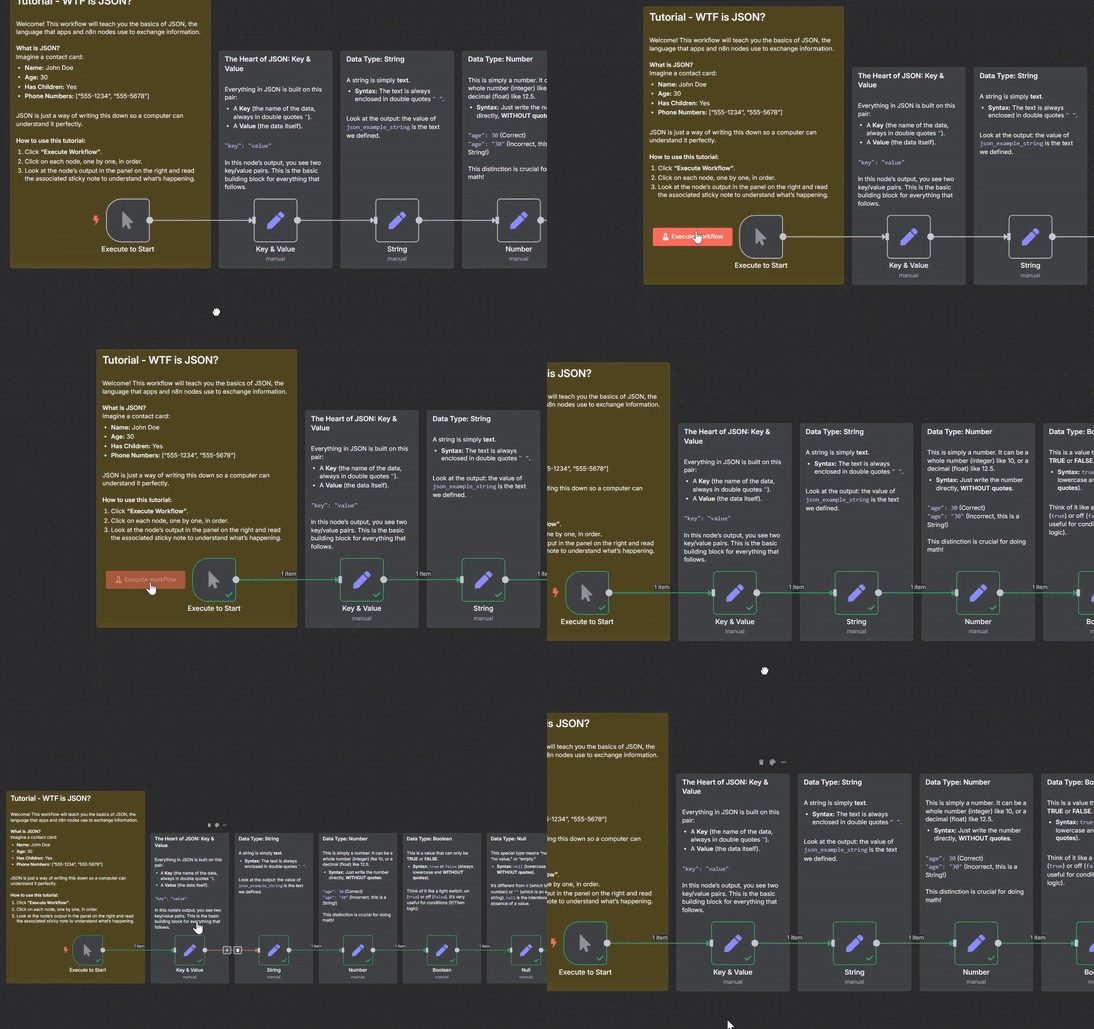](https://www.youtube.com/watch?v=PAmgrwYnzWs)"
},
"typeVersion": 1
},
{
"id": "0d2835ec-33c8-426b-87cd-74af33011bd5",
"cid": "Ikx1Y2FzIFBleXJpbiI",
"name": "Sticky Note15",
"type": "n8n-nodes-base.stickyNote",
"notes": "\u00a9 2025 Lucas Peyrin",
"creator": "Lucas Peyrin",
"position": [
-784,
368
],
"parameters": {
"color": 6,
"width": 336,
"height": 312,
"content": "## [>> Go to Eval Workflow <<](https://n8n.io/workflows/6232)\n\nVerify your skills with a complete eval workflow to put your JSON Skills to the test.\n[](https://n8n.io/workflows/6232)"
},
"typeVersion": 1
}
],
"connections": {
"Null": {
"main": [
[
{
"node": "Array",
"type": "main",
"index": 0
}
]
]
},
"Array": {
"main": [
[
{
"node": "Object",
"type": "main",
"index": 0
}
]
]
},
"Number": {
"main": [
[
{
"node": "Boolean",
"type": "main",
"index": 0
}
]
]
},
"Object": {
"main": [
[
{
"node": "Using JSON (Expressions)",
"type": "main",
"index": 0
}
]
]
},
"String": {
"main": [
[
{
"node": "Number",
"type": "main",
"index": 0
}
]
]
},
"Boolean": {
"main": [
[
{
"node": "Null",
"type": "main",
"index": 0
}
]
]
},
"Key & Value": {
"main": [
[
{
"node": "String",
"type": "main",
"index": 0
}
]
]
},
"Execute to Start": {
"main": [
[
{
"node": "Key & Value",
"type": "main",
"index": 0
}
]
]
},
"Using JSON (Expressions)": {
"main": [
[
{
"node": "Final Exam",
"type": "main",
"index": 0
}
]
]
}
}
}
For the full experience including quality scoring and batch install features for each workflow upgrade to Pro
About this workflow
This workflow is an interactive, hands-on tutorial designed to teach you the absolute basics of JSON (JavaScript Object Notation) and, more importantly, how to use it within n8n. It's perfect for beginners who are new to automation and data structures.
Source: https://n8n.io/workflows/5170/ — original creator credit. Request a take-down →
Related workflows
Workflows that share integrations, category, or trigger type with this one. All free to copy and import.
Reagendamiento. Uses executeWorkflowTrigger, redis, n8n-nodes-evolution-api, dataTable. Event-driven trigger; 73 nodes.
Blotato. Uses googleSheets, @blotato/n8n-nodes-blotato. Event-driven trigger; 65 nodes.
This template is a hands-on, practical exam designed to help you master n8n Expressions—the key to accessing and manipulating data in your workflows.
This template is a hands-on, practical exam designed to test your understanding of the fundamental JSON data types. It's the perfect way to solidify your knowledge after learning the basics.
Agendamiento. Uses n8n-nodes-evolution-api, redis, dataTable, executeWorkflowTrigger. Event-driven trigger; 60 nodes.