The workflow JSON
Copy or download the full n8n JSON below. Paste it into a new n8n workflow, add your credentials, activate. Full import guide →
{
"meta": {
"site": "https://github.com/zengfr/n8n-workflow-all-templates",
"name": "Line Message API : Push Message & Reply",
"wechat": "youandme10086",
"id": 2733,
"update_time": "2025-11-10"
},
"nodes": [
{
"id": "90d7c006-15b5-4301-978f-6a47b8b57150",
"name": "Line : Reply with token",
"type": "n8n-nodes-base.httpRequest",
"position": [
560,
176
],
"parameters": {
"url": "https://api.line.me/v2/bot/message/reply",
"method": "POST",
"options": {},
"jsonBody": "={\n \"replyToken\": \"{{ $('Webhook from Line Message').item.json.body.events[0].replyToken }}\",\n \"messages\": [\n {\n \"type\": \"text\",\n \"text\": \"\u6536\u5230\u60a8\u7684\u8a0a\u606f : {{ $('Webhook from Line Message').item.json.body.events[0].message.text }}\"\n }\n ]\n}",
"sendBody": true,
"specifyBody": "json",
"authentication": "genericCredentialType",
"genericAuthType": "httpHeaderAuth"
},
"typeVersion": 4.2
},
{
"id": "728f4c7b-0ad3-4d53-a456-dcd291b1d096",
"name": "Webhook from Line Message",
"type": "n8n-nodes-base.webhook",
"position": [
80,
192
],
"parameters": {
"path": "638c118e-1c98-4491-b6ff-14e2e75380b6",
"options": {},
"httpMethod": "POST"
},
"typeVersion": 2
},
{
"id": "4b175091-87e2-447b-9dc3-776dd64c7017",
"name": "Sticky Note",
"type": "n8n-nodes-base.stickyNote",
"position": [
0,
0
],
"parameters": {
"width": 720,
"height": 340,
"content": "## Line Message API Reply\n\nReceived Message from user and reply with same text by using reply token \n\nThere are many event types. So we need to determine if the type is message."
},
"typeVersion": 1
},
{
"id": "c858e000-2c08-4d08-bfe7-3b63d6906282",
"name": "If",
"type": "n8n-nodes-base.if",
"position": [
304,
192
],
"parameters": {
"options": {},
"conditions": {
"options": {
"version": 2,
"leftValue": "",
"caseSensitive": true,
"typeValidation": "strict"
},
"combinator": "and",
"conditions": [
{
"id": "b63773bb-f010-4018-8142-240c9aaa4570",
"operator": {
"name": "filter.operator.equals",
"type": "string",
"operation": "equals"
},
"leftValue": "={{ $json.body.events[0].type }}",
"rightValue": "message"
}
]
}
},
"typeVersion": 2.2
},
{
"id": "d18252c8-c22a-4f4b-9876-d88d2e59dd0e",
"name": "Sticky Note1",
"type": "n8n-nodes-base.stickyNote",
"position": [
0,
432
],
"parameters": {
"width": 720,
"height": 340,
"content": "## Line Message API Send Message\n\nYou need to get the Line UID first.\nEvery user is differnt.\n\nIf you have the Line UID. Then you can push the message to the User."
},
"typeVersion": 1
},
{
"id": "34def141-e980-406b-870d-c6f748183d14",
"name": "When clicking \u2018Test workflow\u2019",
"type": "n8n-nodes-base.manualTrigger",
"position": [
80,
608
],
"parameters": {},
"typeVersion": 1
},
{
"id": "b7920f19-2e45-40f4-9d1d-b2f04a74d9ef",
"name": "Edit Fields",
"type": "n8n-nodes-base.set",
"position": [
304,
608
],
"parameters": {
"options": {},
"assignments": {
"assignments": [
{
"id": "6278f340-6287-4e89-b774-f6c584954d5b",
"name": "line_uid",
"type": "string",
"value": "Uxxxxxxxxxxxx"
}
]
}
},
"typeVersion": 3.4
},
{
"id": "06d37439-afef-4ebc-ae43-5f68bf88590d",
"name": "Line : Push Message",
"type": "n8n-nodes-base.httpRequest",
"position": [
544,
608
],
"parameters": {
"url": "https://api.line.me/v2/bot/message/push",
"method": "POST",
"options": {},
"jsonBody": "={\n \"to\": \"{{ $json.line_uid }}\",\n \"messages\": [\n {\n \"type\": \"text\",\n \"text\": \"\u63a8\u64ad\u6e2c\u8a66\"\n }\n ]\n}",
"sendBody": true,
"specifyBody": "json",
"authentication": "genericCredentialType",
"genericAuthType": "httpHeaderAuth"
},
"typeVersion": 4.2
},
{
"id": "de5ff6cb-879f-49f0-8a4c-1f9a52f9e6c9",
"name": "Sticky Note2",
"type": "n8n-nodes-base.stickyNote",
"position": [
752,
0
],
"parameters": {
"color": 4,
"width": 464,
"height": 500,
"content": "## How to get Line Message API Token ?\n\n1. Go to Linve Developer Console\ndevelopers.line.biz/console/\n\n2. Select the Chatbot.\n\n3. Open `Messaging API`\n\n4. Check the `Channel Acccess Token`\n\n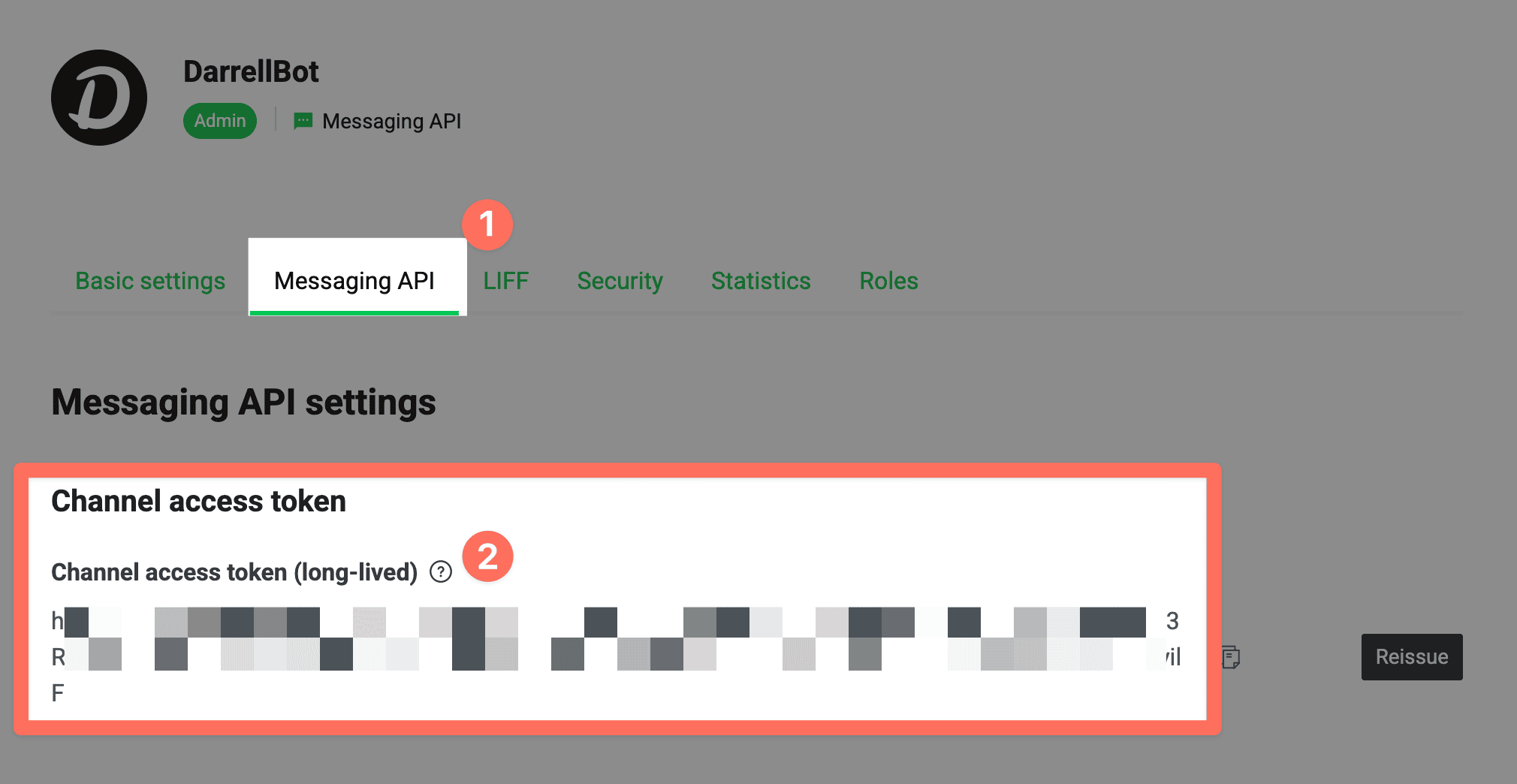"
},
"typeVersion": 1
},
{
"id": "3a342e06-9e85-4300-9db6-2cfa2526c4fa",
"name": "Sticky Note3",
"type": "n8n-nodes-base.stickyNote",
"position": [
1248,
0
],
"parameters": {
"color": 4,
"width": 464,
"height": 692,
"content": "## How to get Line UID for yourself ?\n\n1. Go to Linve Developer Console\ndevelopers.line.biz/console/\n\n2. Select the Chatbot.\n\n3. Open `Basic Settings`\n\n4. Check the `Your user ID`\n\n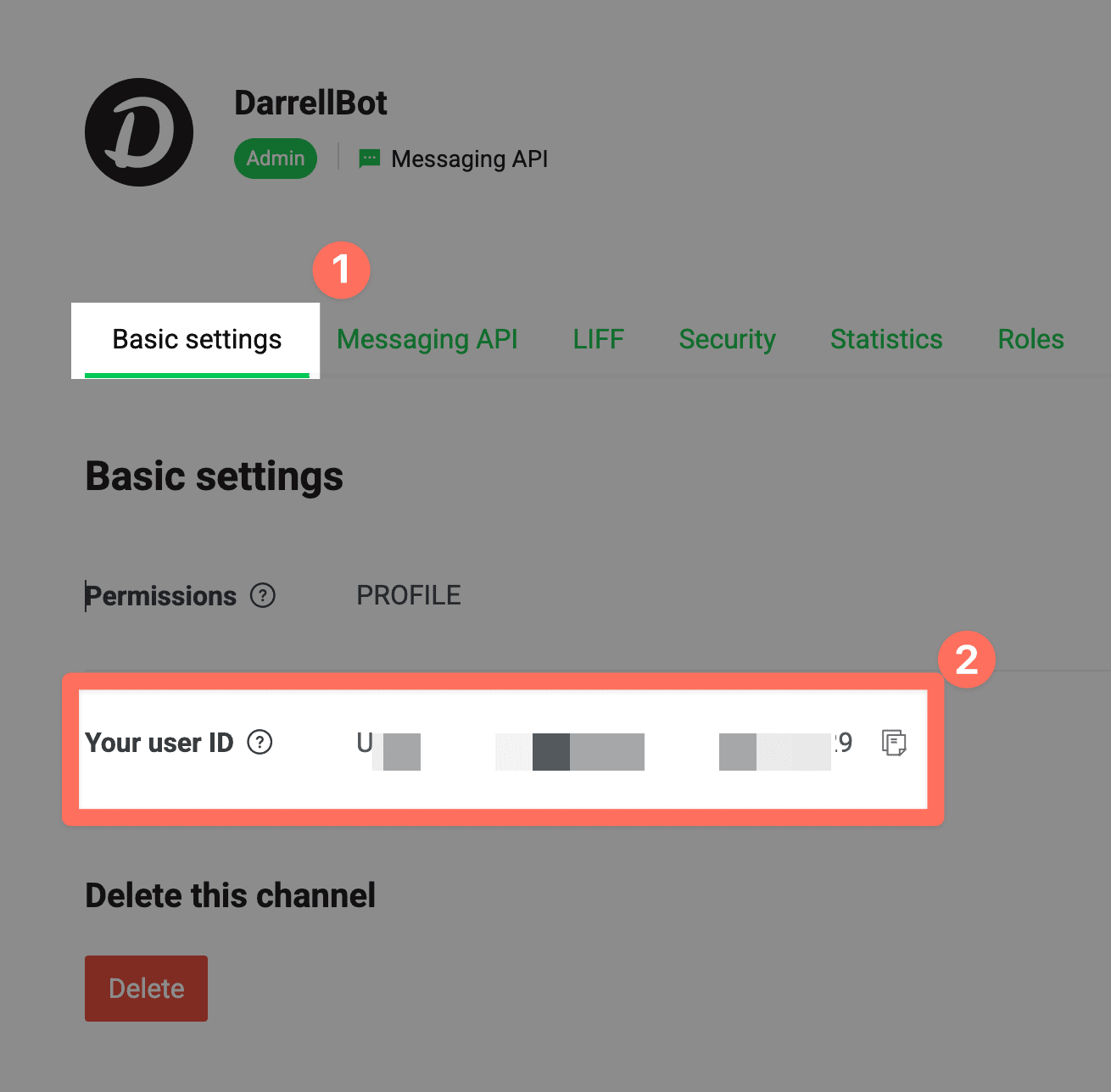"
},
"typeVersion": 1
},
{
"id": "192a2559-46e0-4ec7-abc0-bef3c5210099",
"name": "Sticky Note4",
"type": "n8n-nodes-base.stickyNote",
"position": [
-320,
0
],
"parameters": {
"color": 7,
"width": 296,
"height": 468,
"content": "## Created by darrell_tw_ \n\nHi \u6211\u662f Darrell\n\u6709 n8n \u554f\u984c\u53ef\u4ee5\u627e\u6211\u804a\u804a\n\n- [n8n \u6559\u5b78\u8cc7\u6e90\u7db2\u7ad9](https://www.darrelltw.com/n8n-tutorial-resources/)\n- [n8n \u6a21\u677f\u5206\u4eab\u7db2\u7ad9](https://www.darrelltw.com/tools/n8n_template/models.html)\n\n### Social Media:\n[Website](https://www.darrelltw.com/)\n[X](https://x.com/darrell_tw_)\n[Threads](https://www.threads.net/@darrell_tw_)\n[Instagram](https://www.instagram.com/darrell_tw_/)\n"
},
"typeVersion": 1
}
],
"connections": {
"If": {
"main": [
[
{
"node": "Line : Reply with token",
"type": "main",
"index": 0
}
]
]
},
"Edit Fields": {
"main": [
[
{
"node": "Line : Push Message",
"type": "main",
"index": 0
}
]
]
},
"Webhook from Line Message": {
"main": [
[
{
"node": "If",
"type": "main",
"index": 0
}
]
]
},
"When clicking \u2018Test workflow\u2019": {
"main": [
[
{
"node": "Edit Fields",
"type": "main",
"index": 0
}
]
]
}
}
}
For the full experience including quality scoring and batch install features for each workflow upgrade to Pro
About this workflow
Line Message Api Push Message Reply. Uses httpRequest. Webhook trigger; 11 nodes.
Source: https://github.com/zengfr/n8n-workflow-all-templates/blob/6a3e60251e39ea8c87e061d82f52633e5d0debe6/n8n-workflow-all-templates/00/00/27/2733_Line_Message_API___Push_Message___Reply.json — original creator credit. Request a take-down →
Related workflows
Workflows that share integrations, category, or trigger type with this one. All free to copy and import.
Community Node Disclaimer: This workflow uses KlickTipp community nodes.
Automatically sync Fizzy cards to Basecamp todos in real-time. When cards are created, assigned, completed, or reopened in Fizzy, the changes sync instantly to your Basecamp project. Card tags determi
This workflow automates accounts payable: upload a PDF invoice, let Claude AI extract the key fields, and automatically create a vendor bill (incoming invoice) in Odoo 18.
JS-15B: Donor Cascade Engine. Uses httpRequest. Webhook trigger; 28 nodes.