 Trung Tran
 This workflow corresponds to n8n.io template #7500 — we link there as the canonical source.
This workflow follows the HTTP Request → Slack recipe pattern — see all workflows that pair these two integrations.
The workflow JSON
Copy or download the full n8n JSON below. Paste it into a new n8n workflow, add your credentials, activate. Full import guide →
{
"id": "JQzVd68SaXiYdyoz",
"meta": {
"templateCredsSetupCompleted": true
},
"name": "AWS IAM Inactive User Automation Alert Workflow",
"tags": [],
"nodes": [
{
"id": "36340c3b-188b-47a4-bf2f-58c757092b8f",
"name": "Weekly scheduler",
"type": "n8n-nodes-base.scheduleTrigger",
"position": [
-448,
0
],
"parameters": {
"rule": {
"interval": [
{
"field": "weeks"
}
]
}
},
"typeVersion": 1.2
},
{
"id": "ceab393d-abf0-4717-8c4c-fa12878ae3d1",
"name": "Get many users",
"type": "n8n-nodes-base.awsIam",
"position": [
-96,
0
],
"parameters": {
"returnAll": true,
"requestOptions": {},
"additionalFields": {}
},
"credentials": {
"aws": {
"name": "<your credential>"
}
},
"typeVersion": 1
},
{
"id": "79c8efd6-e671-4ec8-b2e1-270a0f092015",
"name": "Get user",
"type": "n8n-nodes-base.awsIam",
"position": [
256,
-96
],
"parameters": {
"user": {
"__rl": true,
"mode": "userName",
"value": "={{ $json.UserName }}"
},
"operation": "get",
"requestOptions": {}
},
"credentials": {
"aws": {
"name": "<your credential>"
}
},
"typeVersion": 1
},
{
"id": "387a10b7-cea6-4541-b2ad-9d6c75833164",
"name": "No Operation, do nothing",
"type": "n8n-nodes-base.noOp",
"position": [
1280,
112
],
"parameters": {},
"typeVersion": 1
},
{
"id": "eeb64146-6255-45b7-80bd-2b25f725cbd5",
"name": "Send a message",
"type": "n8n-nodes-base.slack",
"position": [
1280,
-80
],
"parameters": {
"text": "=:warning: *Inactive IAM User Detected* :warning:\n\nThe following IAM user has been inactive for more than *90 days*:\n\n*User ARN:* `{{ $json.Arn }}`\n*User Name:* `{{ $json.UserName }}`\n*Last Activity:* {{ $json.PasswordLastUsed.toDateTime('s') }}\n\nPlease review this account and take appropriate action (disable access keys, remove user, or re-activate if still needed).",
"user": {
"__rl": true,
"mode": "list",
"value": "U054RMBTVBM",
"cachedResultName": "trung.tran"
},
"select": "user",
"otherOptions": {},
"authentication": "oAuth2"
},
"credentials": {
"slackOAuth2Api": {
"name": "<your credential>"
}
},
"typeVersion": 2.3
},
{
"id": "9443abfc-7618-418a-9fa5-302e679243a5",
"name": "IAM user inactive for more than 90 days?",
"type": "n8n-nodes-base.if",
"position": [
928,
16
],
"parameters": {
"options": {},
"conditions": {
"options": {
"version": 2,
"leftValue": "",
"caseSensitive": true,
"typeValidation": "strict"
},
"combinator": "and",
"conditions": [
{
"id": "93641224-b6d2-4db1-8537-d85b1bbff56d",
"operator": {
"type": "dateTime",
"operation": "before"
},
"leftValue": "={{ $json.PasswordLastUsed.toDateTime('s') }}",
"rightValue": "={{ $now }}"
}
]
}
},
"typeVersion": 2.2
},
{
"id": "9aac0aeb-6a50-4ad4-8ec7-f1067eac9c08",
"name": "Filter bad data",
"type": "n8n-nodes-base.filter",
"position": [
608,
16
],
"parameters": {
"options": {},
"conditions": {
"options": {
"version": 2,
"leftValue": "",
"caseSensitive": true,
"typeValidation": "strict"
},
"combinator": "and",
"conditions": [
{
"id": "2853872a-825b-4f59-8b4b-358cac8b197b",
"operator": {
"type": "number",
"operation": "exists",
"singleValue": true
},
"leftValue": "={{ $json.PasswordLastUsed }}",
"rightValue": ""
}
]
}
},
"typeVersion": 2.2
},
{
"id": "242c3a32-3ec9-45b8-8646-5f3fe0d8cb11",
"name": "Sticky Note",
"type": "n8n-nodes-base.stickyNote",
"position": [
-1536,
-592
],
"parameters": {
"width": 992,
"height": 1328,
"content": "# AWS IAM Inactive User Automation Alert Workflow\n\n> Weekly job that finds IAM users with **no activity for > 90 days** and notifies a Slack channel. \n> \u26a0\ufe0f **Important:** AWS SigV4 for IAM must be scoped to **`us-east-1`**. Create the AWS credential in n8n with region **us-east-1** (even if your other services run elsewhere).\n\n## **Who\u2019s it for**\n- SRE/DevOps teams that want automated IAM hygiene checks.\n- Security/compliance owners who need regular inactivity reports.\n- MSPs managing multiple AWS accounts who need lightweight alerting.\n\n## **How it works / What it does**\n1. **Weekly scheduler** \u2013 kicks off the workflow (e.g., every Monday 09:00).\n2. **Get many users** \u2013 lists IAM users.\n3. **Get user** \u2013 enriches each user with details (password status, MFA, etc.).\n4. **Filter bad data** \u2013 drops service-linked users or items without usable dates.\n5. **IAM user inactive for more than 90 days?** \u2013 keeps users whose **last activity** is older than 90 days.\n - Last activity is derived from any of:\n - `PasswordLastUsed` (console sign-in)\n - `AccessKeyLastUsed.LastUsedDate` (from `GetAccessKeyLastUsed` if you add it)\n - Fallback to `CreateDate` if no usage data exists (optional)\n6. **Send a message (Slack)** \u2013 posts an alert for each inactive user.\n7. **No operation** \u2013 path for users that don\u2019t match (do nothing).\n\n## **How to set up**\n1. **Credentials**\n - **AWS (Predefined \u2192 AWS)** \n - Service: `iam` \n - Region: `us-east-1` \u2190 **required for IAM** \n - Access/Secret (or Assume Role) with read-only IAM perms (see below).\n - **Slack** OAuth (bot in your target channel).\n\n## **Requirements**\n- n8n (current version).\n- **AWS IAM permissions** (minimum):\n - `iam:ListUsers`, `iam:GetUser`\n - *(Optional for higher fidelity)* `iam:ListAccessKeys`, `iam:GetAccessKeyLastUsed`\n- Slack bot with permission to post in the target channel.\n- Network egress to `iam.amazonaws.com`.\n\n## **How to customize the workflow**\n- **Change window:** set 60/120/180 days by adjusting `minus(N, 'days')`.\n- **Audit log:** append results to Google Sheets/DB with `UserName`, `Arn`, `LastActivity`, `CheckedAt`.\n- **Escalation:** if a user remains inactive for another cycle, mention `@security` or open a ticket.\n- **Auto-remediation (advanced):** on a separate approval path, disable access keys or detach policies.\n- **Multi-account / multi-region:** iterate a list of AWS credentials (one per account; IAM stays `us-east-1`).\n- **Exclude list:** add a static list or tag-based filter to skip known service users.\n\n## **Notes & gotchas**\n- Many users never sign in; if you don\u2019t pull `GetAccessKeyLastUsed`, they may look \u201cinactive\u201d. Add that call for accuracy.\n- `PasswordLastUsed` is null if console login never happened.\n- IAM returns timestamps in ISO or epoch\u2014use `toDate`/`toDateTime` before comparisons."
},
"typeVersion": 1
},
{
"id": "9b0815bf-dde1-465c-8262-7d1ed099f4a2",
"name": "Custom HTTP Request (enable to try)",
"type": "n8n-nodes-base.httpRequest",
"disabled": true,
"position": [
256,
96
],
"parameters": {
"url": "=https://iam.amazonaws.com/?Action=GetUser&UserName={{ $json.UserName }}&Version=2010-05-08",
"options": {},
"authentication": "predefinedCredentialType",
"nodeCredentialType": "aws"
},
"credentials": {
"aws": {
"name": "<your credential>"
}
},
"typeVersion": 4.2
},
{
"id": "0be727ef-fc32-409d-8f63-27bbde0e607c",
"name": "Sticky Note1",
"type": "n8n-nodes-base.stickyNote",
"position": [
-512,
-176
],
"parameters": {
"height": 128,
"content": "### 1. Trigger Workflow\nStart the workflow on a schedule or manually when you want to check IAM users."
},
"typeVersion": 1
},
{
"id": "1b6f9219-9005-4da1-9924-b32020576b81",
"name": "Sticky Note2",
"type": "n8n-nodes-base.stickyNote",
"position": [
-144,
192
],
"parameters": {
"width": 208,
"height": 112,
"content": "\n### 2. List Users\nCall the `ListUsers` API to retrieve all IAM user names available in the account."
},
"typeVersion": 1
},
{
"id": "1e658098-4c72-4ab7-87c5-05c18df8e626",
"name": "Sticky Note3",
"type": "n8n-nodes-base.stickyNote",
"position": [
176,
-320
],
"parameters": {
"width": 256,
"height": 192,
"content": "### 3. Get User Details\nFor each user, call the `GetUser` API to fetch detailed attributes including ARN, Path, UserId, Creation date, and last password use.\n- Use builtin-node\n- Use custom HTTP request"
},
"typeVersion": 1
},
{
"id": "9e9dd194-be45-49bf-86ae-4e730906321e",
"name": "Sticky Note4",
"type": "n8n-nodes-base.stickyNote",
"position": [
544,
208
],
"parameters": {
"height": 144,
"content": "\n### 4. Filter Out Irrelevant Data\nRemove service-linked accounts or entries without valid activity information to avoid noise in the results."
},
"typeVersion": 1
},
{
"id": "43884563-7736-4f13-9055-f3c456c7a97d",
"name": "Sticky Note5",
"type": "n8n-nodes-base.stickyNote",
"position": [
848,
-176
],
"parameters": {
"height": 144,
"content": "### 5. Identify Inactive Users\nCompare the last activity date (`PasswordLastUsed` or key usage) against today minus 90 days to find inactive accounts."
},
"typeVersion": 1
},
{
"id": "8dbc51b7-40a3-472b-8e0d-65e3e2a1f2c8",
"name": "Sticky Note6",
"type": "n8n-nodes-base.stickyNote",
"position": [
1216,
-272
],
"parameters": {
"content": "### 6. Send Slack Notification\nPost a message to Slack listing the inactive user(s), including ARN, username, and last activity date, with instructions for review."
},
"typeVersion": 1
},
{
"id": "8b8651c4-37f0-41ce-90c8-4dc4b4472ecd",
"name": "Sticky Note7",
"type": "n8n-nodes-base.stickyNote",
"position": [
1472,
-96
],
"parameters": {
"width": 528,
"content": "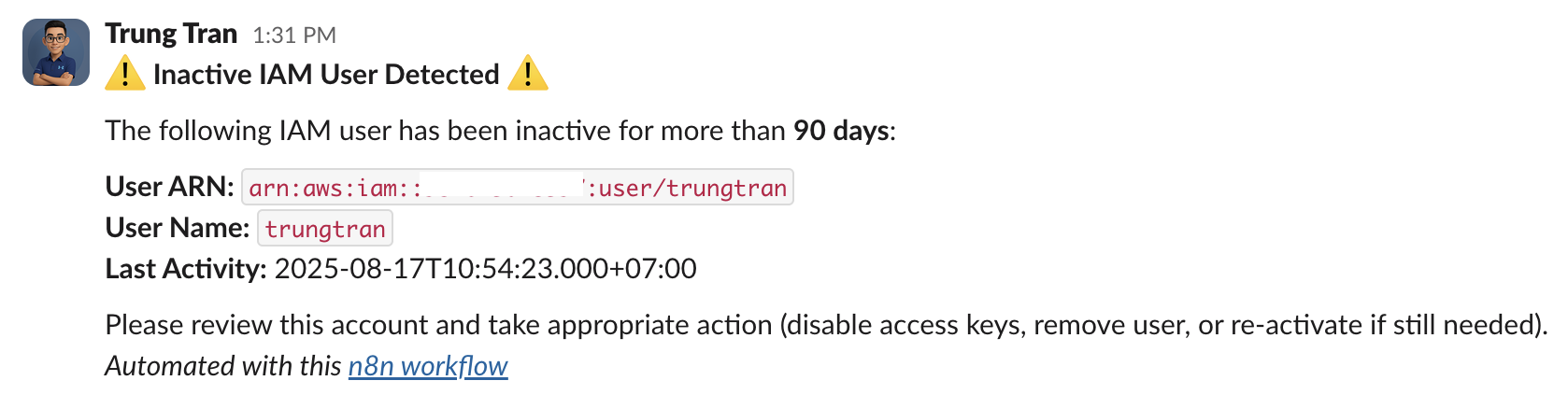"
},
"typeVersion": 1
}
],
"active": false,
"settings": {
"executionOrder": "v1"
},
"versionId": "1fe2c30a-5001-4dac-9725-be3bce01b214",
"connections": {
"Get user": {
"main": [
[
{
"node": "Filter bad data",
"type": "main",
"index": 0
}
]
]
},
"Get many users": {
"main": [
[
{
"node": "Get user",
"type": "main",
"index": 0
},
{
"node": "Custom HTTP Request (enable to try)",
"type": "main",
"index": 0
}
]
]
},
"Filter bad data": {
"main": [
[
{
"node": "IAM user inactive for more than 90 days?",
"type": "main",
"index": 0
}
]
]
},
"Weekly scheduler": {
"main": [
[
{
"node": "Get many users",
"type": "main",
"index": 0
}
]
]
},
"Custom HTTP Request (enable to try)": {
"main": [
[
{
"node": "Filter bad data",
"type": "main",
"index": 0
}
]
]
},
"IAM user inactive for more than 90 days?": {
"main": [
[
{
"node": "Send a message",
"type": "main",
"index": 0
}
],
[
{
"node": "No Operation, do nothing",
"type": "main",
"index": 0
}
]
]
}
}
}
Credentials you'll need
Each integration node will prompt for credentials when you import. We strip credential IDs before publishing — you'll add your own.
awsslackOAuth2Api
For the full experience including quality scoring and batch install features for each workflow upgrade to Pro
About this workflow
> Weekly job that finds IAM users with no activity for > 90 days and notifies a Slack channel. > ⚠️ Important: AWS SigV4 for IAM must be scoped to **. Create the AWS credential in n8n with region us-east-1** (even if your other services run elsewhere). SRE/DevOps teams…
Source: https://n8n.io/workflows/7500/ — original creator credit. Request a take-down →
Related workflows
Workflows that share integrations, category, or trigger type with this one. All free to copy and import.
[](https://youtu.be/tW2y_dRvcs0) DevOps/SRE teams responsible for AWS account security. Security/compliance officers ensuring key rotation policies are followed. Any AWS account owner who wants automa
This workflow is designed for engineering teams, project managers, and IT operations who need consistent visibility into team availability across multiple projects. It’s perfect for organizations that
This workflow is an automated system that tracks End-of-Life (EOL) dates for software and technologies used across your projects. It eliminates the need to manually monitor EOL dates in spreadsheets o
This workflow continuously monitors the Meta Ads Library for new creatives from a specific competitor pages, logs them into Google Sheets, and sends a concise Telegram notification with the number of
Enhance financial oversight with this automated n8n workflow. Triggered every 5 minutes, it fetches real-time bank transactions via an API, enriches and transforms the data, and applies smart logic to