This workflow follows the Editimage → HTTP Request recipe pattern — see all workflows that pair these two integrations.
The workflow JSON
Copy or download the full n8n JSON below. Paste it into a new n8n workflow, add your credentials, activate. Full import guide →
{
"nodes": [
{
"id": "bae5d407-9210-4bd0-99a3-3637ee893065",
"name": "When clicking \u2018Test workflow\u2019",
"type": "n8n-nodes-base.manualTrigger",
"position": [
-1440,
-280
],
"parameters": {},
"typeVersion": 1
},
{
"id": "c5a14c8e-4aeb-4a4e-b202-f88e837b6efb",
"name": "Get Variables",
"type": "n8n-nodes-base.set",
"position": [
-200,
-180
],
"parameters": {
"options": {},
"assignments": {
"assignments": [
{
"id": "b455afe0-2311-4d3f-8751-269624d76cf1",
"name": "coords",
"type": "array",
"value": "={{ $json.candidates[0].content.parts[0].text.parseJson() }}"
},
{
"id": "92f09465-9a0b-443c-aa72-6d208e4df39c",
"name": "width",
"type": "string",
"value": "={{ $('Get Image Info').item.json.size.width }}"
},
{
"id": "da98ce2a-4600-46a6-b4cb-159ea515cb50",
"name": "height",
"type": "string",
"value": "={{ $('Get Image Info').item.json.size.height }}"
}
]
}
},
"typeVersion": 3.4
},
{
"id": "f24017c9-05bc-4f75-a18c-29efe99bfe0e",
"name": "Get Test Image",
"type": "n8n-nodes-base.httpRequest",
"position": [
-1260,
-280
],
"parameters": {
"url": "https://www.stonhambarns.co.uk/wp-content/uploads/jennys-ark-petting-zoo-for-website-6.jpg",
"options": {}
},
"typeVersion": 4.2
},
{
"id": "c0f6a9f7-ba65-48a3-8752-ce5d80fe33cf",
"name": "Gemini 2.0 Object Detection",
"type": "n8n-nodes-base.httpRequest",
"position": [
-680,
-180
],
"parameters": {
"url": "https://generativelanguage.googleapis.com/v1beta/models/gemini-2.0-flash-exp:generateContent",
"method": "POST",
"options": {},
"jsonBody": "={{\n{\n \"contents\": [{\n \"parts\":[\n {\"text\": \"I want to see all bounding boxes of rabbits in this image.\"},\n {\n \"inline_data\": {\n \"mime_type\":\"image/jpeg\",\n \"data\": $input.item.binary.data.data\n }\n }\n ]\n }],\n \"generationConfig\": {\n \"response_mime_type\": \"application/json\",\n \"response_schema\": {\n \"type\": \"ARRAY\",\n \"items\": {\n \"type\": \"OBJECT\",\n \"properties\": {\n \"box_2d\": {\"type\":\"ARRAY\", \"items\": { \"type\": \"NUMBER\" } },\n \"label\": { \"type\": \"STRING\"}\n }\n }\n }\n }\n}\n}}",
"sendBody": true,
"specifyBody": "json",
"authentication": "predefinedCredentialType",
"nodeCredentialType": "googlePalmApi"
},
"credentials": {
"googlePalmApi": {
"name": "<your credential>"
}
},
"typeVersion": 4.2
},
{
"id": "edbc1152-4642-4656-9a3a-308dae42bac6",
"name": "Scale Normalised Coords",
"type": "n8n-nodes-base.code",
"position": [
-20,
-180
],
"parameters": {
"jsCode": "const { coords, width, height } = $input.first().json;\n\nconst scale = 1000;\nconst scaleCoordX = (val) => (val * width) / scale;\nconst scaleCoordY = (val) => (val * height) / scale;\n \nconst normalisedOutput = coords\n .filter(coord => coord.box_2d.length === 4)\n .map(coord => {\n return {\n xmin: coord.box_2d[1] ? scaleCoordX(coord.box_2d[1]) : coord.box_2d[1],\n xmax: coord.box_2d[3] ? scaleCoordX(coord.box_2d[3]) : coord.box_2d[3],\n ymin: coord.box_2d[0] ? scaleCoordY(coord.box_2d[0]) : coord.box_2d[0],\n ymax: coord.box_2d[2] ? scaleCoordY(coord.box_2d[2]) : coord.box_2d[2],\n }\n });\n\nreturn {\n json: {\n coords: normalisedOutput\n },\n binary: $('Get Test Image').first().binary\n}"
},
"typeVersion": 2
},
{
"id": "e0380611-ac7d-48d8-8eeb-35de35dbe56a",
"name": "Draw Bounding Boxes",
"type": "n8n-nodes-base.editImage",
"position": [
400,
-180
],
"parameters": {
"options": {},
"operation": "multiStep",
"operations": {
"operations": [
{
"color": "#ff00f277",
"operation": "draw",
"endPositionX": "={{ $json.coords[0].xmax }}",
"endPositionY": "={{ $json.coords[0].ymax }}",
"startPositionX": "={{ $json.coords[0].xmin }}",
"startPositionY": "={{ $json.coords[0].ymin }}"
},
{
"color": "#ff00f277",
"operation": "draw",
"endPositionX": "={{ $json.coords[1].xmax }}",
"endPositionY": "={{ $json.coords[1].ymax }}",
"startPositionX": "={{ $json.coords[1].xmin }}",
"startPositionY": "={{ $json.coords[1].ymin }}"
},
{
"color": "#ff00f277",
"operation": "draw",
"endPositionX": "={{ $json.coords[2].xmax }}",
"endPositionY": "={{ $json.coords[2].ymax }}",
"startPositionX": "={{ $json.coords[2].xmin }}",
"startPositionY": "={{ $json.coords[2].ymin }}"
},
{
"color": "#ff00f277",
"operation": "draw",
"endPositionX": "={{ $json.coords[3].xmax }}",
"endPositionY": "={{ $json.coords[3].ymax }}",
"startPositionX": "={{ $json.coords[3].xmin }}",
"startPositionY": "={{ $json.coords[3].ymin }}"
},
{
"color": "#ff00f277",
"operation": "draw",
"endPositionX": "={{ $json.coords[4].xmax }}",
"endPositionY": "={{ $json.coords[4].ymax }}",
"startPositionX": "={{ $json.coords[4].xmin }}",
"startPositionY": "={{ $json.coords[4].ymin }}"
},
{
"color": "#ff00f277",
"operation": "draw",
"cornerRadius": "=0",
"endPositionX": "={{ $json.coords[5].xmax }}",
"endPositionY": "={{ $json.coords[5].ymax }}",
"startPositionX": "={{ $json.coords[5].xmin }}",
"startPositionY": "={{ $json.coords[5].ymin }}"
}
]
}
},
"typeVersion": 1
},
{
"id": "52daac1b-5ba3-4302-b47b-df3f410b40fc",
"name": "Get Image Info",
"type": "n8n-nodes-base.editImage",
"position": [
-1080,
-280
],
"parameters": {
"operation": "information"
},
"typeVersion": 1
},
{
"id": "0d2ab96a-3323-472d-82ff-2af5e7d815a1",
"name": "Sticky Note",
"type": "n8n-nodes-base.stickyNote",
"position": [
740,
-460
],
"parameters": {
"width": 440,
"height": 380,
"content": "Fig 1. Output of Object Detection\n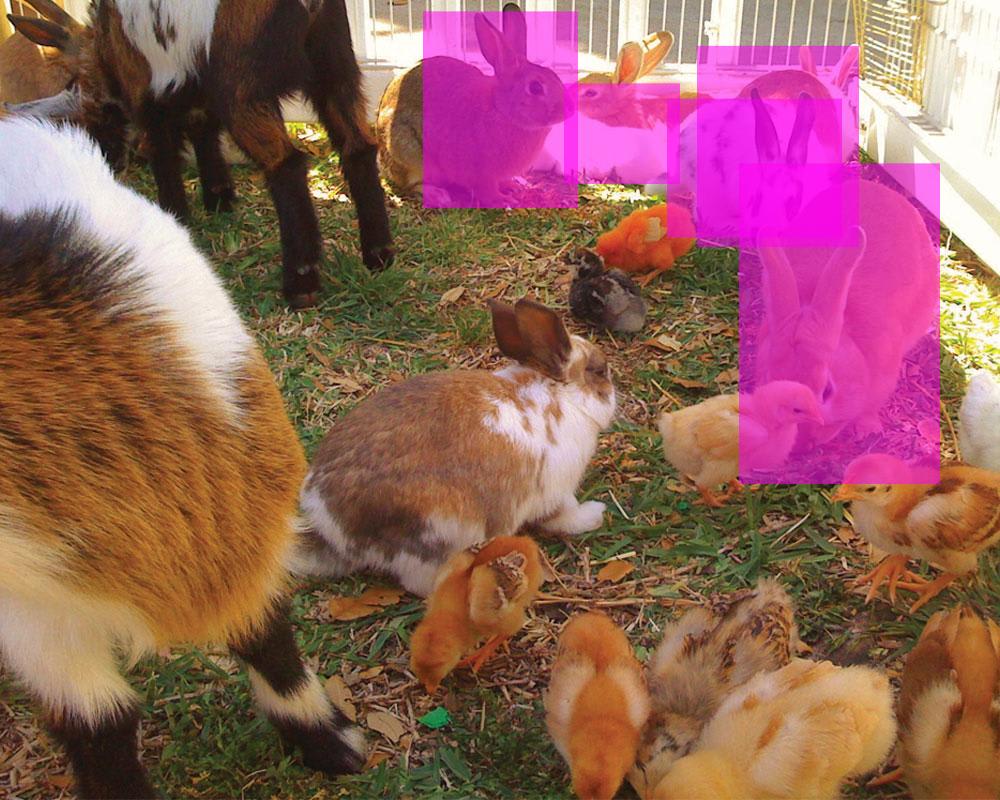"
},
"typeVersion": 1
},
{
"id": "c1806400-57da-4ef2-a50d-6ed211d5df29",
"name": "Sticky Note1",
"type": "n8n-nodes-base.stickyNote",
"position": [
-1520,
-480
],
"parameters": {
"color": 7,
"width": 600,
"height": 420,
"content": "## 1. Download Test Image\n[Read more about the HTTP node](https://docs.n8n.io/integrations/builtin/core-nodes/n8n-nodes-base.httprequest)\n\nAny compatible image will do ([see docs](https://ai.google.dev/gemini-api/docs/vision?lang=rest#technical-details-image)) but best if it isn't too busy or the subjects too obscure. Most importantly, you are able to retrieve the width and height as this is required for a later step."
},
"typeVersion": 1
},
{
"id": "3ae12a7c-a20f-4087-868e-b118cc09fa9a",
"name": "Sticky Note2",
"type": "n8n-nodes-base.stickyNote",
"position": [
-900,
-480
],
"parameters": {
"color": 7,
"width": 560,
"height": 540,
"content": "## 2. Use Prompt-Based Object Detection\n[Read more about the HTTP node](https://docs.n8n.io/integrations/builtin/core-nodes/n8n-nodes-base.httprequest)\n\nWe've had generalised object detection before ([see my other template using ResNet](https://n8n.io/workflows/2331-build-your-own-image-search-using-ai-object-detection-cdn-and-elasticsearch/)) but being able to prompt for what you're looking for is a very exciting proposition! Not only could this reduce the effort in post-detection filtering but also introduce contextual use-cases such as searching by \"emotion\", \"locality\", \"anomolies\" and many more!\n\nI found the the output json schema of `{ \"box_2d\": { \"type\": \"array\", ... } }` works best for Gemini to return coordinates. "
},
"typeVersion": 1
},
{
"id": "35673272-7207-41d1-985e-08032355846e",
"name": "Sticky Note3",
"type": "n8n-nodes-base.stickyNote",
"position": [
-320,
-400
],
"parameters": {
"color": 7,
"width": 520,
"height": 440,
"content": "## 3. Scale Coords to Fit Original Image\n[Read more about the Code node](https://docs.n8n.io/integrations/builtin/core-nodes/n8n-nodes-base.code/)\n\nAccording to the Gemini 2.0 overview on [how it calculates bounding boxes](https://ai.google.dev/gemini-api/docs/models/gemini-v2?_gl=1*187cb6v*_up*MQ..*_ga*MTU1ODkzMDc0Mi4xNzM0NDM0NDg2*_ga_P1DBVKWT6V*MTczNDQzNDQ4Ni4xLjAuMTczNDQzNDQ4Ni4wLjAuMjEzNzc5MjU0Ng..#bounding-box), we'll have to rescale the coordinate values as they are normalised to a 0-1000 range. Nothing a little code node can't help with!"
},
"typeVersion": 1
},
{
"id": "d3d4470d-0fe1-47fd-a892-10a19b6a6ecc",
"name": "Sticky Note4",
"type": "n8n-nodes-base.stickyNote",
"position": [
-660,
80
],
"parameters": {
"color": 5,
"width": 340,
"height": 100,
"content": "### Q. Why not use the Basic LLM node?\nAt time of writing, Langchain version does not recognise Gemini 2.0 to be a multimodal model."
},
"typeVersion": 1
},
{
"id": "5b2c1eff-6329-4d9a-9d3d-3a48fb3bd753",
"name": "Sticky Note5",
"type": "n8n-nodes-base.stickyNote",
"position": [
220,
-400
],
"parameters": {
"color": 7,
"width": 500,
"height": 440,
"content": "## 4. Draw!\n[Read more about the Edit Image node](https://docs.n8n.io/integrations/builtin/core-nodes/n8n-nodes-base.editimage/)\n\nFinally for this demonstration, we can use the \"Edit Image\" node to draw the bounding boxes on top of the original image. In my test run, I can see Gemini did miss out one of the bunnies but seeing how this is the experimental version we're playing with, it's pretty good to see it doesn't do too bad of a job."
},
"typeVersion": 1
},
{
"id": "965d791b-a183-46b0-b2a6-dd961d630c13",
"name": "Sticky Note6",
"type": "n8n-nodes-base.stickyNote",
"position": [
-1960,
-740
],
"parameters": {
"width": 420,
"height": 680,
"content": "## Try it out!\n### This n8n template demonstrates how to use Gemini 2.0's new Bounding Box detection capabilities your workflows.\n\nThe key difference being this enables prompt-based object detection for images which is pretty powerful for things like contextual search over an image. eg. \"Put a bounding box around all adults with children in this image\" or \"Put a bounding box around cars parked out of bounds of a parking space\".\n\n## How it works\n* An image is downloaded via the HTTP node and an \"Edit Image\" node is used to extract the file's width and height.\n* The image is then given to the Gemini 2.0 API to parse and return coordinates of the bounding box of the requested subjects. In this demo, we've asked for the AI to identify all bunnies.\n* The coordinates are then rescaled with the original image's width and height to correctl align them.\n* Finally to measure the accuracy of the object detection, we use the \"Edit Image\" node to draw the bounding boxes onto the original image.\n\n\n### Need Help?\nJoin the [Discord](https://discord.com/invite/XPKeKXeB7d) or ask in the [Forum](https://community.n8n.io/)!\n\nHappy Hacking!"
},
"typeVersion": 1
}
],
"connections": {
"Get Variables": {
"main": [
[
{
"node": "Scale Normalised Coords",
"type": "main",
"index": 0
}
]
]
},
"Get Image Info": {
"main": [
[
{
"node": "Gemini 2.0 Object Detection",
"type": "main",
"index": 0
}
]
]
},
"Get Test Image": {
"main": [
[
{
"node": "Get Image Info",
"type": "main",
"index": 0
}
]
]
},
"Draw Bounding Boxes": {
"main": [
[]
]
},
"Scale Normalised Coords": {
"main": [
[
{
"node": "Draw Bounding Boxes",
"type": "main",
"index": 0
}
]
]
},
"Gemini 2.0 Object Detection": {
"main": [
[
{
"node": "Get Variables",
"type": "main",
"index": 0
}
]
]
},
"When clicking \u2018Test workflow\u2019": {
"main": [
[
{
"node": "Get Test Image",
"type": "main",
"index": 0
}
]
]
}
}
}
Credentials you'll need
Each integration node will prompt for credentials when you import. We strip credential IDs before publishing — you'll add your own.
googlePalmApi
For the full experience including quality scoring and batch install features for each workflow upgrade to Pro
How this works
This workflow enables you to upload an image and receive a visual output with bounding boxes around detected objects, based on a custom prompt interpreted by the Gemini 2.0 model. It suits developers, researchers, or content creators needing quick, prompt-driven object detection without building complex AI pipelines from scratch. The key step involves sending the image via HTTP request to Gemini 2.0 for analysis, followed by scaling coordinates and drawing boxes using the editImage node to produce an annotated result.
Use this workflow for prototyping computer vision tasks, such as identifying products in photos or analysing scene elements in real-time experiments. Avoid it for production-scale applications requiring high accuracy or real-time processing, as it's optimised for testing rather than heavy loads. Common variations include integrating additional HTTP requests for batch image processing or swapping Gemini 2.0 with other vision APIs for specialised detection needs.
About this workflow
Prompt Based Object Detection With Gemini 2 0. Uses manualTrigger, httpRequest, editImage, stickyNote. Event-driven trigger; 14 nodes.
Source: https://github.com/Zie619/n8n-workflows — original creator credit. Request a take-down →
Related workflows
Workflows that share integrations, category, or trigger type with this one. All free to copy and import.
Prompt-Based Object Detection With Gemini 2.0. Uses manualTrigger, httpRequest, editImage, stickyNote. Event-driven trigger; 14 nodes.
This n8n template demonstrates how to get started with Gemini 2.0's new Bounding Box detection capabilities in your workflows.
In this tutorial, I’ll show how to create UGC (User Generated Content) videos automatically using n8n and Sora 2.
This workflow automatically turns a topic and a reference image URL into a finished, branded article image. It uses GPT-4o to generate a short, detailed image prompt, sends it to FAL Flux image-to-ima
legal_rag_telegram_api_current_github_ready. Uses telegramTrigger, httpRequest. Event-driven trigger; 56 nodes.