 gotoHuman
 This workflow corresponds to n8n.io template #8489 — we link there as the canonical source.
This workflow follows the Agent → Googledocstool recipe pattern — see all workflows that pair these two integrations.
The workflow JSON
Copy or download the full n8n JSON below. Paste it into a new n8n workflow, add your credentials, activate. Full import guide →
{
"nodes": [
{
"id": "5945e791-28e6-4d39-8400-8c87340933aa",
"name": "When clicking \u2018Execute workflow\u2019",
"type": "n8n-nodes-base.manualTrigger",
"position": [
-544,
144
],
"parameters": {},
"typeVersion": 1
},
{
"id": "8f5922a1-f13a-41e9-a6eb-f44a469aac3c",
"name": "AI Agent",
"type": "@n8n/n8n-nodes-langchain.agent",
"position": [
-304,
144
],
"parameters": {
"text": "Write a content strategy based on the company description and the given overall strategy. Consider the channels LinkedIn, Instagram and Email Newsletter",
"options": {},
"promptType": "define",
"hasOutputParser": true
},
"typeVersion": 2.2
},
{
"id": "749793fe-528d-48a2-b8a0-dbd9937a41ed",
"name": "Get company strategy",
"type": "n8n-nodes-base.googleDocsTool",
"position": [
-144,
400
],
"parameters": {
"operation": "get"
},
"typeVersion": 2
},
{
"id": "28899559-c2b6-4854-ae47-bae9ff2b56d0",
"name": "Get company description",
"type": "n8n-nodes-base.googleDocsTool",
"position": [
-304,
400
],
"parameters": {
"operation": "get"
},
"typeVersion": 2
},
{
"id": "cbca9a87-37e7-48b8-a8e7-4ccb87defbcd",
"name": "OpenAI Chat Model",
"type": "@n8n/n8n-nodes-langchain.lmChatOpenAi",
"position": [
-464,
400
],
"parameters": {
"model": {
"__rl": true,
"mode": "list",
"value": "gpt-4.1",
"cachedResultName": "gpt-4.1"
},
"options": {}
},
"typeVersion": 1.2
},
{
"id": "e07b5c1a-2e18-4966-981f-a824badca121",
"name": "Structured Output Parser",
"type": "@n8n/n8n-nodes-langchain.outputParserStructured",
"position": [
0,
400
],
"parameters": {
"jsonSchemaExample": "{\n\t\"strategyMarkdown\": \"\"\n}"
},
"typeVersion": 1.3
},
{
"id": "43f16854-7f37-45dd-af7d-9bf5e175a78c",
"name": "Send review request and wait for response",
"type": "@gotohuman/n8n-nodes-gotohuman.gotoHuman",
"position": [
416,
144
],
"parameters": {
"fields": {
"value": {
"strategyMarkdown": "={{ $json.output.strategyMarkdown }}"
},
"schema": [
{
"id": "strategyMarkdown",
"type": "string",
"display": true,
"removed": false,
"required": false,
"displayName": "strategyMarkdown (markdown)",
"defaultMatch": false,
"canBeUsedToMatch": true
}
],
"mappingMode": "defineBelow",
"matchingColumns": [
"strategyMarkdown"
],
"attemptToConvertTypes": false,
"convertFieldsToString": false
},
"additionalFields": {},
"reviewTemplateID": {
"__rl": true,
"mode": "list"
}
},
"typeVersion": 1
},
{
"id": "f315babc-14fc-4621-966e-13fe88e5c773",
"name": "Approved?",
"type": "n8n-nodes-base.if",
"position": [
848,
144
],
"parameters": {
"options": {},
"conditions": {
"options": {
"version": 2,
"leftValue": "",
"caseSensitive": true,
"typeValidation": "strict"
},
"combinator": "and",
"conditions": [
{
"id": "fe38c1f1-781b-4c14-98e8-945de4cbfeb9",
"operator": {
"name": "filter.operator.equals",
"type": "string",
"operation": "equals"
},
"leftValue": "={{ $json.response }}",
"rightValue": "approved"
}
]
}
},
"typeVersion": 2.2
},
{
"id": "6942b5c9-f992-40aa-b80c-aa203615e3e9",
"name": "Update file",
"type": "n8n-nodes-base.googleDrive",
"position": [
1424,
96
],
"parameters": {
"fileId": {
"__rl": true,
"mode": "url",
"value": ""
},
"options": {},
"operation": "update",
"changeFileContent": true
},
"typeVersion": 3
},
{
"id": "2a2a3bb6-7515-40a4-ba26-beaf8fc824bf",
"name": "Convert to File",
"type": "n8n-nodes-base.convertToFile",
"position": [
1104,
96
],
"parameters": {
"options": {},
"operation": "toText",
"sourceProperty": "responseValues.strategyMarkdown.value"
},
"typeVersion": 1.1
},
{
"id": "d778ea6e-68bd-4b70-9acf-120d7adc729f",
"name": "Sticky Note1",
"type": "n8n-nodes-base.stickyNote",
"position": [
288,
16
],
"parameters": {
"color": 7,
"width": 340,
"height": 320,
"content": ""
},
"typeVersion": 1
},
{
"id": "755dadd8-4142-42a6-81e4-cc3524195ac3",
"name": "Sticky Note",
"type": "n8n-nodes-base.stickyNote",
"position": [
-688,
-208
],
"parameters": {
"color": 7,
"width": 2320,
"height": 864,
"content": "## How It Works\n1. The AI Agent has access to other documents that provide enough context to write the content strategy. We ask it to generate the text in markdown format.\n2. To ensure our strategy document is not changed without our approval, we request a human review using **gotoHuman**. There the markdown content can be edited and properly previewed.\n3. Our workflow resumes once the review is completed. We check if the content was approved and then write the (potentially edited) markdown to our Google Docs file via the Google Drive node."
},
"typeVersion": 1
},
{
"id": "db7d3131-81e8-4839-a877-66d6c1fd9d4b",
"name": "Set file type as markdown",
"type": "n8n-nodes-base.code",
"position": [
1264,
96
],
"parameters": {
"mode": "runOnceForEachItem",
"jsCode": "const item = $input.item;\n\nif (item.binary && item.binary.data) {\n item.binary.data.mimeType = 'text/markdown';\n}\n\nreturn item;"
},
"typeVersion": 2
},
{
"id": "fe856f6d-9e06-4cb1-ac60-d2f0ec87f242",
"name": "Sticky Note2",
"type": "n8n-nodes-base.stickyNote",
"position": [
-1408,
-208
],
"parameters": {
"width": 656,
"height": 864,
"content": "## \ud83c\udfaf Content Strategy Agent\n\nCollaborate with an AI Agent on a joint document, e.g. for creating your content marketing strategy, a sales plan, project status updates, or market analysis.\nThe AI Agent generates markdown text that you can review and edit it in **gotoHuman**, and only then is the existing Google Doc updated. \nIn this example we use AI to update our company's content strategy for the next quarter.\n\n## How to set up\n1. **Most importantly, install the verified gotoHuman node before importing this template!**\n(Just add the node to a blank canvas before importing. Works with n8n cloud and self-hosted)\n2. Set up your credentials for gotoHuman, OpenAI, and Google Docs/Drive\n3. In gotoHuman, select and create the pre-built review template \"Strategy agent\" or import the ID: `F4sbcPEpyhNKBKbG9C1d`\n4. Select this template in the gotoHuman node\n\n## Requirements\nYou need accounts for\n- gotoHuman (human supervision)\n- OpenAI (Doc writing)\n- Google Docs/Drive\n\n## How to customize\n- Let the workflow run on a schedule, or create and connect a [manual trigger in gotoHuman](https://docs.gotohuman.com/manual-triggers) that lets you capture additional human input to feed your agent\n- Provide the agent with more context to write the content strategy\n- Use the gotoHuman response (or a Google Drive file change trigger) to run additional AI agents that can execute on the new strategy"
},
"typeVersion": 1
},
{
"id": "746e85d4-0e5d-4ddc-a8c5-296e6b4d0e9a",
"name": "Sticky Note3",
"type": "n8n-nodes-base.stickyNote",
"position": [
144,
384
],
"parameters": {
"width": 624,
"height": 416,
"content": "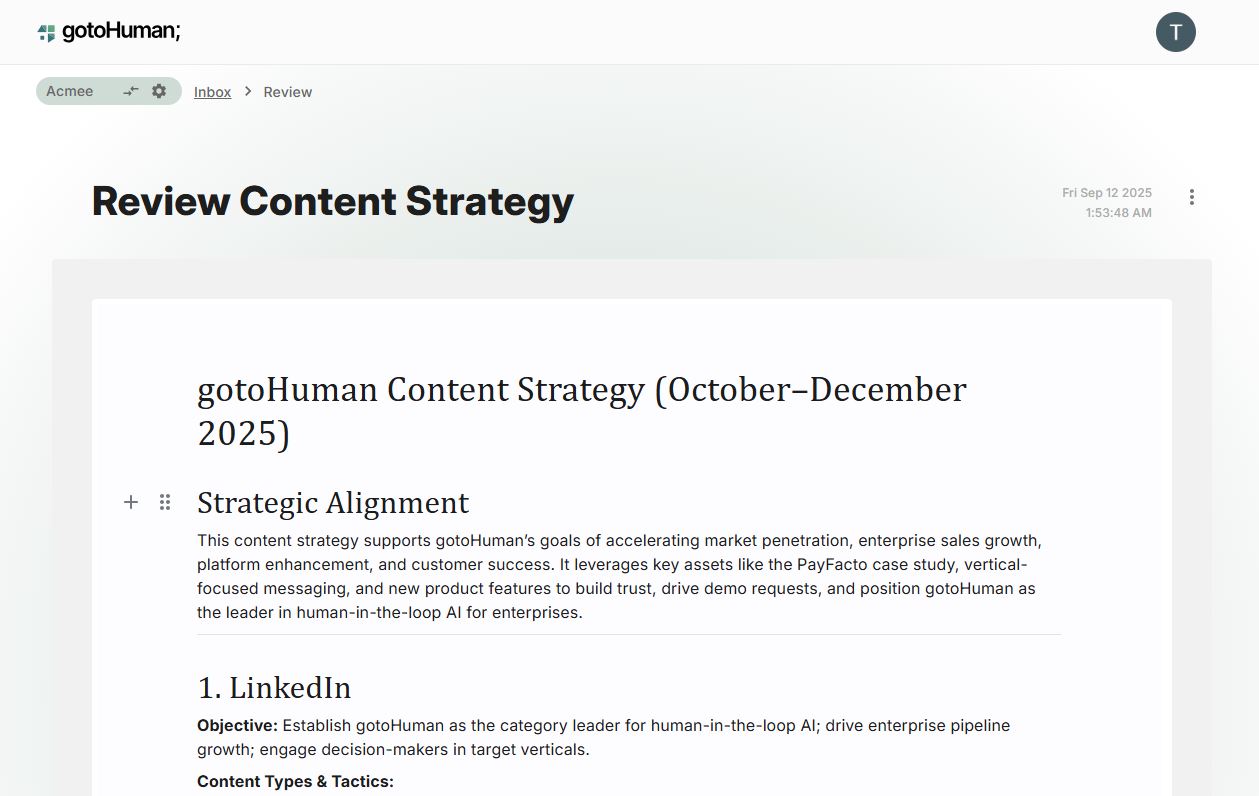"
},
"typeVersion": 1
}
],
"connections": {
"AI Agent": {
"main": [
[
{
"node": "Send review request and wait for response",
"type": "main",
"index": 0
}
]
]
},
"Approved?": {
"main": [
[
{
"node": "Convert to File",
"type": "main",
"index": 0
}
]
]
},
"Convert to File": {
"main": [
[
{
"node": "Set file type as markdown",
"type": "main",
"index": 0
}
]
]
},
"OpenAI Chat Model": {
"ai_languageModel": [
[
{
"node": "AI Agent",
"type": "ai_languageModel",
"index": 0
}
]
]
},
"Get company strategy": {
"ai_tool": [
[
{
"node": "AI Agent",
"type": "ai_tool",
"index": 0
}
]
]
},
"Get company description": {
"ai_tool": [
[
{
"node": "AI Agent",
"type": "ai_tool",
"index": 0
}
]
]
},
"Structured Output Parser": {
"ai_outputParser": [
[
{
"node": "AI Agent",
"type": "ai_outputParser",
"index": 0
}
]
]
},
"Set file type as markdown": {
"main": [
[
{
"node": "Update file",
"type": "main",
"index": 0
}
]
]
},
"When clicking \u2018Execute workflow\u2019": {
"main": [
[
{
"node": "AI Agent",
"type": "main",
"index": 0
}
]
]
},
"Send review request and wait for response": {
"main": [
[
{
"node": "Approved?",
"type": "main",
"index": 0
}
]
]
}
}
}
For the full experience including quality scoring and batch install features for each workflow upgrade to Pro
About this workflow
Collaborate with an AI Agent on a joint document, e.g. for creating your content marketing strategy, a sales plan, project status updates, or market analysis. The AI Agent generates markdown text that you can review and edit it in gotoHuman, and only then is the existing Google…
Source: https://n8n.io/workflows/8489/ — original creator credit. Request a take-down →
Related workflows
Workflows that share integrations, category, or trigger type with this one. All free to copy and import.
This AI workflow helps you quickly react to new leads with an initial personalized outreach. A great start of your lead nurturing sequence to avoid loosing precious leads that could turn into paying c
🎯 Create viral TikToks, Shorts, Reels, podcasts, and ASMR videos in minutes — all on autopilot.
Generate AI viral videos with NanoBanana & VEO3, shared on socials via Blotato 2. Uses @blotato/n8n-nodes-blotato, googleSheets, lmChatOpenAi, toolThink. Event-driven trigger; 94 nodes.
The best content automation template in the market is now even better—with “deep research” on time-sensitive topics\! Unlike most n8n content automation templates that are mainly for “demo purposes,”
This template is designed for marketers, content creators, and e-commerce brands who want to automate the creation of professional ad videos at scale. It’s ideal for teams looking to generate consiste