 CentralStationCRM
 This workflow corresponds to n8n.io template #6093 — we link there as the canonical source.
This workflow follows the Agent → HTTP Request recipe pattern — see all workflows that pair these two integrations.
The workflow JSON
Copy or download the full n8n JSON below. Paste it into a new n8n workflow, add your credentials, activate. Full import guide →
{
"id": "FFhbQGYt5qqyuN6X",
"name": "Auto-Enrich New CRM Companies with ChatGPT Web Research via Tavily",
"tags": [],
"nodes": [
{
"id": "93cbff54-9038-49e0-8ea7-29a15d447f15",
"name": "OpenAI Chat Model",
"type": "@n8n/n8n-nodes-langchain.lmChatOpenAi",
"position": [
2128,
896
],
"parameters": {
"model": {
"__rl": true,
"mode": "list",
"value": "gpt-4.1",
"cachedResultName": "gpt-4.1"
},
"options": {}
},
"typeVersion": 1.2
},
{
"id": "4b9637f5-86f8-40c1-96fe-0f1a2eb42097",
"name": "Sticky Note2",
"type": "n8n-nodes-base.stickyNote",
"position": [
1696,
-96
],
"parameters": {
"color": 7,
"width": 340,
"height": 980,
"content": "## 5. set up webhook trigger\n* double-click node\n* HTTP Method: POST\n* Authentication none\n\n### For testing: \nCreate a company in CentralStationCRM and click on \"Listen for Test Event\" on the node shortly beforehand. The webhook should be triggered and the node should transfer the data.\n\n### For operation:\n* switch from \"Test URL\" to \"Production URL\"\n* copy new webhook URL (click on it)\n* enter new URL under \"Endpoint URL\" in the CentralStationCRM webhook"
},
"typeVersion": 1
},
{
"id": "78f0de7d-b936-4838-97c8-cb7ee6eb8740",
"name": "Sticky Note3",
"type": "n8n-nodes-base.stickyNote",
"position": [
1232,
-96
],
"parameters": {
"color": 7,
"width": 420,
"height": 980,
"content": "## 4. set up CentralStationCRM Webhook\n* log in to CentralStationCRM\n* click on the gear wheel in the top right corner\n\n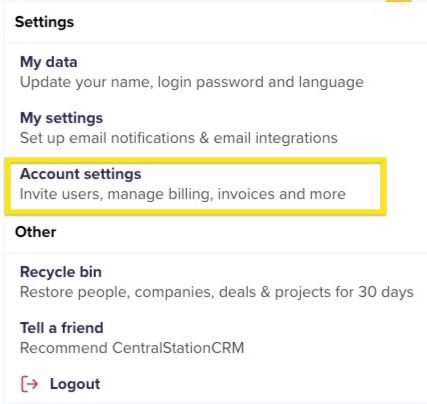\n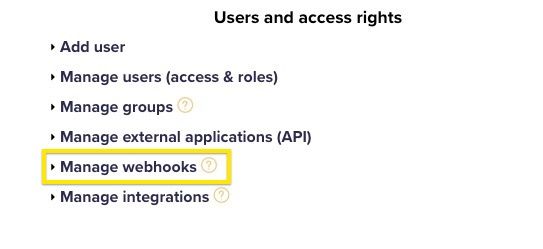\n* click \"Create webhook\"\n* enter password\n* \"Monitored object type\": company\n* \"Monitored event\": create\n* for \"Endpoint URL\" enter Webhook URL\n* Enter name and description (e.g. n8n Test)\n* Set status to active and save"
},
"typeVersion": 1
},
{
"id": "4fd0cd1d-bfe3-4826-ba1c-f1ff19a2c0fb",
"name": "Sticky Note5",
"type": "n8n-nodes-base.stickyNote",
"position": [
768,
752
],
"parameters": {
"color": 7,
"width": 420,
"height": 140,
"content": "## 3. get webhook URL from n8n\n* Double-click the first node in the workflow\n* Click once on the url next to POST"
},
"typeVersion": 1
},
{
"id": "2d24692f-8206-46cb-a297-0cedb0ee4ed6",
"name": "Sticky Note",
"type": "n8n-nodes-base.stickyNote",
"position": [
2080,
-96
],
"parameters": {
"color": 7,
"width": 500,
"height": 1512,
"content": "## 6. set up Research AI Agent\n### Set up Open AI Node\n* Register with Open AI\n* Surf to [https://platform.openai.com/api-keys](https://platform.openai.com/api-keys)\n* Click on \"Create New Secret Key\"\n* Enter name and project for the key, if applicable\n* Copy API key\n\n* Switch to n8n\n* Double-click \"OpenAI Chat Model\" node\n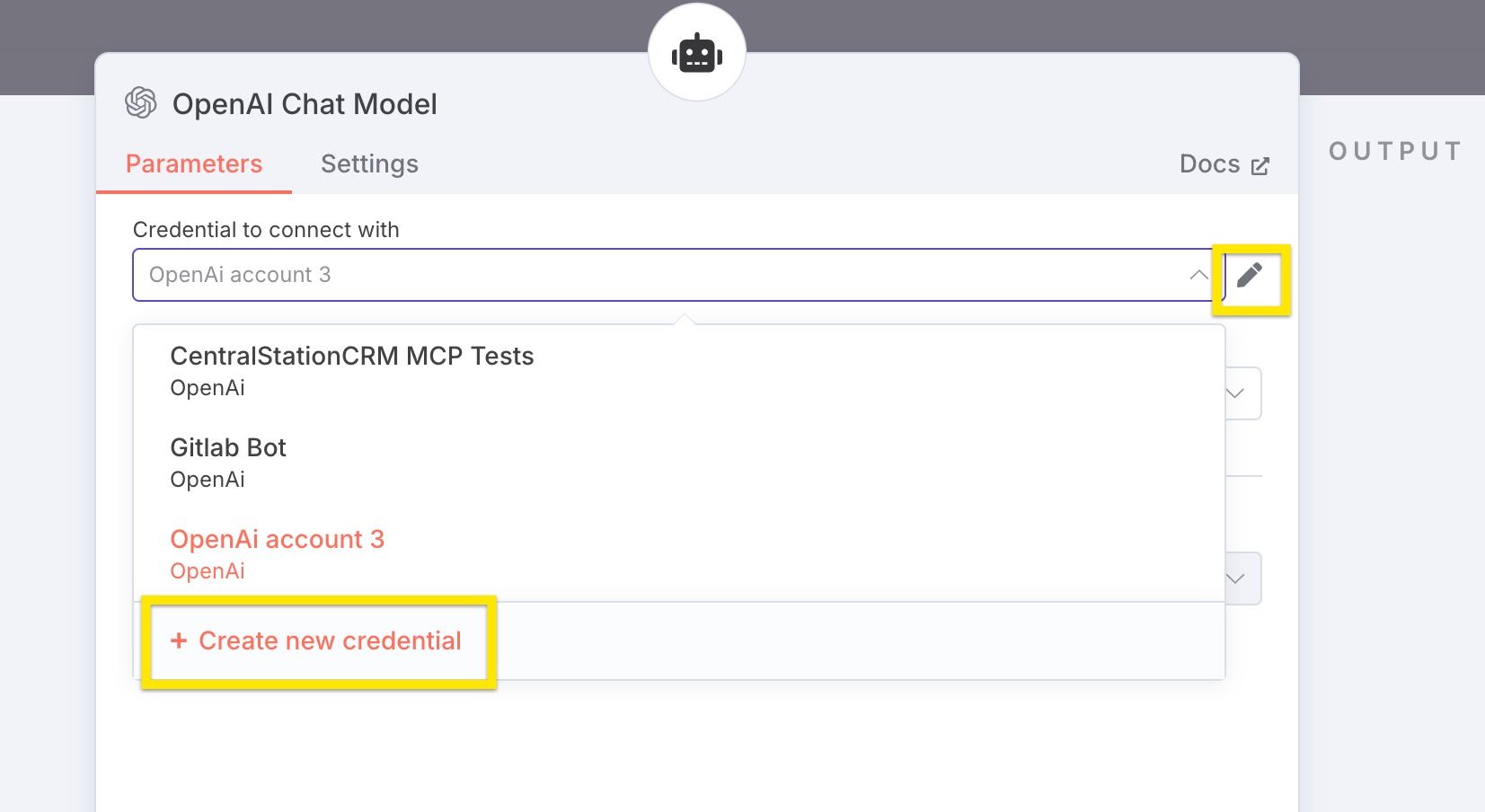\n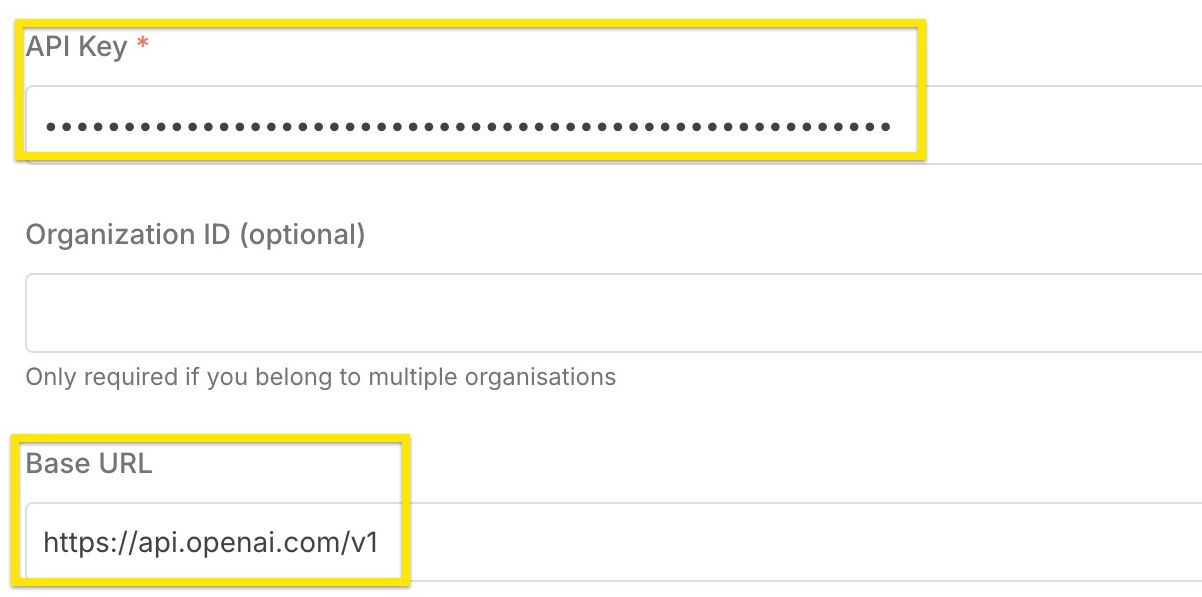\n\n\n\n\n\n\n\n\n\n\n\n\n\n\n\n\n\n\n\n\n\n\n\n\n\n\n\n\n\n\n\n\n\n\n\n\n\n### Set up Tavily\n* surf to [https://tavily.com](https://tavily.com)\n* register Account\n* copy API key from Tavily\n* create new Tavily credential in n8n\n* enter Tavily credential in Tavily nodes (connect nodes if necessary)\n\n*if Tavily is not installed, install it by clicking the plus icon on the right, searching for \"Tavily\" and hitting \"install\""
},
"typeVersion": 1
},
{
"id": "a064ee23-b4a1-497e-8071-9091bd52b371",
"name": "Sticky Note1",
"type": "n8n-nodes-base.stickyNote",
"position": [
2592,
-96
],
"parameters": {
"color": 7,
"width": 380,
"height": 980,
"content": "## 7. set up CentralStationCRM protocol\n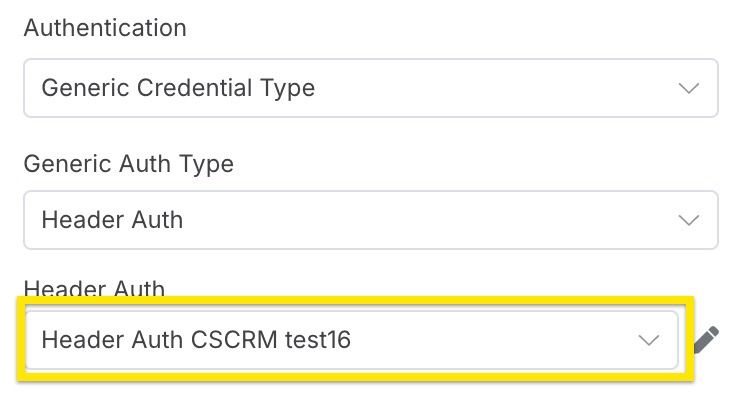\n* Select credentials created in step 1"
},
"typeVersion": 1
},
{
"id": "5630ae7c-4993-4f9e-bcb9-5f171f53bb1b",
"name": "Sticky Note8",
"type": "n8n-nodes-base.stickyNote",
"position": [
768,
-96
],
"parameters": {
"color": 7,
"width": 420,
"height": 820,
"content": "## 2. set up CentralStationCRM n8n credentials\n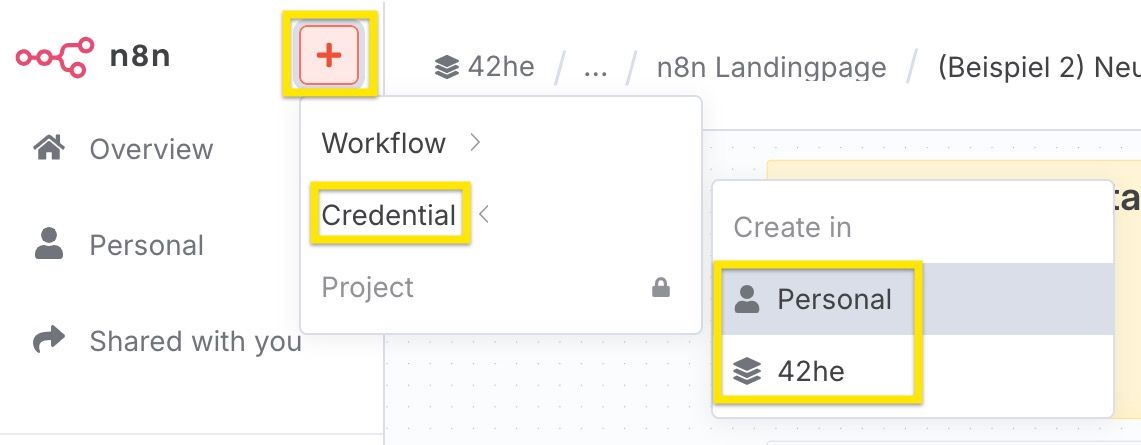\n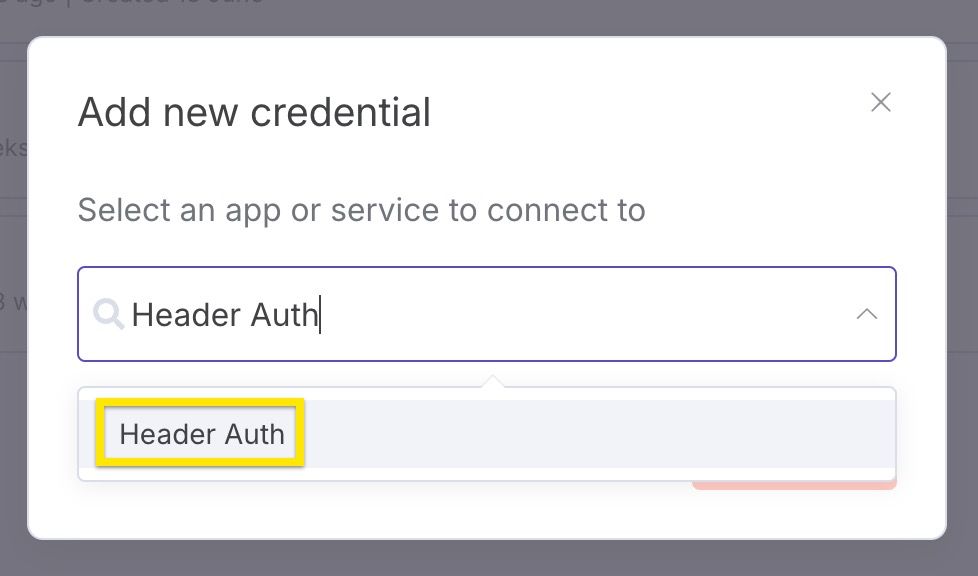\n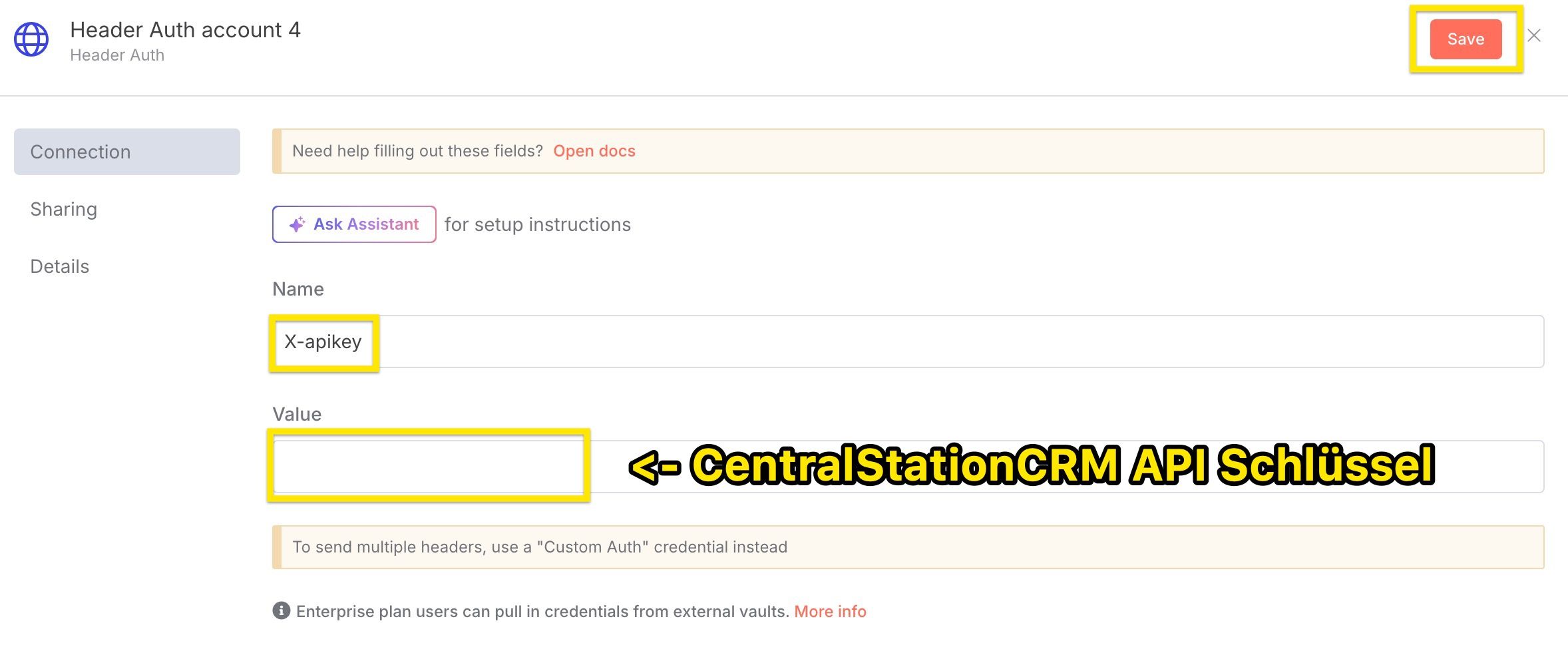\nImportant:\n* select Header Auth as credential type\n* assign X-apikey as name\n* enter the CentralStationCRM API key under \"Value"
},
"typeVersion": 1
},
{
"id": "e3733d35-a273-4108-b7fb-1623243c6253",
"name": "Sticky Note9",
"type": "n8n-nodes-base.stickyNote",
"position": [
-192,
688
],
"parameters": {
"width": 460,
"height": 200,
"content": "## Tools in this workflow\n* [CentralStationCRM](https://centralstationcrm.de), the easy and intuitive CRM Software for small teams. [Here is our API Documentation](https://api.centralstationcrm.net/api-docs/index.html) if you want to customize the workflow.\n* [ChatGPT](https://openai.com), the well-known ai chatbot\n* [Tavily](https://www.tavily.com/), a web search service for large language models"
},
"typeVersion": 1
},
{
"id": "74880ca3-b502-4c17-83f6-6b55a2c7989f",
"name": "Sticky Note4",
"type": "n8n-nodes-base.stickyNote",
"position": [
-192,
-96
],
"parameters": {
"width": 460,
"height": 740,
"content": "\n# Auto-Enrich New CRM Companies with ChatGPT Web Research via Tavily\n\nIn this workflow, you use **ChatGPT** in conjunction with the **web search tool Tavily**.\n\n* the webhook is triggered when a new company is created in the CRM\n* the company data is transferred to ChatGPT\n* the AI agent searches the web with Tavily and converts the information into Markdown format\n* A note with the resulting information is added to your CRM\n\n\n\n*To edit the nodes: Simply double-click!\n\n*At the very end: Set the workflow switch to \u201cActive\u201d."
},
"typeVersion": 1
},
{
"id": "1955a9e0-0176-4625-887b-f81aa8df9aa1",
"name": "Sticky Note6",
"type": "n8n-nodes-base.stickyNote",
"position": [
320,
-96
],
"parameters": {
"color": 7,
"width": 420,
"height": 980,
"content": "## 1. set up CentralStationCRM API Key\n* log in to CentralStationCRM\n* click on the gear wheel in the top right corner\n\n\n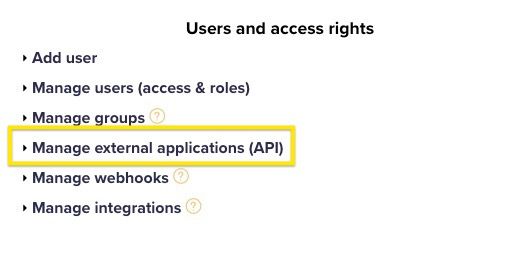\n* click \"Create API key\" on the right-hand side\n* enter \"Description\" (e.g. n8n Test)\n* save\n* save the API key! The key cannot be called up again in CRM and is required for step 2."
},
"typeVersion": 1
},
{
"id": "ced963bb-18d0-495c-80b7-bd79f68b4f14",
"name": "Research AI Agent",
"type": "@n8n/n8n-nodes-langchain.agent",
"position": [
2192,
704
],
"parameters": {
"text": "=We are a small consulting firm specialised on sales and marketing consulting. \n\nDo a deep research in German about the company \"{{ $json.body.record.name }}\". The research shall help sales people get a good overview about the company and allow to identify potential opportunities.\n\nUse the following structure:\n\n```markdown\n- **Name:** Firmenname\n- **Webseite:** http://foobar.com\n- **Zentrale:** San Francisco ([1](http://foobar))\n- **Gr\u00fcndungsjahr:** 2018 ([1](http://...), [2](http://...))\n- **Anzahl der Mitarbeiter:** 123 ([1](...))\n\nAllgemeine Beschreibung der Firma, inklusive Quellen. ([1](http://source))\n\n## Social media\n\n- **Linked In:** http://...\n- **Facebook:** http://...\n```\n\nThis structure is not complete, you can add more facts, social media sites or sections. You can use multiple searches, use more specific search queries if there are important facts missing. Add sources to every fact you mention.\n\nRespond only with the markdown itself, do not start with ```markdown.",
"options": {},
"promptType": "define"
},
"typeVersion": 2
},
{
"id": "7ef4f9c2-aafe-4c9b-a266-64ca16b7e41c",
"name": "a mind space prompt for the ai",
"type": "@n8n/n8n-nodes-langchain.toolThink",
"position": [
2480,
896
],
"parameters": {},
"typeVersion": 1
},
{
"id": "0eb6ee91-3c40-47b7-b0de-5456a583f069",
"name": "Tavily Websearch Extract URLs",
"type": "@tavily/n8n-nodes-tavily.tavilyTool",
"position": [
2368,
1024
],
"parameters": {
"urls": [
"={{ /*n8n-auto-generated-fromAI-override*/ $fromAI('urls0_URLs', ``, 'string') }}"
],
"options": {},
"resource": "extract"
},
"typeVersion": 1
},
{
"id": "8a0223ad-cc6b-4a28-a0db-6308c1047bdf",
"name": "Tavily Websearch Search the Web",
"type": "@tavily/n8n-nodes-tavily.tavilyTool",
"position": [
2208,
1024
],
"parameters": {
"query": "={{ /*n8n-auto-generated-fromAI-override*/ $fromAI('Query', ``, 'string') }}",
"options": {
"max_results": 15,
"search_depth": "advanced"
}
},
"typeVersion": 1
},
{
"id": "6746fdd7-f702-44c2-a84a-55b368ba7c4a",
"name": "Add a note to company in CentralStationCRM",
"type": "n8n-nodes-base.httpRequest",
"position": [
2736,
704
],
"parameters": {
"url": "https://api.centralstationcrm.net/api/protocols.json",
"method": "POST",
"options": {},
"jsonBody": "={\n \"protocol\": {\n \"company_ids\": [{{ $('Company created in CentralStationCRM').item.json.body.record.id }}],\n \"type\": \"ProtocolObjectNote\",\n \"badge\": \"note\",\n \"content\": {{ $json.output.toJsonString() }},\n \"format\": \"markdown\"\n }\n} \n",
"sendBody": true,
"sendHeaders": true,
"specifyBody": "json",
"authentication": "genericCredentialType",
"genericAuthType": "httpHeaderAuth",
"headerParameters": {
"parameters": [
{
"name": "accept",
"value": "application/json"
},
{
"name": "Content-Type",
"value": "application/json"
}
]
}
},
"credentials": {
"httpHeaderAuth": {
"name": "<your credential>"
}
},
"typeVersion": 4.2
},
{
"id": "c888a393-afe2-42c7-bb90-6b51d7b694b9",
"name": "Company created in CentralStationCRM",
"type": "n8n-nodes-base.webhook",
"position": [
1808,
704
],
"parameters": {
"path": "c8682af5-17b7-48f5-9be3-49ef787b40e5",
"options": {},
"httpMethod": "POST"
},
"typeVersion": 2
}
],
"active": false,
"settings": {
"executionOrder": "v1"
},
"versionId": "f89e6c02-0f73-4481-963c-7e3265138595",
"connections": {
"OpenAI Chat Model": {
"ai_languageModel": [
[
{
"node": "Research AI Agent",
"type": "ai_languageModel",
"index": 0
}
]
]
},
"Research AI Agent": {
"main": [
[
{
"node": "Add a note to company in CentralStationCRM",
"type": "main",
"index": 0
}
]
]
},
"Tavily Websearch Extract URLs": {
"ai_tool": [
[
{
"node": "Research AI Agent",
"type": "ai_tool",
"index": 0
}
]
]
},
"a mind space prompt for the ai": {
"ai_tool": [
[
{
"node": "Research AI Agent",
"type": "ai_tool",
"index": 0
}
]
]
},
"Tavily Websearch Search the Web": {
"ai_tool": [
[
{
"node": "Research AI Agent",
"type": "ai_tool",
"index": 0
}
]
]
},
"Company created in CentralStationCRM": {
"main": [
[
{
"node": "Research AI Agent",
"type": "main",
"index": 0
}
]
]
}
}
}
Credentials you'll need
Each integration node will prompt for credentials when you import. We strip credential IDs before publishing — you'll add your own.
httpHeaderAuth
For the full experience including quality scoring and batch install features for each workflow upgrade to Pro
About this workflow
This template benefits anyone who wants to: automate web research on a prospect company compile that research into an easily readable note and save the note into CentralStationCRM CentralStationCRM, the easy and intuitive CRM Software for small teams. Here is our API…
Source: https://n8n.io/workflows/6093/ — original creator credit. Request a take-down →
Related workflows
Workflows that share integrations, category, or trigger type with this one. All free to copy and import.
CLINICAINTEGRAL_secretary. Uses postgres, mcpClientTool, googleDriveTool, toolWorkflow. Webhook trigger; 89 nodes.
my-secretary. Uses postgres, mcpClientTool, googleDriveTool, toolWorkflow. Webhook trigger; 86 nodes.
Hi! I'm Bruno — I’ve been building AI-powered workflows for n8n and Make for 2+ years, focused on smart automation and real conversational agents.
This n8n template automates B2B lead research and enrichment for Attio CRM. It combines data from Apollo.io, LinkedIn scraping, and news sources with AI-powered analysis to generate actionable sales i
Secretaria_IA. Uses postgres, httpRequest, openAi, agent. Webhook trigger; 60 nodes.