 Trung Tran
 This workflow corresponds to n8n.io template #7728 — we link there as the canonical source.
The workflow JSON
Copy or download the full n8n JSON below. Paste it into a new n8n workflow, add your credentials, activate. Full import guide →
{
"id": "IrGwRuTSulKQNDCO",
"meta": {
"templateCredsSetupCompleted": true
},
"name": "Automated Slack Channel Audit Workflow with Chatbot and GPT-4.1",
"tags": [],
"nodes": [
{
"id": "58a17978-d554-4042-ae0e-262a1cd5a285",
"name": "Get many channels",
"type": "n8n-nodes-base.slack",
"position": [
-224,
32
],
"parameters": {
"filters": {
"types": [
"public_channel",
"private_channel"
]
},
"resource": "channel",
"operation": "getAll",
"authentication": "oAuth2"
},
"credentials": {
"slackOAuth2Api": {
"name": "<your credential>"
}
},
"typeVersion": 2.3
},
{
"id": "12bde87c-f8a8-4eb3-bf81-8e94916f1db6",
"name": "Get the history of a channel",
"type": "n8n-nodes-base.slack",
"position": [
0,
32
],
"parameters": {
"limit": 1,
"filters": {},
"resource": "channel",
"channelId": {
"__rl": true,
"mode": "id",
"value": "={{ $json.id }}"
},
"operation": "history",
"authentication": "oAuth2"
},
"credentials": {
"slackOAuth2Api": {
"name": "<your credential>"
}
},
"typeVersion": 2.3
},
{
"id": "7043ccc2-4d82-49a5-ba8c-299e9842e92d",
"name": "Filter channel with last discussion 30 days ago",
"type": "n8n-nodes-base.filter",
"position": [
224,
32
],
"parameters": {
"options": {},
"conditions": {
"options": {
"version": 2,
"leftValue": "",
"caseSensitive": true,
"typeValidation": "strict"
},
"combinator": "and",
"conditions": [
{
"id": "1d9de0c9-232d-455b-a625-563dc785f484",
"operator": {
"type": "dateTime",
"operation": "before"
},
"leftValue": "={{ $json.ts.toDateTime('s') }}",
"rightValue": "={{ $today.minus(30,'days') }}"
}
]
}
},
"typeVersion": 2.2
},
{
"id": "b3c69271-5007-484d-89d6-48b1384fcf20",
"name": "Collect expired channel information",
"type": "n8n-nodes-base.code",
"position": [
448,
32
],
"parameters": {
"mode": "runOnceForEachItem",
"jsCode": "const channel = $('Get many channels').item.json;\n\nreturn {\n json: {\n ChannelID: channel.id,\n ChannelName: channel.name,\n CreatedDate: new Date(channel.created * 1000).toLocaleDateString('en-US'),\n TotalMember: $('Get many channels').item.json.num_members,\n Purpose: $('Get many channels').item.json.purpose.value || 'N/A'\n }\n};"
},
"typeVersion": 2
},
{
"id": "24fb2413-9c3c-4894-bfa3-f18f15011de9",
"name": "Consume slack report",
"type": "n8n-nodes-base.code",
"position": [
672,
32
],
"parameters": {
"jsCode": "const channels = $input.all().map(item => item.json);\n\nlet report = '*\ud83d\udcca Weekly Slack Channel Inactivity Report*\\n\\n';\nreport += 'The following channels have had *no discussion in the past 30 days*. Please review and take action if needed:\\n\\n';\nreport += '```';\nreport += 'Channel ID Name Members Created On Purpose\\n';\nreport += '------------- -------------------------- ------- ---------- ------------------------------\\n';\n\nfor (const c of channels) {\n report += `${c.ChannelID.padEnd(15)} ${('#' + c.ChannelName).padEnd(26)} ${String(c.TotalMember).padEnd(9)} ${c.CreatedDate.padEnd(12)} ${c.Purpose || 'N/A'}\\n`;\n}\n\nreport += '```\\n\\n';\n\nreport += '\\n\u26a0\ufe0f *Recommendation:*\\n';\nreport += '- Channels with *0 members* or *no defined purpose* should be reviewed for archiving.\\n';\nreport += '- Channels like `#aws-study-group` and `#team-coffee` may benefit from engagement prompts or repurposing.\\n\\n';\n\nreport += `\ud83d\udcc5 _Report generated on:_ ${new Date().toLocaleDateString('en-GB')}`;\n\n// Output for Slack\nreturn [\n {\n json: {\n text: report\n }\n }\n];"
},
"typeVersion": 2
},
{
"id": "92353f17-c390-4116-b66d-798605754f4f",
"name": "Send Channel Inactivity Report",
"type": "n8n-nodes-base.slack",
"position": [
896,
32
],
"parameters": {
"text": "={{ $json.text }}",
"user": {
"__rl": true,
"mode": "username",
"value": "@trung.tran"
},
"select": "user",
"otherOptions": {
"mrkdwn": true
}
},
"credentials": {
"slackApi": {
"name": "<your credential>"
}
},
"typeVersion": 2.3
},
{
"id": "88965563-dfeb-40e4-b0af-19b4d84a5188",
"name": "Weekly Schedule Trigger",
"type": "n8n-nodes-base.scheduleTrigger",
"position": [
-448,
32
],
"parameters": {
"rule": {
"interval": [
{
"field": "weeks",
"triggerAtDay": [
1
]
}
]
}
},
"typeVersion": 1.2
},
{
"id": "67dc318e-6c64-4f56-b225-0c061236b127",
"name": "Sticky Note",
"type": "n8n-nodes-base.stickyNote",
"position": [
1088,
-112
],
"parameters": {
"width": 960,
"height": 416,
"content": "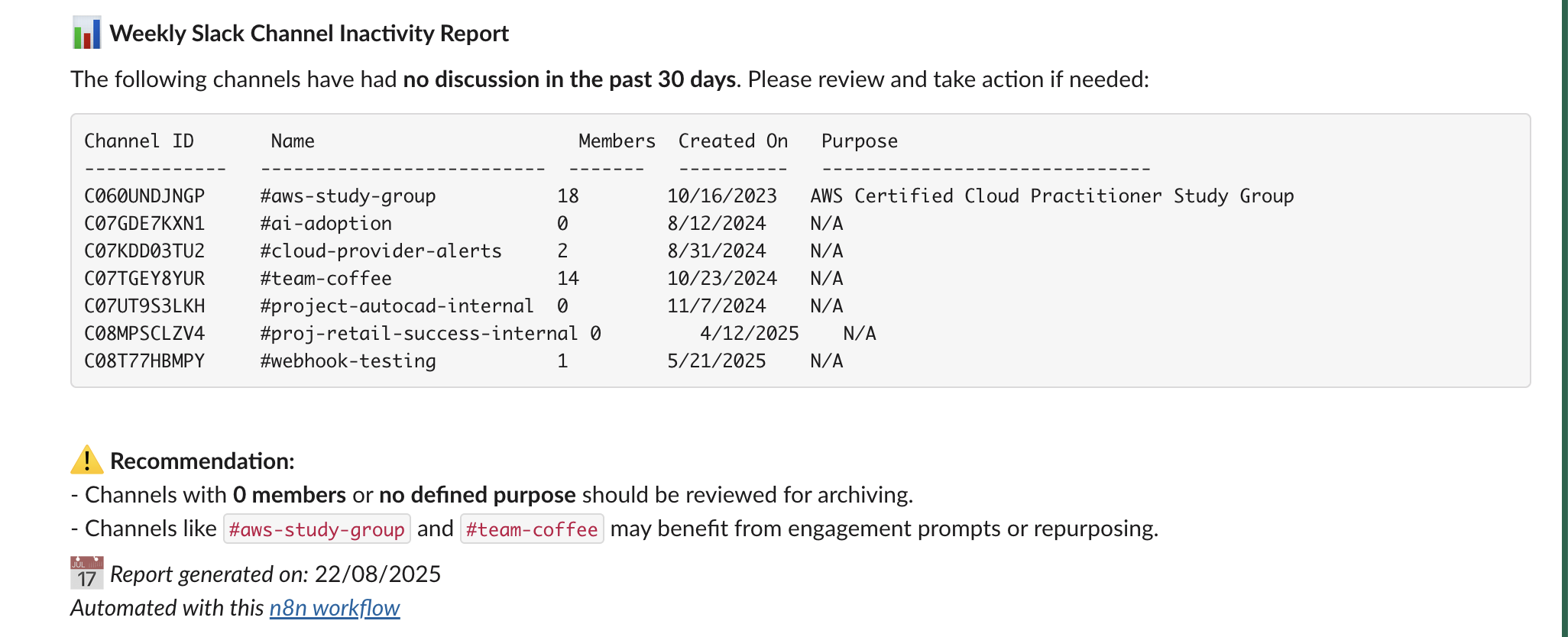"
},
"typeVersion": 1
},
{
"id": "0e5cb456-17a7-4a9e-be55-ffaa66d795fe",
"name": "Sticky Note1",
"type": "n8n-nodes-base.stickyNote",
"position": [
-1600,
-768
],
"parameters": {
"width": 1040,
"height": 2224,
"content": "# Automated Slack Channel Audit Workflow with Chatbot and GPT-4.1\n\n> Automatically scans all public Slack channels weekly to detect those with no activity in the past 30 days, then generates and sends a detailed inactivity report to admins for review and action. Helps keep your Slack workspace clean, relevant, and clutter-free.\n\n## \ud83e\uddd1\u200d\ud83d\udcbc Who\u2019s it for\n\nThis workflow is built for:\n- **Slack Workspace Admins**\n- **IT or Ops Managers**\n- **HR/Compliance Teams**\n\u2026who want to maintain a clean and active Slack workspace by regularly reviewing **inactive channels**.\n\n## \u2699\ufe0f How it works / What it does\n\nThis automated n8n workflow:\n1. **Runs weekly** via a scheduled trigger.\n2. **Fetches all public Slack channels** in the workspace.\n3. **Checks message history** of each channel for activity.\n4. **Filters channels** that have had **no discussion in the past 30 days**.\n5. **Generates a Slack-friendly report** with key metadata (name, member count, purpose, etc.).\n6. **Sends the report to a Slack channel** for admin review and possible action (e.g., archive, engage, repurpose).\n\n## \ud83d\udee0\ufe0f How to set up\n\n1. **Configure your Slack App**\n - Go to https://api.slack.com/apps \u2192 Create App\n - Add the following **OAuth scopes** to your **Bot Token**:\n - `channels:read` \u2192 to get list of public channels\n - `channels:history` \u2192 to fetch message history\n - `users:read` \u2192 to personalize report (optional)\n - `chat:write` \u2192 to post the report to a Slack channel\n\n2. **Install the app in your workspace** \n - Copy the **Bot User OAuth Token** \n - Add it to your n8n Slack credentials under \"Slack API\"\n\n3. **Customize the schedule** in the \"Weekly Schedule Trigger\" node to control report frequency.\n\n4. **Connect your Slack workspace** to the workflow using your credentials.\n\n## \u2705 Requirements\n\n- n8n (self-hosted or cloud)\n- Slack App with:\n - `channels:read`\n - `channels:history`\n - `chat:write`\n- Active channels and member data\n- A designated Slack channel to receive the report\n\n## \ud83d\udd27 How to customize the workflow\n\n| Component | Customization Options |\n|----------|------------------------|\n| \u23f1\ufe0f Schedule Trigger | Change to daily, monthly, etc. |\n| \ud83d\udcc5 Inactivity Threshold | Modify `Filter channel with last discussion 30 days ago` to 60/90 days |\n| \ud83d\udcca Report Formatting | Tweak the `Consume slack report` node to change formatting or summary |\n| \ud83d\udcac Output Channel | Change target channel in `Send Channel Inactivity Report` |\n| \ud83d\udeab Auto-archiving | Add logic to archive channels with 0 members or activity (using Slack API) |\n\n## \ud83d\udcdd Slack Permissions Reference\n\n| Action | Slack Scope Required |\n|--------|-----------------------|\n| Get all public channels | `channels:read` |\n| Get message history of a channel | `channels:history` |\n| Post message to Slack | `chat:write` |\n| Get user info (optional) | `users:read` |"
},
"typeVersion": 1
},
{
"id": "f788c89e-9c9e-42a9-ab7d-5e9ddd24ea41",
"name": "Sticky Note2",
"type": "n8n-nodes-base.stickyNote",
"position": [
-480,
224
],
"parameters": {
"width": 256,
"height": 144,
"content": "### 1. \u23f0 Weekly Schedule Trigger\nStarts the workflow on a recurring schedule (e.g., every Monday at 9 AM) to automate the review process without manual intervention."
},
"typeVersion": 1
},
{
"id": "d71481ff-856e-493d-b3e4-fd9a44b515f7",
"name": "Sticky Note3",
"type": "n8n-nodes-base.stickyNote",
"position": [
-224,
-128
],
"parameters": {
"height": 128,
"content": "### 2. \ud83d\udce1 Get Many Channels\nFetches a list of all public Slack channels in the workspace using Slack\u2019s `channels:read` scope."
},
"typeVersion": 1
},
{
"id": "21906417-62bb-4364-8b2f-43e7561134cb",
"name": "Sticky Note4",
"type": "n8n-nodes-base.stickyNote",
"position": [
-48,
224
],
"parameters": {
"width": 288,
"height": 144,
"content": "### 3. \ud83d\udd53 Get the History of a Channel\nRetrieves recent message history from each channel using Slack\u2019s `channels:history` scope. This helps determine when the last discussion occurred."
},
"typeVersion": 1
},
{
"id": "7e81e9d5-15c9-438c-8010-a8e4a7355958",
"name": "Sticky Note5",
"type": "n8n-nodes-base.stickyNote",
"position": [
176,
-160
],
"parameters": {
"content": "### 4. \ud83d\udeab Filter Channels with No Activity in 30 Days\nFilters out channels that have had no messages or discussion in the last 30 days. These are considered \"expired\" or inactive."
},
"typeVersion": 1
},
{
"id": "f57c3472-2168-4dcf-98a1-ed60cc2f2f96",
"name": "Sticky Note6",
"type": "n8n-nodes-base.stickyNote",
"position": [
368,
208
],
"parameters": {
"height": 272,
"content": "### 5. \ud83d\udce6 Collect Expired Channel Information\nExtracts relevant metadata for each inactive channel, including:\n- Channel ID and name\n- Member count\n- Created date\n- Purpose\n\nThis data is prepared for reporting."
},
"typeVersion": 1
},
{
"id": "089fb6fe-2711-4cfc-ae9a-34c51f8bf277",
"name": "Sticky Note7",
"type": "n8n-nodes-base.stickyNote",
"position": [
560,
-160
],
"parameters": {
"height": 144,
"content": "### 6. \ud83d\udcdd Consume Slack Report\nGenerates a clean and Slack-friendly Markdown report (or code block format) listing all inactive channels with contextual recommendations."
},
"typeVersion": 1
},
{
"id": "f70b2bd0-6db2-423e-beff-9e8083f0db2b",
"name": "Sticky Note8",
"type": "n8n-nodes-base.stickyNote",
"position": [
816,
208
],
"parameters": {
"content": "### 7. \ud83d\udce4 Send Channel Inactivity Report\nPosts the formatted report to a specified Slack channel using `chat:write`, notifying admins or moderators to take cleanup action."
},
"typeVersion": 1
}
],
"active": false,
"settings": {
"executionOrder": "v1"
},
"versionId": "89b4dd41-9469-44ca-9635-7e9670e3568f",
"connections": {
"Get many channels": {
"main": [
[
{
"node": "Get the history of a channel",
"type": "main",
"index": 0
}
]
]
},
"Consume slack report": {
"main": [
[
{
"node": "Send Channel Inactivity Report",
"type": "main",
"index": 0
}
]
]
},
"Weekly Schedule Trigger": {
"main": [
[
{
"node": "Get many channels",
"type": "main",
"index": 0
}
]
]
},
"Get the history of a channel": {
"main": [
[
{
"node": "Filter channel with last discussion 30 days ago",
"type": "main",
"index": 0
}
]
]
},
"Collect expired channel information": {
"main": [
[
{
"node": "Consume slack report",
"type": "main",
"index": 0
}
]
]
},
"Filter channel with last discussion 30 days ago": {
"main": [
[
{
"node": "Collect expired channel information",
"type": "main",
"index": 0
}
]
]
}
}
}
Credentials you'll need
Each integration node will prompt for credentials when you import. We strip credential IDs before publishing — you'll add your own.
slackApislackOAuth2Api
For the full experience including quality scoring and batch install features for each workflow upgrade to Pro
About this workflow
> Automatically scans all public Slack channels weekly to detect those with no activity in the past 30 days, then generates and sends a detailed inactivity report to admins for review and action. Helps keep your Slack workspace clean, relevant, and clutter-free.
Source: https://n8n.io/workflows/7728/ — original creator credit. Request a take-down →
Related workflows
Workflows that share integrations, category, or trigger type with this one. All free to copy and import.
Bet Assistant - Monitoring i Alerty Systemu. Uses httpRequest, slack, emailSend. Scheduled trigger; 10 nodes.
[DEPRECATED — use portal-internal-activity] T+7 — Follow-up (writes chatbot_activity). Uses httpRequest, slack. Scheduled trigger; 7 nodes.
[DEPRECATED — use portal-internal-activity] T+3 — Follow-up (writes chatbot_activity). Uses httpRequest, slack. Scheduled trigger; 7 nodes.
[DEPRECATED — use portal-internal-activity] T+14 — Follow-up (writes chatbot_activity). Uses httpRequest, slack. Scheduled trigger; 7 nodes.
T+3 — Onboarding Email + Portal Activity (KAIA-756). Uses httpRequest, slack. Scheduled trigger; 6 nodes.