 Ruthwik
 This workflow corresponds to n8n.io template #8212 — we link there as the canonical source.
This workflow follows the Emailreadimap → HTTP Request recipe pattern — see all workflows that pair these two integrations.
The workflow JSON
Copy or download the full n8n JSON below. Paste it into a new n8n workflow, add your credentials, activate. Full import guide →
{
"id": "wkiyDt5r9848Duzh",
"meta": {
"templateCredsSetupCompleted": true
},
"name": "AI-Powered Email Categorization & Labeling in Zoho Mail",
"tags": [],
"nodes": [
{
"id": "c5597735-99ba-476c-9204-23fddc8a3a3a",
"name": "Get Access token",
"type": "n8n-nodes-base.httpRequest",
"position": [
-416,
432
],
"parameters": {
"url": "https://accounts.zoho.com/oauth/v2/token",
"method": "POST",
"options": {},
"sendQuery": true,
"authentication": "genericCredentialType",
"genericAuthType": "httpQueryAuth",
"queryParameters": {
"parameters": [
{
"name": "client_id",
"value": "{{YourclientId}}"
},
{
"name": "grant_type",
"value": "refresh_token"
},
{
"name": "refresh_token",
"value": "{{yourrefreshtoken}}"
}
]
}
},
"credentials": {
"httpQueryAuth": {
"name": "<your credential>"
}
},
"typeVersion": 4.2
},
{
"id": "7b17ac20-46c8-4a51-a410-ae257c5c9d4f",
"name": "Set Account ID",
"type": "n8n-nodes-base.set",
"position": [
-640,
432
],
"parameters": {
"options": {},
"assignments": {
"assignments": [
{
"id": "c4f3c247-0e8d-48d9-8f57-689ecf5100b7",
"name": "accountID",
"type": "string",
"value": "{{youraccountId}}"
}
]
}
},
"typeVersion": 3.4
},
{
"id": "5a682928-06fe-4679-8526-5fe98809b28b",
"name": "Get labels",
"type": "n8n-nodes-base.httpRequest",
"position": [
-192,
432
],
"parameters": {
"url": "=https://mail.zoho.com/api/accounts/{{ $('Set Account ID').item.json.accountID }}/labels",
"options": {},
"sendHeaders": true,
"headerParameters": {
"parameters": [
{
"name": "Accept",
"value": "application/json"
},
{
"name": "Authorization",
"value": "=Zoho-oauthtoken {{ $json.access_token }}"
}
]
}
},
"typeVersion": 4.2
},
{
"id": "bb0fe829-cb35-4ad6-ad00-1e432357534d",
"name": "Text Classifier",
"type": "@n8n/n8n-nodes-langchain.textClassifier",
"position": [
256,
432
],
"parameters": {
"options": {},
"inputText": "={{ $('Incoming Email').item.json.textPlain }}",
"categories": {
"categories": [
{
"category": "support",
"description": "Emails where customers ask for help, report problems, or request troubleshooting.\nExamples:\n\u201cI can\u2019t log into my account.\u201d\n\u201cThe app keeps crashing after the update.\u201d\n\u201cHow do I reset my password?\u201d"
},
{
"category": "leads",
"description": "Emails from potential customers showing interest in products or services. Usually contain inquiries, demo requests, or sales opportunities.\nExamples:\n\u201cI\u2019d like to learn more about your pricing plans.\u201d\n\u201cCan we schedule a demo of your software?\u201d\n\u201cWe\u2019re interested in purchasing licenses for our team.\u201d"
},
{
"category": "account management",
"description": "Emails about changes, updates, or management of existing accounts. Includes renewals, cancellations, and upgrades.\nExamples:\n\u201cI\u2019d like to upgrade my subscription plan.\u201d\n\u201cPlease cancel my account.\u201d\n\u201cCan I change my billing address?\u201d"
},
{
"category": "billing and finance",
"description": "Emails related to invoices, payments, refunds, receipts, and financial queries.\nExamples:\n\u201cI haven\u2019t received my invoice for July.\u201d\n\u201cCan you send me a receipt for my last payment?\u201d\n\u201cI\u2019d like a refund for my subscription.\u201d"
},
{
"category": "hr and recruitment",
"description": "Emails related to hiring, job applications, interviews, and employee management.\nExamples:\n\u201cI\u2019d like to apply for the marketing manager role.\u201d\n\u201cCan we schedule an interview for next week?\u201d\n\u201cWe\u2019re looking for candidates to fill open positions.\u201d"
},
{
"category": "Other",
"description": "This is related to emails which is not related to any of the above categories"
}
]
}
},
"typeVersion": 1.1
},
{
"id": "ac7f7ec0-f932-457a-809d-deb96c63838c",
"name": "OpenRouter Chat Model",
"type": "@n8n/n8n-nodes-langchain.lmChatOpenRouter",
"position": [
328,
784
],
"parameters": {
"model": "openai/gpt-4o-mini",
"options": {}
},
"credentials": {
"openRouterApi": {
"name": "<your credential>"
}
},
"typeVersion": 1
},
{
"id": "d8fff84b-ebce-4f17-a849-888d5d7270e4",
"name": "Merge",
"type": "n8n-nodes-base.merge",
"position": [
832,
288
],
"parameters": {
"numberInputs": 5
},
"typeVersion": 3.2
},
{
"id": "0dcc2d49-bc01-4bba-bb4f-71d0e3267406",
"name": "Incoming Email",
"type": "n8n-nodes-base.emailReadImap",
"position": [
-864,
432
],
"parameters": {
"mailbox": "Inbox",
"options": {}
},
"credentials": {
"imap": {
"name": "<your credential>"
}
},
"typeVersion": 2.1
},
{
"id": "00c546e6-331f-4f63-8011-4d955055b892",
"name": "Add Label to the email",
"type": "n8n-nodes-base.httpRequest",
"position": [
1056,
336
],
"parameters": {
"url": "=https://mail.zoho.com/api/accounts/{{ $('Set Account ID').item.json.accountID }}/updatemessage",
"method": "PUT",
"options": {},
"jsonBody": "={\n \"mode\": \"applyLabel\",\n \"labelId\": [\n \"{{ $json.Category }}\"\n ],\n \"messageId\": [\n \"{{ $('Incoming Email').item.json.metadata['x-zm-messageid'] }}\"\n ],\n \"isFolderSpecific\": false\n} ",
"sendBody": true,
"sendHeaders": true,
"specifyBody": "json",
"headerParameters": {
"parameters": [
{
"name": "Accept",
"value": "application/json"
},
{
"name": "Authorization",
"value": "=Zoho-oauthtoken {{ $('Get Access token').item.json.access_token }}"
}
]
}
},
"typeVersion": 4.2
},
{
"id": "759d2539-06db-4b17-b41b-e58bc4452e4f",
"name": "Set Support Category",
"type": "n8n-nodes-base.set",
"position": [
608,
-48
],
"parameters": {
"options": {},
"assignments": {
"assignments": [
{
"id": "b0d46556-64db-42ee-840d-70099c6b0f5b",
"name": "Category",
"type": "string",
"value": "={{ $json.labelMap.support }}"
}
]
}
},
"typeVersion": 3.4
},
{
"id": "8881eaf8-fda9-40e3-b24b-042f976374cd",
"name": "Set Billing & Finance Category",
"type": "n8n-nodes-base.set",
"position": [
608,
528
],
"parameters": {
"options": {},
"assignments": {
"assignments": [
{
"id": "b0d46556-64db-42ee-840d-70099c6b0f5b",
"name": "Category",
"type": "string",
"value": "={{ $json.labelMap['billing and finance'] }}"
}
]
}
},
"typeVersion": 3.4
},
{
"id": "3c96af0d-2a5d-4340-b01c-5ad602582a75",
"name": "Set Account Management Category",
"type": "n8n-nodes-base.set",
"position": [
608,
336
],
"parameters": {
"options": {},
"assignments": {
"assignments": [
{
"id": "b0d46556-64db-42ee-840d-70099c6b0f5b",
"name": "Category",
"type": "string",
"value": "={{ $json.labelMap['account management'] }}"
}
]
}
},
"typeVersion": 3.4
},
{
"id": "503ee1a0-1633-41d4-ad93-8b60280e221a",
"name": "Set HR & Recruitment Category",
"type": "n8n-nodes-base.set",
"position": [
608,
720
],
"parameters": {
"options": {},
"assignments": {
"assignments": [
{
"id": "b0d46556-64db-42ee-840d-70099c6b0f5b",
"name": "Category",
"type": "string",
"value": "={{ $json.labelMap['hr and recruitment'] }}"
}
]
}
},
"typeVersion": 3.4
},
{
"id": "75e03d2f-07d8-4776-bd8d-bc268f29e395",
"name": "Set Leads Category",
"type": "n8n-nodes-base.set",
"position": [
608,
144
],
"parameters": {
"options": {},
"assignments": {
"assignments": [
{
"id": "b0d46556-64db-42ee-840d-70099c6b0f5b",
"name": "Category",
"type": "string",
"value": "={{ $json.labelMap.leads }}"
}
]
}
},
"typeVersion": 3.4
},
{
"id": "f9f1e5ca-fc94-4bbb-ba75-ace833b6912c",
"name": "No Operation, do nothing",
"type": "n8n-nodes-base.noOp",
"position": [
608,
912
],
"parameters": {},
"typeVersion": 1
},
{
"id": "565deaa1-d8ff-4ea7-83b7-9e12f3a6770f",
"name": "Label name to ID map",
"type": "n8n-nodes-base.code",
"position": [
32,
432
],
"parameters": {
"jsCode": "// n8n Code node (Node.js)\n// Input expectation:\n// - Previous node (HTTP Request) returns the Zoho labels JSON you showed,\n// typically available as items[0].json (or items[0].json.body in some setups).\n// - Optionally pass a category on the incoming item, e.g. items[0].json.category = \"support\"\n//\n// Output:\n// - json.labelMap -> { [displayNameLowerCase]: labelId }\n// - json.selectedLabelId -> labelId for provided category (if any), else null\n\n// Try to grab the payload regardless of whether it's at json or json.body\nconst root = items[0]?.json?.body ?? items[0]?.json;\n\n// Normalize to the array you posted, then to its `.data` array\nconst dataArray =\n Array.isArray(root) ? root[0]?.data :\n Array.isArray(root?.data) ? root.data :\n null;\n\nif (!Array.isArray(dataArray)) {\n throw new Error('Could not find labels array at input[0].json (or .json.body)[0].data');\n}\n\n// Build a case-insensitive map: displayName (lowercase) -> labelId\nconst labelMap = {};\nfor (const entry of dataArray) {\n if (!entry?.displayName || !entry?.labelId) continue;\n labelMap[entry.displayName.toLowerCase()] = entry.labelId;\n}\n\n// If caller provided a category, resolve it (case-insensitive)\nconst categoryRaw =\n items[0]?.json?.category ??\n items[0]?.json?.Category ??\n items[0]?.json?.displayName ?? '';\n\nconst category = String(categoryRaw).trim().toLowerCase();\nconst out = { labelMap };\n\nif (category) {\n out.selectedLabelId = labelMap[category] ?? null;\n}\n\nreturn [{ json: out }];\n"
},
"typeVersion": 2
},
{
"id": "a5562339-b5bc-4a1d-b65d-2f0a7a5707dc",
"name": "Sticky Note",
"type": "n8n-nodes-base.stickyNote",
"position": [
-1600,
-64
],
"parameters": {
"color": 4,
"width": 672,
"height": 1088,
"content": "\n## Try It Out!\n\n### This n8n template demonstrates how to use AI to automatically classify and organize incoming emails in **Zoho Mail** by applying the correct label (e.g., Support, Billing, HR, etc.).\n\nUse cases include:\n\n- Automatically routing customer support requests to the right team.\n \n- Keeping billing and finance emails separate from general communication.\n \n- Streamlining HR and recruitment email handling.\n \n- Reducing inbox clutter and ensuring nothing important is missed.\n \n\n----------\n\n### How it works\n\n- The workflow is triggered whenever a new email arrives in Zoho Mail.\n \n- Zoho OAuth credentials are used to authenticate and fetch all available labels from your inbox.\n \n- A lookup map is created to match each label\u2019s **display name \u2192 label ID**.\n \n- The AI model analyzes the email subject and body to predict the correct category.\n \n- Based on the classification, the workflow routes the email to the corresponding branch.\n \n- Finally, the correct Zoho Mail label is applied (node deactivated by default for safe testing).\n \n\n----------\n\n### How to use\n\n- Replace the **Zoho Mail Account ID** in the _Set Account ID_ node.\n \n- Configure your **Zoho OAuth credentials** in the _Get Access Token_ node.\n \n- Activate the **AI-Powered Email Categorization & Labeling in Zoho Mail** node once you are ready to run in production.\n \n- Test with sample emails to validate classification before enabling on your live inbox.\n \n\n----------\n\n### Requirements\n\n- Zoho Mail account with API access enabled.\n \n- Zoho OAuth credentials configured in n8n.\n \n- An AI model (via OpenRouter or other provider) for text classification.\n"
},
"typeVersion": 1
},
{
"id": "c49472ef-313e-44a0-910a-a23cf8b80fa9",
"name": "Sticky Note2",
"type": "n8n-nodes-base.stickyNote",
"position": [
1264,
256
],
"parameters": {
"color": 3,
"width": 764,
"height": 376,
"content": "## Output\n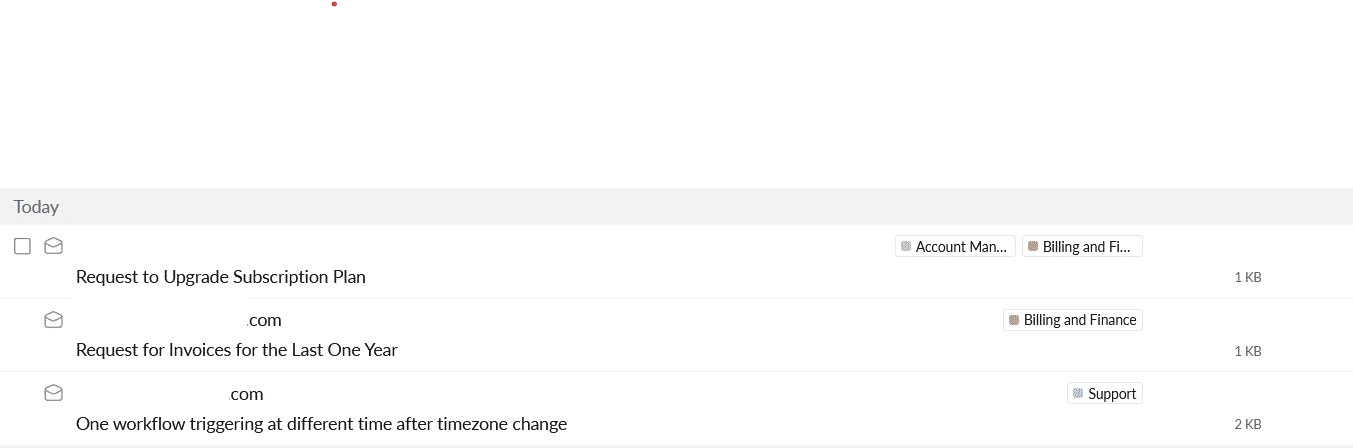"
},
"typeVersion": 1
}
],
"active": true,
"settings": {
"executionOrder": "v1"
},
"versionId": "b465eebe-5e17-4924-93f6-2ac2208ba6b5",
"connections": {
"Merge": {
"main": [
[
{
"node": "Add Label to the email",
"type": "main",
"index": 0
}
]
]
},
"Get labels": {
"main": [
[
{
"node": "Label name to ID map",
"type": "main",
"index": 0
}
]
]
},
"Incoming Email": {
"main": [
[
{
"node": "Set Account ID",
"type": "main",
"index": 0
}
]
]
},
"Set Account ID": {
"main": [
[
{
"node": "Get Access token",
"type": "main",
"index": 0
}
]
]
},
"Text Classifier": {
"main": [
[
{
"node": "Set Support Category",
"type": "main",
"index": 0
}
],
[
{
"node": "Set Leads Category",
"type": "main",
"index": 0
}
],
[
{
"node": "Set Account Management Category",
"type": "main",
"index": 0
}
],
[
{
"node": "Set Billing & Finance Category",
"type": "main",
"index": 0
}
],
[
{
"node": "Set HR & Recruitment Category",
"type": "main",
"index": 0
}
],
[
{
"node": "No Operation, do nothing",
"type": "main",
"index": 0
}
]
]
},
"Get Access token": {
"main": [
[
{
"node": "Get labels",
"type": "main",
"index": 0
}
]
]
},
"Set Leads Category": {
"main": [
[
{
"node": "Merge",
"type": "main",
"index": 1
}
]
]
},
"Label name to ID map": {
"main": [
[
{
"node": "Text Classifier",
"type": "main",
"index": 0
}
]
]
},
"Set Support Category": {
"main": [
[
{
"node": "Merge",
"type": "main",
"index": 0
}
]
]
},
"OpenRouter Chat Model": {
"ai_languageModel": [
[
{
"node": "Text Classifier",
"type": "ai_languageModel",
"index": 0
}
]
]
},
"Add Label to the email": {
"main": [
[]
]
},
"Set HR & Recruitment Category": {
"main": [
[
{
"node": "Merge",
"type": "main",
"index": 4
}
]
]
},
"Set Billing & Finance Category": {
"main": [
[
{
"node": "Merge",
"type": "main",
"index": 3
}
]
]
},
"Set Account Management Category": {
"main": [
[
{
"node": "Merge",
"type": "main",
"index": 2
}
]
]
}
}
}
Credentials you'll need
Each integration node will prompt for credentials when you import. We strip credential IDs before publishing — you'll add your own.
httpQueryAuthimapopenRouterApi
For the full experience including quality scoring and batch install features for each workflow upgrade to Pro
About this workflow
This n8n template demonstrates how to use AI text classification to automatically categorize incoming emails in Zoho Mail and apply the correct label (e.g., Support, Billing, HR). It saves time by keeping your inbox structured and ensures emails are routed to the right category.…
Source: https://n8n.io/workflows/8212/ — original creator credit. Request a take-down →
Related workflows
Workflows that share integrations, category, or trigger type with this one. All free to copy and import.
Anyone who is drowning in emails Busy parents who has alot of school emails Busy executives with too many emails
Automatically read inbound email replies, use AI to detect intent and sentiment, and send natural in-thread responses. Opt-out requests are confirmed, pushed to your ESP suppression list, and logged.
Create E-Mail Responses With Fastmail And Openai. Uses httpRequest, splitOut, emailReadImap, openAi. Manual trigger; 11 nodes.
This n8n workflow automates the drafting of email replies for Fastmail using OpenAI's GPT-4 model. Here’s the overall process: Email Monitoring: The workflow continuously monitors a specified IMAP inb
This workflow automates URL reporting to Spamhaus based on incoming spam/phishing sample emails. It watches one or more IMAP folders, extracts URLs from each email body, removes duplicates and common