 Davide Boizza
 This workflow corresponds to n8n.io template #2890 — we link there as the canonical source.
This workflow follows the Form Trigger → Google Sheets recipe pattern — see all workflows that pair these two integrations.
The workflow JSON
Copy or download the full n8n JSON below. Paste it into a new n8n workflow, add your credentials, activate. Full import guide →
{
"name": "Automate Drive-To-Store Lead Generation System (with coupon) on SuiteCRM",
"tags": [],
"nodes": [
{
"id": "53342c2a-f707-4ed0-9054-7928e6832745",
"name": "Token SuiteCRM",
"type": "n8n-nodes-base.httpRequest",
"position": [
1560,
920
],
"parameters": {
"url": "=https://SUITECRMURL/Api/access_token",
"options": {},
"requestMethod": "POST",
"bodyParametersUi": {
"parameter": [
{
"name": "grant_type",
"value": "client_credentials"
},
{
"name": "client_id",
"value": "CLIENTID"
},
{
"name": "client_secret",
"value": "CLIENTSECRET"
}
]
},
"allowUnauthorizedCerts": true
},
"notesInFlow": true,
"typeVersion": 1
},
{
"id": "18d04094-1ced-4431-9ba2-b9b33d76c453",
"name": "Create Lead SuiteCRM",
"type": "n8n-nodes-base.httpRequest",
"position": [
1800,
920
],
"parameters": {
"url": "https://SUITECRMURL/Api/V8/module",
"method": "POST",
"options": {
"response": {
"response": {
"responseFormat": "json"
}
}
},
"jsonBody": "={\"data\": \n {\n \"type\": \"Leads\",\n \"attributes\": { \n \"first_name\": \"{{ $('Form Fields').item.json.Name }}\",\n \"last_name\": \"{{ $('Form Fields').item.json.Surname }}\",\n \"email1\": \"{{ $('Form Fields').item.json.Email }}\",\n \"phone_mobile\":\"{{ $('Form Fields').item.json.Phone }}\",\n \"coupon_c\": \"{{ $('Get Coupon').item.json.COUPON }}\"\n }\n }\n}",
"sendBody": true,
"sendHeaders": true,
"specifyBody": "json",
"headerParameters": {
"parameters": [
{
"name": "Authorization",
"value": "=Bearer {{$node[\"Token SuiteCRM\"].json[\"access_token\"]}}"
},
{
"name": "Content-Type",
"value": "application/vnd.api+json"
}
]
}
},
"notesInFlow": true,
"typeVersion": 3
},
{
"id": "59b9c124-f6eb-457d-b3cb-2c831b66db85",
"name": "Webhook",
"type": "n8n-nodes-base.webhook",
"position": [
440,
1020
],
"parameters": {
"path": "4b98315d-782e-47a5-8fea-7d16155c811d",
"options": {},
"httpMethod": "POST"
},
"typeVersion": 2
},
{
"id": "75d6f561-754d-4153-8a85-12cb135a555c",
"name": "On form submission",
"type": "n8n-nodes-base.formTrigger",
"position": [
440,
820
],
"parameters": {
"options": {},
"formTitle": "Landing",
"formFields": {
"values": [
{
"fieldLabel": "Name",
"placeholder": "Name",
"requiredField": true
},
{
"fieldLabel": "Surname",
"placeholder": "Surname",
"requiredField": true
},
{
"fieldType": "email",
"fieldLabel": "Email",
"placeholder": "Email",
"requiredField": true
},
{
"fieldLabel": "Phone",
"placeholder": "Phone",
"requiredField": true
}
]
}
},
"typeVersion": 2.2
},
{
"id": "e9eac3a2-0351-4457-ae1d-44d42974ab20",
"name": "Duplicate Lead?",
"type": "n8n-nodes-base.googleSheets",
"position": [
880,
820
],
"parameters": {
"options": {},
"filtersUI": {
"values": [
{
"lookupValue": "={{ $json.Email }}",
"lookupColumn": "EMAIL"
}
]
},
"sheetName": {
"__rl": true,
"mode": "list",
"value": "gid=0",
"cachedResultUrl": "https://docs.google.com/spreadsheets/d/1lnRZodxZSOA0QSuzkAb7ZJcfFfNXpX7NcxMdckMTN90/edit#gid=0",
"cachedResultName": "Foglio1"
},
"documentId": {
"__rl": true,
"mode": "list",
"value": "1lnRZodxZSOA0QSuzkAb7ZJcfFfNXpX7NcxMdckMTN90",
"cachedResultUrl": "https://docs.google.com/spreadsheets/d/1lnRZodxZSOA0QSuzkAb7ZJcfFfNXpX7NcxMdckMTN90/edit?usp=drivesdk",
"cachedResultName": "Coupon"
}
},
"credentials": {
"googleSheetsOAuth2Api": {
"name": "<your credential>"
}
},
"typeVersion": 4.5,
"alwaysOutputData": true
},
{
"id": "a5ae5f5a-7028-495b-ad27-192561ce88d5",
"name": "Form Fields",
"type": "n8n-nodes-base.set",
"position": [
680,
820
],
"parameters": {
"options": {},
"assignments": {
"assignments": [
{
"id": "661d1475-f964-4a12-bfe7-88bf96851319",
"name": "Name",
"type": "string",
"value": "={{ $json.Name }}"
},
{
"id": "9991645d-c716-47db-80d6-850f3d64c782",
"name": "Surname",
"type": "string",
"value": "={{ $json.Surname }}"
},
{
"id": "c999afa6-2ec7-4f7f-bf3b-088a3597591c",
"name": "Email",
"type": "string",
"value": "={{ $json.Email }}"
},
{
"id": "f3faccdb-2412-4363-a0e3-f13b8f85b242",
"name": "Phone",
"type": "string",
"value": "={{ $json.Phone }}"
}
]
}
},
"typeVersion": 3.4
},
{
"id": "9edb0d07-b4fb-42f8-9555-1d3caf8998c7",
"name": "Get Coupon",
"type": "n8n-nodes-base.googleSheets",
"position": [
1340,
920
],
"parameters": {
"options": {
"returnFirstMatch": true
},
"filtersUI": {
"values": [
{
"lookupColumn": "ID LEAD"
}
]
},
"sheetName": {
"__rl": true,
"mode": "list",
"value": "gid=0",
"cachedResultUrl": "https://docs.google.com/spreadsheets/d/1lnRZodxZSOA0QSuzkAb7ZJcfFfNXpX7NcxMdckMTN90/edit#gid=0",
"cachedResultName": "Foglio1"
},
"documentId": {
"__rl": true,
"mode": "list",
"value": "1lnRZodxZSOA0QSuzkAb7ZJcfFfNXpX7NcxMdckMTN90",
"cachedResultUrl": "https://docs.google.com/spreadsheets/d/1lnRZodxZSOA0QSuzkAb7ZJcfFfNXpX7NcxMdckMTN90/edit?usp=drivesdk",
"cachedResultName": "Coupon"
}
},
"credentials": {
"googleSheetsOAuth2Api": {
"name": "<your credential>"
}
},
"executeOnce": false,
"typeVersion": 4.5
},
{
"id": "9469dd95-04ac-4c74-abb3-674fec277f6e",
"name": "Respond OK",
"type": "n8n-nodes-base.respondToWebhook",
"position": [
2300,
920
],
"parameters": {
"options": {
"responseCode": 200
},
"respondWith": "json",
"responseBody": "{\n \"result\": \"OK\",\n \"reason\": \"lead created\"\n}"
},
"typeVersion": 1.1
},
{
"id": "5b81c406-d70b-4a36-b4f4-8941373958b9",
"name": "Respond KO",
"type": "n8n-nodes-base.respondToWebhook",
"position": [
1320,
700
],
"parameters": {
"options": {
"responseCode": 200
},
"respondWith": "json",
"responseBody": "{\n \"result\": \"KO\",\n \"reason\": \"duplicate lead\"\n}"
},
"typeVersion": 1.1
},
{
"id": "5fdf0eca-d1f6-4c9e-8e77-84d8e71bdb0e",
"name": "Is Duplicate?",
"type": "n8n-nodes-base.if",
"position": [
1080,
820
],
"parameters": {
"options": {},
"conditions": {
"options": {
"version": 2,
"leftValue": "",
"caseSensitive": true,
"typeValidation": "strict"
},
"combinator": "and",
"conditions": [
{
"id": "9e3a8422-14f1-453e-bfed-4feecff34662",
"operator": {
"type": "string",
"operation": "notEmpty",
"singleValue": true
},
"leftValue": "={{ $json.EMAIL }}",
"rightValue": "={{ $('Form Fields').item.json.email }}"
}
]
}
},
"typeVersion": 2.2
},
{
"id": "e9cba682-bf5b-4efa-9d10-4fab5d02610a",
"name": "Sticky Note",
"type": "n8n-nodes-base.stickyNote",
"position": [
420,
20
],
"parameters": {
"color": 3,
"width": 540,
"height": 380,
"content": "## STEP 1\n\nCreate a Google Sheet like this (Fill only the column \"COUPON\")\n\n[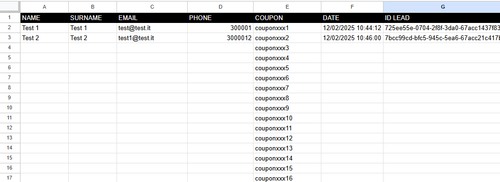]\n\nThis is the basic Google Sheet used in [this Workflow](https://docs.google.com/spreadsheets/d/1lnRZodxZSOA0QSuzkAb7ZJcfFfNXpX7NcxMdckMTN90/edit?usp=drive_link):\n\n"
},
"typeVersion": 1
},
{
"id": "1c304620-368d-42bf-b0d2-de3f9d552e51",
"name": "Sticky Note1",
"type": "n8n-nodes-base.stickyNote",
"position": [
420,
440
],
"parameters": {
"color": 4,
"width": 540,
"height": 260,
"content": "## STEP 2 - MAIN FLOW\n\nThis workflow is ideal for businesses looking to automate lead generation and management, especially when integrating with CRM systems like SuiteCRM and using Google Sheets for data tracking.\n\nIf you use an external form, hook the webbook trigger and the two webhooks \"Respond KO\" and \"Respond OK\" to the workflow.\n\nIt works with SuiteCRM 7.14.x and 8.x version. Remeber to create a Lead custom fields called 'coupon' on SuiteCRM."
},
"typeVersion": 1
},
{
"id": "6248c920-02f4-4407-881a-376d2a9dd904",
"name": "Sticky Note2",
"type": "n8n-nodes-base.stickyNote",
"position": [
660,
740
],
"parameters": {
"width": 340,
"height": 240,
"content": "Check if the lead has already received the coupon"
},
"typeVersion": 1
},
{
"id": "0c07d1b7-b12f-4cf7-8d0c-1dd905365534",
"name": "Sticky Note3",
"type": "n8n-nodes-base.stickyNote",
"position": [
1300,
860
],
"parameters": {
"width": 180,
"height": 220,
"content": "Find the first available unassigned coupon"
},
"typeVersion": 1
},
{
"id": "34167626-9041-4cce-baaf-e1ed2efe8378",
"name": "Sticky Note4",
"type": "n8n-nodes-base.stickyNote",
"position": [
1540,
700
],
"parameters": {
"width": 400,
"height": 380,
"content": "Enter the lead with the relative coupon on Suite CRM. Change SUITECRMURL, CLIENTSECRET and CLIENTID\n\nTo create the CLIENTSECRET and CLIEDID go to Admin -> Oauth2 Client and Token -> and click on \"New CLient Credentials Client\" \n\nFor the full tutorial step-by-step [here the official SuiteCRM Docs](https://docs.suitecrm.com/developer/api/developer-setup-guide/json-api/#_generate_private_and_public_key_for_oauth2)"
},
"typeVersion": 1
},
{
"id": "50f65f6b-8045-4cb1-9e3d-489f27cdb038",
"name": "Update Lead",
"type": "n8n-nodes-base.googleSheets",
"position": [
2040,
920
],
"parameters": {
"columns": {
"value": {
"DATE": "={{ $now.format('dd/LL/yyyy HH:mm:ss') }}",
"NAME": "={{ $json.data.attributes.first_name }}",
"EMAIL": "={{ $json.data.attributes.email1 }}",
"PHONE": "={{ $json.data.attributes.phone_mobile }}",
"COUPON": "={{ $('Get Coupon').item.json.COUPON }}",
"ID LEAD": "={{ $json.data.id }}",
"SURNAME": "={{ $json.data.attributes.last_name }}"
},
"schema": [
{
"id": "NAME",
"type": "string",
"display": true,
"required": false,
"displayName": "NAME",
"defaultMatch": false,
"canBeUsedToMatch": true
},
{
"id": "SURNAME",
"type": "string",
"display": true,
"required": false,
"displayName": "SURNAME",
"defaultMatch": false,
"canBeUsedToMatch": true
},
{
"id": "EMAIL",
"type": "string",
"display": true,
"required": false,
"displayName": "EMAIL",
"defaultMatch": false,
"canBeUsedToMatch": true
},
{
"id": "PHONE",
"type": "string",
"display": true,
"required": false,
"displayName": "PHONE",
"defaultMatch": false,
"canBeUsedToMatch": true
},
{
"id": "COUPON",
"type": "string",
"display": true,
"removed": false,
"required": false,
"displayName": "COUPON",
"defaultMatch": false,
"canBeUsedToMatch": true
},
{
"id": "DATE",
"type": "string",
"display": true,
"required": false,
"displayName": "DATE",
"defaultMatch": false,
"canBeUsedToMatch": true
},
{
"id": "ID LEAD",
"type": "string",
"display": true,
"required": false,
"displayName": "ID LEAD",
"defaultMatch": false,
"canBeUsedToMatch": true
},
{
"id": "row_number",
"type": "string",
"display": true,
"removed": true,
"readOnly": true,
"required": false,
"displayName": "row_number",
"defaultMatch": false,
"canBeUsedToMatch": true
}
],
"mappingMode": "defineBelow",
"matchingColumns": [
"COUPON"
],
"attemptToConvertTypes": false,
"convertFieldsToString": false
},
"options": {},
"operation": "update",
"sheetName": {
"__rl": true,
"mode": "list",
"value": "gid=0",
"cachedResultUrl": "https://docs.google.com/spreadsheets/d/1lnRZodxZSOA0QSuzkAb7ZJcfFfNXpX7NcxMdckMTN90/edit#gid=0",
"cachedResultName": "Foglio1"
},
"documentId": {
"__rl": true,
"mode": "list",
"value": "1lnRZodxZSOA0QSuzkAb7ZJcfFfNXpX7NcxMdckMTN90",
"cachedResultUrl": "https://docs.google.com/spreadsheets/d/1lnRZodxZSOA0QSuzkAb7ZJcfFfNXpX7NcxMdckMTN90/edit?usp=drivesdk",
"cachedResultName": "Coupon"
}
},
"credentials": {
"googleSheetsOAuth2Api": {
"name": "<your credential>"
}
},
"typeVersion": 4.5
}
],
"active": false,
"settings": {
"executionOrder": "v1"
},
"versionId": "",
"connections": {
"Get Coupon": {
"main": [
[
{
"node": "Token SuiteCRM",
"type": "main",
"index": 0
}
]
]
},
"Form Fields": {
"main": [
[
{
"node": "Duplicate Lead?",
"type": "main",
"index": 0
}
]
]
},
"Is Duplicate?": {
"main": [
[],
[
{
"node": "Get Coupon",
"type": "main",
"index": 0
}
]
]
},
"Token SuiteCRM": {
"main": [
[
{
"node": "Create Lead SuiteCRM",
"type": "main",
"index": 0
}
]
]
},
"Duplicate Lead?": {
"main": [
[
{
"node": "Is Duplicate?",
"type": "main",
"index": 0
}
]
]
},
"On form submission": {
"main": [
[
{
"node": "Form Fields",
"type": "main",
"index": 0
}
]
]
},
"Create Lead SuiteCRM": {
"main": [
[
{
"node": "Update Lead",
"type": "main",
"index": 0
}
]
]
}
}
}
Credentials you'll need
Each integration node will prompt for credentials when you import. We strip credential IDs before publishing — you'll add your own.
googleSheetsOAuth2Api
For the full experience including quality scoring and batch install features for each workflow upgrade to Pro
About this workflow
Drive-to-Store is a multi-channel marketing strategy that includes both the web and the physical context, with the aim of increasing the number of customers and sales in physical stores. This strategy guides potential customers from the online world to the physical point of sale…
Source: https://n8n.io/workflows/2890/ — original creator credit. Request a take-down →
Related workflows
Workflows that share integrations, category, or trigger type with this one. All free to copy and import.
This workflow is designed to manage the assignment and validation of unique QR code coupons within a lead generation system with SuiteCRM.
Automate Drive-To-Store Lead Generation System (with coupon) on SuiteCRM. Uses httpRequest, formTrigger, googleSheets. Webhook trigger; 16 nodes.
Universal Lead Processing Workflow. Uses googleSheets, gmail, httpRequest, gmailTrigger. Webhook trigger; 34 nodes.
This workflow acts as an instant SDR that replies to new inbound leads across multiple channels in real time. It first captures and normalizes all incoming lead data into a unified structure. The work
A comprehensive n8n workflow template for streamlining influencer application processing with real-time social media data validation, intelligent scoring algorithms, and automated onboarding workflows