 InfraNodus
 This workflow corresponds to n8n.io template #6887 — we link there as the canonical source.
This workflow follows the Chat Trigger → HTTP Request recipe pattern — see all workflows that pair these two integrations.
The workflow JSON
Copy or download the full n8n JSON below. Paste it into a new n8n workflow, add your credentials, activate. Full import guide →
{
"id": "MqHZXsobgwvx8B1f",
"meta": {
"templateCredsSetupCompleted": true
},
"name": "Augment Your Prompt with a Knowledge Graph Ontology Expert",
"tags": [
{
"id": "2Q64isOPYcTslspA",
"name": "AI",
"createdAt": "2025-08-02T13:39:06.091Z",
"updatedAt": "2025-08-02T13:39:06.091Z"
},
{
"id": "pZUWchtD7Jo42VrS",
"name": "AI Chatbot",
"createdAt": "2025-08-02T13:39:11.275Z",
"updatedAt": "2025-08-02T13:39:11.275Z"
},
{
"id": "MNbFLjKxPdVAYXIC",
"name": "AI Rag",
"createdAt": "2025-08-02T13:39:08.349Z",
"updatedAt": "2025-08-02T13:39:08.349Z"
}
],
"nodes": [
{
"id": "2568cca8-643d-48cd-969a-eccf267dd000",
"name": "When chat message received",
"type": "@n8n/n8n-nodes-langchain.chatTrigger",
"position": [
-512,
0
],
"parameters": {
"public": true,
"options": {}
},
"typeVersion": 1.1
},
{
"id": "92d3bec1-b54d-43c8-8ac2-1e11d92135cb",
"name": "Prompt Augmented with Reasoning Ontology",
"type": "n8n-nodes-base.httpRequest",
"position": [
-16,
0
],
"parameters": {
"url": "https://infranodus.com/api/v1/graphAndAdvice?doNotSave=true&addStats=true&optimize=develop&includeStatements=true&includeGraphSummary=true&includeGraph=false",
"method": "POST",
"options": {},
"sendBody": true,
"authentication": "genericCredentialType",
"bodyParameters": {
"parameters": [
{
"name": "name",
"value": "eightos_system"
},
{
"name": "requestMode",
"value": "reprompt"
},
{
"name": "aiTopics",
"value": "true"
},
{
"name": "prompt",
"value": "={{ $json.chatInput }}"
},
{
"name": "systemPrompt",
"value": "Your task is to reformulate the original query of a user using the context provided"
}
]
},
"genericAuthType": "httpBearerAuth"
},
"credentials": {
"httpBearerAuth": {
"name": "<your credential>"
}
},
"typeVersion": 4.2
},
{
"id": "cb908d48-e575-4844-a026-aa95d0655935",
"name": "Ask the Knowledge Base",
"type": "n8n-nodes-base.httpRequest",
"position": [
608,
0
],
"parameters": {
"url": "https://infranodus.com/api/v1/graphAndAdvice?doNotSave=true&addStats=true&optimize=develop&includeStatements=true&includeGraphSummary=true&includeGraph=false",
"method": "POST",
"options": {},
"sendBody": true,
"authentication": "genericCredentialType",
"bodyParameters": {
"parameters": [
{
"name": "name",
"value": "eightos_system"
},
{
"name": "requestMode",
"value": "response"
},
{
"name": "aiTopics",
"value": "true"
},
{
"name": "prompt",
"value": "={{ $json.aiAdvice[0].text }}"
},
{
"name": "systemPrompt",
"value": "Use the context you are provided as a logic to use when providing a response to the user query, not as the content you should be providing. IT IS IMPERATIVE THAT YOU DO NOT EXTRACT THE CONTENT FROM THE CONTEXT PROVIDED FOR YOUR ANSWER BUT USE IT AS A REASONING LOGIC TO PROVIDE YOUR ANSWER."
}
]
},
"genericAuthType": "httpBearerAuth"
},
"credentials": {
"httpBearerAuth": {
"name": "<your credential>"
}
},
"typeVersion": 4.2
},
{
"id": "401b9dc0-c51e-4fe9-87cd-be393c5bd66e",
"name": "Sticky Note",
"type": "n8n-nodes-base.stickyNote",
"position": [
-2592,
-976
],
"parameters": {
"color": 6,
"width": 540,
"height": 760,
"content": "## AI Chatbot Agent with Experts\n\n### Uses the InfraNodus knowledge graphs and its Graph RAG to retrieve relevant information.\n\nUse your [InfraNodus graph](https://infranodus.com) as the knowledge base for your AI chatbot. \n\nUpload any data to InfraNodus, generate separate knowledge graphs, then connect them as tools to the agent, so it can decide which \"expert\" to use. InfraNodus' Graph RAG will provide high-quality responses that will augment the chatbot's answers.\n\nVideo demo: [https://www.youtube.com/watch?v=kS0QTUvcH6E](https://www.youtube.com/watch?v=kS0QTUvcH6E)\n\nDetailed description: [Nodus Labs support portal](https://support.noduslabs.com/hc/en-us/articles/20174217658396-Using-InfraNodus-Knowledge-Graphs-as-Experts-for-AI-Chatbot-Agents-in-n8n)\n\nInfraNodus API key can be obtained at [InfraNodus.Com](https://infranodus.com/use-case/ai-knowledge-graphs)\n\n\n[](https://www.youtube.com/watch?v=kS0QTUvcH6E)"
},
"typeVersion": 1
},
{
"id": "8f70c71d-84bc-43cd-a13c-550ca6da336a",
"name": "Sticky Note1",
"type": "n8n-nodes-base.stickyNote",
"position": [
-224,
-32
],
"parameters": {
"width": 520,
"height": 1220,
"content": "\n\n\n\n\n\n\n\n\n\n\n\n\n\n\n\n\n## 2. Reasoning Expert Reformulates the User's Query\n\n### Create an InfraNodus graph with a reasoning ontology. This node will then provide the reasoning logic to your LLM to reformulate the original query. Learn more about this approach in our [article on reasoning agents](https://support.noduslabs.com/hc/en-us/articles/21429518472988-Using-Knowledge-Graphs-as-Reasoning-Experts) \n\nTO CREATE THE REASONING CHAIN GRAPH:\n\n\u2022 use the [InfraNodus AI Ontologies Generator](https://infranodus.com/import/ai-ontologies) \u2014 learn more how it works on our [support portal](https://support.noduslabs.com/hc/en-us/articles/18301655686172-Generate-Knowledge-Graphs-and-Ontologies-in-Plain-Text)\n\n\u2022\u00a0choose a reasoning graph from our [multiple freely available graphs online](https://infranodus.com/knowledge-graphs)\n\n\u2022\u00a0download the existing graph on [EightOS cognitive variability framework](https://infranodus.com/expert/eightos_system?background=dark&show_analytics=1&most_influential=bc2&maxnodes=150&threshold=8&labelsize=proportional&edgestype=curve&drawedges=true&drawnodes=true&labelsizeratio=2&dynamic=highlight&cutgraph=1&selected=highlight) or use one \n\n### Once ready, add your InfraNodus graph here via the HTTP node using its name in the `body.name` field.\n\n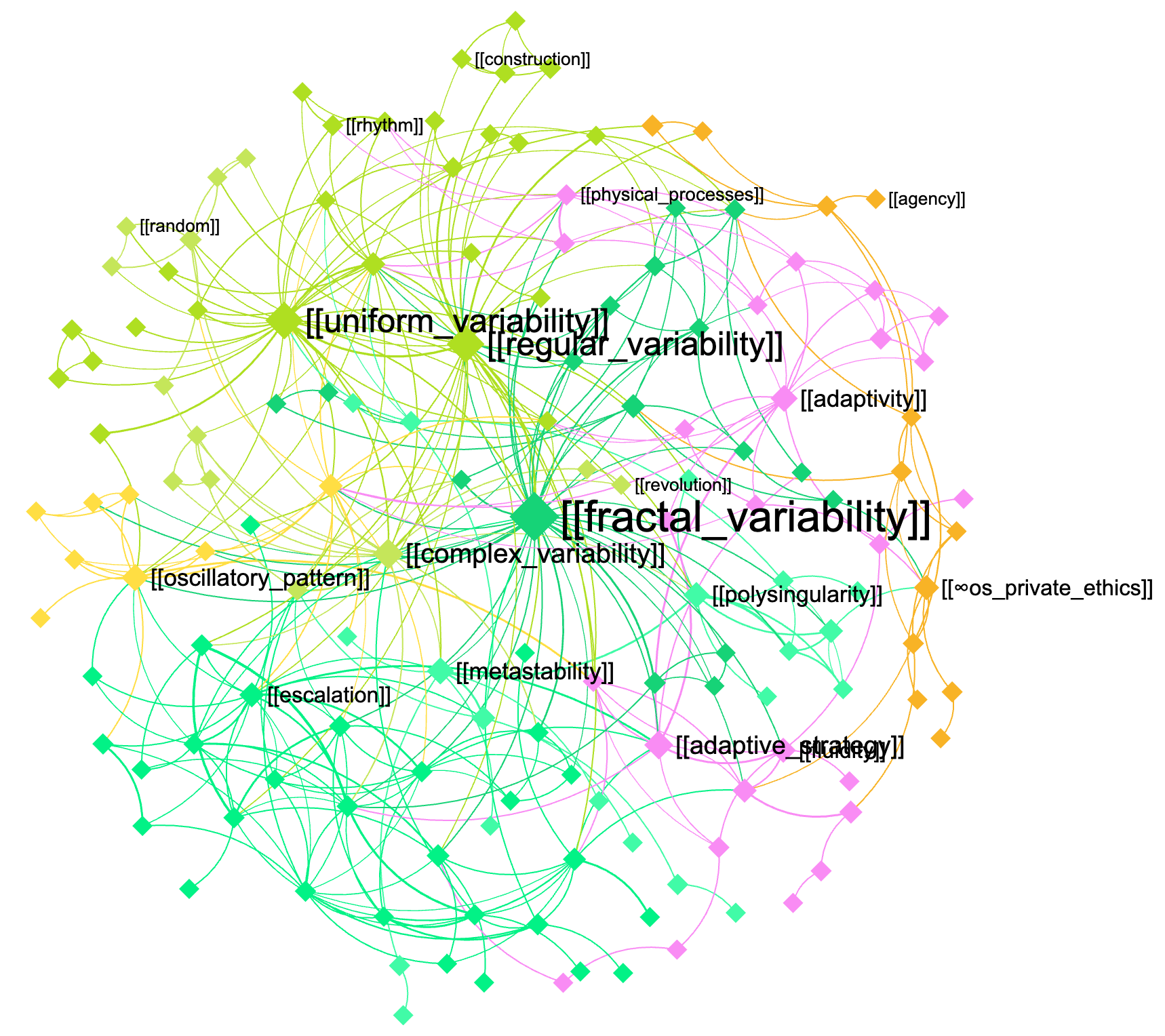"
},
"typeVersion": 1
},
{
"id": "c6d16d77-1aed-4fa8-a7aa-fb7fc6974469",
"name": "Sticky Note9",
"type": "n8n-nodes-base.stickyNote",
"position": [
400,
-32
],
"parameters": {
"width": 520,
"height": 1216,
"content": "\n\n\n\n\n\n\n\n\n\n\n\n\n\n\n\n\n## 3. The augmented query is sent to the knowledge base and the response is retrieved using GraphRAG\n\nNow that the query is augmented with domain-specific knowledge, you can send it back to this same graph or to another graph (for cross-disciplinary requests \u2014 e.g. to use the machine learning expertise in biology, etc)\n\n[InfraNodus](https://infranodus.com) will use [GraphRAG](https://infranodus.com/docs/graph-rag-knowledge-graph) to traverse the graph for answers and extract a response for your user query.\n\nProvide the name of the graph you'll be using as a knowledge base in the `name` field of the node.\n\nYou can also replace this node with any external AI model (e.g. Open AI chat message node).\n"
},
"typeVersion": 1
},
{
"id": "3d1fe3e7-dbd5-4b13-a62c-97ee5fa42046",
"name": "Sticky Note2",
"type": "n8n-nodes-base.stickyNote",
"position": [
-576,
-48
],
"parameters": {
"height": 768,
"content": "\n\n\n\n\n\n\n\n\n\n\n\n\n\n\n\n\n## 1. Trigger the chat and send a message\n\nYou can also make this node publicly available via a URL and embed it on a website or make it available via a Telegram node that is activated upon receiving a message (check [this workflow](https://n8n.io/workflows/4485-telegram-ai-chatbot-agent-with-infranodus-graphrag-knowledge-base/) to learn how to set it up). "
},
"typeVersion": 1
}
],
"active": false,
"settings": {
"executionOrder": "v1"
},
"versionId": "2bb0a437-1815-4bff-bdd4-600faa19b456",
"connections": {
"When chat message received": {
"main": [
[
{
"node": "Prompt Augmented with Reasoning Ontology",
"type": "main",
"index": 0
}
]
]
},
"Prompt Augmented with Reasoning Ontology": {
"main": [
[
{
"node": "Ask the Knowledge Base",
"type": "main",
"index": 0
}
]
]
}
}
}
Credentials you'll need
Each integration node will prompt for credentials when you import. We strip credential IDs before publishing — you'll add your own.
httpBearerAuth
For the full experience including quality scoring and batch install features for each workflow upgrade to Pro
About this workflow
In this workflow, we augment the original prompt using the InfraNodus GraphRAG system that will extract a reasoning ontology from a graph that you create (or that you can copy from our repository of public graphs).
Source: https://n8n.io/workflows/6887/ — original creator credit. Request a take-down →
Related workflows
Workflows that share integrations, category, or trigger type with this one. All free to copy and import.
This template adapts Andrej Karpathy’s LLM Council concept for use in n8n, creating a workflow that collects, evaluates, and synthesizes multiple large language model (LLM) responses to reduce individ
"I used to spend hours every week just copy-pasting product descriptions to find the right tariff codes for our international shipments. It was tedious and prone to errors." - Accounting specialist.
Paste any competitor's YouTube URL in chat — and this n8n workflow does everything automatically. WayinVideo API reads the entire video, extracts the summary, key highlights with timestamps, and hasht
Disclaimer: This workflow contains community nodes that are only compatible with the self-hosted version of n8n.
Analyze Screenshots with AI. Uses stickyNote, httpRequest, openAi, manualTrigger. Event-driven trigger; 9 nodes.