 Allan Vaccarizi
 This workflow corresponds to n8n.io template #15074 — we link there as the canonical source.
This workflow follows the Datatable → Gmail recipe pattern — see all workflows that pair these two integrations.
The workflow JSON
Copy or download the full n8n JSON below. Paste it into a new n8n workflow, add your credentials, activate. Full import guide →
{
"nodes": [
{
"id": "55b32b5a-3320-4e6e-acae-9a960b30eae0",
"name": "Sticky Note",
"type": "n8n-nodes-base.stickyNote",
"position": [
1568,
224
],
"parameters": {
"color": 7,
"width": 1024,
"height": 240,
"content": "## Need more advanced automation solutions? Contact us for custom enterprise workflows!\n\n# Growth-AI.fr\n\n## https://www.linkedin.com/in/allanvaccarizi/\n## https://www.linkedin.com/in/hugo-marinier-%F0%9F%A7%B2-6537b633/"
},
"typeVersion": 1
},
{
"id": "4871a388-e7ea-46ee-a366-97b4d7b4bce3",
"name": "Sticky Note16",
"type": "n8n-nodes-base.stickyNote",
"position": [
1568,
-224
],
"parameters": {
"width": 1024,
"height": 400,
"content": ""
},
"typeVersion": 1
},
{
"id": "46ac9a16-dfbb-4583-9b62-44d79eccba4f",
"name": "Sticky Note21",
"type": "n8n-nodes-base.stickyNote",
"position": [
1008,
448
],
"parameters": {
"color": 2,
"width": 480,
"height": 176,
"content": "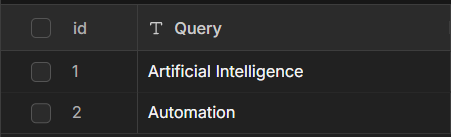"
},
"typeVersion": 1
},
{
"id": "4913d4bc-5db1-453f-9825-04625f26ed0a",
"name": "When Schedule Triggers",
"type": "n8n-nodes-base.scheduleTrigger",
"position": [
1072,
848
],
"parameters": {
"rule": {
"interval": [
{}
]
}
},
"typeVersion": 1.2
},
{
"id": "94097653-0e95-47d5-ad66-3a2920249458",
"name": "Send TikTok Report by Email",
"type": "n8n-nodes-base.gmail",
"notes": "Send dahsboard with top 10 of the most engaging post ",
"position": [
2400,
848
],
"parameters": {
"sendTo": "user@example.com",
"message": "=<!DOCTYPE html>\n<html lang=\"fr\">\n<head>\n <meta charset=\"UTF-8\">\n <meta name=\"viewport\" content=\"width=device-width, initial-scale=1.0\">\n <title>Trends Social Media - {{ $('Loop Over TikTok Queries').first().json.Query }}</title>\n <style>\n * {\n margin: 0;\n padding: 0;\n box-sizing: border-box;\n }\n\n body {\n font-family: 'Segoe UI', Tahoma, Geneva, Verdana, sans-serif;\n line-height: 1.6;\n color: #333;\n background: linear-gradient(135deg, #667eea 0%, #764ba2 100%);\n min-height: 100vh;\n padding: 20px;\n }\n\n .newsletter-container {\n max-width: 1200px;\n margin: 0 auto;\n background: white;\n border-radius: 20px;\n overflow: hidden;\n box-shadow: 0 20px 40px rgba(0,0,0,0.1);\n }\n\n .header {\n background: linear-gradient(135deg, #ff6b6b, #ee5a24);\n color: white;\n padding: 40px 30px;\n text-align: center;\n }\n\n .header h1 {\n font-size: 2.8em;\n margin-bottom: 10px;\n font-weight: 700;\n }\n\n .header p {\n font-size: 1.2em;\n opacity: 0.9;\n margin-bottom: 15px;\n }\n\n .keyword-badge {\n display: inline-block;\n background: rgba(255,255,255,0.2);\n color: white;\n padding: 8px 20px;\n border-radius: 20px;\n font-size: 1em;\n font-weight: 600;\n backdrop-filter: blur(10px);\n }\n\n .stats-overview {\n display: grid;\n grid-template-columns: repeat(auto-fit, minmax(200px, 1fr));\n gap: 20px;\n padding: 30px;\n background: #f8f9fa;\n }\n\n .stat-card {\n background: white;\n padding: 20px;\n border-radius: 15px;\n text-align: center;\n box-shadow: 0 5px 15px rgba(0,0,0,0.08);\n border-left: 4px solid;\n }\n\n .stat-card.high { border-left-color: #ff4757; }\n .stat-card.medium { border-left-color: #ffa502; }\n .stat-card.low { border-left-color: #70a1ff; }\n\n .stat-number {\n font-size: 2.5em;\n font-weight: bold;\n margin-bottom: 5px;\n }\n\n .stat-label {\n color: #666;\n font-size: 0.9em;\n text-transform: uppercase;\n letter-spacing: 1px;\n }\n\n .table-container {\n margin: 30px;\n background: white;\n border-radius: 15px;\n overflow: hidden;\n box-shadow: 0 10px 25px rgba(0,0,0,0.1);\n }\n\n .table-header {\n background: linear-gradient(135deg, #2c3e50, #34495e);\n color: white;\n padding: 25px 30px;\n text-align: center;\n }\n\n .table-title {\n font-size: 1.8em;\n font-weight: 600;\n margin-bottom: 5px;\n }\n\n .table-subtitle {\n opacity: 0.8;\n font-size: 1em;\n }\n\n .trends-table {\n width: 100%;\n border-collapse: collapse;\n font-size: 0.95em;\n }\n\n .trends-table th {\n background: #f8f9fa;\n padding: 15px 12px;\n text-align: left;\n font-weight: 600;\n color: #555;\n border-bottom: 2px solid #dee2e6;\n text-transform: uppercase;\n font-size: 0.8em;\n letter-spacing: 0.5px;\n }\n\n .trends-table td {\n padding: 15px 12px;\n border-bottom: 1px solid #eee;\n vertical-align: middle;\n text-align: center;\n }\n\n .trends-table td:nth-child(3),\n .trends-table td:nth-child(4) {\n text-align: left;\n }\n\n .trends-table tr:nth-child(even) {\n background-color: #f8f9fa;\n }\n\n .trends-table tr:hover {\n background-color: #e3f2fd;\n transform: scale(1.01);\n transition: all 0.2s ease;\n }\n\n .rank-number {\n font-weight: bold;\n font-size: 1.2em;\n color: #2c3e50;\n }\n\n .rank-number.top3 {\n color: #ff6b6b;\n font-size: 1.4em;\n }\n\n .source-badge {\n padding: 6px 12px;\n border-radius: 20px;\n font-size: 0.8em;\n font-weight: 600;\n text-transform: uppercase;\n letter-spacing: 0.5px;\n }\n\n .source-badge.tiktok {\n background: #ff0050;\n color: white;\n }\n\n .source-badge.reddit {\n background: #ff4500;\n color: white;\n }\n\n .source-badge.instagram {\n background: #e4405f;\n color: white;\n }\n\n .level-badge {\n padding: 4px 10px;\n border-radius: 15px;\n font-size: 0.75em;\n font-weight: 600;\n text-transform: uppercase;\n }\n\n .level-badge.high {\n background: #ff4757;\n color: white;\n }\n\n .level-badge.medium {\n background: #ffa502;\n color: white;\n }\n\n .level-badge.low {\n background: #70a1ff;\n color: white;\n }\n\n .content-text {\n max-width: 250px;\n overflow: hidden;\n text-overflow: ellipsis;\n white-space: nowrap;\n color: #555;\n line-height: 1.4;\n }\n\n .author-link {\n color: #667eea;\n text-decoration: none;\n font-weight: 600;\n }\n\n .author-link:hover {\n text-decoration: underline;\n }\n\n .score-number {\n font-weight: bold;\n color: #2c3e50;\n font-size: 1.1em;\n }\n\n .footer {\n text-align: center;\n padding: 30px;\n background: #f8f9fa;\n color: #666;\n border-top: 1px solid #eee;\n }\n\n .footer p {\n margin-bottom: 10px;\n }\n\n .date-info {\n font-size: 0.9em;\n color: #888;\n }\n\n @media (max-width: 768px) {\n .newsletter-container {\n margin: 10px;\n border-radius: 15px;\n }\n \n .header {\n padding: 30px 20px;\n }\n \n .header h1 {\n font-size: 2.2em;\n }\n \n .table-container {\n margin: 20px;\n overflow-x: auto;\n }\n \n .trends-table {\n min-width: 800px;\n }\n \n .stats-overview {\n padding: 20px;\n grid-template-columns: 1fr;\n }\n }\n </style>\n</head>\n<body>\n <div class=\"newsletter-container\">\n <!-- Header -->\n <header class=\"header\">\n <h1>\ud83d\udcca R\u00e9capitulatif par Hashtag</h1>\n <p>Scores totaux par r\u00e9seau social</p>\n </header>\n\n <!-- Hashtag Summary Table -->\n <section class=\"table-container\" style=\"margin: 30px 30px 0 30px;\">\n <table class=\"trends-table\">\n <thead>\n <tr>\n <th>Hashtag</th>\n <th>TikTok</th>\n <th>Reddit</th>\n <th>Instagram</th>\n <th>Score Total</th>\n </tr>\n </thead>\n <tbody>\n <tr>\n <td>\n <span style=\"font-weight: bold; color: #ff6b6b; font-size: 1.1em;\">#{{ $('Loop Over TikTok Queries').first().json.Query }}</span>\n </td>\n <td>\n <span class=\"score-number\">{{ $('Rank TikTok Posts1').all().filter(item => item.json.source === 'TikTok').reduce((sum, item) => sum + item.json.score, 0).toLocaleString('fr-FR') }}</span>\n </td>\n <td>\n <span class=\"score-number\">{{ $('Rank TikTok Posts1').all().filter(item => item.json.source === 'Reddit').reduce((sum, item) => sum + item.json.score, 0).toLocaleString('fr-FR') }}</span>\n </td>\n <td>\n <span class=\"score-number\">{{ $('Rank TikTok Posts1').all().filter(item => item.json.source === 'Instagram').reduce((sum, item) => sum + item.json.score, 0).toLocaleString('fr-FR') }}</span>\n </td>\n <td>\n <span class=\"score-number\" style=\"color: #ff6b6b; font-size: 1.2em;\">{{ $('Rank TikTok Posts1').all().reduce((sum, item) => sum + item.json.score, 0).toLocaleString('fr-FR') }}</span>\n </td>\n </tr>\n </tbody>\n </table>\n </section>\n\n <!-- Main Table -->\n <section class=\"table-container\">\n <div class=\"table-header\">\n <div class=\"table-title\">#{{ $('Loop Over TikTok Queries').first().json.Query }}</div>\n <div class=\"table-subtitle\"></div>\n </div>\n \n <table class=\"trends-table\">\n <thead>\n <tr>\n <th>Rang</th>\n <th>Source</th>\n <th>Auteur</th>\n <th>Contenu</th>\n <th>Score</th>\n <th>Level</th>\n </tr>\n </thead>\n <tbody>\n {{ $('Rank TikTok Posts1').all().map(item => `\n <tr onclick=\"window.open('${item.json.url}', '_blank')\" style=\"cursor: pointer;\">\n <td>\n <span class=\"rank-number ${item.json.rank <= 3 ? 'top3' : ''}\">${item.json.rank}</span>\n </td>\n <td>\n <span class=\"source-badge ${item.json.source.toLowerCase()}\">${item.json.source}</span>\n </td>\n <td>\n <a href=\"${item.json.url}\" target=\"_blank\" class=\"author-link\">${item.json.author}</a>\n </td>\n <td>\n <div class=\"content-text\" title=\"${item.json.content}\">${item.json.content}</div>\n </td>\n <td>\n <span class=\"score-number\">${item.json.score.toLocaleString('fr-FR')}</span>\n </td>\n <td>\n <span class=\"level-badge ${item.json.level.toLowerCase()}\">${item.json.level}</span>\n </td>\n </tr>\n `).join('') }}\n </tbody>\n </table>\n </section>\n\n <!-- Footer -->\n <footer class=\"footer\">\n <p><strong>Social Media Trends Dashboard</strong></p>\n <p>Analyse automatis\u00e9e des contenus par mot-cl\u00e9</p>\n <div class=\"date-info\">\n <p>G\u00e9n\u00e9r\u00e9 le {{ new Date().toLocaleDateString('fr-FR', { \n year: 'numeric', \n month: 'long', \n day: 'numeric', \n hour: '2-digit', \n minute: '2-digit' \n }) }}</p>\n </div>\n </footer>\n </div>\n</body>\n</html>",
"options": {},
"subject": "Social media monitoring"
},
"credentials": {
"gmailOAuth2": {
"name": "<your credential>"
}
},
"executeOnce": true,
"notesInFlow": true,
"typeVersion": 2.1
},
{
"id": "9efb06ca-39fa-48e1-b9b1-5744b6a67e5c",
"name": "Scrape TikTok via Apify",
"type": "n8n-nodes-base.httpRequest",
"notes": "Post the request on apify",
"position": [
1744,
848
],
"parameters": {
"url": "https://api.apify.com/v2/acts/clockworks~tiktok-scraper/run-sync-get-dataset-items",
"method": "POST",
"options": {},
"jsonBody": "={\n \"hashtags\": [\"{{ $json.Query.replace(/\\s+/g, '') }}\"],\n \"resultsPerPage\": 50,\n \"oldestPostDateUnified\": \"7 days\"\n}",
"sendBody": true,
"sendHeaders": true,
"specifyBody": "json",
"authentication": "predefinedCredentialType",
"headerParameters": {
"parameters": [
{
"name": "Content-Type",
"value": "application/json"
}
]
},
"nodeCredentialType": "apifyApi"
},
"credentials": {
"apifyApi": {
"name": "<your credential>"
},
"httpHeaderAuth": {
"name": "<your credential>"
}
},
"executeOnce": false,
"notesInFlow": true,
"retryOnFail": true,
"typeVersion": 4.2
},
{
"id": "ef644544-31a8-48de-a8b6-72f91b36a77a",
"name": "Score and Sort TikTok Posts",
"type": "n8n-nodes-base.code",
"notes": "Sorts posts",
"position": [
1984,
848
],
"parameters": {
"jsCode": "// Code pour n\u0153ud Code n8n - Classement TikTok avec score personnalis\u00e9\n// R\u00e9cup\u00e9rer les donn\u00e9es d'entr\u00e9e\nconst items = $input.all();\n\n// V\u00e9rifier si on a des donn\u00e9es\nif (!items || items.length === 0) {\n console.log(\"\u274c Aucune donn\u00e9e d'entr\u00e9e trouv\u00e9e\");\n return [];\n}\n\n// Extraire les posts TikTok du JSON\nlet posts = [];\n\n// Si les donn\u00e9es sont dans un tableau \u00e0 l'int\u00e9rieur du premier item\nif (items[0] && items[0].json && Array.isArray(items[0].json)) {\n posts = items[0].json;\n} \n// Si les donn\u00e9es sont directement dans les items\nelse if (Array.isArray(items)) {\n posts = items.map(item => item.json);\n}\n\nconsole.log(`\ud83d\udce5 ${posts.length} posts TikTok trouv\u00e9s`);\n\n// Calculer le score pour chaque post TikTok\nconst postsWithScore = posts.map((post, index) => {\n // M\u00e9triques TikTok\n const likes = post.diggCount || 0;\n const comments = post.commentCount || 0;\n const shares = post.shareCount || 0;\n const views = post.playCount || 0;\n \n // Calcul du score : (likes * 1) + (comments * 2) + (shares * 3) + (views / 1000)\n const likesScore = likes * 1;\n const commentsScore = comments * 2;\n const sharesScore = shares * 3;\n const viewsScore = Math.floor(views / 1000);\n const totalScore = likesScore + commentsScore + sharesScore + viewsScore;\n \n return {\n json: {\n url: post.webVideoUrl || `https://www.tiktok.com/@${post.authorMeta?.name}/video/${post.id}`,\n caption: post.text || \"Pas de caption\",\n score: totalScore,\n // Donn\u00e9es d\u00e9taill\u00e9es pour debug (optionnel)\n details: {\n likes: likes,\n comments: comments,\n shares: shares,\n views: views,\n author: post.authorMeta?.name || \"Inconnu\",\n id: post.id\n }\n }\n };\n}).filter(post => post.json.url); // Filtrer les posts sans URL\n\nconsole.log(`\u2705 ${postsWithScore.length} posts trait\u00e9s avec succ\u00e8s`);\n\n// Trier par score d\u00e9croissant\nconst sortedPosts = postsWithScore.sort((a, b) => b.json.score - a.json.score);\n\n// Prendre les 10 meilleurs\nconst topPosts = sortedPosts.slice(0, 10);\n\n// Ajouter un rang \u00e0 chaque post\nconst rankedPosts = topPosts.map((post, index) => ({\n json: {\n rank: index + 1,\n url: post.json.url,\n caption: post.json.caption,\n score: post.json.score\n }\n}));\n\n// Retourner les r\u00e9sultats avec le format demand\u00e9 : url, caption, score\nreturn rankedPosts;"
},
"notesInFlow": true,
"typeVersion": 2
},
{
"id": "f57ac21e-eaf9-455c-812e-c34572957f7f",
"name": "Loop Over TikTok Queries",
"type": "n8n-nodes-base.splitInBatches",
"position": [
1520,
848
],
"parameters": {
"options": {}
},
"typeVersion": 3
},
{
"id": "731ab30b-110f-424a-a071-c5ad15023cd2",
"name": "Sticky Note14",
"type": "n8n-nodes-base.stickyNote",
"position": [
464,
512
],
"parameters": {
"width": 480,
"height": 896,
"content": "## Trend monitoring TikTok\n\n### How it works\n\n1. A schedule trigger fires the workflow at regular intervals and retrieves a list of search queries from a data table.\n2. Each query is looped over in batches, and for each one, a POST request is sent to the Apify TikTok scraper API to fetch recent posts.\n3. The raw API results are sorted and scored using a custom ranking algorithm, then a final classification step is applied.\n4. The ranked results are saved back to a data table for storage and simultaneously sent out via Gmail as a message.\n5. After the email is sent, the loop continues to the next batch of queries until all are processed.\n\n### Setup steps\n\n- - [ ] Configure the **Reddit Schedule Trigger1** node with the desired run frequency (e.g., daily, hourly).\n- - [ ] Set up the **Reddit Get row(s)1** data table node with the correct table/sheet containing the list of queries to process.\n- - [ ] Add your Apify API key to the **Tiktok get posts solo1** HTTP Request node (POST to `https://api.apify.com/v2/acts/clockworks...`).\n- - [ ] Connect a Gmail account to the **Reddit Send a message1** node and configure the recipient, subject, and message body.\n- - [ ] Configure the **Reddot Push to data table1** node to point to the correct destination table where ranked results should be stored.\n- - [ ] Review and adjust the scoring logic in **Sort TikTok solo1** and **Classement Instagram** code nodes to match your ranking criteria.\n\n### Customization\n\nThe custom scoring formula in the `Sort TikTok solo1` and `Classement Instagram` code nodes can be adjusted to weight engagement metrics (likes, views, comments) differently. The batch size in `TikTok Loop Over Query1` can be tuned to control API request rate."
},
"typeVersion": 1
},
{
"id": "38bf052a-7107-4293-bc86-b41d12948e83",
"name": "Sticky Note15",
"type": "n8n-nodes-base.stickyNote",
"position": [
1024,
688
],
"parameters": {
"color": 7,
"width": 384,
"height": 320,
"content": "## Schedule trigger and query fetch\n\nA schedule trigger initiates the workflow and retrieves the list of queries to process from a data table."
},
"typeVersion": 1
},
{
"id": "bd69a5b9-7359-43a1-a2be-b42b85905e96",
"name": "Sticky Note19",
"type": "n8n-nodes-base.stickyNote",
"position": [
1472,
688
],
"parameters": {
"color": 7,
"width": 416,
"height": 320,
"content": "## Loop and fetch TikTok posts\n\nIterates over each query in batches and calls the Apify TikTok scraper API to retrieve recent posts for each query."
},
"typeVersion": 1
},
{
"id": "871a466f-a25e-48b9-bbf3-2fdaf839a7d1",
"name": "Sticky Note20",
"type": "n8n-nodes-base.stickyNote",
"position": [
1936,
688
],
"parameters": {
"color": 7,
"width": 384,
"height": 320,
"content": "## Sort and rank posts\n\nApplies a custom scoring algorithm to sort TikTok posts, then performs a final classification/ranking step on the results."
},
"typeVersion": 1
},
{
"id": "1524197f-3624-42df-af14-de36d5f6d10d",
"name": "Sticky Note23",
"type": "n8n-nodes-base.stickyNote",
"position": [
2352,
512
],
"parameters": {
"color": 7,
"height": 496,
"content": "## Save results and notify\n\nStores the ranked results in a data table for persistence and sends the results via Gmail as a notification message."
},
"typeVersion": 1
},
{
"id": "67f547d3-234b-48c4-a0e4-f22c68cddf50",
"name": "Rank TikTok Posts1",
"type": "n8n-nodes-base.code",
"notes": "Sorts all posts + give them points depending on their likes + comments",
"position": [
2176,
848
],
"parameters": {
"jsCode": "// Code pour n\u0153ud Code n8n - Classement TikTok\n// R\u00e9cup\u00e9rer le keyword dynamiquement\nconst keyword = $('Loop Over TikTok Queries').first().json.Query;\n\n// R\u00e9cup\u00e9rer les donn\u00e9es du n\u0153ud pr\u00e9c\u00e9dent\nconst tiktokData = $('Score and Sort TikTok Posts').all();\n\n// Fonction pour d\u00e9terminer le level bas\u00e9 sur le score\nfunction getLevel(score) {\n if (score >= 10000) return 'High';\n if (score >= 1000) return 'Medium';\n return 'Low';\n}\n\n// Fonction pour extraire l'auteur TikTok\nfunction getAuthor(item) {\n const tiktokMatch = item.url.match(/tiktok\\.com\\/@([^\\/]+)/);\n return tiktokMatch ? `@${tiktokMatch[1]}` : '@inconnu';\n}\n\n// Transformer les donn\u00e9es TikTok\nconst tiktokPosts = tiktokData.map(item => ({\n json: {\n source: 'TikTok',\n keyword: keyword,\n author: getAuthor(item.json),\n content: (item.json.caption || 'Pas de caption').substring(0, 50) + '...',\n score: item.json.score,\n level: getLevel(item.json.score),\n url: item.json.url,\n originalRank: item.json.rank\n }\n}));\n\n// Trier par score d\u00e9croissant\nconst sortedPosts = tiktokPosts.sort((a, b) => b.json.score - a.json.score);\n\n// Ajouter le rang\nconst rankedPosts = sortedPosts.map((post, index) => ({\n json: {\n ...post.json,\n rank: index + 1,\n date: new Date().toISOString().split('T')[0]\n }\n}));\n\n// Prendre le top 15\nconst topPosts = rankedPosts.slice(0, 15);\n\nreturn topPosts;"
},
"notesInFlow": true,
"typeVersion": 2
},
{
"id": "7ff09b4e-f990-4d7c-8496-40b6e0674642",
"name": "Get Queries from Table1",
"type": "n8n-nodes-base.dataTable",
"position": [
1264,
848
],
"parameters": {
"operation": "get",
"returnAll": true,
"dataTableId": {
"__rl": true,
"mode": "list",
"value": "BYMzHVIbNU0mmvAZ",
"cachedResultUrl": "/projects/oTpNUA7ZOCuhiQA0/datatables/BYMzHVIbNU0mmvAZ",
"cachedResultName": "Query social media"
}
},
"typeVersion": 1
},
{
"id": "ab6b8fd2-5171-4273-8a0e-898a8558f009",
"name": "Save Rankings to Table1",
"type": "n8n-nodes-base.dataTable",
"position": [
2400,
720
],
"parameters": {
"columns": {
"value": {
"url": "={{ $json.url }}",
"Date": "={{ $now.toISO() }}",
"rank": "={{ $json.rank }}",
"level": "={{ $json.level }}",
"score": "={{ $json.score }}",
"author": "={{ $json.author }}",
"source": "={{ $json.source }}",
"content": "={{ $json.content }}",
"keyword": "={{ $json.keyword }}"
},
"schema": [
{
"id": "rank",
"type": "number",
"display": true,
"removed": false,
"readOnly": false,
"required": false,
"displayName": "rank",
"defaultMatch": false
},
{
"id": "keyword",
"type": "string",
"display": true,
"removed": false,
"readOnly": false,
"required": false,
"displayName": "keyword",
"defaultMatch": false
},
{
"id": "source",
"type": "string",
"display": true,
"removed": false,
"readOnly": false,
"required": false,
"displayName": "source",
"defaultMatch": false
},
{
"id": "author",
"type": "string",
"display": true,
"removed": false,
"readOnly": false,
"required": false,
"displayName": "author",
"defaultMatch": false
},
{
"id": "content",
"type": "string",
"display": true,
"removed": false,
"readOnly": false,
"required": false,
"displayName": "content",
"defaultMatch": false
},
{
"id": "score",
"type": "number",
"display": true,
"removed": false,
"readOnly": false,
"required": false,
"displayName": "score",
"defaultMatch": false
},
{
"id": "level",
"type": "string",
"display": true,
"removed": false,
"readOnly": false,
"required": false,
"displayName": "level",
"defaultMatch": false
},
{
"id": "url",
"type": "string",
"display": true,
"removed": false,
"readOnly": false,
"required": false,
"displayName": "url",
"defaultMatch": false
},
{
"id": "Date",
"type": "dateTime",
"display": true,
"removed": false,
"readOnly": false,
"required": false,
"displayName": "Date",
"defaultMatch": false
}
],
"mappingMode": "defineBelow",
"matchingColumns": [],
"attemptToConvertTypes": false,
"convertFieldsToString": false
},
"options": {},
"dataTableId": {
"__rl": true,
"mode": "list",
"value": "75Jvx9ALCoEGcdwY",
"cachedResultUrl": "/projects/oTpNUA7ZOCuhiQA0/datatables/75Jvx9ALCoEGcdwY",
"cachedResultName": "Trend Social media"
}
},
"typeVersion": 1
}
],
"connections": {
"Rank TikTok Posts1": {
"main": [
[
{
"node": "Send TikTok Report by Email",
"type": "main",
"index": 0
},
{
"node": "Save Rankings to Table1",
"type": "main",
"index": 0
}
]
]
},
"When Schedule Triggers": {
"main": [
[
{
"node": "Get Queries from Table1",
"type": "main",
"index": 0
}
]
]
},
"Get Queries from Table1": {
"main": [
[
{
"node": "Loop Over TikTok Queries",
"type": "main",
"index": 0
}
]
]
},
"Scrape TikTok via Apify": {
"main": [
[
{
"node": "Score and Sort TikTok Posts",
"type": "main",
"index": 0
}
]
]
},
"Loop Over TikTok Queries": {
"main": [
[],
[
{
"node": "Scrape TikTok via Apify",
"type": "main",
"index": 0
}
]
]
},
"Score and Sort TikTok Posts": {
"main": [
[
{
"node": "Rank TikTok Posts1",
"type": "main",
"index": 0
}
]
]
},
"Send TikTok Report by Email": {
"main": [
[
{
"node": "Loop Over TikTok Queries",
"type": "main",
"index": 0
}
]
]
}
}
}
Credentials you'll need
Each integration node will prompt for credentials when you import. We strip credential IDs before publishing — you'll add your own.
apifyApigmailOAuth2httpHeaderAuth
For the full experience including quality scoring and batch install features for each workflow upgrade to Pro
About this workflow
This workflow is for social media managers, content strategists, and marketing teams who need to track TikTok engagement trends across multiple hashtags on a recurring basis — without manually checking each one. A schedule trigger fires the workflow at a configured interval…
Source: https://n8n.io/workflows/15074/ — original creator credit. Request a take-down →
Related workflows
Workflows that share integrations, category, or trigger type with this one. All free to copy and import.
> Watch the full Youtube Video Tutorial [](https://youtu.be/Y-wUr2-UYZk)
📺 Full walkthrough video: https://www.youtube.com/watch?v=Me4d4BILvHk
This workflow automatically scrapes business leads from Google Maps on a daily schedule and ensures only high-quality, unique leads are processed. New businesses are cleaned, validated, and deduplicat
Perfect for social media managers, content creators, and personal brands who want to stay relevant on X without manually tracking trends or writing posts every day. The workflow runs 3 times daily by
This workflow runs daily to scrape competitor Shopify app reviews via Apify, logs and deduplicates new low-rated reviews in Google Sheets, looks up the reviewer’s website with Serper, enriches contact