 Davide Boizza
 This workflow corresponds to n8n.io template #4916 — we link there as the canonical source.
This workflow follows the Google Drive → Google Sheets recipe pattern — see all workflows that pair these two integrations.
The workflow JSON
Copy or download the full n8n JSON below. Paste it into a new n8n workflow, add your credentials, activate. Full import guide →
{
"id": "IctMuVMXlEownJe1",
"meta": {
"templateCredsSetupCompleted": true
},
"name": "Generate AI Contextualize Images with FLUX Kontext",
"tags": [],
"nodes": [
{
"id": "b0f612bd-9665-4607-81fd-5b6fbd9cb562",
"name": "When clicking \u2018Test workflow\u2019",
"type": "n8n-nodes-base.manualTrigger",
"position": [
-140,
660
],
"parameters": {},
"typeVersion": 1
},
{
"id": "8f02f950-7ea3-4dfe-be9e-989f675080e0",
"name": "Get status",
"type": "n8n-nodes-base.httpRequest",
"position": [
800,
660
],
"parameters": {
"url": "=https://queue.fal.run/fal-ai/flux-pro/requests/{{ $('Create Image').item.json.request_id }}/status ",
"options": {},
"authentication": "genericCredentialType",
"genericAuthType": "httpHeaderAuth"
},
"credentials": {
"httpHeaderAuth": {
"name": "<your credential>"
}
},
"typeVersion": 4.2
},
{
"id": "ec42f3a9-f489-4dcd-b606-e5dee097eea9",
"name": "Wait 60 sec.",
"type": "n8n-nodes-base.wait",
"position": [
580,
660
],
"parameters": {
"amount": 60
},
"typeVersion": 1.1
},
{
"id": "8c927df4-9f70-4e91-940c-9c3a08394a8b",
"name": "Schedule Trigger",
"type": "n8n-nodes-base.scheduleTrigger",
"position": [
-140,
520
],
"parameters": {
"rule": {
"interval": [
{
"field": "minutes"
}
]
}
},
"typeVersion": 1.2
},
{
"id": "19b6b133-842d-49e6-9fe4-3acb2afeac78",
"name": "Sticky Note3",
"type": "n8n-nodes-base.stickyNote",
"position": [
-220,
-500
],
"parameters": {
"color": 3,
"width": 740,
"height": 320,
"content": "# Generate AI Contextualize Images with FLUX Kontext\n\n## Generate AI Contextualize Images in a scenario with FLUX Kontext and Save to Google Drive\n\nThis workflow automates the generation of **AI-enhanced, contextualized images using FLUX Kontext**, based on prompts stored in a Google Sheet. The generated images are then s**aved to Google Drive**, and their URLs are written back to the spreadsheet for easy access.\n\n\n\n\n"
},
"typeVersion": 1
},
{
"id": "de86c0a1-ad6f-4037-83a1-099b52b8ed8b",
"name": "Sticky Note4",
"type": "n8n-nodes-base.stickyNote",
"position": [
-220,
-140
],
"parameters": {
"width": 740,
"height": 220,
"content": "## STEP 1 - GOOGLE SHEET\nCreate a [Google Sheet like this](https://docs.google.com/spreadsheets/d/1N1Yg7FA4tQ8mDll5HLKqwPBuHj31AGDKwzAOg8mLQKs/edit?usp=sharing).\n\nPlease insert:\n- in the \"PROMPT\" column the accurate description of the image you want to generate\n- in the \"IMAGE_URL\" starting image\n- in the \"ASPECT RATIO\" select the aspect ratio\n- in the \"OUTPU FORMAT\" select jpeg or png"
},
"typeVersion": 1
},
{
"id": "74a1a103-a662-4b03-97e6-1d557731c43e",
"name": "Completed?",
"type": "n8n-nodes-base.if",
"position": [
1020,
660
],
"parameters": {
"options": {},
"conditions": {
"options": {
"version": 2,
"leftValue": "",
"caseSensitive": true,
"typeValidation": "strict"
},
"combinator": "and",
"conditions": [
{
"id": "383d112e-2cc6-4dd4-8985-f09ce0bd1781",
"operator": {
"name": "filter.operator.equals",
"type": "string",
"operation": "equals"
},
"leftValue": "={{ $json.status }}",
"rightValue": "COMPLETED"
}
]
}
},
"typeVersion": 2.2
},
{
"id": "8410d765-7507-4b14-b64c-429cb962db0a",
"name": "Update result",
"type": "n8n-nodes-base.googleSheets",
"position": [
820,
1000
],
"parameters": {
"columns": {
"value": {
"RESULT": "={{ $('Get Image Url').item.json.images[0].url }}",
"row_number": "={{ $('Get new image').item.json.row_number }}"
},
"schema": [
{
"id": "IMAGE URL",
"type": "string",
"display": true,
"removed": false,
"required": false,
"displayName": "IMAGE URL",
"defaultMatch": false,
"canBeUsedToMatch": true
},
{
"id": "PROMPT",
"type": "string",
"display": true,
"removed": false,
"required": false,
"displayName": "PROMPT",
"defaultMatch": false,
"canBeUsedToMatch": true
},
{
"id": "ASCPECT RATIO",
"type": "string",
"display": true,
"removed": false,
"required": false,
"displayName": "ASCPECT RATIO",
"defaultMatch": false,
"canBeUsedToMatch": true
},
{
"id": "OUTPUT FORMAT",
"type": "string",
"display": true,
"removed": false,
"required": false,
"displayName": "OUTPUT FORMAT",
"defaultMatch": false,
"canBeUsedToMatch": true
},
{
"id": "RESULT",
"type": "string",
"display": true,
"removed": false,
"required": false,
"displayName": "RESULT",
"defaultMatch": false,
"canBeUsedToMatch": true
},
{
"id": "row_number",
"type": "string",
"display": true,
"removed": false,
"readOnly": true,
"required": false,
"displayName": "row_number",
"defaultMatch": false,
"canBeUsedToMatch": true
}
],
"mappingMode": "defineBelow",
"matchingColumns": [
"row_number"
],
"attemptToConvertTypes": false,
"convertFieldsToString": false
},
"options": {},
"operation": "update",
"sheetName": {
"__rl": true,
"mode": "list",
"value": "gid=0",
"cachedResultUrl": "https://docs.google.com/spreadsheets/d/11ebWJvwwXHgvQld9kxywKQUvIoBw6xMa0g0BuIqHDxE/edit#gid=0",
"cachedResultName": "Foglio1"
},
"documentId": {
"__rl": true,
"mode": "list",
"value": "1N1Yg7FA4tQ8mDll5HLKqwPBuHj31AGDKwzAOg8mLQKs",
"cachedResultUrl": "https://docs.google.com/spreadsheets/d/1N1Yg7FA4tQ8mDll5HLKqwPBuHj31AGDKwzAOg8mLQKs/edit?usp=drivesdk",
"cachedResultName": "Flux Kontext"
}
},
"credentials": {
"googleSheetsOAuth2Api": {
"name": "<your credential>"
}
},
"typeVersion": 4.5
},
{
"id": "b3087b1a-f9c9-4674-a894-0290768b0c9b",
"name": "Sticky Note5",
"type": "n8n-nodes-base.stickyNote",
"position": [
-220,
300
],
"parameters": {
"width": 740,
"height": 100,
"content": "## STEP 4 - MAIN FLOW\nStart the workflow manually or periodically by hooking the \"Schedule Trigger\" node. It is recommended to set it at 5 minute intervals."
},
"typeVersion": 1
},
{
"id": "9b149100-99eb-4b6a-9335-ee4888a97c25",
"name": "Sticky Note6",
"type": "n8n-nodes-base.stickyNote",
"position": [
-220,
120
],
"parameters": {
"width": 740,
"height": 140,
"content": "## STEP 2 - GET API KEY (YOURAPIKEY)\nCreate an account [here](https://fal.ai/) and obtain API KEY.\nIn the node \"Create Image\" set \"Header Auth\" and set:\n- Name: \"Authorization\"\n- Value: \"Key YOURAPIKEY\""
},
"typeVersion": 1
},
{
"id": "8a34a1a2-3f39-4cc5-9739-0cad1d811f10",
"name": "Sticky Note7",
"type": "n8n-nodes-base.stickyNote",
"position": [
280,
600
],
"parameters": {
"width": 180,
"height": 200,
"content": "Set API Key created in Step 2"
},
"typeVersion": 1
},
{
"id": "d8240bd8-f127-40a7-aa3a-29211befe2e3",
"name": "Get Image Url",
"type": "n8n-nodes-base.httpRequest",
"position": [
100,
1000
],
"parameters": {
"url": "=https://queue.fal.run/fal-ai/flux-pro/requests/{{ $json.request_id }}",
"options": {},
"authentication": "genericCredentialType",
"genericAuthType": "httpHeaderAuth"
},
"credentials": {
"httpHeaderAuth": {
"name": "<your credential>"
}
},
"typeVersion": 4.2
},
{
"id": "987ce6a8-13ac-4516-9a3a-a71fa8b513b1",
"name": "Upload Image",
"type": "n8n-nodes-base.googleDrive",
"position": [
580,
1000
],
"parameters": {
"name": "={{ $now.format('yyyyLLddHHmmss') }}.{{ $('Get new image').item.json[\"OUTPUT FORMAT\"] }}",
"driveId": {
"__rl": true,
"mode": "list",
"value": "My Drive"
},
"options": {},
"folderId": {
"__rl": true,
"mode": "list",
"value": "1aHRwLWyrqfzoVC8HoB-YMrBvQ4tLC-NZ",
"cachedResultUrl": "https://drive.google.com/drive/folders/1aHRwLWyrqfzoVC8HoB-YMrBvQ4tLC-NZ",
"cachedResultName": "Fal.run"
}
},
"credentials": {
"googleDriveOAuth2Api": {
"name": "<your credential>"
}
},
"typeVersion": 3
},
{
"id": "1d6b21c5-429e-4095-b74d-fd12ca62afca",
"name": "Create Image",
"type": "n8n-nodes-base.httpRequest",
"position": [
320,
660
],
"parameters": {
"url": "https://queue.fal.run/fal-ai/flux-pro/kontext",
"method": "POST",
"options": {},
"jsonBody": "={\n \"prompt\": \"{{ $json.PROMPT }}\",\n \"image_url\": \"{{ $json['IMAGE URL'] }}\",\n \"output_format\": \"{{ $json['OUTPUT FORMAT'] }}\",\n \"aspect_ratio\": \"{{ $json['ASCPECT RATIO'] }}\"\n}",
"sendBody": true,
"sendHeaders": true,
"specifyBody": "json",
"authentication": "genericCredentialType",
"genericAuthType": "httpHeaderAuth",
"headerParameters": {
"parameters": [
{
"name": "Content-Type",
"value": "application/json"
}
]
}
},
"credentials": {
"httpHeaderAuth": {
"name": "<your credential>"
}
},
"typeVersion": 4.2
},
{
"id": "c350e744-bf61-4837-bc97-8b35ff1c6755",
"name": "Get new image",
"type": "n8n-nodes-base.googleSheets",
"position": [
80,
660
],
"parameters": {
"options": {},
"filtersUI": {
"values": [
{
"lookupColumn": "RESULT"
}
]
},
"sheetName": {
"__rl": true,
"mode": "list",
"value": "gid=0",
"cachedResultUrl": "https://docs.google.com/spreadsheets/d/1N1Yg7FA4tQ8mDll5HLKqwPBuHj31AGDKwzAOg8mLQKs/edit#gid=0",
"cachedResultName": "Foglio1"
},
"documentId": {
"__rl": true,
"mode": "list",
"value": "1N1Yg7FA4tQ8mDll5HLKqwPBuHj31AGDKwzAOg8mLQKs",
"cachedResultUrl": "https://docs.google.com/spreadsheets/d/1N1Yg7FA4tQ8mDll5HLKqwPBuHj31AGDKwzAOg8mLQKs/edit?usp=drivesdk",
"cachedResultName": "Flux Kontext"
}
},
"credentials": {
"googleSheetsOAuth2Api": {
"name": "<your credential>"
}
},
"typeVersion": 4.5
},
{
"id": "6f5181b9-300f-4214-a19b-f0f717c9db29",
"name": "Get Image File",
"type": "n8n-nodes-base.httpRequest",
"position": [
320,
1000
],
"parameters": {
"url": "={{ $json.images[0].url }}",
"options": {}
},
"typeVersion": 4.2
},
{
"id": "539eb1dc-e439-42ad-b313-943d1dbc1937",
"name": "Sticky Note",
"type": "n8n-nodes-base.stickyNote",
"position": [
560,
-500
],
"parameters": {
"color": 5,
"width": 360,
"height": 900,
"content": "## Example\n\n**Image**:\n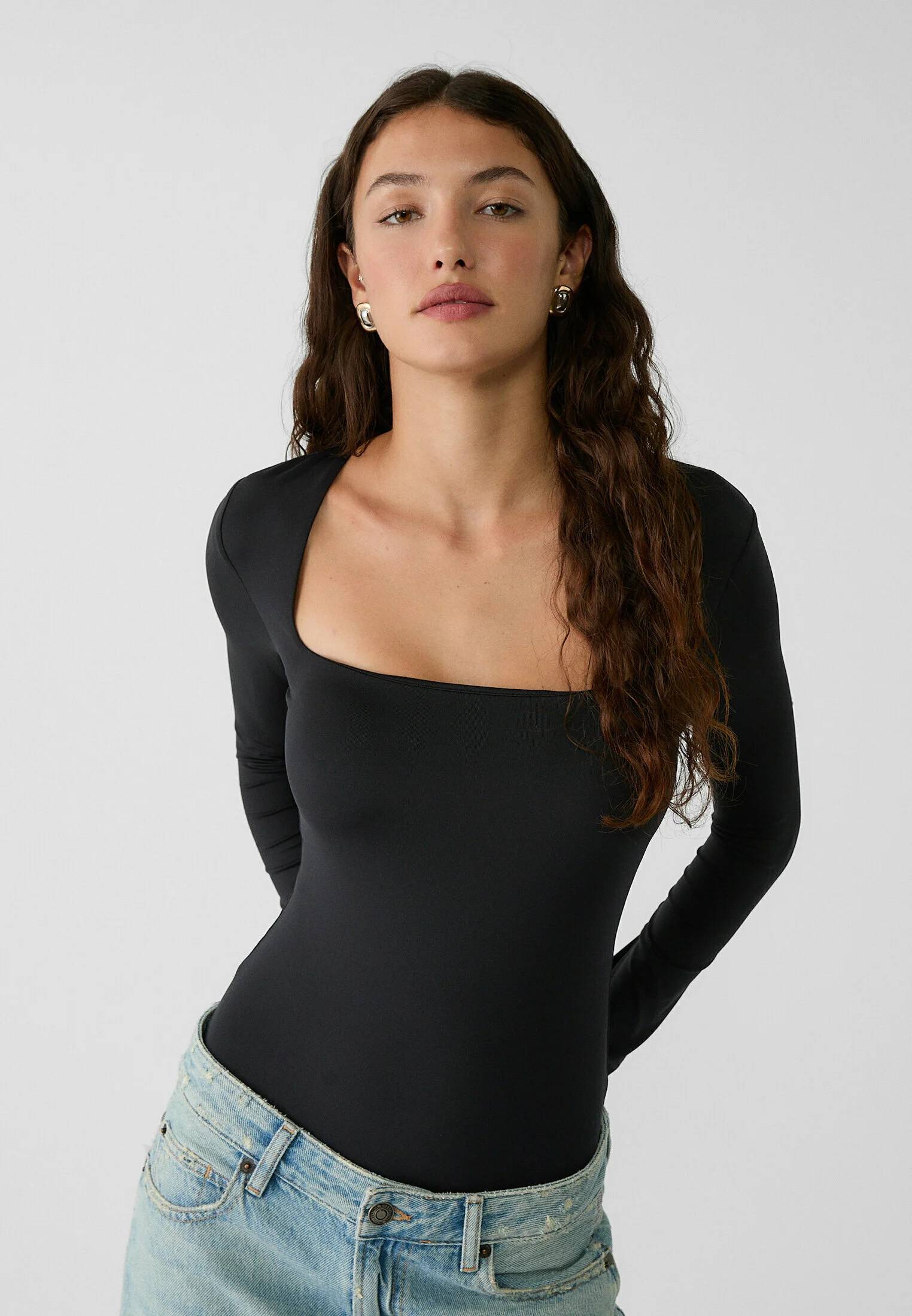\n\n**Prompt**:\nThe girl is lying on the bed and sleeping\n\n**Result**:\n"
},
"typeVersion": 1
}
],
"active": false,
"settings": {
"executionOrder": "v1"
},
"versionId": "0efa8e9f-21d0-45ce-b557-03620f3fc771",
"connections": {
"Completed?": {
"main": [
[
{
"node": "Get Image Url",
"type": "main",
"index": 0
}
],
[
{
"node": "Wait 60 sec.",
"type": "main",
"index": 0
}
]
]
},
"Get status": {
"main": [
[
{
"node": "Completed?",
"type": "main",
"index": 0
}
]
]
},
"Create Image": {
"main": [
[
{
"node": "Wait 60 sec.",
"type": "main",
"index": 0
}
]
]
},
"Upload Image": {
"main": [
[
{
"node": "Update result",
"type": "main",
"index": 0
}
]
]
},
"Wait 60 sec.": {
"main": [
[
{
"node": "Get status",
"type": "main",
"index": 0
}
]
]
},
"Get Image Url": {
"main": [
[
{
"node": "Get Image File",
"type": "main",
"index": 0
}
]
]
},
"Get new image": {
"main": [
[
{
"node": "Create Image",
"type": "main",
"index": 0
}
]
]
},
"Update result": {
"main": [
[]
]
},
"Get Image File": {
"main": [
[
{
"node": "Upload Image",
"type": "main",
"index": 0
}
]
]
},
"When clicking \u2018Test workflow\u2019": {
"main": [
[
{
"node": "Get new image",
"type": "main",
"index": 0
}
]
]
}
}
}
Credentials you'll need
Each integration node will prompt for credentials when you import. We strip credential IDs before publishing — you'll add your own.
googleDriveOAuth2ApigoogleSheetsOAuth2ApihttpHeaderAuth
For the full experience including quality scoring and batch install features for each workflow upgrade to Pro
About this workflow
This workflow automates the generation of AI-enhanced, contextualized images using FLUX Kontext, based on prompts stored in a Google Sheet. The generated images are then saved to Google Drive, and their URLs are written back to the spreadsheet for easy access.
Source: https://n8n.io/workflows/4916/ — original creator credit. Request a take-down →
Related workflows
Workflows that share integrations, category, or trigger type with this one. All free to copy and import.
This workflow acts as a junior finance research analyst for a UK boutique M&A or corporate finance team. It listens for Slack messages, classifies the request, gathers company or market data, and prod
Author: Oliver Bardenheier
This workflow is perfect for productivity-focused teams, remote workers, virtual assistants, and digital knowledge managers who receive documents, images, or notes through Telegram and want to automat
This n8n workflow automates the transformation of spreadsheet data into professional charts and graphs using AI-driven analysis. Triggered via Slack, it processes uploaded files (Excel, CSV, Google Sh
Accounting to DWH via email CSV reader (DE). Uses httpRequest, postgres, googleSheets, gmailTrigger. Event-driven trigger; 55 nodes.