 txampa_n8n
 This workflow corresponds to n8n.io template #13638 — we link there as the canonical source.
This workflow follows the HTTP Request → Notion recipe pattern — see all workflows that pair these two integrations.
The workflow JSON
Copy or download the full n8n JSON below. Paste it into a new n8n workflow, add your credentials, activate. Full import guide →
{
"id": "zBwcs8kk59DvnRwu",
"meta": {
"templateCredsSetupCompleted": true
},
"name": "Insert Notion Database Fields from a Public URL via WhatsApp",
"tags": [],
"nodes": [
{
"id": "4a7cba95-d787-4b0d-9b46-47d40f90e37d",
"name": "Extract Url ",
"type": "n8n-nodes-base.code",
"onError": "continueRegularOutput",
"position": [
656,
64
],
"parameters": {
"jsCode": "// Get JSON input\nconst data = $input.first().json;\n\n// Extract organic results\nconst results = data.organic_results || [];\n\nconst output = results.map(result => {\n return {\n json: {\n title: result.title || \"\",\n link: result.link || \"\",\n displayed_link: result.displayed_link || \"\"\n }\n };\n});\n\nreturn output;\n"
},
"executeOnce": true,
"typeVersion": 2,
"alwaysOutputData": true
},
{
"id": "72991adf-2161-4097-a540-d1a700b11186",
"name": "HTTP Request",
"type": "n8n-nodes-base.httpRequest",
"position": [
1040,
64
],
"parameters": {
"url": "={{ $('Search').item.json.organic_results[0].link }}",
"options": {
"response": {
"response": {
"responseFormat": "text"
}
}
},
"sendHeaders": true,
"authentication": "genericCredentialType",
"genericAuthType": "httpHeaderAuth",
"headerParameters": {
"parameters": [
{
"name": "User-Agent",
"value": "Mozilla/5.0 (Windows NT 10.0; Win64; x64) AppleWebKit/537.36 (KHTML, like Gecko) Chrome/120 Safari/537.36"
},
{
"name": "Accept-Language",
"value": "es-ES,es;q=0.9,en;q=0.8"
}
]
}
},
"credentials": {
"httpHeaderAuth": {
"name": "<your credential>"
}
},
"typeVersion": 4.4
},
{
"id": "3673cf8d-562a-44b2-bc3f-edbd69f7cd17",
"name": "Code",
"type": "n8n-nodes-base.code",
"position": [
1184,
64
],
"parameters": {
"jsCode": "// n8n Code node (Run once for each item)\n// Input esperado: HTML string en $json.body o $json.data o $json.html\n// Output: titleExact, subtitle, author, link\n\nconst html = $json.body ?? $json.data ?? $json.html ?? \"\";\nconst fallbackUrl = $json.bestUrl ?? $json.url ?? \"\";\n\nif (!html || typeof html !== \"string\") {\n return [{ json: { error: \"No HTML string found\", link: fallbackUrl } }];\n}\n\nfunction extractJsonLd(htmlStr) {\n const matches = [...htmlStr.matchAll(\n /<script[^>]+type=[\"']application\\/ld\\+json[\"'][^>]*>([\\s\\S]*?)<\\/script>/gi\n )];\n\n const parsed = [];\n for (const m of matches) {\n const raw = (m[1] || \"\").trim();\n if (!raw) continue;\n\n try {\n const clean = raw.replace(/<!--|-->/g, \"\").trim();\n const data = JSON.parse(clean);\n if (Array.isArray(data)) parsed.push(...data);\n else parsed.push(data);\n } catch (_) {}\n }\n return parsed;\n}\n\nfunction flattenGraph(objs) {\n const flat = [];\n for (const o of objs) {\n if (!o) continue;\n if (o[\"@graph\"] && Array.isArray(o[\"@graph\"])) flat.push(...o[\"@graph\"]);\n else flat.push(o);\n }\n return flat;\n}\n\nfunction hasType(o, t) {\n const ty = o?.[\"@type\"];\n if (!ty) return false;\n if (Array.isArray(ty)) return ty.map(String).includes(t);\n return String(ty) === t;\n}\n\nfunction pickBest(flat) {\n return flat.find(o => hasType(o, \"Book\"))\n || flat.find(o => hasType(o, \"Product\"))\n || flat[0]\n || null;\n}\n\nfunction normalizeAuthor(a) {\n if (!a) return \"\";\n if (typeof a === \"string\") return a;\n if (Array.isArray(a)) {\n return a.map(x => (typeof x === \"string\" ? x : x?.name)).filter(Boolean).join(\", \");\n }\n if (typeof a === \"object\") return a.name || \"\";\n return \"\";\n}\n\nfunction smartTitleCaseEs(input) {\n if (!input) return \"\";\n const s = String(input).trim().replace(/\\s+/g, \" \");\n if (!s) return \"\";\n\n // Stopwords (nunca son siglas, aunque vengan en may\u00fasculas)\n const lowerWords = new Set([\n \"a\",\"al\",\"ante\",\"bajo\",\"cabe\",\"con\",\"contra\",\"de\",\"del\",\"desde\",\"durante\",\"en\",\"entre\",\n \"hacia\",\"hasta\",\"la\",\"las\",\"el\",\"los\",\"y\",\"e\",\"o\",\"u\",\"ni\",\"que\",\"por\",\"para\",\n \"sin\",\"sobre\",\"tras\",\"un\",\"una\",\"unos\",\"unas\"\n ]);\n\n // Detecta si viene \"gritado\" o con demasiadas may\u00fasculas\n const letters = s.replace(/[^A-Za-z\u00c1\u00c9\u00cd\u00d3\u00da\u00dc\u00d1\u00e1\u00e9\u00ed\u00f3\u00fa\u00fc\u00f1]/g, \"\");\n const upperLetters = letters.replace(/[^A-Z\u00c1\u00c9\u00cd\u00d3\u00da\u00dc\u00d1]/g, \"\");\n const ratioUpper = letters.length ? upperLetters.length / letters.length : 0;\n\n // Si no parece grito, no tocar\n if (ratioUpper < 0.60) return s;\n\n function isAcronym(token) {\n const clean = token.replace(/[^A-Za-z\u00c1\u00c9\u00cd\u00d3\u00da\u00dc\u00d1]/g, \"\");\n if (clean.length < 2 || clean.length > 5) return false;\n\n // Si es una stopword (\"LA\", \"DE\", \"LAS\"...), NO es sigla\n const asLower = clean.toLowerCase();\n if (lowerWords.has(asLower)) return false;\n\n return clean === clean.toUpperCase();\n }\n\n function titleCaseWord(word, isFirstWord) {\n const w = word.toLowerCase();\n if (!isFirstWord && lowerWords.has(w)) return w;\n return w.charAt(0).toUpperCase() + w.slice(1);\n }\n\n const tokens = s.split(\" \");\n\n const out = tokens.map((tok, idx) => {\n if (!/[A-Za-z\u00c1\u00c9\u00cd\u00d3\u00da\u00dc\u00d1\u00e1\u00e9\u00ed\u00f3\u00fa\u00fc\u00f1]/.test(tok)) return tok;\n\n // Siglas reales tipo USA/ONU/TV\n if (isAcronym(tok)) return tok.toUpperCase();\n\n // Soporte guiones\n const parts = tok.split(\"-\");\n const casedParts = parts.map((p, partIdx) => {\n if (!/[A-Za-z\u00c1\u00c9\u00cd\u00d3\u00da\u00dc\u00d1\u00e1\u00e9\u00ed\u00f3\u00fa\u00fc\u00f1]/.test(p)) return p;\n if (isAcronym(p)) return p.toUpperCase();\n\n const isFirstWord = (idx === 0 && partIdx === 0);\n return titleCaseWord(p, isFirstWord);\n });\n\n return casedParts.join(\"-\");\n });\n\n return out.join(\" \");\n}\n\nconst jsonlds = extractJsonLd(html);\nconst flat = flattenGraph(jsonlds);\nconst item = pickBest(flat);\n\nlet titleExact = \"\";\nlet subtitle = \"\";\nlet author = \"\";\n\nif (item) {\n titleExact = item.name || item.headline || \"\";\n subtitle = item.alternateName || item.subtitle || item.description || \"\";\n author = normalizeAuthor(item.author);\n}\n\n// Limpieza subtitle\nif (subtitle && subtitle.length > 180) subtitle = subtitle.slice(0, 180).trim();\n\n// Normaliza t\u00edtulo\ntitleExact = smartTitleCaseEs(titleExact);\n\n// Fallbacks\nif (!titleExact) titleExact = $json.query || \"\";\nconst link = item?.url || fallbackUrl || \"\";\n\nreturn [{\n json: {\n titleExact: titleExact || \"\",\n subtitle: subtitle || \"\",\n author: author || \"\",\n link: link || \"\"\n }\n}];"
},
"typeVersion": 2
},
{
"id": "14b82099-d4ae-46e5-a222-53415873606c",
"name": "Insert in Notion DB",
"type": "n8n-nodes-base.notion",
"position": [
1328,
64
],
"parameters": {
"options": {},
"resource": "databasePage",
"databaseId": {
"__rl": true,
"mode": "list",
"value": "8c87b7dc-6ebb-4f21-a2ae-ce8fac233c56",
"cachedResultUrl": "https://www.notion.so/8c87b7dc6ebb4f21a2aece8fac233c56",
"cachedResultName": "Books"
},
"propertiesUi": {
"propertyValues": [
{
"key": "T\u00edtulo|title",
"title": "={{ $json.titleExact }}"
},
{
"key": "Subt\u00edtulo|rich_text",
"textContent": "={{ $json.subtitle }}"
},
{
"key": "Autor|rich_text",
"textContent": "={{ $json.author }}"
},
{
"key": "Link|url",
"urlValue": "={{ $json.link }}"
},
{
"key": "Status|select",
"selectValue": "to read"
}
]
}
},
"credentials": {
"notionApi": {
"name": "<your credential>"
}
},
"typeVersion": 2.2
},
{
"id": "bbdcdd93-14bb-472d-9184-8a7f710ab238",
"name": "WhatsApp Trigger",
"type": "n8n-nodes-base.whatsAppTrigger",
"position": [
320,
64
],
"parameters": {
"options": {},
"updates": [
"messages"
]
},
"credentials": {
"whatsAppTriggerApi": {
"name": "<your credential>"
}
},
"typeVersion": 1
},
{
"id": "ded3f289-cc26-45f9-b2cc-a04039b7303f",
"name": "Sticky Note",
"type": "n8n-nodes-base.stickyNote",
"position": [
480,
-16
],
"parameters": {
"color": 7,
"width": 496,
"height": 304,
"content": "### 1.- Search URL and extract info\n"
},
"typeVersion": 1
},
{
"id": "7407a104-1e51-4719-bbed-f58d1544c394",
"name": "Scrape URL Apify",
"type": "n8n-nodes-base.httpRequest",
"onError": "continueRegularOutput",
"position": [
816,
64
],
"parameters": {
"url": "=https://api.apify.com/v2/acts/6sigmag~fast-website-content-crawler/run-sync-get-dataset-items",
"method": "POST",
"options": {},
"jsonBody": "={\n \"startUrls\": [\n \"{{ $json.link }}\"\n ]\n}",
"sendBody": true,
"sendQuery": true,
"specifyBody": "json",
"queryParameters": {
"parameters": [
{
"name": "token",
"value": "apify_api_YOUR_TOKEN_HERE_TOKEN_HERE"
}
]
}
},
"typeVersion": 4.2,
"alwaysOutputData": true
},
{
"id": "56840ec3-ab17-48a0-95bd-dba1c2e9a0d1",
"name": "Search",
"type": "n8n-nodes-serpapi.serpApi",
"onError": "continueRegularOutput",
"position": [
512,
64
],
"parameters": {
"q": "=site:casadellibro.com \"{{ $json.messages[0].text.body }}\" libro",
"requestOptions": {},
"additionalFields": {}
},
"credentials": {
"serpApi": {
"name": "<your credential>"
}
},
"typeVersion": 1
},
{
"id": "7da81536-3baa-4b58-a234-9562da2265b3",
"name": "Sticky Note2",
"type": "n8n-nodes-base.stickyNote",
"position": [
-144,
-192
],
"parameters": {
"width": 400,
"height": 752,
"content": "## Insert Notion Database Fields from a Public URL via WhatsApp\n\n### How it works\n1. WhatsApp Trigger receives a message containing a public URL.\n2. The workflow extracts the URL and retrieves the page content (via Apify).\n3. The content is parsed and transformed into structured fields.\n4. A new record is created in Notion, mapping the extracted fields to your database properties.\n\n### Setup steps\n1. Configure your WhatsApp credentials in the WhatsApp Trigger node.\n2. In the Search / URL Extraction step, adjust the input logic if your message format differs.\n3. Configure your Apify credentials (and actor/task) to scrape the target page.\n4. Connect your Notion database and map the extracted values in Properties.\n\n### Customization\nDefault example: Amazon/Goodreads/Casa del Libro book pages.\n\nUpdate the scraping/parsing logic to match your target sources (e.g., books, products, articles, recipes, news, or LinkedIn profiles).\n\nIf you change the data model in Notion, update the Properties mapping accordingly in the final node."
},
"typeVersion": 1
},
{
"id": "e1b7ad3d-6540-41aa-9247-766f05faae33",
"name": "Sticky Note1",
"type": "n8n-nodes-base.stickyNote",
"position": [
1024,
-16
],
"parameters": {
"color": 7,
"width": 496,
"height": 304,
"content": "### 2.- Convert data into fields and insert in DB\n"
},
"typeVersion": 1
},
{
"id": "32faa248-8ce6-46b0-9bec-c724d7e0c7a1",
"name": "Sticky Note3",
"type": "n8n-nodes-base.stickyNote",
"position": [
1552,
-112
],
"parameters": {
"width": 864,
"height": 448,
"content": "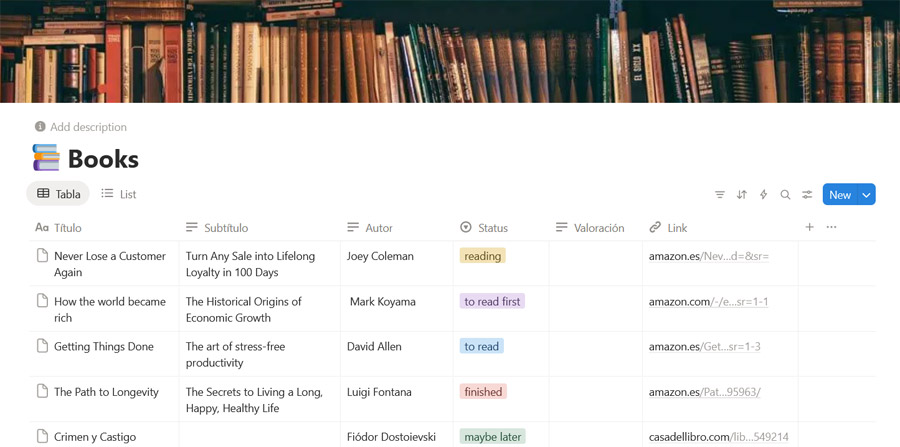"
},
"typeVersion": 1
}
],
"active": false,
"settings": {
"binaryMode": "separate",
"availableInMCP": false,
"executionOrder": "v1"
},
"versionId": "eeb83e6b-47c3-4e36-8fec-7247a606e1b2",
"connections": {
"Code": {
"main": [
[
{
"node": "Insert in Notion DB",
"type": "main",
"index": 0
}
]
]
},
"Search": {
"main": [
[
{
"node": "Extract Url ",
"type": "main",
"index": 0
}
]
]
},
"Extract Url ": {
"main": [
[
{
"node": "Scrape URL Apify",
"type": "main",
"index": 0
}
]
]
},
"HTTP Request": {
"main": [
[
{
"node": "Code",
"type": "main",
"index": 0
}
]
]
},
"Scrape URL Apify": {
"main": [
[
{
"node": "HTTP Request",
"type": "main",
"index": 0
}
]
]
},
"WhatsApp Trigger": {
"main": [
[
{
"node": "Search",
"type": "main",
"index": 0
}
]
]
}
}
}
Credentials you'll need
Each integration node will prompt for credentials when you import. We strip credential IDs before publishing — you'll add your own.
httpHeaderAuthnotionApiserpApiwhatsAppTriggerApi
For the full experience including quality scoring and batch install features for each workflow upgrade to Pro
About this workflow
WhatsApp Trigger receives a message containing a public URL. The workflow extracts the URL and retrieves the page content (via Apify). The content is parsed and transformed into structured fields. A new record is created in Notion, mapping the extracted fields to your database…
Source: https://n8n.io/workflows/13638/ — original creator credit. Request a take-down →
Related workflows
Workflows that share integrations, category, or trigger type with this one. All free to copy and import.
Worflow. Uses whatsAppTrigger, httpRequest, whatsApp. Event-driven trigger; 94 nodes.
This workflow is designed for **customer support teams, e-commerce founders, and operations managers** who want to handle thousands of customer queries seamlessly. Instead of building a brand-new chat
This workflow captures invoice images/documents from WhatsApp, extracts structured invoice data with Google Gemini, and syncs the result to HubSpot by creating vendor-payment tasks or closing matching
This n8n template from Intuz provides a complete and automated solution for preparing and delivering context-rich briefings directly to attendees before every meeting.
Sweep departing staff commitments from Google Calendar and Asana into a Notion checklist and Slack. Uses formTrigger, googleCalendar, asana, notion. Event-driven trigger; 23 nodes.