 ScoutNow
 This workflow corresponds to n8n.io template #9718 — we link there as the canonical source.
This workflow follows the Datatable → Gmail recipe pattern — see all workflows that pair these two integrations.
The workflow JSON
Copy or download the full n8n JSON below. Paste it into a new n8n workflow, add your credentials, activate. Full import guide →
{
"id": "DGTd6bbmeVa2b6CN",
"meta": {
"templateCredsSetupCompleted": true
},
"name": "Social",
"tags": [],
"nodes": [
{
"id": "123b9c99-c80f-4125-ae22-b46a64d2627e",
"name": "Fetch X Profile Metrics",
"type": "n8n-nodes-base.httpRequest",
"position": [
384,
-16
],
"parameters": {
"url": "=https://api.twitter.com/2/users/by/username/{{ $json.xUsername }}",
"options": {},
"sendQuery": true,
"authentication": "predefinedCredentialType",
"queryParameters": {
"parameters": [
{
"name": "user.fields",
"value": "public_metrics"
}
]
},
"nodeCredentialType": "httpBearerAuth"
},
"credentials": {
"httpBearerAuth": {
"name": "<your credential>"
}
},
"typeVersion": 4.2
},
{
"id": "ccf9bbd4-dcdb-46a4-9823-2be64b89af64",
"name": "Save X Followers Count",
"type": "n8n-nodes-base.dataTable",
"position": [
864,
-16
],
"parameters": {
"columns": {
"value": {
"date": "={{new Date(Date.UTC(\n new Date().getUTCFullYear(),\n new Date().getUTCMonth(),\n new Date().getUTCDate()\n))}}",
"xFollowersCount": "={{ $json.data.public_metrics.followers_count }}"
},
"schema": [
{
"id": "date",
"type": "dateTime",
"display": true,
"removed": false,
"readOnly": false,
"required": false,
"displayName": "date",
"defaultMatch": false
},
{
"id": "xFollowersCount",
"type": "number",
"display": true,
"removed": false,
"readOnly": false,
"required": false,
"displayName": "xFollowersCount",
"defaultMatch": false
}
],
"mappingMode": "defineBelow",
"matchingColumns": [],
"attemptToConvertTypes": false,
"convertFieldsToString": false
},
"filters": {
"conditions": [
{
"keyName": "date",
"keyValue": "={{new Date(Date.UTC(\n new Date().getUTCFullYear(),\n new Date().getUTCMonth(),\n new Date().getUTCDate()\n))}}"
}
]
},
"operation": "upsert",
"dataTableId": {
"__rl": true,
"mode": "list",
"value": "KwrO5hl8XpYMpYrB",
"cachedResultUrl": "/projects/HYafFfnC5WR0yevj/datatables/KwrO5hl8XpYMpYrB",
"cachedResultName": "first"
}
},
"typeVersion": 1
},
{
"id": "c930400f-e05f-452f-bcef-321b86815404",
"name": "Save YT Subscriber Count",
"type": "n8n-nodes-base.dataTable",
"position": [
864,
288
],
"parameters": {
"columns": {
"value": {
"date": "={{new Date(Date.UTC(\n new Date().getUTCFullYear(),\n new Date().getUTCMonth(),\n new Date().getUTCDate()\n))}}",
"ytSubscriberCount": "={{ $json.items[0].statistics.subscriberCount }}"
},
"schema": [
{
"id": "date",
"type": "dateTime",
"display": true,
"removed": false,
"readOnly": false,
"required": false,
"displayName": "date",
"defaultMatch": false
},
{
"id": "xFollowersCount",
"type": "number",
"display": true,
"removed": true,
"readOnly": false,
"required": false,
"displayName": "xFollowersCount",
"defaultMatch": false
},
{
"id": "ytSubscriberCount",
"type": "number",
"display": true,
"removed": false,
"readOnly": false,
"required": false,
"displayName": "ytSubscriberCount",
"defaultMatch": false
}
],
"mappingMode": "defineBelow",
"matchingColumns": [],
"attemptToConvertTypes": false,
"convertFieldsToString": false
},
"filters": {
"conditions": [
{
"keyName": "date",
"keyValue": "={{new Date(Date.UTC(\n new Date().getUTCFullYear(),\n new Date().getUTCMonth(),\n new Date().getUTCDate()\n))}}"
}
]
},
"operation": "upsert",
"dataTableId": {
"__rl": true,
"mode": "list",
"value": "KwrO5hl8XpYMpYrB",
"cachedResultUrl": "/projects/HYafFfnC5WR0yevj/datatables/KwrO5hl8XpYMpYrB",
"cachedResultName": "first"
}
},
"typeVersion": 1
},
{
"id": "a0c51a0a-7431-4511-9c11-9d0207e96a44",
"name": "Set YT Channel Username",
"type": "n8n-nodes-base.set",
"position": [
-112,
288
],
"parameters": {
"options": {},
"assignments": {
"assignments": [
{
"id": "ccc4b9d9-abc0-4787-bda1-5c70c932c20d",
"name": "ytUsername",
"type": "string",
"value": "n8n-io"
}
]
}
},
"typeVersion": 3.4
},
{
"id": "be086132-976f-4493-99f2-90178417ea9d",
"name": "Fetch YT Channel Stats",
"type": "n8n-nodes-base.httpRequest",
"position": [
384,
288
],
"parameters": {
"url": "https://www.googleapis.com/youtube/v3/channels",
"options": {},
"sendQuery": true,
"authentication": "genericCredentialType",
"genericAuthType": "httpQueryAuth",
"queryParameters": {
"parameters": [
{
"name": "part",
"value": "statistics"
},
{
"name": "forHandle",
"value": "=@{{ $json.ytUsername }}"
}
]
}
},
"credentials": {
"httpQueryAuth": {
"name": "<your credential>"
},
"httpBearerAuth": {
"name": "<your credential>"
},
"youTubeOAuth2Api": {
"name": "<your credential>"
}
},
"typeVersion": 4.2
},
{
"id": "92665fb8-b19d-4c45-a589-9bb09f7d03b0",
"name": "Sticky Note",
"type": "n8n-nodes-base.stickyNote",
"position": [
-208,
-368
],
"parameters": {
"width": 304,
"height": 896,
"content": "## Set Your Target Usernames\n\nEdit the fields below to track your own social accounts:\n\n* `xUsername` \u2192 your **X (Twitter)** handle\n* `ytChannelId` \u2192 your **YouTube Channel ID**\n\n> Make sure the values are accurate \u2014 these will be used to fetch follower and subscriber counts in the workflow.\n"
},
"typeVersion": 1
},
{
"id": "82bb689e-48d8-4981-b66c-3842a124ffd2",
"name": "Sticky Note1",
"type": "n8n-nodes-base.stickyNote",
"position": [
288,
208
],
"parameters": {
"width": 304,
"height": 800,
"content": "## Set Up Query Auth\n\n\n\n\n\n\n\n\n\n\n\n\n\n\n\n**1. In the HTTP Request node \u2192**\nScroll to **Authentication** \u2192 select **Query Auth**.\n\n**2. Fill in the fields:**\n\n* **Name**: `Key`\n* **Value**: *Paste your API key obtained from Google Cloud Console*\n\nThis adds your key to the request as `?key=YOUR_API_KEY`.\n\n---\n\n#### \ud83d\udcf8 Reference Image:\n\n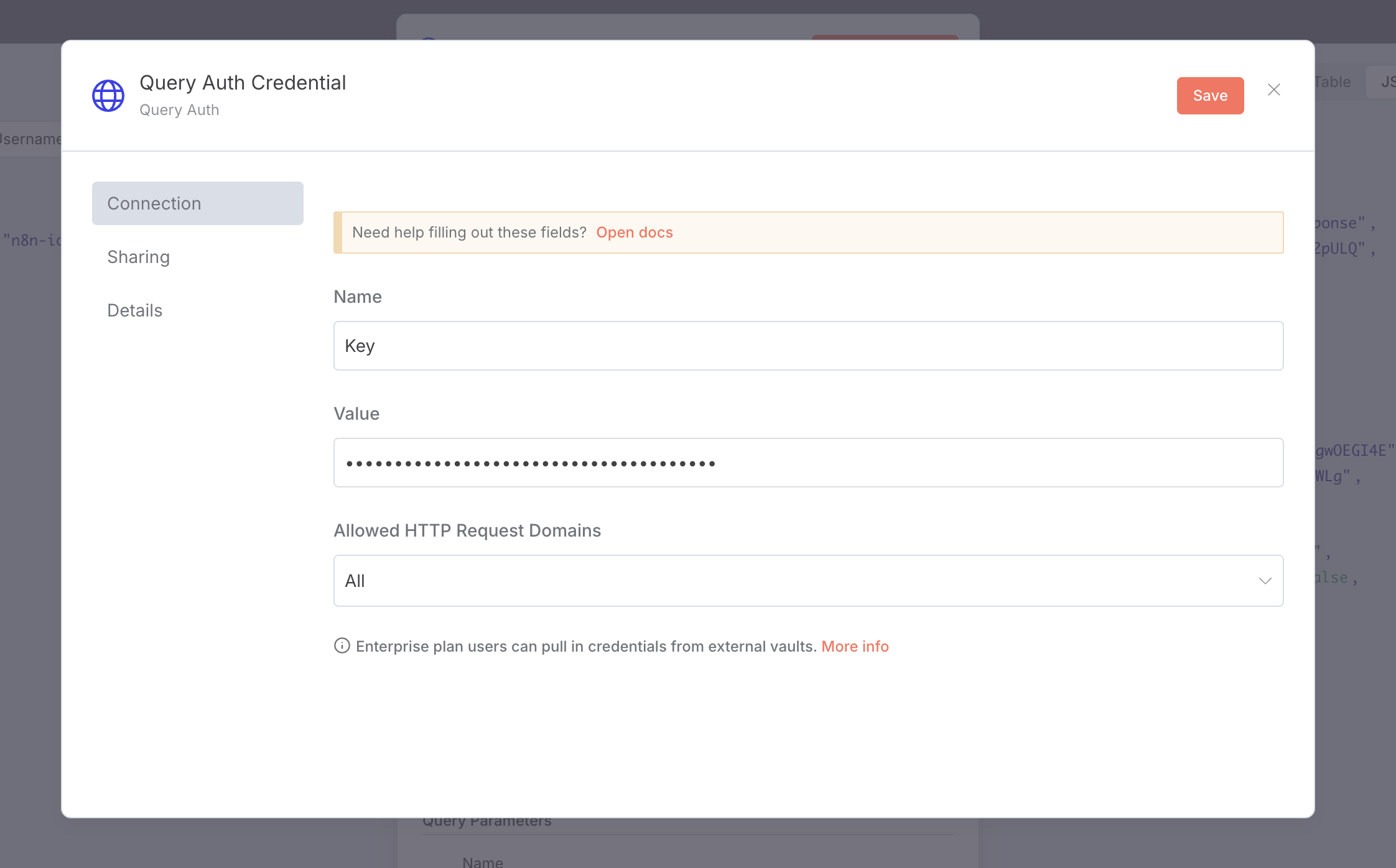\n\n"
},
"typeVersion": 1
},
{
"id": "3770ccc5-1bbf-4d45-b279-024837ee8cd1",
"name": "Sticky Note2",
"type": "n8n-nodes-base.stickyNote",
"position": [
720,
-336
],
"parameters": {
"width": 400,
"height": 800,
"content": "## Create Data Table in n8n\n\nMake sure to create a **Data Table** in the n8n dashboard with the following fields:\n\n| Field Name | Type |\n| ------------------- | -------- |\n| `date` | DateTime |\n| `xFollowersCount` | Number |\n| `ytSubscriberCount` | Number |\n\n> This table will store daily metrics from X (Twitter) and YouTube.\n> Make sure field types are set correctly to avoid data type issues later in the workflow.\n"
},
"typeVersion": 1
},
{
"id": "2a1f3e1b-5ce3-4dd3-afb6-d7d26129da6a",
"name": "Set X Username",
"type": "n8n-nodes-base.set",
"position": [
-112,
-16
],
"parameters": {
"options": {},
"assignments": {
"assignments": [
{
"id": "ccc4b9d9-abc0-4787-bda1-5c70c932c20d",
"name": "xUsername",
"type": "string",
"value": "n8n_io"
}
]
}
},
"typeVersion": 3.4
},
{
"id": "245946e9-5326-4770-a914-cd3e8bfb66ac",
"name": "Sticky Note3",
"type": "n8n-nodes-base.stickyNote",
"position": [
288,
-448
],
"parameters": {
"width": 304,
"height": 624,
"content": "## Set Up Bearer YOUR_TOKEN_HERE for X API\n\n1. Go to the **HTTP Request node** \u2192\n Under **Authentication**, select **Bearer YOUR_TOKEN_HERE**.\n\n2. In the **Credential setup**, enter:\n\n * **Name**: `X API Key` (or your preferred label)\n * **Token**: Paste your **Bearer YOUR_TOKEN_HERE** from the X Developer Portal\n\n> You can find the Bearer YOUR_TOKEN_HERE in your X App\u2019s settings under \u201cKeys and Tokens\u201d \u2192 \u201cBearer YOUR_TOKEN_HERE\u201d.\n"
},
"typeVersion": 1
},
{
"id": "38455f97-1298-4dcb-9cc3-565d6cd93822",
"name": "Sticky Note4",
"type": "n8n-nodes-base.stickyNote",
"position": [
1280,
-96
],
"parameters": {
"width": 304,
"height": 400,
"content": "## Need Help with This Template?\n\n\n### Feel free to reach out. Our DMs are always open!\n\n**Email:** [hello@scoutnow.app](mailto:hello@scoutnow.app)\n**X (Twitter):** [@ScoutNowApp](https://x.com/ScoutNowApp) | [@encryptman](https://x.com/encryptman)\n**Discord:** [encryptman#4196](https://discord.com/users/1061669636610994196)\n**WhatsApp:** [Chat with us](https://wa.me/923161262192)\n**Reddit:** [u/Logical-Reputation46](https://www.reddit.com/user/Logical-Reputation46/)\n\n\ud83d\udcac No question is too small. We\u2019re here to help!\n"
},
"typeVersion": 1
},
{
"id": "f8ef510d-4dbb-481c-b862-bf7a994a27b3",
"name": "Schedule Trigger",
"type": "n8n-nodes-base.scheduleTrigger",
"position": [
-640,
288
],
"parameters": {
"rule": {
"interval": [
{}
]
}
},
"typeVersion": 1.2
},
{
"id": "3b83b5b8-192e-4462-b069-e09b27efb56d",
"name": "If Today Is Sunday",
"type": "n8n-nodes-base.if",
"position": [
-96,
1152
],
"parameters": {
"options": {},
"conditions": {
"options": {
"version": 2,
"leftValue": "",
"caseSensitive": true,
"typeValidation": "strict"
},
"combinator": "and",
"conditions": [
{
"id": "fb7df54d-6bd3-4e79-88c8-1cabf6dcd189",
"operator": {
"name": "filter.operator.equals",
"type": "string",
"operation": "equals"
},
"leftValue": "={{ new Date(new Date().toISOString().split('T')[0] + 'T00:00:00.000Z').getUTCDay() }}\n",
"rightValue": "0"
}
]
}
},
"typeVersion": 2.2
},
{
"id": "1fd1172e-39c8-45c7-a300-a39cac32072f",
"name": "Get Today's Data",
"type": "n8n-nodes-base.dataTable",
"position": [
384,
1136
],
"parameters": {
"filters": {
"conditions": [
{
"keyName": "date",
"keyValue": "={{ new Date(Date.UTC( new Date().getUTCFullYear(), new Date().getUTCMonth(), new Date().getUTCDate() )) }}"
}
]
},
"operation": "get",
"dataTableId": {
"__rl": true,
"mode": "list",
"value": "KwrO5hl8XpYMpYrB",
"cachedResultUrl": "/projects/HYafFfnC5WR0yevj/datatables/KwrO5hl8XpYMpYrB",
"cachedResultName": "first"
}
},
"typeVersion": 1
},
{
"id": "3e5c7e63-27f0-4078-af11-2fbecdcd407a",
"name": "Get Last Monday's Data",
"type": "n8n-nodes-base.dataTable",
"position": [
880,
1136
],
"parameters": {
"filters": {
"conditions": [
{
"keyName": "date",
"keyValue": "={{ new Date(Date.UTC( new Date().getUTCFullYear(), new Date().getUTCMonth(), new Date().getUTCDate() - ((new Date().getUTCDay() + 6) % 7) )) }}"
}
]
},
"operation": "get",
"dataTableId": {
"__rl": true,
"mode": "list",
"value": "KwrO5hl8XpYMpYrB",
"cachedResultUrl": "/projects/HYafFfnC5WR0yevj/datatables/KwrO5hl8XpYMpYrB",
"cachedResultName": "first"
}
},
"typeVersion": 1
},
{
"id": "eaac317a-e470-4135-823a-b070bc1a2c62",
"name": "Send a message",
"type": "n8n-nodes-base.gmail",
"position": [
1408,
1136
],
"parameters": {
"sendTo": "user@example.com",
"message": "=Hey there,\n\nHere\u2019s your social media performance summary for this week:\n\n- X Followers Change: {{ $('Get Today\\'s Data').item.json.xFollowersCount - $json.xFollowersCount }} ({{ (( $('Get Today\\'s Data').item.json.xFollowersCount - $json.xFollowersCount ) / $json.xFollowersCount * 100).toFixed(2) }}%)\n- YouTube Subscribers Change: {{ $('Get Today\\'s Data').item.json.ytSubscriberCount - $json.ytSubscriberCount }} ({{ (( $('Get Today\\'s Data').item.json.ytSubscriberCount - $json.ytSubscriberCount ) / $json.ytSubscriberCount * 100).toFixed(2) }}%)\n\nSummary:\nStarted with {{ $json.xFollowersCount }} X followers and {{ $json.ytSubscriberCount }} YouTube subscribers.\nNow at {{ $('Get Today\\'s Data').item.json.xFollowersCount }} X followers and {{ $('Get Today\\'s Data').item.json.ytSubscriberCount }} subscribers.\n\nKeep up the great work \ud83d\ude80\n",
"options": {},
"subject": "Weekly Social Media Growth Report \ud83d\udcca",
"emailType": "text"
},
"credentials": {
"gmailOAuth2": {
"name": "<your credential>"
}
},
"typeVersion": 2.1
},
{
"id": "54e8b995-f97c-45a6-bdae-2d822ca706f4",
"name": "Sticky Note5",
"type": "n8n-nodes-base.stickyNote",
"position": [
1264,
448
],
"parameters": {
"width": 384,
"height": 896,
"content": "## Set Up Gmail Send Message with Google OAuth2\n\n1. Go to the **Gmail node** \u2192\n Under **Authentication**, select **Google OAuth2**.\n\n2. In the **Credential setup**, enter:\n\n * **Name**: `Gmail OAuth` (or your preferred label)\n * **Client ID / Secret**: From your Google Cloud project\n * **Scopes**:\n\n ```\n https://www.googleapis.com/auth/gmail.send\n ```\n\n> In Google Cloud Console: Enable **Gmail API**, create an **OAuth 2.0 Client**, and add the redirect URI:\n> `https://<your-n8n-domain>/rest/oauth2-credential/callback`\n\n---\n\n## Set Recipient Address\n\n1. In the same **Gmail node**, scroll to **To Email** field.\n2. Enter one or more recipient addressesformatting.\n"
},
"typeVersion": 1
},
{
"id": "9c593ad2-adc9-48fa-bd91-b3f6cc97149e",
"name": "Sticky Note6",
"type": "n8n-nodes-base.stickyNote",
"position": [
-176,
944
],
"parameters": {
"width": 272,
"height": 400,
"content": "## Generate and Send a Weekly Report only on Sunday"
},
"typeVersion": 1
}
],
"active": false,
"settings": {
"executionOrder": "v1"
},
"versionId": "c5cc5cbf-2039-469f-bf3d-0bf73bbfcdfa",
"connections": {
"Set X Username": {
"main": [
[
{
"node": "Fetch X Profile Metrics",
"type": "main",
"index": 0
}
]
]
},
"Get Today's Data": {
"main": [
[
{
"node": "Get Last Monday's Data",
"type": "main",
"index": 0
}
]
]
},
"Schedule Trigger": {
"main": [
[
{
"node": "Set X Username",
"type": "main",
"index": 0
},
{
"node": "Set YT Channel Username",
"type": "main",
"index": 0
},
{
"node": "If Today Is Sunday",
"type": "main",
"index": 0
}
]
]
},
"If Today Is Sunday": {
"main": [
[
{
"node": "Get Today's Data",
"type": "main",
"index": 0
}
]
]
},
"Fetch YT Channel Stats": {
"main": [
[
{
"node": "Save YT Subscriber Count",
"type": "main",
"index": 0
}
]
]
},
"Get Last Monday's Data": {
"main": [
[
{
"node": "Send a message",
"type": "main",
"index": 0
}
]
]
},
"Fetch X Profile Metrics": {
"main": [
[
{
"node": "Save X Followers Count",
"type": "main",
"index": 0
}
]
]
},
"Set YT Channel Username": {
"main": [
[
{
"node": "Fetch YT Channel Stats",
"type": "main",
"index": 0
}
]
]
}
}
}
Credentials you'll need
Each integration node will prompt for credentials when you import. We strip credential IDs before publishing — you'll add your own.
gmailOAuth2httpBearerAuthhttpQueryAuthyouTubeOAuth2Api
For the full experience including quality scoring and batch install features for each workflow upgrade to Pro
About this workflow
Using official APIs from X (formerly Twitter) and YouTube, the workflow fetches daily follower and subscriber counts, stores them in a structured n8n Data Table, and now sends automated weekly summary emails via Gmail.
Source: https://n8n.io/workflows/9718/ — original creator credit. Request a take-down →
Related workflows
Workflows that share integrations, category, or trigger type with this one. All free to copy and import.
Tags: Image Compression, Tinify API, TinyPNG, SEO Optimisation, E-commerce, Marketing
📺 Full walkthrough video: https://youtu.be/-xqjoUvbXbs
📺 Full walkthrough video: https://www.youtube.com/watch?v=Me4d4BILvHk
Automate WhatsApp communication for recruitment agencies with an interactive, structured customer experience. This workflow handles pricing inquiries, request submissions, tracking, complaints, and hu
Relatórios aos Laboratórios. Uses httpRequest, gmail, formTrigger. Scheduled trigger; 54 nodes.