 Summer
 This workflow corresponds to n8n.io template #8935 — we link there as the canonical source.
This workflow follows the Gmail → Google Calendar recipe pattern — see all workflows that pair these two integrations.
The workflow JSON
Copy or download the full n8n JSON below. Paste it into a new n8n workflow, add your credentials, activate. Full import guide →
{
"nodes": [
{
"id": "55b8ddc2-3cdb-4d36-b975-8c3f1b0adbf0",
"name": "Setup",
"type": "n8n-nodes-base.set",
"position": [
336,
-32
],
"parameters": {
"fields": {
"values": [
{
"name": "apiKey",
"stringValue": "YOUR_TAVILY_API_KEY_HERE"
},
{
"name": "newsAge",
"type": "numberValue",
"numberValue": "20"
},
{
"name": "maxArticles",
"stringValue": "20"
},
{
"name": "emails"
}
]
},
"options": {}
},
"typeVersion": 3.2
},
{
"id": "b787b36b-d931-4055-a528-da4b9a06c7eb",
"name": "Extract company name",
"type": "n8n-nodes-base.set",
"position": [
1280,
-48
],
"parameters": {
"fields": {
"values": [
{
"name": "companyName",
"stringValue": "={{ $json.summary.toLowerCase().replace('meeting with', '').replace('call with', '').trim() }}"
}
]
},
"options": {}
},
"typeVersion": 3.2
},
{
"id": "34bd9e4b-72fd-4ab5-bc99-3d3b4c872248",
"name": "Every morning @ 7",
"type": "n8n-nodes-base.scheduleTrigger",
"position": [
32,
-32
],
"parameters": {
"rule": {
"interval": [
{
"triggerAtHour": 9
}
]
}
},
"typeVersion": 1.1
},
{
"id": "50c085ea-68ff-49b6-95a9-d0664dc82d1c",
"name": "Filter meetings",
"type": "n8n-nodes-base.if",
"position": [
944,
-32
],
"parameters": {
"options": {},
"conditions": {
"options": {
"version": 1,
"leftValue": "",
"caseSensitive": true,
"typeValidation": "strict"
},
"combinator": "or",
"conditions": [
{
"id": "bcfb06b1-d365-43a8-9802-869529baca98",
"operator": {
"type": "string",
"operation": "startsWith"
},
"leftValue": "={{ $json.summary.toLowerCase() }}",
"rightValue": "call with"
},
{
"id": "4ea43ccf-d586-4985-87db-fc1e9f734351",
"operator": {
"type": "string",
"operation": "startsWith"
},
"leftValue": "={{ $json.summary.toLowerCase() }}",
"rightValue": "meeting with"
}
]
}
},
"typeVersion": 2
},
{
"id": "3a4b313d-35c2-4b15-b2d3-98e382fb5539",
"name": "Format for email",
"type": "n8n-nodes-base.code",
"position": [
1984,
-48
],
"parameters": {
"jsCode": "// Simple working version for n8n\nlet html = `<table style=\"width: 100%\">`;\n\n// Try multiple ways to access the data (n8n versions vary)\nconst inputData = $json || $input.item?.json || $input.first()?.json;\n\nconsole.log('Input data:', JSON.stringify(inputData, null, 2));\n\n// Tavily returns results in a 'results' array\nconst articles = inputData?.results || inputData?.articles || [];\n\nif (Array.isArray(articles) && articles.length > 0) {\n for (const article of articles) {\n html += `\n <tr>\n <td style=\"background-color: #f2f4f8; font-family: sans-serif; padding: 1em;\">\n <div>\n <a style=\"display: block; margin-bottom: 10px; font-size: 1.2em; text-decoration: none; color: #0066cc;\" href=\"${article.url || '#'}\">${article.title || 'No title available'}</a>\n <p style=\"margin: 10px 0; color: #666; font-style: italic;\">\n ${article.content || article.snippet || article.description || 'No description available'}\n </p>\n <div style=\"margin-top: 10px; font-size: 0.9em; color: #888;\">\n ${article.published_date ? '<b>Published:</b> ' + article.published_date + '<br>' : ''}\n ${article.score ? '<b>Relevance:</b> ' + Math.round(article.score * 100) + '%' : ''}\n </div>\n </div>\n </td>\n </tr>\n `;\n }\n} else {\n html += `\n <tr>\n <td style=\"background-color: #f2f4f8; font-family: sans-serif; padding: 2em; text-align: center;\">\n <p style=\"color: #666; font-style: italic;\">No recent news found for this company.</p>\n </td>\n </tr>\n `;\n}\n\nhtml += '</table>';\n\nreturn { html: html };"
},
"typeVersion": 2
},
{
"id": "4e18d898-f28a-4a3b-8c74-de300adb1655",
"name": "Send news",
"type": "n8n-nodes-base.gmail",
"position": [
2304,
-48
],
"parameters": {
"sendTo": "user@example.com",
"message": "={{ $json.html }}",
"options": {
"senderName": "Meeting Prep Agent",
"appendAttribution": false
},
"subject": "=Latest news for '{{ $('Extract company name').item.json.summary }}'"
},
"typeVersion": 2.1
},
{
"id": "d3eb386f-e43b-4357-9371-8958d3048c9f",
"name": "No meetings today",
"type": "n8n-nodes-base.noOp",
"position": [
1280,
112
],
"parameters": {},
"typeVersion": 1
},
{
"id": "68f53a86-68a0-49e8-a1fe-89b553421eee",
"name": "Get meetings for today",
"type": "n8n-nodes-base.googleCalendar",
"position": [
624,
-32
],
"parameters": {
"options": {
"timeMax": "={{ $today.plus({ days: 1 }) }}",
"timeMin": "={{ $today }}",
"singleEvents": true
},
"calendar": {
"__rl": true,
"mode": "list",
"value": "user@example.com",
"cachedResultName": "Primary Calendar"
},
"operation": "getAll"
},
"typeVersion": 1
},
{
"id": "8ac5dcd6-3583-4922-9648-83511b69cfcc",
"name": "Research Company/ Person",
"type": "@tavily/n8n-nodes-tavily.tavily",
"position": [
1616,
-48
],
"parameters": {
"query": "={{ $json.companyName }}",
"options": {
"time_range": "month",
"include_raw_content": true
}
},
"typeVersion": 1
},
{
"id": "900377bb-b73f-4bc4-8cb8-fb1d41d7ccd6",
"name": "Sticky Note",
"type": "n8n-nodes-base.stickyNote",
"position": [
-832,
16
],
"parameters": {
"color": 7,
"width": 656,
"height": 768,
"content": "## Research for Upcoming Meeting\n\nCreator: [Summer Chang](https://www.youtube.com/channel/UCAdp-nOSH-jcrwXkLlUMyXQ)\n\nNever walk into a meeting unprepared again!\n\nThis workflow automatically researches your meeting contacts every morning and emails you the latest news and insights about the companies you're meeting with today.\n\n\u2705 Step 1: Set Your Morning Briefing Time\nOpen the Every morning @ 7 Schedule Trigger and adjust the time when you'd like to receive your daily meeting briefings. The default is set to 9 AM.\n\n\u2705 Step 2: Connect Your Google Calendar\nLink your Google Calendar credentials to the Get meetings for today node. This allows the workflow to scan your calendar for external meetings.\n\n\u2705 Step 3: Connect Your Tavily Research API\nAdd your Tavily API key to the Research Company/Person node. This powers the intelligent research that finds recent news and insights about your meeting contacts.\n\n\u2705 Step 4: Link Your Gmail Account\nConnect your Gmail credentials to the Send news node so your research briefings can be automatically delivered to your inbox each morning.\n\n\u2705 Step 5: Customize Your Email Settings\nIn the Send news node, update:\n\nSend To: Your email address\nSender Name: Customize how the emails appear in your inbox\n\n\u2705 Step 6: Activate the Workflow\nOnce everything is connected, set the workflow to active so it runs automatically each morning and keeps you prepared."
},
"typeVersion": 1
},
{
"id": "9233618c-486d-46e8-b155-7b5cdda138c0",
"name": "Sticky Note1",
"type": "n8n-nodes-base.stickyNote",
"position": [
-832,
-464
],
"parameters": {
"color": 7,
"width": 656,
"height": 416,
"content": "### Use Case Walkthrough\n[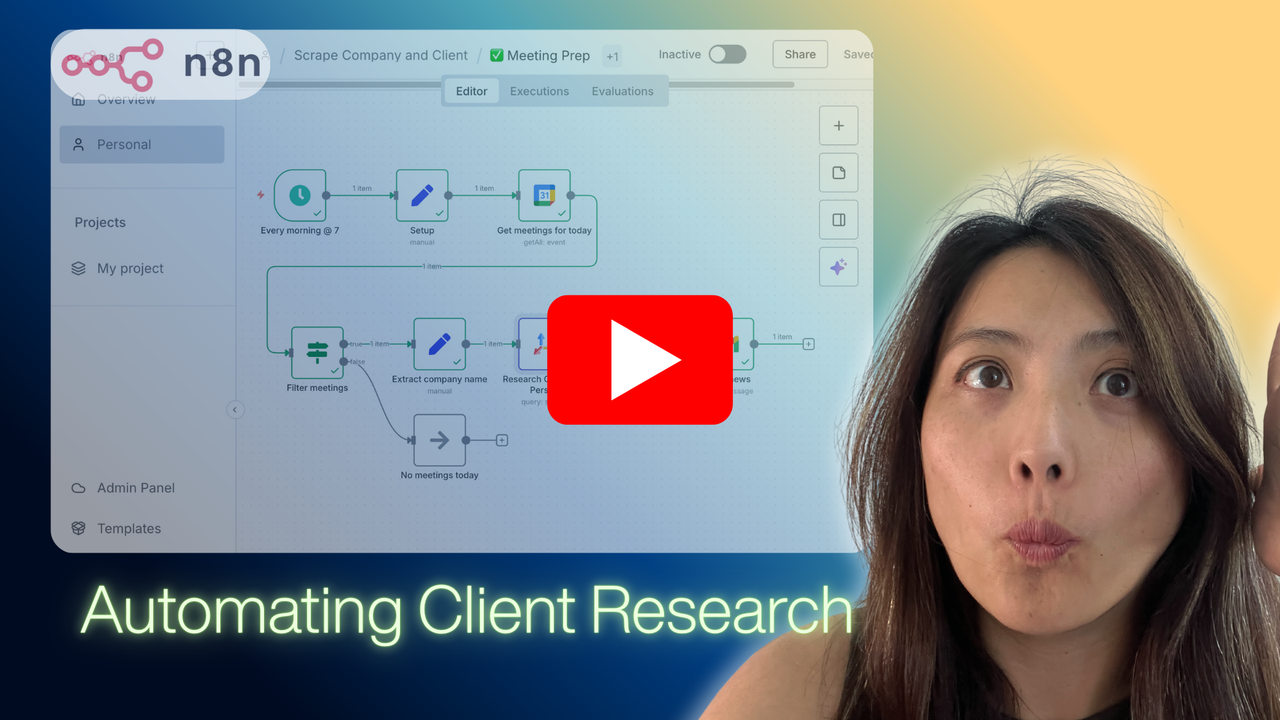](https://www.youtube.com/shorts/rT0cR93cyXI)"
},
"typeVersion": 1
},
{
"id": "bc19430e-42ca-441c-a53f-4db6fbc1c9b0",
"name": "Sticky Note - Calendar",
"type": "n8n-nodes-base.stickyNote",
"position": [
496,
128
],
"parameters": {
"color": 5,
"width": 320,
"height": 400,
"content": "### \ud83d\udcc5 Fetch Today's Calendar\n\n**What it does:**\nConnects to your Google Calendar and retrieves all meetings scheduled for today.\n\n**Configuration Required:**\n1. Add Google Calendar credentials\n2. Select your calendar from the dropdown\n3. The time range is automatically set to today\n\n**Output:**\nList of all calendar events for the current day, including meeting titles, times, and participants."
},
"typeVersion": 1
},
{
"id": "9ddd6870-46e7-4434-bbf6-7f2147d3e95a",
"name": "Sticky Note - Filter",
"type": "n8n-nodes-base.stickyNote",
"position": [
832,
128
],
"parameters": {
"color": 5,
"width": 320,
"height": 400,
"content": "### \ud83d\udd0d Filter Relevant Meetings\n\n**What it does:**\nIdentifies meetings that likely involve external companies or contacts.\n\n**How it works:**\nChecks if the meeting summary starts with:\n- \"Meeting with [company/person]\"\n- \"Call with [company/person]\"\n\n**Output:**\n\u2705 True path: External meetings to research\n\u274c False path: Internal meetings (no research needed)"
},
"typeVersion": 1
},
{
"id": "d7167733-fb2b-4cd8-86ef-8a8f04d54fa5",
"name": "Sticky Note - Extract",
"type": "n8n-nodes-base.stickyNote",
"position": [
1152,
-480
],
"parameters": {
"color": 5,
"width": 320,
"height": 384,
"content": "### \ud83d\udcdd Extract Company Name\n\n**What it does:**\nParses the meeting title to extract the company or person name.\n\n**How it works:**\nRemoves common prefixes like \"Meeting with\" or \"Call with\" and extracts the remaining text as the company name.\n\n**Example:**\n- Input: \"Meeting with Acme Corp\"\n- Output: \"Acme Corp\"\n\n**Output:**\nClean company/person name ready for research."
},
"typeVersion": 1
},
{
"id": "7784ce9b-7a0a-41c5-93f7-1470b8f77634",
"name": "Sticky Note - Research",
"type": "n8n-nodes-base.stickyNote",
"position": [
1504,
-480
],
"parameters": {
"color": 5,
"width": 320,
"height": 384,
"content": "### \ud83d\udd0e AI-Powered Research\n\n**What it does:**\nUses Tavily AI to search for recent news, articles, and updates about the company or person.\n\n**Configuration Required:**\n1. Add your Tavily API key\n2. Adjust search settings if needed:\n - Time range: Past month\n - Include raw content: Yes\n\n**Output:**\nRelevant articles with titles, descriptions, URLs, publication dates, and relevance scores."
},
"typeVersion": 1
},
{
"id": "177acb9b-6ed8-42d8-968d-95369edce989",
"name": "Sticky Note - Format",
"type": "n8n-nodes-base.stickyNote",
"position": [
1888,
112
],
"parameters": {
"color": 5,
"width": 320,
"height": 432,
"content": "### \ud83d\udc8c Format Email Content\n\n**What it does:**\nTransforms research results into a beautiful HTML email format.\n\n**Features:**\n- Creates a styled table layout\n- Displays article titles as clickable links\n- Shows article descriptions/snippets\n- Includes publication dates and relevance scores\n- Handles cases with no results gracefully\n\n**Output:**\nFormatted HTML ready to send via email."
},
"typeVersion": 1
},
{
"id": "13980d72-6755-4c5b-a673-e8572d131286",
"name": "Sticky Note - Send",
"type": "n8n-nodes-base.stickyNote",
"position": [
2240,
112
],
"parameters": {
"color": 5,
"width": 320,
"height": 432,
"content": "### \ud83d\udce7 Send Email Briefing\n\n**What it does:**\nSends the formatted research briefing to your email inbox.\n\n**Configuration Required:**\n1. Add Gmail credentials\n2. Update recipient email address\n3. Customize sender name (optional)\n\n**Email includes:**\n- Subject: \"Latest news for [Company Name]\"\n- Body: Formatted research results with clickable links\n\n**Result:**\nYou receive a comprehensive briefing before your meeting!"
},
"typeVersion": 1
},
{
"id": "1f7589e3-f650-4dac-9ed0-68f9c2739b4c",
"name": "Sticky Note - Trigger1",
"type": "n8n-nodes-base.stickyNote",
"position": [
-80,
-464
],
"parameters": {
"color": 5,
"width": 320,
"height": 376,
"content": "### \ud83d\udd50 Trigger: Schedule Daily Run\n\n**What it does:**\nAutomatically triggers this workflow every morning at your chosen time (default: 9 AM).\n\n**Configuration:**\n- Click to open and adjust the trigger hour to match your preference\n- The workflow will run at this time every day\n\n**Output:**\nStarts the workflow execution for the day."
},
"typeVersion": 1
},
{
"id": "9d519c10-28f9-4043-bb23-1be38fafa8c4",
"name": "Sticky Note - Setup1",
"type": "n8n-nodes-base.stickyNote",
"position": [
272,
-464
],
"parameters": {
"color": 5,
"width": 320,
"height": 384,
"content": "### \u2699\ufe0f Setup Configuration\n\n**What it does:**\nInitializes workflow variables including your Tavily API key and search parameters.\n\n**Key Variables:**\n- `apiKey`: Your Tavily API key for research\n- `newsAge`: How many days back to search (default: 20)\n- `maxArticles`: Maximum articles to retrieve (default: 20)\n\n**Note:**\nYou'll add your actual Tavily API key in the Research node, not here."
},
"typeVersion": 1
}
],
"connections": {
"Setup": {
"main": [
[
{
"node": "Get meetings for today",
"type": "main",
"index": 0
}
]
]
},
"Filter meetings": {
"main": [
[
{
"node": "Extract company name",
"type": "main",
"index": 0
}
],
[
{
"node": "No meetings today",
"type": "main",
"index": 0
}
]
]
},
"Format for email": {
"main": [
[
{
"node": "Send news",
"type": "main",
"index": 0
}
]
]
},
"Every morning @ 7": {
"main": [
[
{
"node": "Setup",
"type": "main",
"index": 0
}
]
]
},
"Extract company name": {
"main": [
[
{
"node": "Research Company/ Person",
"type": "main",
"index": 0
}
]
]
},
"Get meetings for today": {
"main": [
[
{
"node": "Filter meetings",
"type": "main",
"index": 0
}
]
]
},
"Research Company/ Person": {
"main": [
[
{
"node": "Format for email",
"type": "main",
"index": 0
}
]
]
}
}
}
For the full experience including quality scoring and batch install features for each workflow upgrade to Pro
About this workflow
Creator: Summer Chang
Source: https://n8n.io/workflows/8935/ — original creator credit. Request a take-down →
Related workflows
Workflows that share integrations, category, or trigger type with this one. All free to copy and import.
This workflow is an automated invoice payment tracking and reminder system for the Polish accounting service iFirma.pl. It monitors unpaid and overdue invoices, then automatically sends escalating rem
Automatically extract structured information from emails using AI-powered document analysis. This workflow processes emails from specified domains, classifies them by type, and extracts structured dat
This weekly workflow helps you stay on top of SEO visibility losses by automatically detecting when your previously strong keywords fall out of Google’s top 10 results.
What This Flow Does
This workflow listens for Stripe payment failures, looks up the customer in HighLevel, logs or updates the failure in an n8n Data Table, and—when not recently automated—creates a Stripe coupon and ema